
1. Introduction
Thank you for choosing the UMJIGF Portable Mini Exercise Machine. This manual provides essential information for the safe and effective use of your new pedal exerciser. Please read it thoroughly before operation and retain it for future reference.
This compact exercise device is designed for both arm and leg workouts, offering a convenient way to incorporate physical activity into your daily routine, whether at home or in the office. It helps maintain joint flexibility, tone muscles, and improve circulation.

Figure 1: The UMJIGF Portable Mini Exercise Machine. This image shows the compact design of the pedal exerciser with its digital display and pedals.
2. Important Safety Information
Before using this exercise machine, please observe the following safety precautions:
- Consult a physician before starting any new exercise program, especially if you have pre-existing health conditions.
- Ensure the exerciser is placed on a stable, flat surface to prevent tipping or sliding during use.
- Keep children and pets away from the device during operation.
- Do not stand on the pedal exerciser. It is designed for seated use only.
- Wear appropriate footwear to ensure a secure grip on the pedals.
- Stop exercising immediately if you feel pain, dizziness, or discomfort.
- Regularly inspect the device for any signs of wear or damage. Do not use if damaged.
3. Package Contents
Upon unpacking, please verify that all components are present:
- UMJIGF Portable Mini Exercise Machine (Main Unit)
- User Manual
If any parts are missing or damaged, please contact customer support.
4. Setup and Assembly
The UMJIGF Mini Exercise Machine is designed for quick setup. Follow these steps:
- Unfold the Legs: Locate the pull ring mechanism. Pull the ring to release the foldable legs and extend them outwards until they lock securely into place. Ensure all four non-slip foot pads are firmly on the ground.
- Positioning: Place the exerciser on a flat, stable surface. For leg exercises, position it under a desk or in front of a chair. For arm exercises, place it on a sturdy table.
- Adjust Pedals: The pedals feature adjustable toe loops. Ensure your feet or hands are securely placed within the straps before beginning your workout.

Figure 2: Foldable leg design with pull ring. This image illustrates how the legs fold for compact storage and the pull ring mechanism used for unfolding.
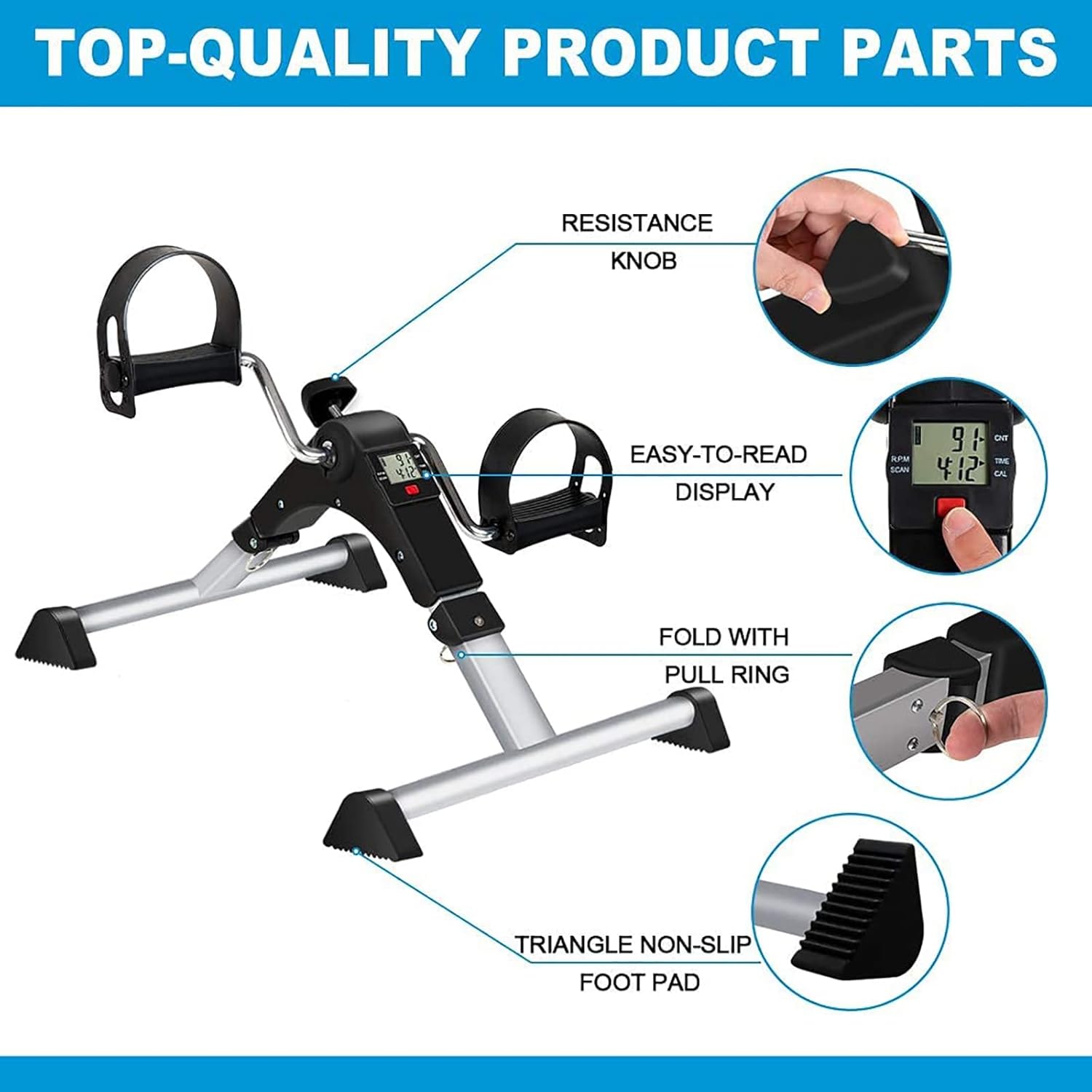
Figure 3: Key product parts. This image highlights the resistance knob, easy-to-read display, fold with pull ring, and triangle non-slip foot pad.
5. Operating Instructions
5.1 Adjusting Resistance
The exercise machine features an adjustable tension knob to vary the resistance level. Turn the knob clockwise to increase resistance for a more challenging workout, and counter-clockwise to decrease resistance.
5.2 Using the Multi-function Display
The integrated digital display tracks your workout progress. It typically shows:
- TIME: Duration of your current exercise session.
- SPEED: Current pedaling speed.
- RPM: Revolutions per minute.
- DISTANCE: Estimated distance covered.
- CALORIES: Estimated calories burned.
Press the red button on the display to cycle through the different metrics. The "SCAN" feature will automatically display each measurement in sequence.
5.3 Exercise Modes
This pedal exerciser can be used for both lower and upper body workouts:
- Leg Exercise: Place the unit on the floor in front of your chair. Sit comfortably, place your feet into the pedal straps, and begin pedaling.
- Arm Exercise: Place the unit on a sturdy table. Sit comfortably, place your hands into the pedal straps, and begin pedaling with your arms.
6. Maintenance and Storage
6.1 Cleaning
Wipe the exerciser with a damp cloth after each use to remove dust and sweat. Do not use abrasive cleaners or solvents. Ensure the display unit does not get wet.
6.2 Storage
To store the unit, pull the ring to fold the legs inwards. Its compact design allows it to be stored under a desk, beside a sofa, or in a locker, saving space.
Figure 4: Storage options. This image demonstrates how the folded exerciser can be stored beside a sofa, under a table, or in a locker.
7. Troubleshooting
| Problem | Possible Cause | Solution |
|---|---|---|
| Display not working | Battery drained or incorrectly installed. | Replace the battery (usually a button cell). Ensure it is inserted with correct polarity. |
| Pedals are stiff or loose | Resistance knob setting. | Adjust the resistance knob to your desired level. |
| Unit wobbles during use | Not on a flat surface; legs not fully locked. | Ensure the exerciser is on a flat, stable surface. Verify that the foldable legs are fully extended and locked. |
8. Specifications
- Model: B0DNYDLPDQ
- Brand: UMJIGF
- Resistance Type: Adjustable Manual Tension
- Display Functions: Time, Speed, RPM, Distance, Calories, Scan
- Usage: Arm and Leg Exercise
- Portability: Foldable design with carry handle

Figure 5: Dimensions of the exerciser. This image provides measurements for both the expanded and collapsed states of the machine.
9. Warranty and Support
For any questions regarding your UMJIGF Portable Mini Exercise Machine, please contact our customer support team. Refer to your purchase documentation for specific warranty details.
Contact: If you have any questions about the product, please contact us by email.
(Specific contact information such as an email address or website URL is not provided in the product data. Please refer to your purchase receipt or the seller's information for direct contact details.)