
1. Introduction
This manual provides detailed instructions for the setup, operation, and maintenance of your ASHATA Net Security Camera 1080P 2MP. Please read this manual thoroughly before using the product to ensure proper functionality and safety.
The ASHATA Net Security Camera is designed for home surveillance, offering 1080P resolution, a 145° wide-angle lens, motion detection, and two-way audio communication. It supports both Net and IP hotspot connections for flexible installation.
2. Package Contents
Verify that all items listed below are present in your package:
- 1 x ASHATA Net Security Camera (Small Memory Card Not Included)
- 1 x Data Cable
- 1 x User Manual (This document)

Image: The ASHATA Net Security Camera, showing its compact design with a desktop stand.
3. Product Features
The ASHATA Net Security Camera offers a range of features for effective home monitoring:
- High-Definition Clarity: Equipped with a 2MP sensor and 1080P resolution, providing clear and detailed video footage day and night.
- Wide-Angle Monitoring: A 145° wide-angle lens covers a larger area, minimizing blind spots for comprehensive surveillance.
- Advanced Motion Detection: Features a sensitive motion sensor that triggers alerts and sends notifications to your connected device upon detecting abnormal activity.
- Two-Way Audio: A built-in microphone enables two-way communication, allowing you to listen to live sounds and speak through the camera.
- Flexible Connectivity: Supports both Net and IP hotspot connections for easy setup and remote real-time monitoring without complex wiring.
- Infrared Recording: Supports infrared recording for enhanced visibility in low-light conditions.
- Local Storage: Supports a small memory card (up to 256GB, not included) for local video storage.

Image: Overview of key features including HD 2MP, dual screen, humanoid tracking, push alarm, infrared night vision, 24/7 recording, two-way audio, and 145° wide angle.
4. Setup Guide
Follow these steps to set up your ASHATA Net Security Camera:
- Unpack the Camera: Carefully remove the camera and all accessories from the packaging.
- Insert Memory Card (Optional): If you plan to use local storage, insert a compatible small memory card (up to 256GB, not included) into the designated slot on the camera.
- Power On: Connect the provided data cable to the camera's USB power port and then to a suitable power adapter (not included) or USB power source. The camera will power on.
- Download the App: Locate the QR code in the physical user manual (if provided) or search for the recommended application in your device's app store. Download and install the corresponding APP on your smartphone or tablet.
- Account Registration: Open the APP and follow the on-screen instructions to register a new account or log in if you already have one.
- Add Device: Within the APP, select the option to "Add Device" or "Add Camera." Follow the prompts to connect your camera to your home Wi-Fi network (Net connection) or set up an IP hotspot connection. This typically involves scanning a QR code displayed on your phone with the camera, or entering Wi-Fi credentials.
- Placement: Position the camera in your desired monitoring location. The desktop stand allows for stable placement on flat surfaces. Ensure the camera has a clear view of the area you wish to monitor.
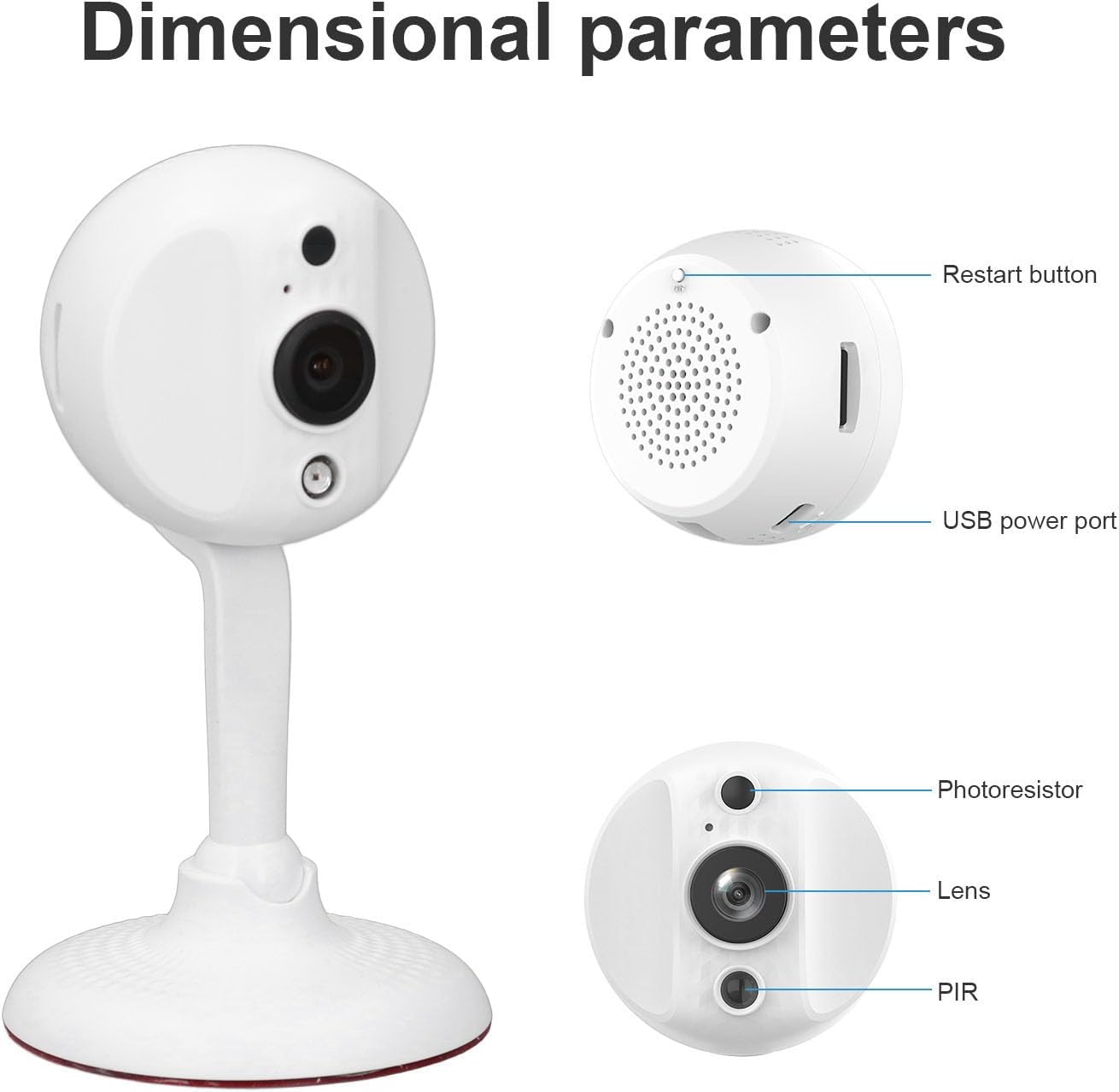
Image: Detailed view of the camera showing the restart button, USB power port, photoresistor, lens, and PIR sensor locations.
5. Operating Instructions
Once the camera is set up and connected to the APP, you can begin using its features:
- Live View: Open the APP and select your camera from the device list to access the live video feed. You can view the monitored area in real-time.
- Two-Way Audio: To use the two-way talk function, tap the microphone icon in the APP. Speak into your phone, and your voice will be transmitted through the camera's speaker. You can also hear audio from the camera's environment.
- Motion Detection Alerts: Ensure motion detection is enabled in the APP settings. When motion is detected, the camera will trigger a prompt and send a notification to your phone. You can review recorded motion events in the APP.
- Video Recording: The camera supports continuous recording or event-triggered recording (e.g., motion detection). Recordings can be stored on the inserted memory card or, if supported by the APP, on cloud storage (subscription may be required).
- Night Vision: The camera automatically switches to infrared night vision in low-light conditions, providing clear black-and-white video.
- Playback: Access recorded footage through the APP's playback function. You can typically filter by date and time or by event.

Image: Illustration of the two-way voice intercom feature, showing a user speaking through the camera to a child.

Image: Depiction of intelligent motion detection, showing a timeline of recorded events triggered by movement.
6. Maintenance
To ensure optimal performance and longevity of your security camera, follow these maintenance guidelines:
- Cleaning: Gently wipe the camera lens and body with a soft, dry cloth. Avoid using harsh chemicals or abrasive cleaners, which can damage the lens or finish.
- Firmware Updates: Regularly check the camera's APP for available firmware updates. Keeping the firmware updated ensures you have the latest features and security enhancements.
- Power Supply: Use only the provided data cable and a compatible power adapter. Ensure the power source is stable to prevent damage to the camera.
- Environmental Conditions: Avoid exposing the camera to extreme temperatures, direct sunlight for prolonged periods, or high humidity. This camera is designed for indoor use.
- Memory Card Management: If using a memory card, periodically check its status in the APP. Consider formatting the card every few months to maintain performance, backing up important footage beforehand.
7. Troubleshooting
If you encounter issues with your ASHATA Net Security Camera, refer to the following common problems and solutions:
| Problem | Possible Cause / Solution |
|---|---|
| Camera not powering on. | Ensure the data cable is securely connected to both the camera and a working power source. Try a different USB power adapter or port. |
| Unable to connect to Wi-Fi. |
|
| No video feed in the APP. |
|
| Motion detection alerts not working. |
|
| Two-way audio not functioning. |
|
If these solutions do not resolve the issue, please contact customer support.
8. Specifications
| Feature | Detail |
|---|---|
| Item Type | Security Camera |
| Brand | ASHATA |
| Model Number | ASHATAz0nyip6skr |
| Material | ABS |
| Pixels | 2MP |
| Resolution | 1080P |
| Lens Angle | 145° Wide Angle |
| Connection | Supports Net, IP Hotspot |
| Microphone | Built-in, Supports Two-Way Intercom Function |
| Motion Detection | Prompt Function |
| Infrared Recording | Support |
| Storage | Up to 256GB Small Memory Card (Not Included) |
| Product Dimensions | 5.91 x 3.94 x 3.54 inches |
| Item Weight | 6 ounces |

Image: Visual comparison demonstrating the clarity difference between 720P and 2MP Full HD resolution, highlighting the camera's superior image quality.

Image: Example of the camera's HD 2MP and 1080P resolution capability, including a night vision scene, emphasizing clear video day and night.
9. Warranty Information
Specific warranty details for the ASHATA Net Security Camera are not provided in the product information. Please refer to the retailer's return policy or contact ASHATA customer support for warranty terms and conditions.
10. Customer Support
For further assistance, technical support, or inquiries regarding your ASHATA Net Security Camera, please contact ASHATA customer service through their official website or the contact information provided with your purchase.
You may also visit the ASHATA Store on Amazon for more product information and support resources.