
1. Introduction
Thank you for choosing the XTRONS IXA94MTVL Car Stereo GPS System. This advanced multimedia unit is designed for select VW, Seat, and Skoda vehicles, offering a comprehensive infotainment experience. Featuring Android 14, wireless CarPlay, Android Auto, GPS navigation, WiFi, and 4G connectivity, this system provides a powerful and intuitive interface for your driving needs. This manual will guide you through the installation, operation, and maintenance of your new device.
2. Safety Information
- Professional Installation Recommended: Due to the complexity of car electrical systems, professional installation is highly recommended to prevent damage to the unit or your vehicle.
- Driving Safety: Do not operate the system in a way that distracts you from driving. Always prioritize road safety.
- Power Supply: Ensure the unit is connected to a 12V DC power supply with negative grounding.
- Avoid Moisture: Keep the unit away from water and excessive moisture to prevent electrical hazards.
- Temperature: Do not expose the unit to extreme temperatures.
3. Package Contents
Please check the contents of your package against the list below. If any items are missing or damaged, contact your retailer.

Image: Overview of the XTRONS IXA94MTVL car stereo accessories, including various wiring harnesses, USB cables, GPS antenna, microphone, and user manual.
- XTRONS IXA94MTVL Head Unit
- Power Harness
- GPS Antenna
- USB Cables
- External Microphone
- RCA Cables
- User Manual
- Other necessary installation accessories (as pictured)
4. Setup and Installation
4.1 Vehicle Compatibility
This unit is specifically designed for the following vehicle models:
- VW Golf
- VW Passat
- VW Tiguan
- Seat models
- Skoda models
Ensure your vehicle's dashboard matches the unit's form factor before proceeding with installation.
4.2 Dimensions

Image: Technical drawing showing the dimensions of the XTRONS IXA94MTVL head unit, including width (220mm, 210mm), height (130mm, 100mm), and depth (178mm).
4.3 General Installation Steps
- Disconnect Battery: Before starting, disconnect the negative terminal of your vehicle's battery to prevent electrical shorts.
- Remove Old Unit: Carefully remove your existing car stereo. Refer to your vehicle's service manual for specific instructions.
- Connect Wiring: Connect the provided wiring harnesses to the corresponding ports on the XTRONS unit and your vehicle's wiring. Ensure all connections are secure.
- Connect Antennas: Connect the GPS antenna and any other relevant antennas (e.g., radio, 4G) to their respective ports. Position the GPS antenna in a location with a clear view of the sky.
- Test Connections: Before fully reassembling, reconnect the battery and briefly power on the unit to ensure basic functionality (power, audio, display).
- Secure Unit: Mount the XTRONS unit securely into the dashboard opening.
- Reassemble: Reassemble the dashboard trim and reconnect any other components.
5. Operating Instructions
5.1 Basic Operation
- Power On/Off: Press and hold the power button (usually on the front panel) to turn the unit on or off. A short press typically mutes or unmutes the audio.
- Touch Screen: The unit features a responsive touch screen. Navigate through menus and applications by tapping, swiping, and pinching.
- Volume Control: Adjust volume using the physical buttons or on-screen controls.
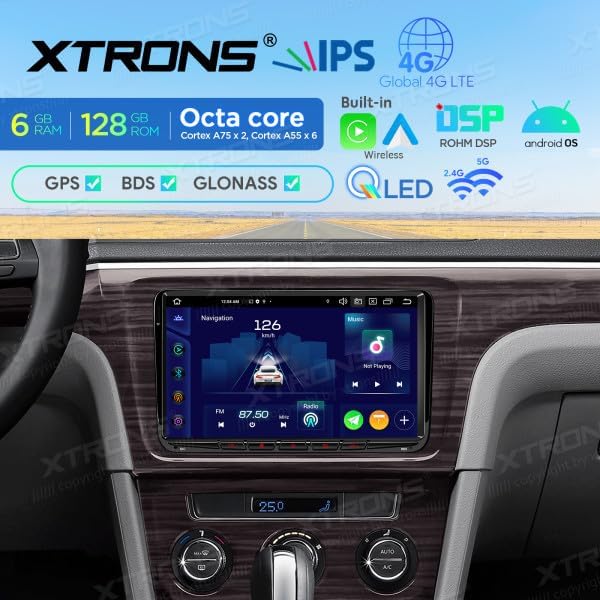
Image: The XTRONS IXA94MTVL car stereo integrated into a vehicle dashboard, displaying the navigation interface with speed and radio frequency.
5.2 Navigation
The unit supports GPS, BDS, and GLONASS for accurate positioning. Access the navigation application from the main menu.
- Starting Navigation: Tap the 'Navigation' icon on the home screen.
- Entering Destination: Use the on-screen keyboard to enter your destination address or select from recent locations/favorites.
- Route Guidance: Follow the voice prompts and on-screen map for turn-by-turn directions.

Image: The XTRONS IXA94MTVL car stereo displaying its navigation interface, showing a map with a vehicle icon, current speed, and radio frequency.
5.3 Wireless CarPlay & Android Auto
Connect your smartphone wirelessly for seamless integration of CarPlay or Android Auto features.
- Pairing: Enable Bluetooth and Wi-Fi on your smartphone. On the head unit, go to the CarPlay/Android Auto application and follow the on-screen instructions to pair your device.
- Features: Access navigation, music, calls, messages, and other compatible apps directly from the car stereo display.

Image: The XTRONS IXA94MTVL car stereo displaying the Apple CarPlay interface, showing icons for Phone, Music, Maps, Messages, Now Playing, Car, Podcasts, and Audiobooks.
5.4 Multimedia Playback
Enjoy various multimedia options including local files, streaming services, and radio.
- Music/Video: Play audio and video files from USB drives or internal storage.
- Radio: Tune into FM radio stations. Use the scan function to find available stations.
- Streaming: Connect to Wi-Fi or 4G to access online streaming applications.

Image: The XTRONS IXA94MTVL car stereo displaying a multimedia interface, showing a map with a vehicle icon, current speed, and radio frequency, similar to the navigation screen but highlighting multimedia aspects.
5.5 Connectivity
- Wi-Fi: Connect to a Wi-Fi hotspot for internet access.
- 4G: Insert a compatible SIM card (if supported by the specific model variant) for mobile data connectivity.
- Bluetooth: Pair your phone for hands-free calling and audio streaming.
- USB: Connect USB drives for media playback or charging.

Image: The XTRONS IXA94MTVL car stereo displaying its Android home screen with various application icons, including Maps, Podcasts, Phone, Calendar, GameSnacks, News, and Settings.
5.6 Digital Sound Processor (DSP)
The built-in DSP allows for advanced audio customization. Access the DSP settings to adjust equalizer, balance, fader, and other sound parameters to optimize your listening experience.
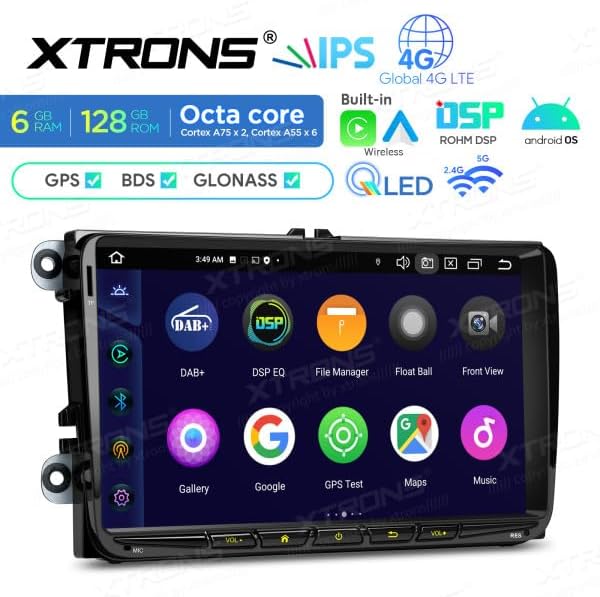
Image: The XTRONS IXA94MTVL car stereo displaying an app drawer or secondary screen with icons for DAB+, DSP EQ, File Manager, Float Ball, Front View, Gallery, Google, GPS Test, Maps, and Music.
6. Maintenance
- Cleaning the Screen: Use a soft, lint-free cloth to gently wipe the screen. For stubborn smudges, slightly dampen the cloth with water or a screen cleaner designed for electronics. Avoid harsh chemicals.
- Software Updates: Periodically check the XTRONS official website or the unit's settings for available software updates to ensure optimal performance and access to new features.
- Avoid Extreme Conditions: Do not expose the unit to direct sunlight for extended periods or to extreme cold, as this can affect its lifespan and performance.
7. Troubleshooting
- No Power: Check all power connections and the vehicle's fuse box. Ensure the battery is properly connected.
- No Sound: Verify speaker connections, check volume levels, and ensure the unit is not muted. Check audio settings in the DSP.
- GPS Signal Lost: Ensure the GPS antenna is properly connected and positioned with a clear view of the sky. Move the vehicle to an open area if in a covered location.
- Touch Screen Unresponsive: Try restarting the unit. If the issue persists, a factory reset might be necessary (note: this will erase all user data).
- Bluetooth/Wi-Fi Connection Issues: Ensure Bluetooth/Wi-Fi is enabled on both the unit and your device. Try unpairing and re-pairing. Check for interference from other devices.
- Unit Freezes/Crashes: Perform a soft reset by pressing the reset button (if available) or by turning the vehicle ignition off and on.
8. Specifications
| Brand | XTRONS |
| Model Number | IXA94MTVL |
| Operating System | Android 14 |
| RAM | 6 GB |
| Internal Storage (ROM) | 128 GB |
| Screen Size | 9 inches |
| Connectivity | Wi-Fi, Bluetooth, 4G, USB |
| Special Features | Android Auto, Apple CarPlay, GPS (GPS, BDS, GLONASS), Built-in DSP |
| Compatible Devices | Smartphone |
| Color | Black |
| Output Power | 180 Watts |
| Surround Sound Channel Configuration | 5.1 |
9. Warranty and Support
For warranty information and technical support, please refer to the warranty card included with your product or visit the official XTRONS website. You can also contact your retailer for assistance.
Please have your model number (IXA94MTVL) and purchase details ready when contacting support.


