
TRIUMPHKEY X66
TRIUMPHKEY X66 Computer Desk with Drawers and Shelves User Manual
Model: X66 | Brand: TRIUMPHKEY
1. Introduction
Thank you for choosing the TRIUMPHKEY X66 Computer Desk. This desk is designed to provide a functional and organized workspace with its integrated drawers and multi-level shelving. This manual provides essential information for assembly, operation, maintenance, and troubleshooting to ensure safe and efficient use of your new desk.

Image 1: Overview of the TRIUMPHKEY X66 Computer Desk. This image displays the desk's overall design, including the integrated shelving unit and three storage drawers.
2. Safety Information
- Read all instructions carefully before assembly and use.
- Keep all small parts and packaging materials away from children.
- Assemble the desk on a soft, clean surface to prevent scratches.
- Ensure all screws and fasteners are securely tightened before use. Periodically check and re-tighten as necessary.
- Do not overload shelves or drawers beyond their capacity.
- Avoid standing or sitting on the desk.
- Use only the provided hardware for assembly.
3. Package Contents
Before beginning assembly, verify that all components are present and undamaged. If any parts are missing or damaged, please contact customer service.
- Desk tabletop
- Metal frame components
- Shelf boards (upper and lower)
- Drawer components (fronts, sides, backs, bottoms)
- Drawer slides
- Assembly hardware (screws, bolts, dowels, Allen wrench)
- Instruction manual
4. Setup and Assembly
Assembly typically requires two people. Follow the illustrated instructions provided in your package. The general steps are outlined below:
4.1 Identify Components
Familiarize yourself with the different parts of the desk. Refer to the diagram below for key components.
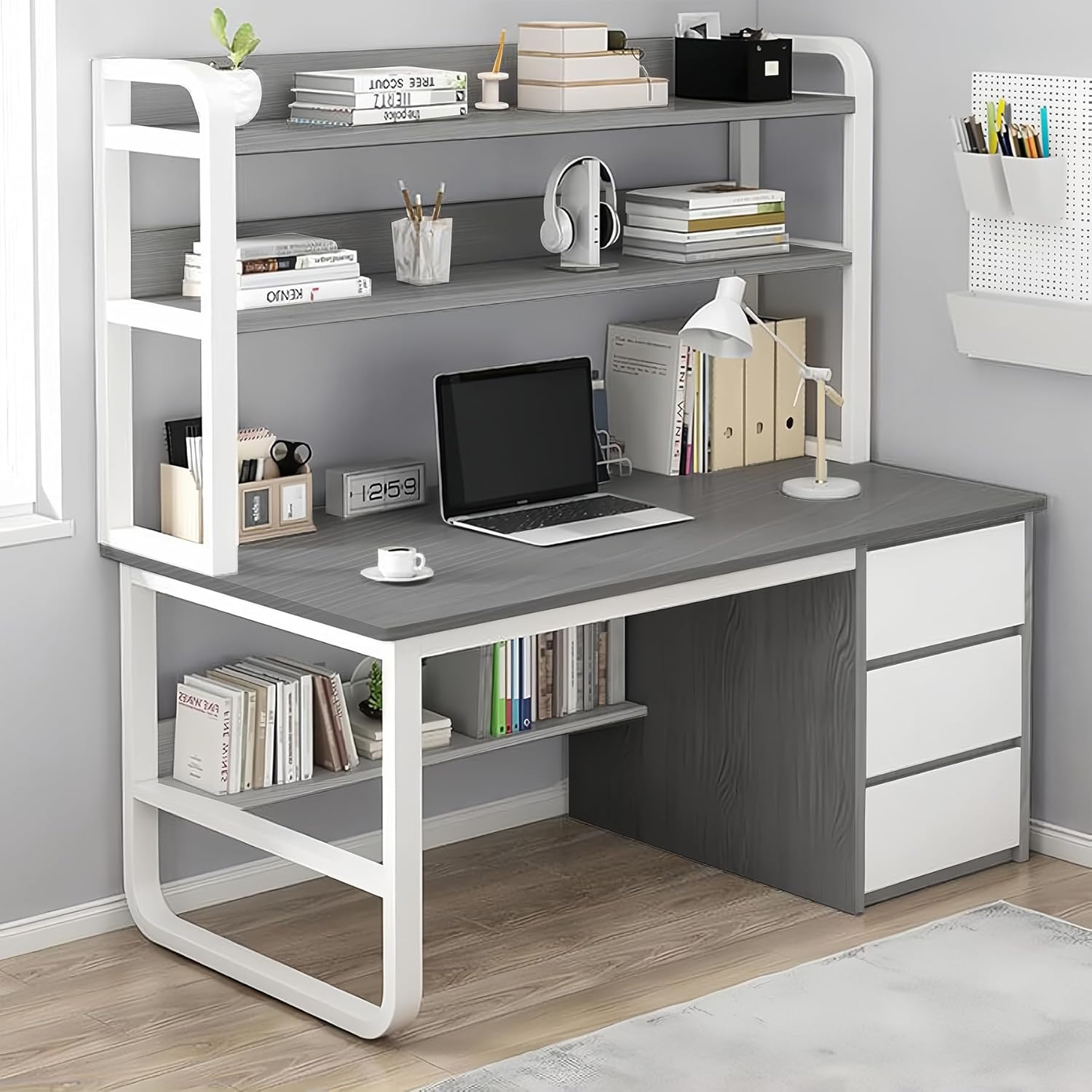
Image 2: Key components of the desk. This diagram highlights the stable frame, thick tubes, fixed steel elements, shelves, spacious desktop, rounded edges, and three large drawers.
4.2 Assemble the Frame
Begin by connecting the metal frame components. Ensure all connections are secure but do not fully tighten screws until the entire frame is assembled to allow for minor adjustments.
4.3 Attach the Desktop
Carefully place the desktop onto the assembled frame and secure it using the provided hardware. Ensure the desktop is aligned correctly.

Image 3: Desk sections including the large countertop, two-level storage shelf, bottom shelf, and three large drawers.
4.4 Install Shelves
Mount the upper and lower shelf boards to the designated frame sections. The upper shelves provide two levels of storage, while the lower shelf is integrated beneath the desktop.
4.5 Assemble and Install Drawers
Assemble the three drawers according to the instructions, ensuring the drawer slides are correctly installed. Then, insert the assembled drawers into their respective compartments on the right side of the desk.

Image 4: Comparison showing the desk with three drawers on the left and a desk without drawers on the right, emphasizing the storage capacity provided by the drawers.
4.6 Final Tightening
Once all components are in place and aligned, fully tighten all screws and fasteners. Ensure the desk is stable and level.
5. Operating Instructions
The TRIUMPHKEY X66 Computer Desk is designed for versatile use in home offices, studies, or gaming setups.
- Desktop Surface: The spacious desktop (100x50 cm) accommodates computer monitors, laptops, and other work essentials.
- Upper Shelves: Utilize the two-level upper shelving unit for organizing books, decorative items, or office supplies.
- Lower Shelf: The integrated lower shelf provides additional storage for books or accessories, keeping them within easy reach.
- Storage Drawers: The three deep drawers on the right side are ideal for storing documents, stationery, and personal items, helping to maintain a tidy workspace.

Image 5: The desk in an operational setting, showcasing its capacity to hold a laptop, books, and various office accessories on its shelves and desktop.
6. Maintenance
- Cleaning: Wipe the desk surfaces with a soft, damp cloth. Avoid harsh chemicals or abrasive cleaners that may damage the finish.
- Dusting: Regularly dust all surfaces to prevent buildup.
- Hardware Check: Periodically check all screws and fasteners to ensure they remain tight. Re-tighten if necessary to maintain stability.
- Spills: Clean up spills immediately to prevent staining or damage to the material.
7. Troubleshooting
- Desk is wobbly: Ensure all screws and bolts are fully tightened. Check that the desk is on a level surface. Adjust leg levelers if present.
- Drawers do not slide smoothly: Check that drawer slides are correctly installed and free of obstructions. Ensure the drawer components are assembled squarely.
- Parts missing during assembly: Double-check the package contents against the parts list. If parts are genuinely missing, contact customer support.
8. Specifications
| Feature | Detail |
|---|---|
| Brand | TRIUMPHKEY |
| Model Number | X66 |
| Product Dimensions (D x W x H) | 19.69"D x 39.37"W x 57.87"H (50cm D x 100cm W x 147cm H) |
| Color | Grey |
| Material Type | Metal Density Board |
| Number of Drawers | 3 |
| Number of Shelves | 2 (upper two-level shelf, 1 lower shelf) |
| Desk Design | Computer Desk with Storage |
| Recommended Uses | Drafting, Gaming, Working, Writing |

Image 6: Dimensional drawing of the desk, showing measurements in centimeters for width, depth, and height, as well as individual shelf and drawer dimensions.
9. Warranty and Support
For warranty information or customer support, please refer to the documentation included with your purchase or contact TRIUMPHKEY customer service. If you have any doubts during assembly, you can contact our customer service and we will provide you with a solution within 24 hours.
Related documentsX66


Ask a question about this manual
Ask about setup, troubleshooting, compatibility, parts, safety, or missing instructions. Manuals+ will review the question and use this page’s manual context to help answer it.