
PGYTECH PG-005
PGYTECH MagCam Phone Grip Kit Instruction Manual
Model: PG-005 | Brand: PGYTECH
1. Introduction
The PGYTECH MagCam Phone Grip Kit is a versatile 3-in-1 mobile phone accessory designed to enhance your smartphone photography experience. It combines a comfortable phone grip, a MagSafe wireless charging power bank, and a detachable Bluetooth remote control, offering a camera-like shooting experience with added convenience and power.
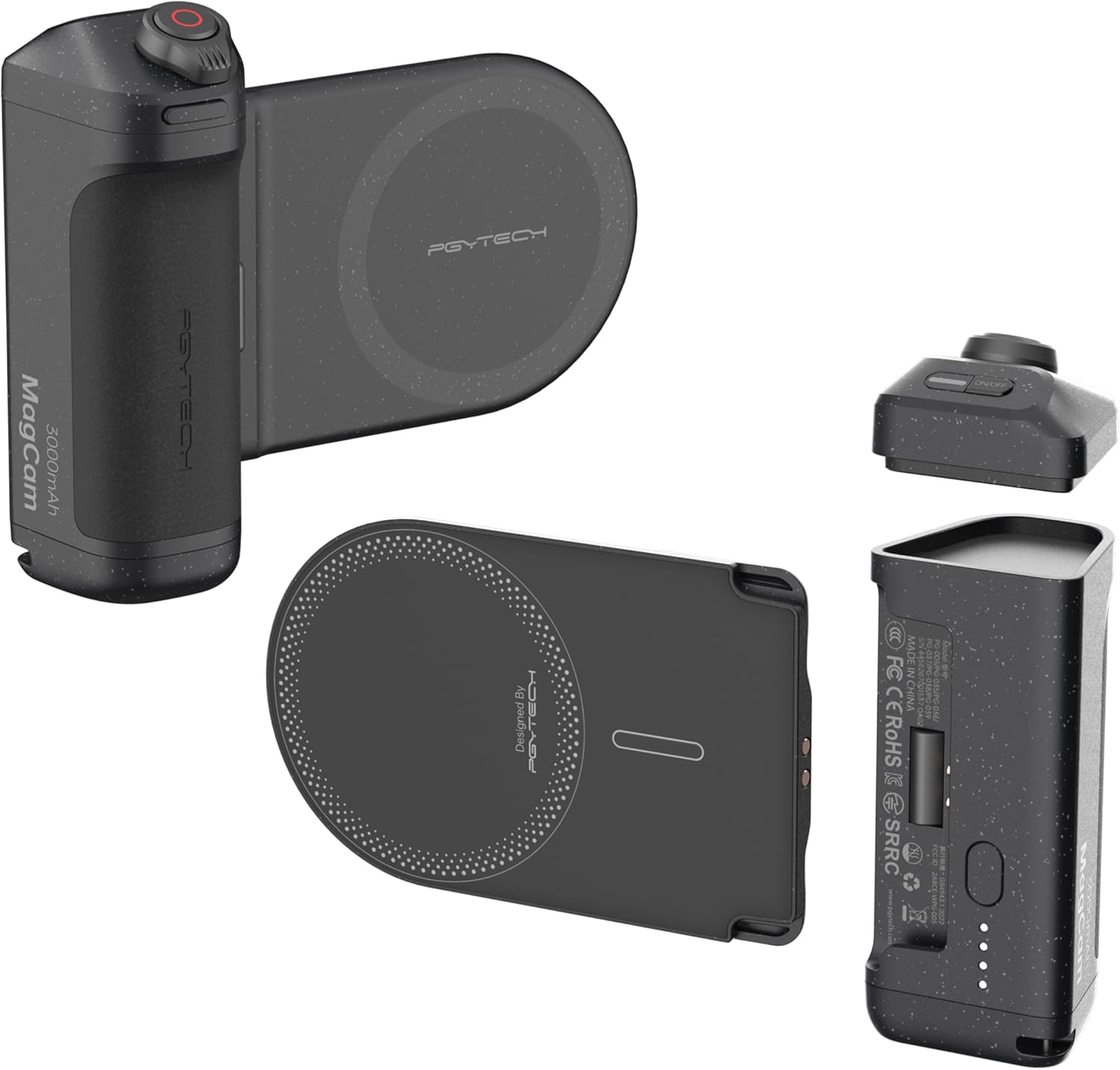
Figure 1.1: PGYTECH MagCam Phone Grip Kit components including the grip, wireless charging module, and Bluetooth remote.
Video 1.1: An overview of the PGYTECH MagCam Phone Grip Kit, showcasing its modular design and various functionalities for enhanced smartphone photography.
2. What's in the Box
Verify that all the following items are included in your package:
- EDC Magnetic Mount
- Camera Grip (Remote Control Included)
- Magnetic ring
- Hand Strap
- Instruction manual
3. Setup
3.1 Assembly
The PGYTECH MagCam Phone Grip features a modular design, allowing for easy assembly and disassembly of its components.
- Connect Charging Module to Grip: Align the Magnetic Wireless Charging Module with the Charging Grip Module and slide them together until they securely click into place.
- Attach Bluetooth Remote: Place the Bluetooth Remote Module onto the top of the Charging Grip Module. It will magnetically attach.
- Attach to Phone: For iPhone 12-16 series, simply align your phone with the Magnetic Wireless Charging Module. For non-MagSafe phones (e.g., Android), attach the included magnetic ring to the back of your phone or phone case first, then align with the module.

Figure 3.1: Visual guide for installing and locking the MagCam Phone Grip components, highlighting the quick-release design.
3.2 Bluetooth Pairing (iPhone Specific)
To fully utilize the remote control features, Bluetooth pairing is required. For iPhone users, specific accessibility settings need to be adjusted.
- Enable AssistiveTouch: Go to your iPhone's Settings > Accessibility > Touch > AssistiveTouch and toggle it On.
- Adjust Tracking Sensitivity: Scroll down in AssistiveTouch settings and set Tracking Sensitivity to the lowest level.
- Lock Portrait Orientation: Open your iPhone's Control Center and enable Portrait Orientation Lock.
- Pair Bluetooth Remote: Press and hold the On/Off button on the Bluetooth Remote Module for 1 second to turn it on. Go to your iPhone's Bluetooth Settings, find "PGY-MagCam" in the list of devices, and tap to pair. A blue light on the remote indicates successful pairing.

Figure 3.2: Quickstart guide detailing iPhone settings adjustments and Bluetooth pairing steps for the PGYTECH MagCam.
Video 3.1: Detailed instructions on setting up the PGYTECH MagCam Phone Grip for iPhone, including Bluetooth pairing and necessary iOS settings.
4. Operating the MagCam Phone Grip
4.1 Using the Bluetooth Remote
The detachable Bluetooth remote provides enhanced control over your phone's camera functions.
- Shutter Button: Press the main button to capture photos or start/stop video recording.
- Zoom Adjustment: Use the dial on the remote to adjust the focal length (zoom in/out).
- Camera Flip: Double-tap the front button on the remote to switch between front and rear cameras.

Figure 4.1: The Bluetooth remote allows for seamless control of camera functions, including shutter, zoom, and camera switching.
4.2 Wireless Charging Functionality
The built-in 3000mAh power bank supports MagSafe wireless charging for compatible iPhone models.
- Start Charging: Once your phone is attached, press the power button on the grip module to initiate wireless charging.
- Stop Charging: Double-press the power button to stop charging.
- Power Bank Use: The grip module can be detached and used as a compact 10W power bank independently.

Figure 4.2: The MagCam Phone Grip provides convenient wireless charging to keep your phone powered during extended use.
4.3 Phone Stand and Tripod Compatibility
The MagCam Phone Grip offers flexible usage options beyond just holding your phone.
- Phone Stand: The wireless charging module can transform into a magnetic phone stand with a simple click, ideal for reviewing shots or watching videos.
- Portrait/Landscape Switching: Easily switch between portrait and landscape orientations without removing the grip.
- Tripod Mount: A 1/4-inch thread on the bottom of the grip allows for attachment to tripods and other accessories.

Figure 4.3: The MagCam Phone Grip offers multiple functionalities including a comfortable grip for shooting, wireless charging, a detachable remote, and a convenient phone stand.

Figure 4.4: The wireless charging module can be used as a desktop stand for hands-free viewing.

Figure 4.5: The grip features a lanyard hole for easy carrying and a 1/4-inch thread for tripod and accessory compatibility.
5. Maintenance
To ensure the longevity and optimal performance of your PGYTECH MagCam Phone Grip Kit, follow these maintenance guidelines:
- Cleaning: Wipe the device with a soft, dry cloth. Avoid using harsh chemicals or abrasive materials.
- Storage: Store the grip in a cool, dry place away from direct sunlight and extreme temperatures.
- Battery Care: For optimal battery life, avoid fully discharging the power bank frequently. Charge it regularly, even if not in use for extended periods.
- Magnetic Surfaces: Keep magnetic surfaces clean and free of debris to ensure a strong and secure connection.
6. Troubleshooting
| Problem | Possible Cause | Solution |
|---|---|---|
| Bluetooth remote functions (zoom, camera flip) not working on iPhone. | AssistiveTouch not enabled or incorrectly configured. Portrait Orientation Lock not enabled. | Ensure AssistiveTouch is enabled and Tracking Sensitivity is set to the lowest in iPhone settings (Settings > Accessibility > Touch). Enable Portrait Orientation Lock in Control Center. Refer to Section 3.2. |
| Bluetooth remote functions (zoom, camera flip) not working on Android/Pixel phones. | Limited compatibility with non-iPhone devices. | The MagCam Phone Grip is primarily designed for iPhone 12-16 series. Compatibility with Android phones may be limited to basic shutter functions. Full functionality is not guaranteed. |
| Phone not charging wirelessly. | Incorrect alignment, low grip battery, or non-MagSafe phone without magnetic ring. | Ensure proper alignment of the phone with the charging module. Check the grip's battery level. If using a non-MagSafe phone, ensure the magnetic ring is correctly attached. |
| Grip feels loose or detaches easily. | Improper assembly or debris on connection points. | Ensure the charging module and grip are securely clicked together. Clean any debris from the connection points. |
Video 6.1: A customer review highlighting potential compatibility issues with non-iPhone devices, particularly concerning zoom and other remote functions.
7. Specifications
| Feature | Detail |
|---|---|
| Model Number | PG-005 |
| Compatibility | Only Compatible with iPhone 12~iPhone 16 series (MagSafe). Magnetic ring included for non-MagSafe phones. |
| Battery Capacity | 3000mAh (Built-in 18650 battery) |
| Wireless Charging Output | 10W |
| Bluetooth Remote Range | Up to 10m |
| Dimensions | 5.08 x 4.65 x 1.54 inches |
| Item Weight | 8.8 ounces |
| Tripod Thread | 1/4-inch |
8. Warranty and Support
PGYTECH products are designed with quality and reliability in mind. For specific warranty information and support, please refer to the warranty card included in your product packaging or visit the official PGYTECH website.
For technical assistance, troubleshooting, or customer service inquiries, please contact PGYTECH customer support through their official channels.
Related documentsPG-005


Ask a question about this manual
Ask about setup, troubleshooting, compatibility, parts, safety, or missing instructions. Manuals+ will review the question and use this page’s manual context to help answer it.