
MELOKEA DECHAF059B
MELOKEA Ergonomic Office Chair Model DECHAF059B Instruction Manual
Your guide to assembly, operation, and maintenance.
1. Introduction
Thank you for choosing the MELOKEA Ergonomic Office Chair Model DECHAF059B. This manual provides detailed instructions for assembling, operating, and maintaining your new office chair. Please read this manual thoroughly before assembly and use to ensure proper function and longevity of your product. This chair is designed to provide optimal ergonomic support and comfort for extended periods of use.
2. Safety Information
- Ensure all parts are present and undamaged before assembly. Do not use if any parts are missing or broken.
- Assemble the chair on a soft, clean surface to prevent scratches.
- Follow the assembly instructions carefully. Incorrect assembly can lead to instability and injury.
- Do not stand on the chair. Use it only for sitting.
- Do not exceed the maximum weight capacity of 200 kg (440 lbs).
- Keep children and pets away during assembly. Small parts can be a choking hazard.
- Regularly check all bolts and screws to ensure they are tight. Retighten if necessary.
- Avoid exposing the chair to direct sunlight or extreme temperatures to prevent material degradation.
3. Package Contents
Please verify that all components are included in your package:
- Backrest assembly
- Seat cushion assembly
- Headrest
- Armrests (2)
- Gas lift cylinder
- Star base
- Casters (5)
- Mechanism/Control unit
- Hardware kit (screws, Allen wrench)
4. Assembly Instructions
Follow these steps to assemble your MELOKEA office chair:
- Attach Casters to Base: Insert the five casters into the holes at the end of each leg of the star base. Push firmly until they click into place.
- Insert Gas Lift: Place the gas lift cylinder into the center hole of the star base.
- Attach Mechanism to Seat: Align the control mechanism with the screw holes on the underside of the seat cushion. Ensure the front of the mechanism faces the front of the seat. Secure with screws provided in the hardware kit.
- Attach Armrests: Secure the armrests to the sides of the seat cushion using the provided screws.
- Attach Backrest: Connect the backrest to the seat assembly. Align the mounting points and secure with screws.
- Attach Headrest: Slide the headrest into the designated slots at the top of the backrest.
- Connect Seat to Gas Lift: Carefully place the assembled seat and backrest onto the gas lift cylinder, ensuring it is centered.
Refer to the included assembly diagram for visual guidance.
5. Operating Instructions
Your MELOKEA office chair offers multiple adjustment options for personalized comfort. All adjustments are cable-controlled for ease of use without needing to bend down.
5.1. Seat Height Adjustment
To adjust the seat height (range: 47-57 cm / 10 cm adjustment):
- To raise: Lift the lever on the right side of the seat while taking your weight off the seat. Release the lever at the desired height.
- To lower: Lift the lever on the right side of the seat while seated. Release the lever at the desired height.

Image: Cable-controlled mechanism for seat height adjustment, illustrating the lever's function.
5.2. Seat Depth Adjustment
To adjust the seat depth (5 cm adjustment):
- Locate the lever for seat depth adjustment (refer to the control mechanism diagram).
- Pull the lever and slide the seat forward or backward to your preferred depth. Release the lever to lock the position.

Image: Detailed view of the seat depth adjustment mechanism, allowing for a 5 cm range.
5.3. Backrest Recline and Lock
The backrest can be reclined and locked in three positions: 90°, 110°, and 130°.
- To recline: Pull the recline lever (part of the control mechanism) and lean back. Release the lever to lock at 90°, 110°, or 130°.
- To return to upright: While seated, pull the recline lever and lean forward slightly. The backrest will return to the upright position.

Image: Illustration of the chair's recline angles (90°, 110°, 130°) and various armrest adjustments.
5.4. Backrest Height Adjustment
The backrest height can be adjusted in 7 positions, with a 7 cm range, to accommodate users from 160 cm to 210 cm.
- To adjust: Lift the backrest upwards. It will click into different height positions.
- To reset to the lowest position: Lift the backrest to its highest point, and it will automatically drop to the lowest setting. Then, adjust upwards to your desired height.
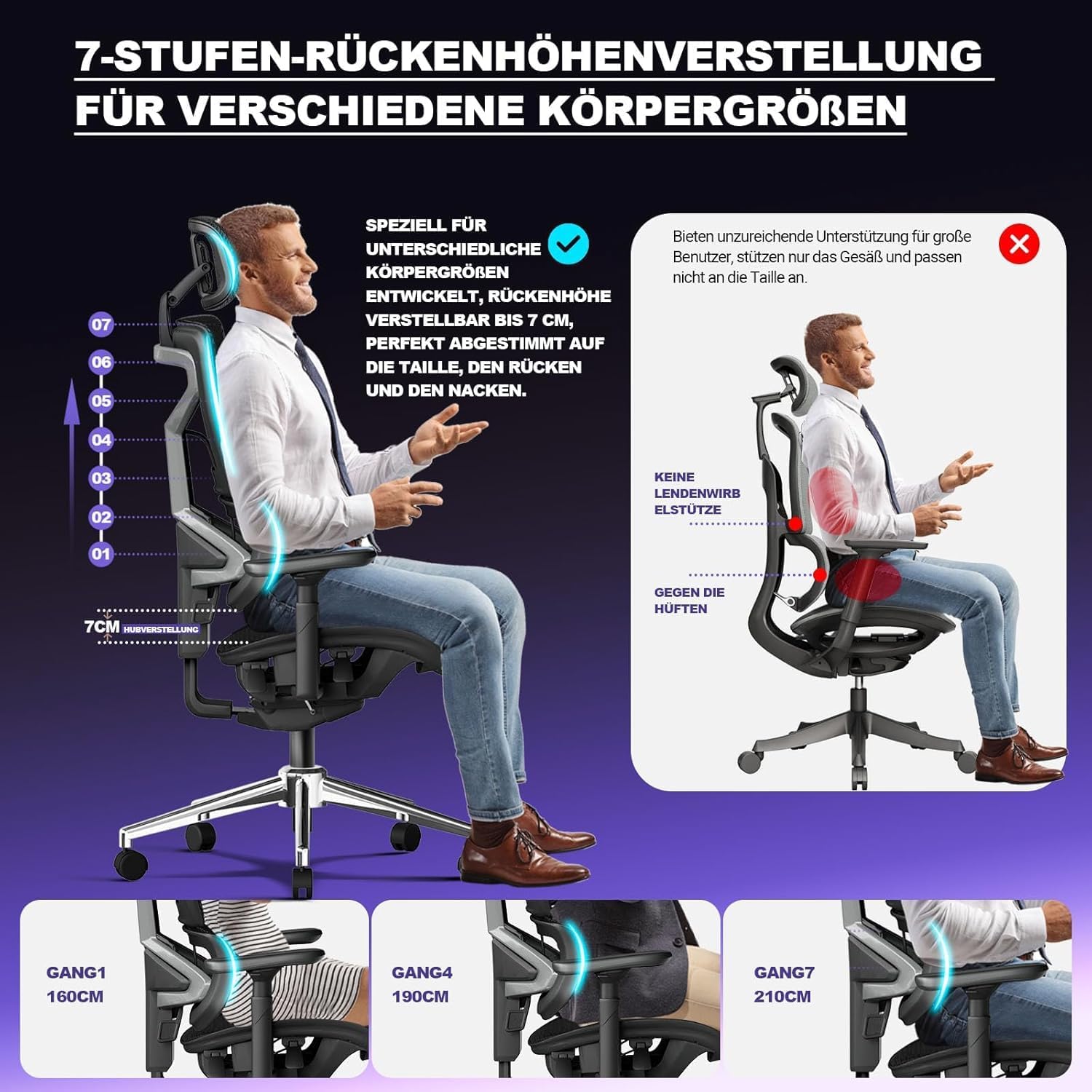
Image: Diagram illustrating the 7-stage backrest height adjustment, suitable for various user heights.
5.5. Lumbar Support Adjustment (Dynamic Lumbar Support 2.0)
The dynamic lumbar support automatically adapts to your spinal movements. It also offers manual adjustment:
- The lumbar support can move forward by 10 cm and rotate by 30°.
- Manual adjustment allows for two positions to fine-tune the support.
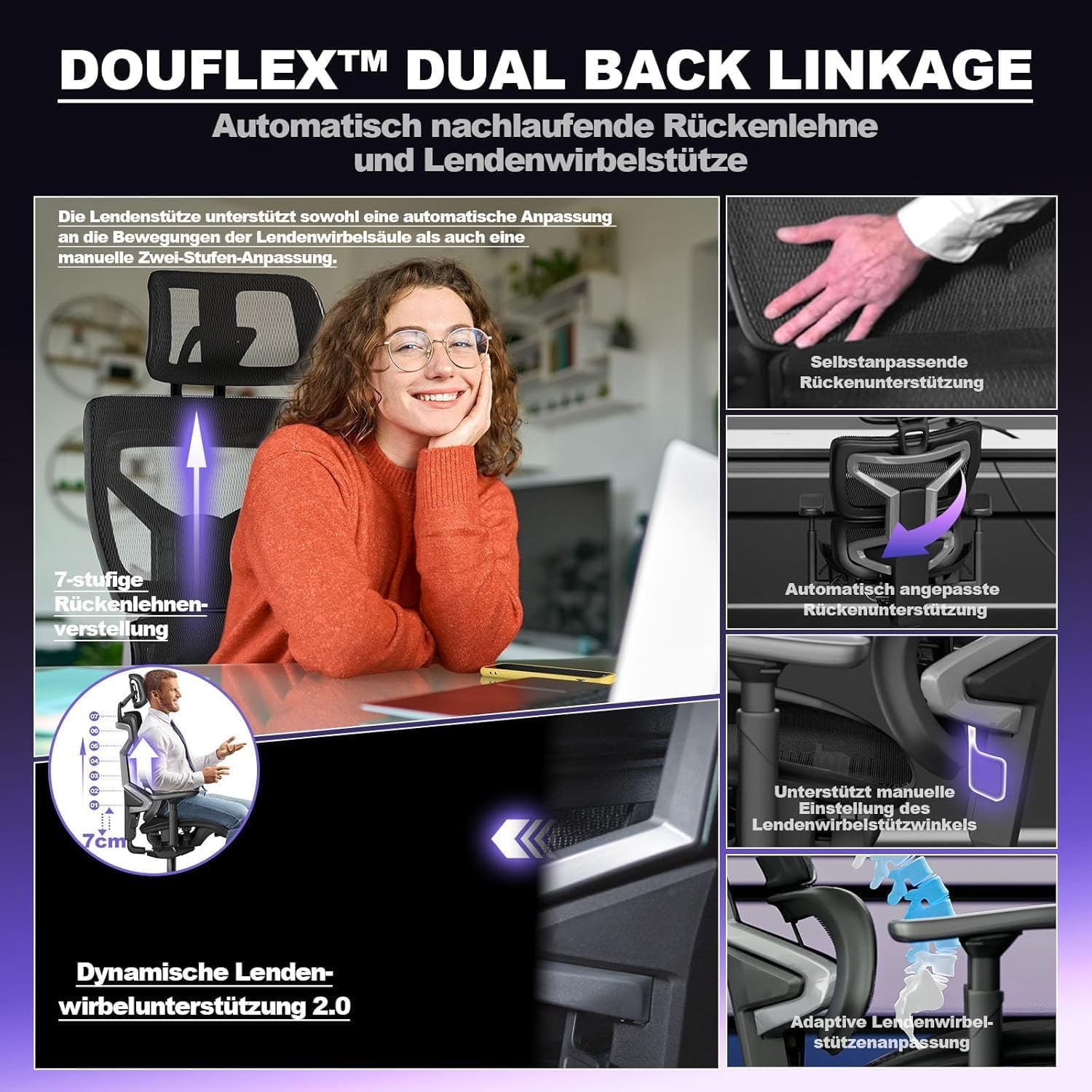
Image: Visual representation of the Douflex Dual Back Linkage system and Dynamic Lumbar Support 2.0, highlighting its adaptive and manual adjustment capabilities.
5.6. 4D Armrest Adjustment
The armrests offer extensive 4D adjustability:
- Height Adjustment: Adjust up or down by 10 cm.
- Forward/Backward Adjustment: Slide forward or backward by 7 cm.
- Inward/Outward Rotation: Rotate 40° inwards or 180° outwards.
- Flip-up Function: Armrests can be folded up 180° for convenience.

Image: Close-up of the 4D armrest, demonstrating its height adjustment feature.

Image: Close-up of the 4D armrest, demonstrating its forward/backward adjustment feature.

Image: Close-up of the 4D armrest, demonstrating its inward rotation feature.

Image: Close-up of the 4D armrest, demonstrating its outward rotation feature.
5.7. 3D Headrest Adjustment
The headrest can be adjusted for optimal neck support:
- Height Adjustment: Adjust up or down by 12 cm.
- Angle Adjustment: Rotate 90° on both axes to find your preferred angle.

Image: Close-up of the 3D headrest, demonstrating its height adjustment feature.

Image: Close-up of the 3D headrest, demonstrating its angle adjustment feature.
6. Maintenance
To ensure the longevity and appearance of your MELOKEA office chair, follow these maintenance guidelines:
- Cleaning:
- For mesh and fabric parts, use a soft brush or vacuum cleaner to remove dust and debris.
- For spills, gently blot with a clean, damp cloth and mild soap. Avoid harsh chemicals.
- For plastic and metal parts, wipe with a soft, damp cloth.
- Inspection: Periodically check all screws, bolts, and connections to ensure they are tight. Retighten as needed to maintain stability and safety.
- Caster Care: Clean casters regularly to remove hair and debris that can impede smooth movement.
- Avoid Overloading: Do not exceed the maximum weight capacity of 200 kg.
- Environmental Conditions: Keep the chair away from direct sunlight, excessive heat, and moisture to prevent material damage and discoloration.
7. Troubleshooting
If you encounter any issues with your MELOKEA office chair, refer to the following common problems and solutions:
| Problem | Possible Cause | Solution |
|---|---|---|
| Chair wobbles or is unstable | Loose screws or uneven floor. | Check and tighten all assembly screws. Ensure the chair is on a flat surface. |
| Gas lift not adjusting height | Lever not fully engaged or gas lift malfunction. | Ensure the height adjustment lever is fully pulled. If the issue persists, contact customer support. |
| Casters not rolling smoothly | Debris (hair, dust) caught in casters. | Turn the chair over and remove any debris from the caster wheels. |
| Backrest not reclining or locking | Recline mechanism jammed or not fully engaged. | Ensure the recline lever is fully operated. Check for any obstructions. |
If you cannot resolve the issue using the troubleshooting guide, please contact MELOKEA customer support for assistance.
8. Specifications
Key technical specifications for the MELOKEA Ergonomic Office Chair Model DECHAF059B:
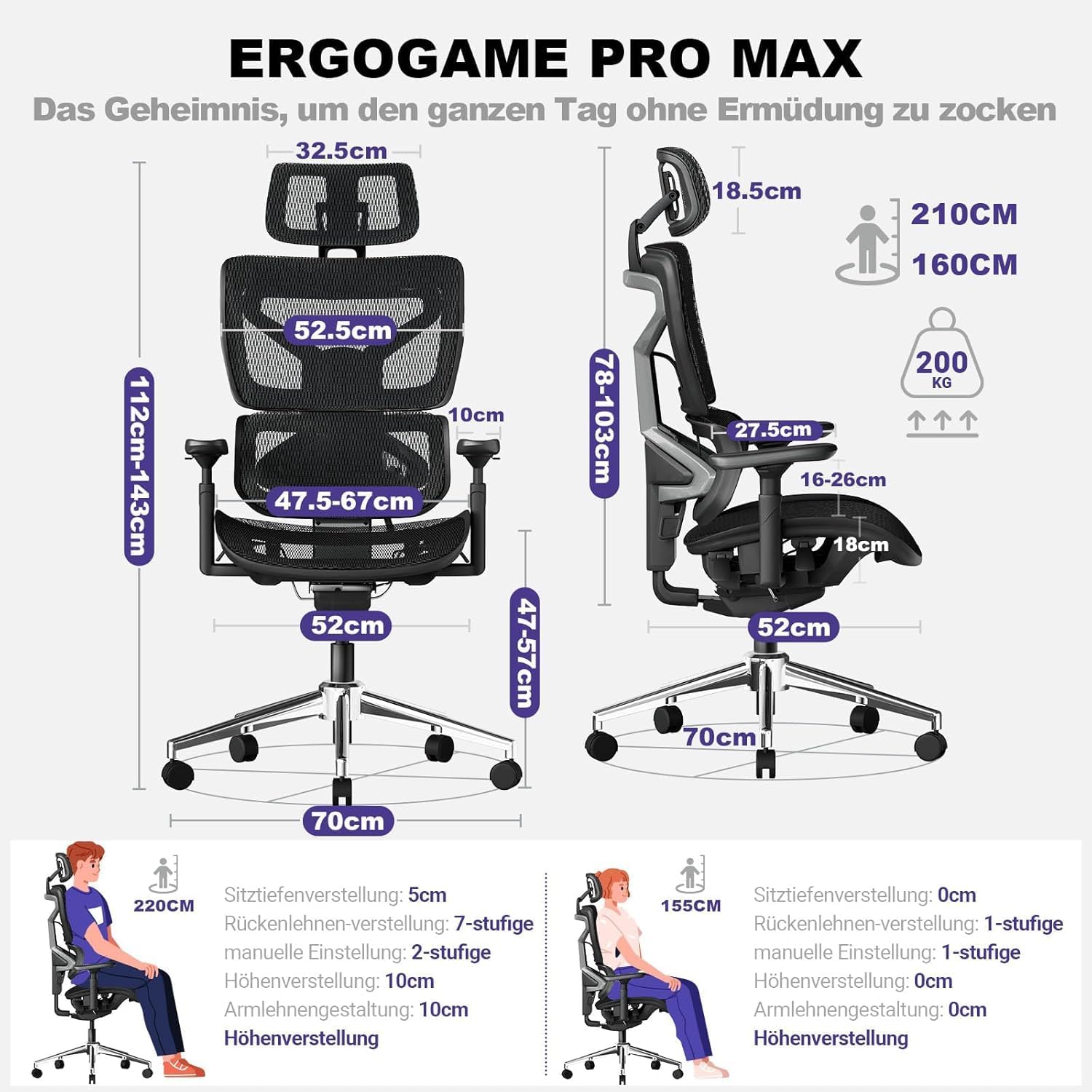
Image: Comprehensive diagram detailing the chair's dimensions and adjustment capabilities.
| Feature | Detail |
|---|---|
| Brand | MELOKEA |
| Model | DECHAF059B |
| Maximum Weight Capacity | 200 kg (440 lbs) |
| Product Dimensions (LxWxH) | 52 x 52 x 47 cm (base dimensions) |
| Item Weight | 23.8 kg |
| Seat Height Adjustment | 10 cm (range 47-57 cm) |
| Seat Depth Adjustment | 5 cm |
| Backrest Recline Angles | 90°, 110°, 130° (lockable) |
| Backrest Height Adjustment | 7 positions, 7 cm range |
| Lumbar Support | Dynamic 2.0, 10 cm forward movement, 30° rotation, 2 manual positions |
| Armrest Adjustment (4D) | 10 cm height, 7 cm forward/backward, 40° inward, 180° outward rotation, 180° flip-up |
| Headrest Adjustment (3D) | 12 cm height, 90° rotation on both axes |
| Gas Lift Certification | SGS, TUV certified |
| Compliance | European standards EN12520 (home seating) and EN1335 (office seating) |
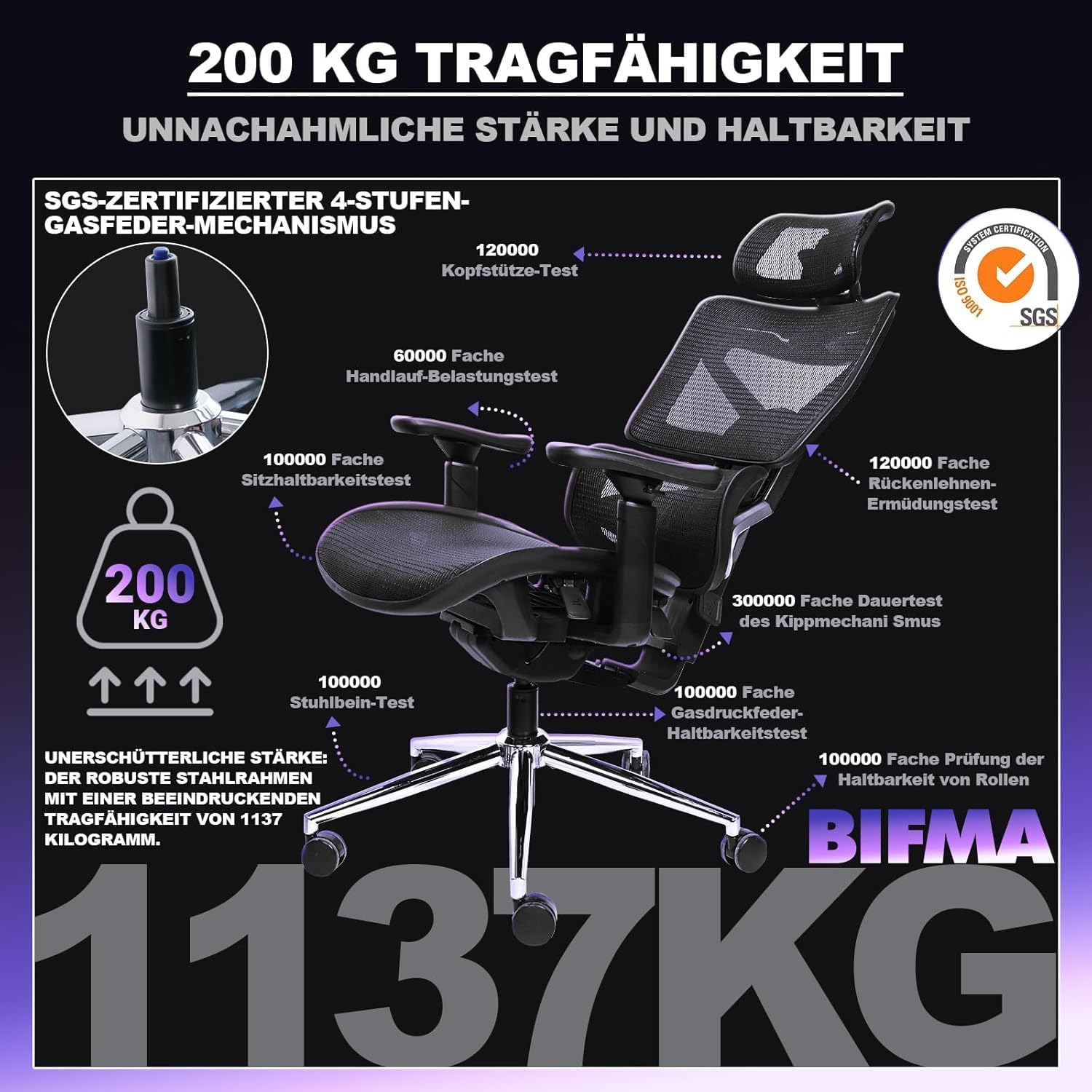
Image: Overview of the chair's robust construction and durability testing, confirming its 200 kg load capacity and certifications.
9. Warranty and Support
MELOKEA offers a 5-year warranty on this product, exceeding industry standards. This warranty covers manufacturing defects and material failures under normal use.
For warranty claims, technical support, or any questions regarding your MELOKEA Ergonomic Office Chair Model DECHAF059B, please contact our customer service team:
- Website: Visit the MELOKEA Store on Amazon
- Email: Refer to your purchase documentation for direct email support.
- Phone: Refer to your purchase documentation for direct phone support.
Please have your purchase receipt and model number (DECHAF059B) ready when contacting support.
Related documentsDECHAF059B


Ask a question about this manual
Ask about setup, troubleshooting, compatibility, parts, safety, or missing instructions. Manuals+ will review the question and use this page’s manual context to help answer it.