Download PDFFree PDF. The Save button below keeps a bookmark and private notes in your account.
Leomru 5-in-1 Heat Press Machine 15x15 Inch User Manual
Comprehensive instructions for setup, operation, and maintenance of your Leomru heat press.
1. Introduction
Thank you for choosing the Leomru 5-in-1 Heat Press Machine. This versatile device is designed for heat transfer applications on various items, including T-shirts, hats, mugs, and plates. Please read this manual thoroughly before operation to ensure safe and efficient use.
2. Important Safety Instructions
Always operate the heat press on a stable, heat-resistant surface.
Keep hands clear of the heating element during operation to prevent burns.
Ensure proper ventilation in the work area.
Do not leave the machine unattended while powered on.
Unplug the machine when not in use or before cleaning/maintenance.
Keep out of reach of children.
Use only the provided attachments and accessories.
Do not immerse the machine in water or other liquids.
3. Product Components
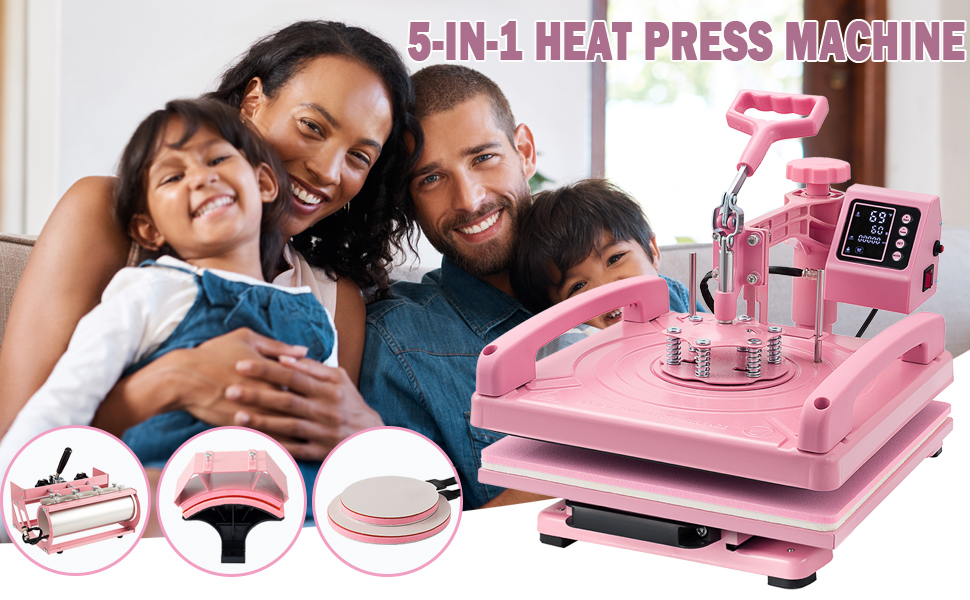
The Leomru 5-in-1 Heat Press Machine includes the main unit and several interchangeable attachments for different applications:
15"x15" T-shirt Press Platen: For flat items like T-shirts, canvas bags, and pillowcases.
5.5"x3" Hat/Cap Press: For pressing designs onto caps and hats.
30oz Mug/Tumbler Press: For cylindrical items such as mugs and tumblers.
5" Plate Press: For smaller ceramic plates.
6" Plate Press: For larger ceramic plates.
Image: The Leomru 5-in-1 Heat Press Machine showing the main unit and its various attachments for different items like T-shirts, hats, mugs, and plates.
Image: Close-up of the 30oz Tumbler Mug Press attachment, illustrating its capacity for various cylindrical items including stainless steel, glass, and ceramic mugs/tumblers with a maximum length of 10.6 inches and diameter of 2.65-3.4 inches.
4. Setup
4.1 Unpacking and Initial Inspection
Carefully remove all components from the packaging. Inspect the machine and attachments for any signs of damage during transit. Ensure all listed components are present.
4.2 Attaching the Desired Platen/Attachment
The machine features a 360° swing-away design and a slide-out bottom platform for easy attachment changes. To attach a platen or press:
Ensure the machine is unplugged and cool.
Loosen any securing screws or knobs holding the current attachment.
Carefully remove the existing attachment.
Align the desired attachment (e.g., T-shirt platen, hat press, mug press) with the mounting points.
Secure the new attachment using the appropriate screws or knobs. Ensure it is firmly in place before operation.
Image: A detailed view of the heat press, highlighting the pressure adjustment knob, the six spring-loaded bolts for even pressure, and the durable silicone mat on the lower platen.
Image: The Leomru 5-in-1 Heat Press Machine with its various components and overall dimensions (19.7"L x 15.6"W x 13.8"H).
5. Operation
5.1 Powering On and Setting Parameters
Plug the machine into a grounded electrical outlet.
Turn on the power switch, usually located on the side of the control box.
Use the digital control box to set the desired temperature (30-450 °F / 0-250 °C) and time (0-999 seconds) according to your material and transfer type. Refer to your transfer material's instructions for recommended settings.
The machine will begin to heat up. Wait until the set temperature is reached.
Image: The digital control box displaying temperature and timer settings, indicating a temperature range of 0-250 °C / 200-480 °F and a timer range of 0-999 seconds.
5.2 Preparing Your Item for Pressing
Place a Teflon sheet or parchment paper on the bottom platen to protect it.
Position your item (T-shirt, mug, hat, plate) on the appropriate attachment.
Place your transfer design (sublimation paper, HTV) onto the item, ensuring it is correctly aligned.
Cover the transfer design with another Teflon sheet or parchment paper to protect the heating element and prevent ink transfer.
5.3 Applying Pressure and Heat
Adjust the pressure knob to achieve the desired pressure. The machine features a pressure knob for customization based on material thickness, ensuring a seamless fit.
Swing the heating platen over the item (if using the swing-away feature) or slide the bottom platform in.
Lower the handle to engage the press. The timer will start automatically.
Once the timer completes, lift the handle and swing the heating platen away or slide the platform out.
Carefully remove the Teflon sheet/parchment paper and then the transfer design.
Remove your pressed item and allow it to cool.
Image: A visual guide showing the three main steps for printing: 1) placing the item on the transfer plate, 2) rotating the plate and aligning it, and 3) pressing down the handle firmly onto the item.
Image: Illustration of the dual-tube heating design, ensuring uniform heat distribution across the entire surface for clear and high-quality patterns, compared to single-tube heating.
Image: Demonstrates the 360° rotation swing-away feature and the slide-out drawer design, which enhances safety and ease of operation by allowing the heating element to be moved away from the work area.
Video: An overview of the Leomru 5-in-1 Heat Press Machine, demonstrating its various functions and attachments for different DIY projects like shirts, mugs, hats, plates, and tumblers. This video provides a general introduction to the machine's capabilities.
Video: A detailed review and demonstration of the Leomru 5-in-1 Heat Press Machine, showcasing its digital controls, ease of use, and the process of pressing a design onto a T-shirt. This video highlights the machine's performance and features.
6. Maintenance
Cleaning: After each use, ensure the machine is cool and unplugged. Wipe down the heating platen and other surfaces with a soft, damp cloth. Do not use abrasive cleaners.
Storage: Store the heat press in a clean, dry environment.
Regular Checks: Periodically check all connections and moving parts for wear or damage.
7. Troubleshooting
Problem
Possible Cause
Solution
Machine does not power on.
Not plugged in; power switch off; circuit breaker tripped.
Check power cord connection; ensure power switch is on; reset circuit breaker.
Uneven heat transfer.
Uneven pressure; faulty heating element.
Adjust pressure knob for even distribution; contact support if heating element is suspected.
Design not adhering properly.
Incorrect temperature/time; insufficient pressure; incorrect transfer material.
Verify temperature and time settings; increase pressure; ensure compatible transfer material.
Machine overheats and shuts off.
Safety feature activated.
Allow machine to cool down; ensure proper ventilation.
8. Specifications
Brand: Leomru
Model: 15X15 5IN1
Material: Aluminum, Metal
Color: Pink
Product Dimensions (L x W x H): 19.7" x 15.6" x 13.8"
Upper Temperature Rating: 450 Degrees Fahrenheit (250 Degrees Celsius)
Voltage: 110 Volts
Wattage: 1400 Watts
UPC: 791137635721
ASIN: B0DNSV1TCV
9. Warranty & Support
This Leomru Heat Press Machine comes with a 2-Year Warranty from the date of purchase.
For technical support, warranty claims, or any questions regarding your product, please contact Leomru customer service through the retailer's platform or visit the official Leomru website for contact information.
Ask a question about this manual
Ask about setup, troubleshooting, compatibility, parts, safety, or missing instructions. Manuals+ will review the question and use this page’s manual context to help answer it.