
OLIXIS D-2CZ
OLIXIS Computer Desk with Drawers Instruction Manual
Model: D-2CZ
Introduction
Thank you for choosing the OLIXIS Computer Desk with Drawers. This manual provides essential information for the safe assembly, operation, and maintenance of your new desk. Please read it thoroughly before beginning assembly and retain it for future reference.
Safety Information
WARNING:
- Always assemble the desk on a stable, level surface to prevent tipping.
- Adjust the adjustable feet as needed to ensure optimal stability.
- Do not exceed the maximum weight capacity of 250 pounds (113 kg) on the desktop.
- Keep small parts and packaging materials away from children during assembly to prevent choking hazards.
- Ensure all screws and fasteners are securely tightened before use. Periodically check and re-tighten as necessary.
Parts List
Please verify that all components are present before beginning assembly. If any parts are missing or damaged, please contact OLIXIS customer support.
| Part | Description | Quantity |
|---|---|---|
| Desktop Panel | Main wooden surface of the desk. | 1 |
| Metal Frame Legs | Black metal support legs. | 2 |
| Fabric Drawers | Collapsible fabric storage drawers. | 2 |
| Side Storage Bag | Fabric bag for additional storage, attaches to side. | 1 |
| Headphone Hook | Metal hook for hanging headphones. | 1 |
| Adjustable Feet | Leveling feet for stability on uneven surfaces. | 4 |
| Assembly Hardware | Screws, bolts, and other fasteners. | 1 Set |
| Screw Driver | Tool for assembly. | 1 |
Assembly Instructions
Recommended number of people for assembly: 1
- Unpack Components: Carefully remove all parts from the packaging and lay them out on a clean, soft surface (e.g., carpet or a blanket) to prevent scratches. Verify all parts are present against the Parts List.
-
Attach Metal Frame to Desktop: Align the metal frame legs with the pre-drilled holes on the underside of the desktop panel. Secure them using the provided screws and the screwdriver. Ensure the frame is oriented correctly.

Image: Assembled OLIXIS Computer Desk with a laptop, open drawers, and side storage bag.
-
Install Adjustable Feet: Screw the adjustable feet into the bottom of each metal leg. These can be adjusted later to level the desk on uneven floors.

Image: Detailed view of the desk's features including adjustable feet.
-
Assemble Fabric Drawers: Fold and assemble the fabric drawers according to the diagram. Insert the bottom panel to give them shape. Slide the assembled drawers into their designated slots under the desktop.

Image: Instructions for assembling the pull-out fabric drawers.
-
Attach Side Storage Bag: Hook the side storage bag onto the metal frame on either the left or right side of the desk, as preferred.

Image: Detail of the side storage bag and headphone hook.
- Install Headphone Hook: Attach the headphone hook to the desired side of the desk frame using the provided hardware.
- Final Check: Once assembled, gently lift and move the desk to its desired location. Adjust the leveling feet to ensure the desk is stable and does not wobble.
Operating Instructions
The OLIXIS Computer Desk is designed for versatile use in various settings, including home offices, study rooms, and bedrooms.
-
Desktop Usage: The smooth tabletop provides ample space for a laptop, monitor, books, and other work or study essentials.

Image: User interacting with the desk in a work-from-home setup.
- Fabric Drawers: Utilize the two pull-out fabric drawers for organized storage of documents, stationery, and personal items. These help in decluttering the desktop.
- Side Storage Bag: The removable side storage bag is ideal for magazines, notebooks, or other frequently accessed items, keeping them within easy reach.
- Headphone Hook: Use the integrated headphone hook to keep your headphones conveniently stored and prevent cable tangles.
- Adjustable Feet: If the desk feels unstable, gently lift one corner and rotate the corresponding adjustable foot clockwise or counter-clockwise until the desk is level and stable.

Image: The desk's versatility, shown as a makeup table.
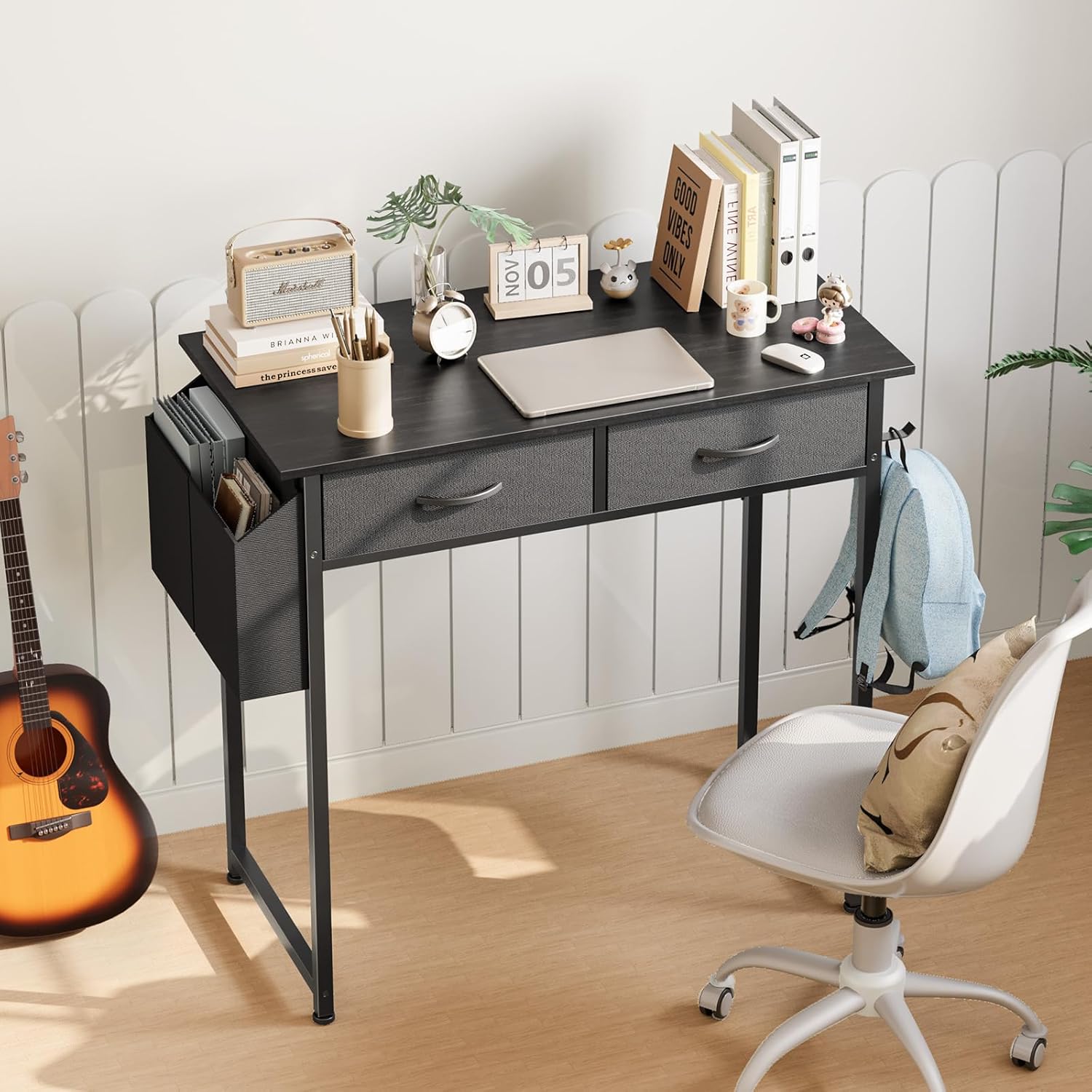
Image: The desk in a study room, highlighting its functional design.
Maintenance
- Cleaning: Wipe the desktop and metal frame with a soft, damp cloth. Avoid using harsh chemicals or abrasive cleaners, as they may damage the finish.
- Dusting: Regularly dust the desk with a dry, soft cloth to prevent dust buildup.
- Fastener Check: Periodically check all screws and fasteners to ensure they remain tight. Re-tighten if any looseness is detected.
- Fabric Care: The fabric drawers and side bag can be spot cleaned with a mild detergent and water. Allow them to air dry completely.
Troubleshooting
| Problem | Possible Cause | Solution |
|---|---|---|
| Desk wobbles or is unstable. | Uneven floor surface or loose adjustable feet. | Adjust the leveling feet at the bottom of the legs until the desk is stable. Ensure all assembly screws are tightened. |
| Drawers do not slide smoothly. | Improper assembly of fabric drawers or obstruction. | Ensure the fabric drawers are correctly folded and the bottom panel is inserted properly. Check for any items obstructing the drawer path. |
| Scratches or marks on the desktop. | Sharp objects or abrasive cleaning. | Use soft coasters or desk pads for items that may scratch the surface. Clean with a soft cloth and avoid abrasive materials. |
Specifications
- Brand: OLIXIS
- Model Number: D-2CZ
- Model Name: Computer Desk with Drawers
- Product Dimensions (D x W x H): 15.7" x 31.5" x 30.5" (39.9 cm x 80 cm x 77.5 cm)
- Desktop Color: Black
- Base Material: Metal
- Top Material Type: Wood
- Number of Drawers: 2
- Item Weight: 17 Pounds (7.7 kg)
- Maximum Weight Capacity: 250 Pounds (113 kg)
- Special Features: Headphone Hook, Side Storage Bag, Adjustable Feet
- Assembly Required: Yes
- Tools Recommended for Assembly: Screw Driver
- UPC: 757111303604

Image: Product dimensions and weight capacity.
Warranty and Support
The OLIXIS Computer Desk comes with a limited warranty. For specific details regarding warranty coverage, please refer to the warranty information provided at the time of purchase or contact OLIXIS customer service.
For any questions, missing parts, or support needs, please contact OLIXIS customer service through the retailer where the product was purchased or visit the official OLIXIS website.
Contact Information:
- Brand Store: Visit the OLIXIS Store on Amazon
Related documentsD-2CZ


Ask a question about this manual
Ask about setup, troubleshooting, compatibility, parts, safety, or missing instructions. Manuals+ will review the question and use this page’s manual context to help answer it.