
1. Important Safety Information
Please read all instructions carefully before installation and use. Keep this manual for future reference.
- Electrical Safety: Ensure the bidet is connected to a grounded 120V/60Hz power outlet. Do not use extension cords. Disconnect power before cleaning or servicing.
- Water Pressure: The operating tapwater pressure should be between 14.5 PSI and 100 PSI.
- Water Temperature: Do not use water hotter than 104°F (40°C) to avoid burns.
- Children and Individuals with Reduced Capabilities: This appliance is not intended for use by persons (including children) with reduced physical, sensory or mental capabilities, or lack of experience and knowledge, unless they have been given supervision or instruction concerning use of the appliance by a person responsible for their safety. Children should be supervised to ensure that they do not play with the appliance.
- Cleaning: Do not spray water directly onto the appliance. Use a soft, damp cloth for cleaning.
- Installation: Ensure the toilet bowl type (Round or Elongated) matches the bidet seat model.
2. Product Overview
The Coway Bidetmega 500S Round Electronic Bidet Toilet Seat offers advanced hygiene features for enhanced comfort and cleanliness.
Key Features:
- i-wave Cleaning Technology: Multi-stage wash care system with customizable water pressure, motion, and spray patterns (Rear, Front, Turbo, Move, Air+, Wide).
- Instantaneous Water Heating: Provides continuous warm water without a tank, saving energy.
- Heated Seat: Adjustable temperature for comfort.
- Warm Air Dryer: Reduces the need for toilet paper.
- Auto Open and Close Lid: Touchless operation for convenience and hygiene.
- Night Light: Soft glow illuminates the toilet for nighttime use.
- Deodorizer: Activated carbon filtration removes odors.
- Stainless Steel Nozzle: Durable and hygienic.
- Triple Hygiene Care: WaterShield mist, auto cleaning nozzle, and UV light nozzle sterilization.
- Wireless Remote Control: For easy operation and personalized settings (user profiles, child mode).
- Easy Installation: Designed for straightforward setup.

Figure 2.1: Overview of Coway Bidetmega 500S features including i-wave cleaning, triple hygiene care, ideal temperature control, triple environment care, and easy installation.
3. Setup & Installation
This section provides step-by-step instructions for installing your Bidetmega 500S. Ensure you have all components listed in the manual's parts overview before beginning.
3.1 Pre-installation Checklist
- Verify operating voltage (120V/60Hz) and use a grounded power outlet.
- Confirm operating tapwater pressure (14.5 PSI ~ 100 PSI).
- Ensure your toilet bowl is Round and matches the bidet type. Refer to the dimensions diagram below.
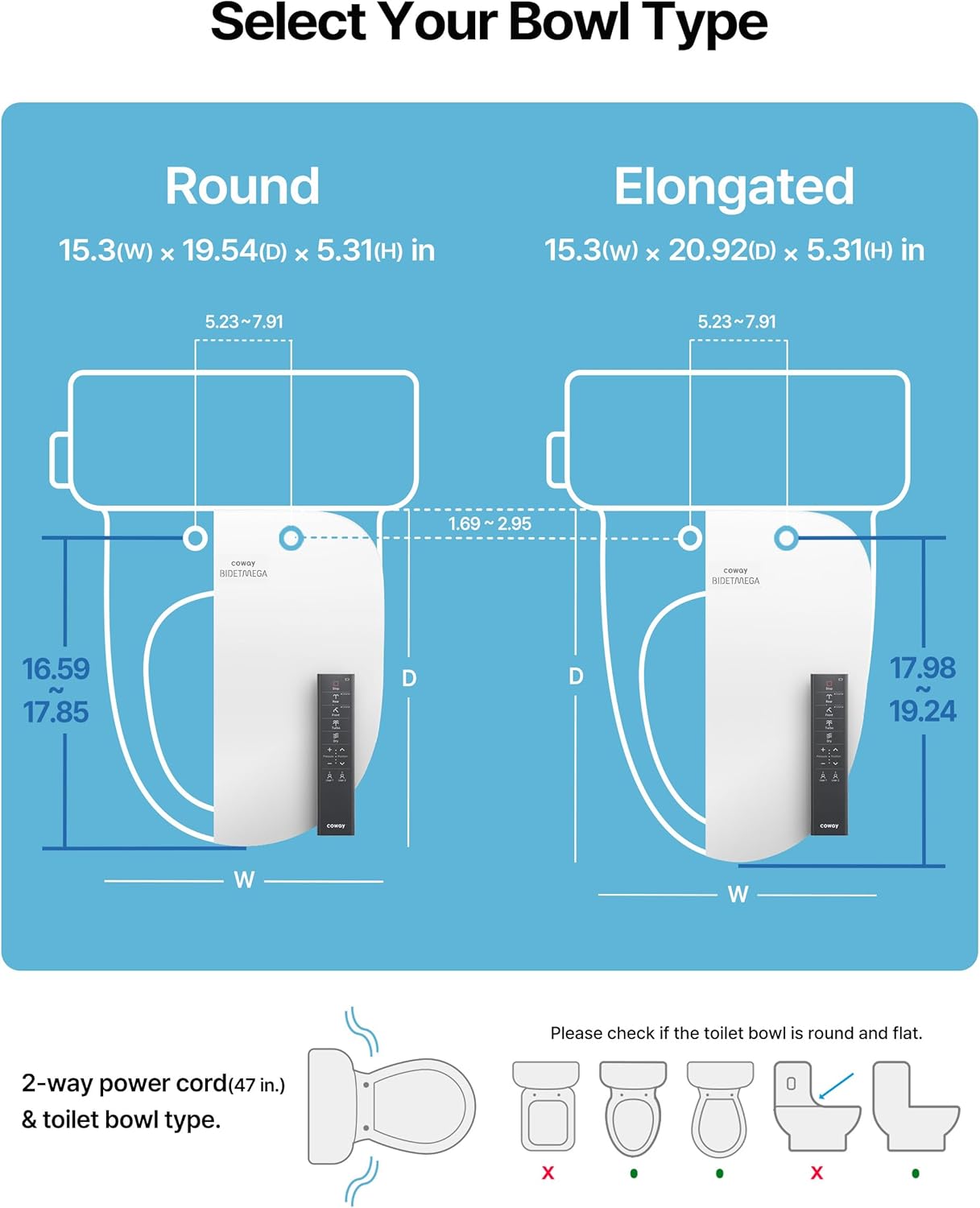
Figure 3.1: Toilet bowl type selection guide with dimensions for Round and Elongated bowls. Ensure your toilet matches the Round type for this model.
3.2 Water Source Connection
- Remove the existing toilet seat and lid.
- Turn off the water supply valve to the toilet and flush the toilet to drain the tank.
- Disconnect the water supply hose from the toilet's water supply pipe.
- Connect the provided 7/8" T-valve to the water supply valve.
- Connect the original water supply hose to the T-valve.
- Connect the bidet hose to the T-valve and then to the bidet seat's water inlet. Ensure all connections are tight to prevent leaks.
- (Optional) The mesh filter inside the water inlet is detachable for cleaning.
Video 3.1: Detailed installation guide for the Coway Bidetmega 400S & 500S, covering pre-installation, water source connection, and product installation steps.
3.3 Product Installation
- Insert the fixing nuts into the toilet holes.
- Place the fixer bracket over the nuts, aligning the fixing slides and washers.
- Insert the fixing screws and tighten them clockwise to secure the bracket.
- Gently slide the bidet seat onto the bracket until you hear a click sound, indicating it is securely in place.
- Connect the 2-way power cord to the bidet seat and then plug it into a grounded electrical outlet.

Figure 3.2: Illustration of the 2-way power cord and bidet hose connection for easy installation.
4. Operating Instructions
Your Bidetmega 500S is designed for intuitive operation using the wireless remote control. The remote automatically pairs with your bidet.
4.1 Remote Control Functions
The remote control features two displays (front and rear) for various settings:
- Front Display: Stop, Rear Mode (General/Course), Front Mode (General/Course), Turbo, Dry, Water Pressure adjustment, Nozzle Position adjustment, User 1/User 2 profiles, Battery Indicator.
- Rear Display: Move, Air+, Wide, Nozzle UV, Deodorizer, Seat Temp, Water/Dry Temp.
- Lid Button (Top): Press to open/close the lid. The lid also closes automatically after use.
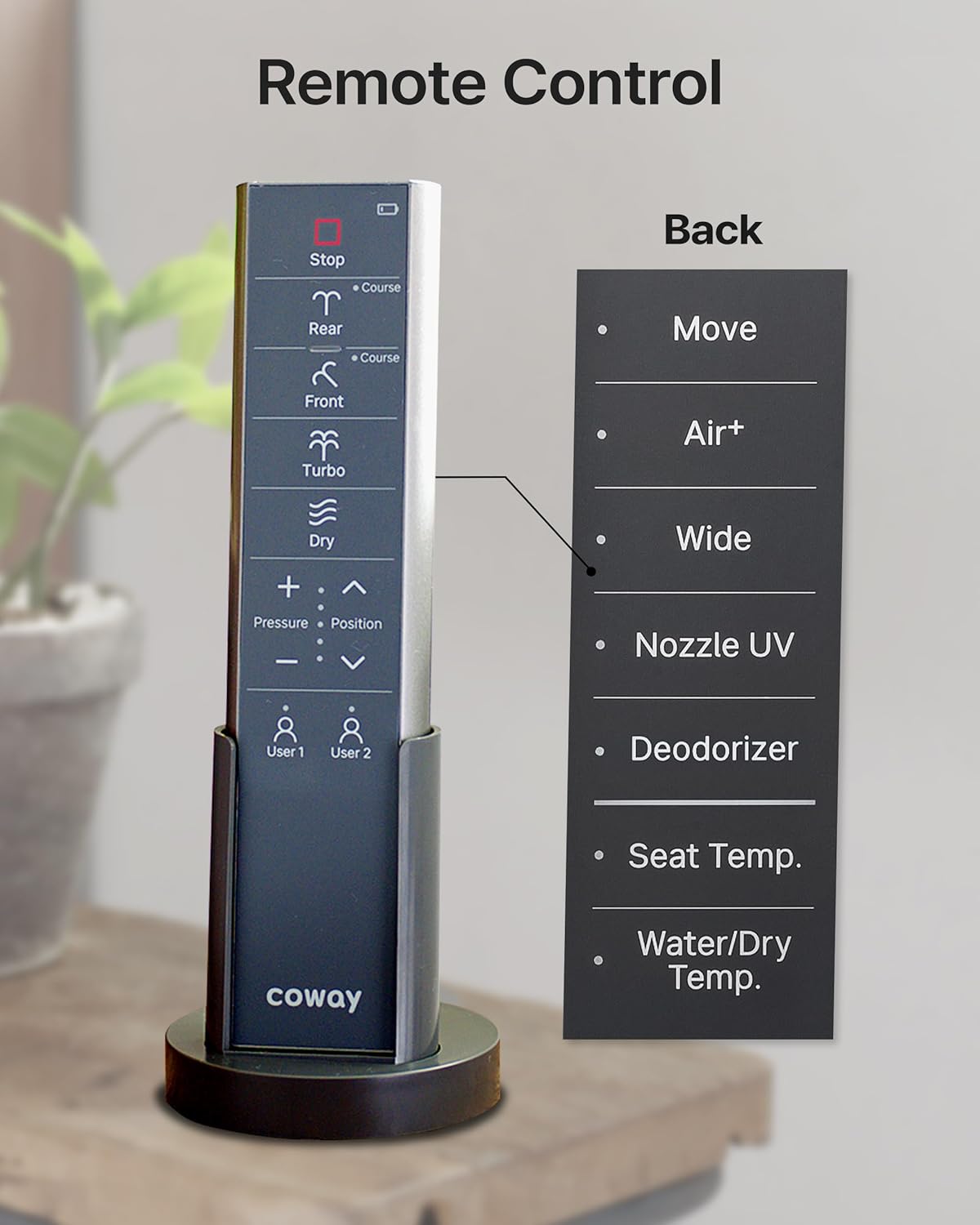
Figure 4.1: Remote control layout showing all available functions for personalized hygiene.
4.2 i-wave Cleaning Technology
Select from various wash modes and customize your experience:
- Rear Mode: Precise and comfortable wash for daily use. Single press for General (1-stage wash), double press for Course (3-stage wash: Soft Start, Main Wash, Rinse Wash).
- Front Mode: Sensitive wash, ideal for feminine hygiene. Single press for General (1-stage wash), double press for Course (3-stage wash).
- Turbo Mode: Maximum strength wash with Air+ bubbles (1-stage wash only).
- Move: The nozzle moves back and forth for a comprehensive clean.
- Air+: Adds more bubbles to the water stream for enhanced cleaning.
- Wide: Expands the spray range for soft cleaning on sensitive skin.

Figure 4.2: Visual representation of the i-wave 3-stage cleaning technology and various wash modes.
4.3 Temperature Control & Comfort Features
- Heated Water: Adjust water stream temperature using the remote (4 settings: off, 1, 2, 3).
- Heated Seat: Select from 4 temperature settings (off, 1, 2, 3) for the seat, includes overheat protection.
- Dryer: Adjust warm air dryer temperature using the remote (4 settings: off, 1, 2, 3).
- Night Light: Provides soft illumination for convenience during nighttime.
- Deodorizer: Activated carbon filtration automatically removes odors.
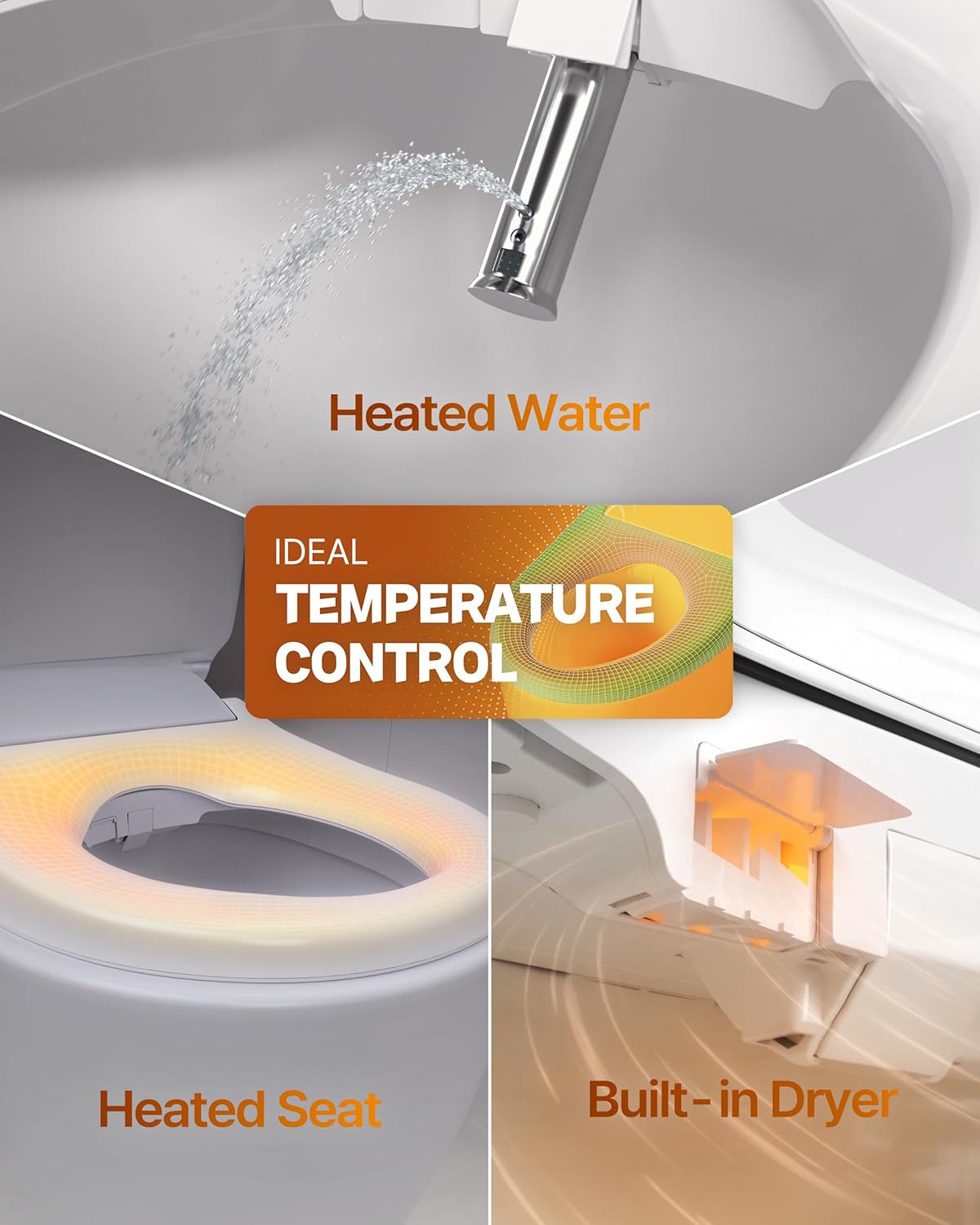
Figure 4.3: Illustration of adjustable heated water, heated seat, and built-in dryer functions.
4.4 User Profiles & Child Mode
- User Profiles: Save up to 2 custom profiles for personalized wash and other settings.
- Child Mode: Included in profile 1 by default for family use.
5. Maintenance & Cleaning
Regular maintenance ensures optimal performance and hygiene of your Bidetmega 500S.
5.1 Nozzle Cleaning
- Auto Cleaning Nozzle: The nozzle automatically cleans itself before and after each use.
- UV Cleaning Nozzle: The nozzle UV light activates after 12 usages or a single usage in 36 hours to sterilize the nozzle. This can also be activated manually via the remote.

Figure 5.1: Triple Hygiene Care features: WaterShield, Auto Cleaning Nozzle, and UV Cleaning Nozzle.
5.2 WaterShield™
When seated, a water mist is sprayed into the bowl to prevent contamination, helping to maintain cleanliness with every flush. This feature can be turned on/off as needed.
5.3 Deodorization Filter
The deodorization filter uses activated carbon filtration to remove waste odors. The filter needs to be changed once a year. A detailed text description accompanying each image for users who cannot view it.

Figure 5.2: Instructions for accessing and replacing the deodorization filter.
5.4 Quick-Release for Cleaning
To remove the bidet seat for thorough cleaning, press the release button located on the side and slide the unit off the bracket.
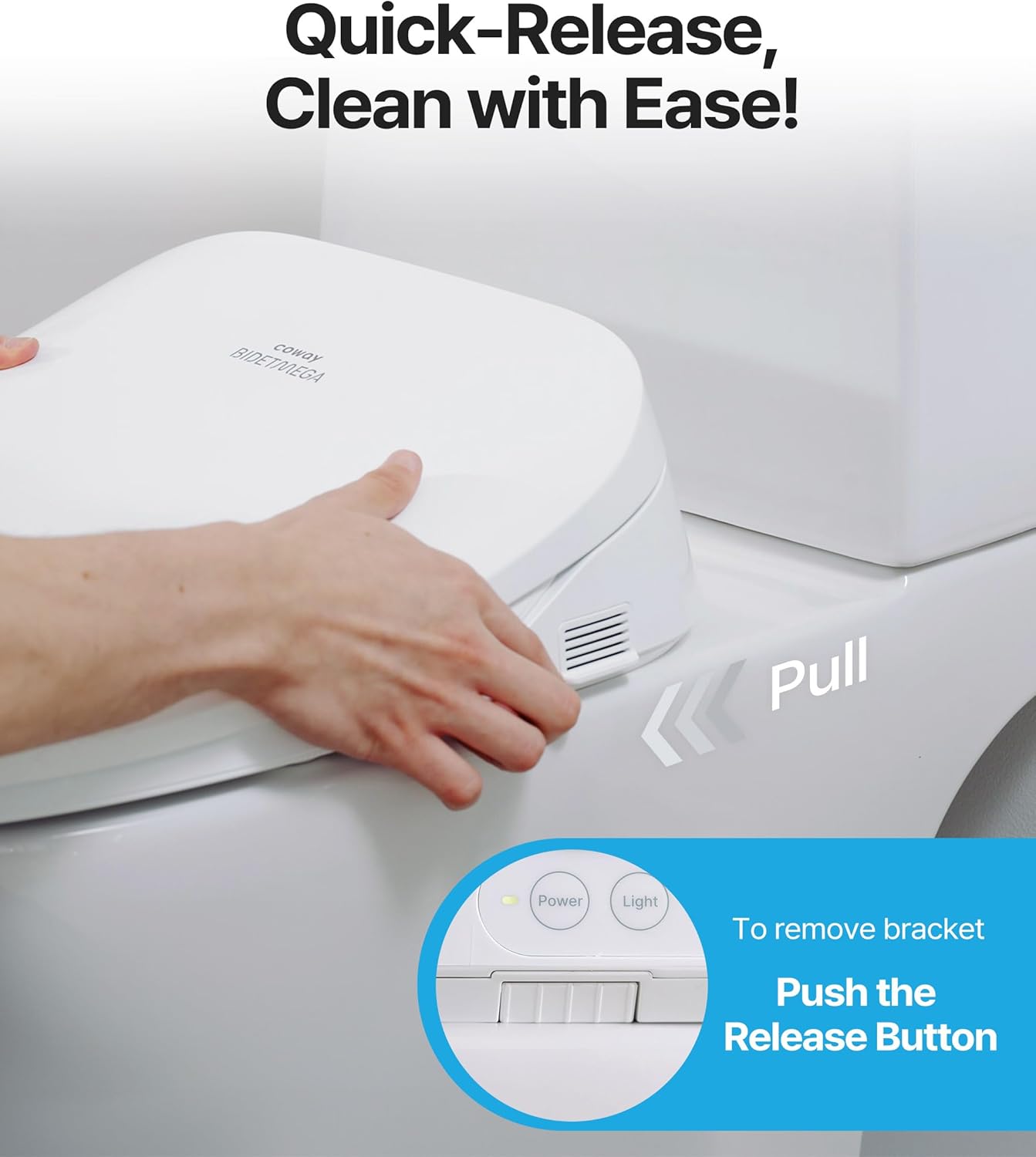
Figure 5.3: Quick-release mechanism for easy removal and cleaning of the bidet seat.
6. Troubleshooting
If you encounter any issues with your Bidetmega 500S, please refer to the following common troubleshooting steps:
- No Power: Ensure the power cord is securely plugged into a grounded outlet. Check if the outlet is functional by plugging in another device.
- No Water Spray: Verify that the water supply valve is fully open. Check if the mesh filter is clogged and requires cleaning.
- Weak Water Pressure: Check the water supply valve and mesh filter for any obstructions. Adjust water pressure settings on the remote control.
- Heated Seat/Water Not Working: Ensure the temperature settings are correctly adjusted on the remote.
- Remote Control Not Responding: Check the battery indicator on the remote and replace batteries if necessary. Ensure there are no obstructions between the remote and the bidet.
- Lid Not Opening/Closing Automatically: Check for any physical obstructions. Ensure the auto-open/close feature is enabled via the remote if applicable.
For persistent issues, please contact Coway customer support.
7. Specifications
| Feature | Detail |
|---|---|
| Brand | Coway |
| Model | Bidetmega 500S Round |
| Color | White |
| Material | Polypropylene Plastic |
| Shape | Round |
| Product Dimensions | 19.57"L x 5.28"W |
| Item Weight | 8.6 Pounds |
| UPC | 826439001247 |
| Power Supply | 120V/60Hz (Grounded outlet required) |
| Water Pressure | 14.5 PSI ~ 100 PSI |
| Included Components | Bidet, Remote, Manual, Installation Kit |
8. Warranty & Support
For warranty information, product registration, or technical assistance, please contact Coway customer support. Keep your purchase receipt for warranty claims.
Contact information can typically be found on the Coway official website or within the product packaging.


