
1. Product Overview
The FURITEK MICROBOOST is a high-performance 2S Lipo 25A/50A Brushless Sensored/Sensorless Electronic Speed Controller (ESC) designed for micro RC cars, including 1/24, 1/27, and 1/28 scale 2WD, AWD, or RWD drift and race cars. It features an integrated LCD display for real-time monitoring and easy programming.
This ESC supports a wide range of brushless sensored and sensorless motors, including Furitek Hellfire, Ensotech, Hobbywing EZRUN 1626, Rocket-RC 1/28 Mini-Z Sensored Brushless Motors 1525, GL Racing, and PN Racing motors.

Image 1.1: The Furitek Microboost ESC unit, showing its compact size and integrated LCD screen.
2. Safety Information
Warning: This product is not intended for use by children.
- Always ensure correct polarity when connecting the battery to prevent damage to the ESC and battery.
- Operate the RC vehicle in a safe environment, away from people, pets, and obstacles.
- Disconnect the battery from the ESC when not in use to prevent accidental operation and battery discharge.
- Avoid exposing the ESC to moisture or extreme temperatures.
3. Setup and Installation
3.1 Component Compatibility
The Microboost ESC is compatible with 2S Lipo batteries and provides a 5.5V/7.4V - 5A built-in BEC. It supports various brushless sensored and sensorless motors. Ensure your motor's specifications align with the ESC's capabilities.
3.2 Physical Installation
- Mount the ESC securely within your micro RC car chassis. Ensure adequate ventilation.
- Connect the motor wires to the ESC's motor output terminals. For sensored motors, connect the sensor cable.
- Connect the ESC's receiver cable to the throttle channel of your RC receiver.
- Connect the battery connector to your 2S Lipo battery.

Image 3.1: The Microboost ESC integrated into a micro RC car chassis, showing wiring connections.
3.3 Initial Power-On and Calibration
After installation, perform a throttle calibration with your radio transmitter according to your transmitter's manual. This ensures the ESC correctly interprets throttle inputs.
3.4 RaceReady Mode Configuration
The RaceReady Mode allows the ESC to power on automatically when the battery is connected, bypassing the need to press the power button. To enable this mode, toggle the designated switch on the ESC. If the switch is off, manual power-on via the ESC button is required for each use.
4. Operating Instructions
4.1 LCD Display and Real-time Monitoring
The integrated LCD display provides real-time monitoring of critical parameters, including:
- Battery voltage and individual cell voltage
- ESC temperatures
- Motor RPM and top speed RPM
- Running time
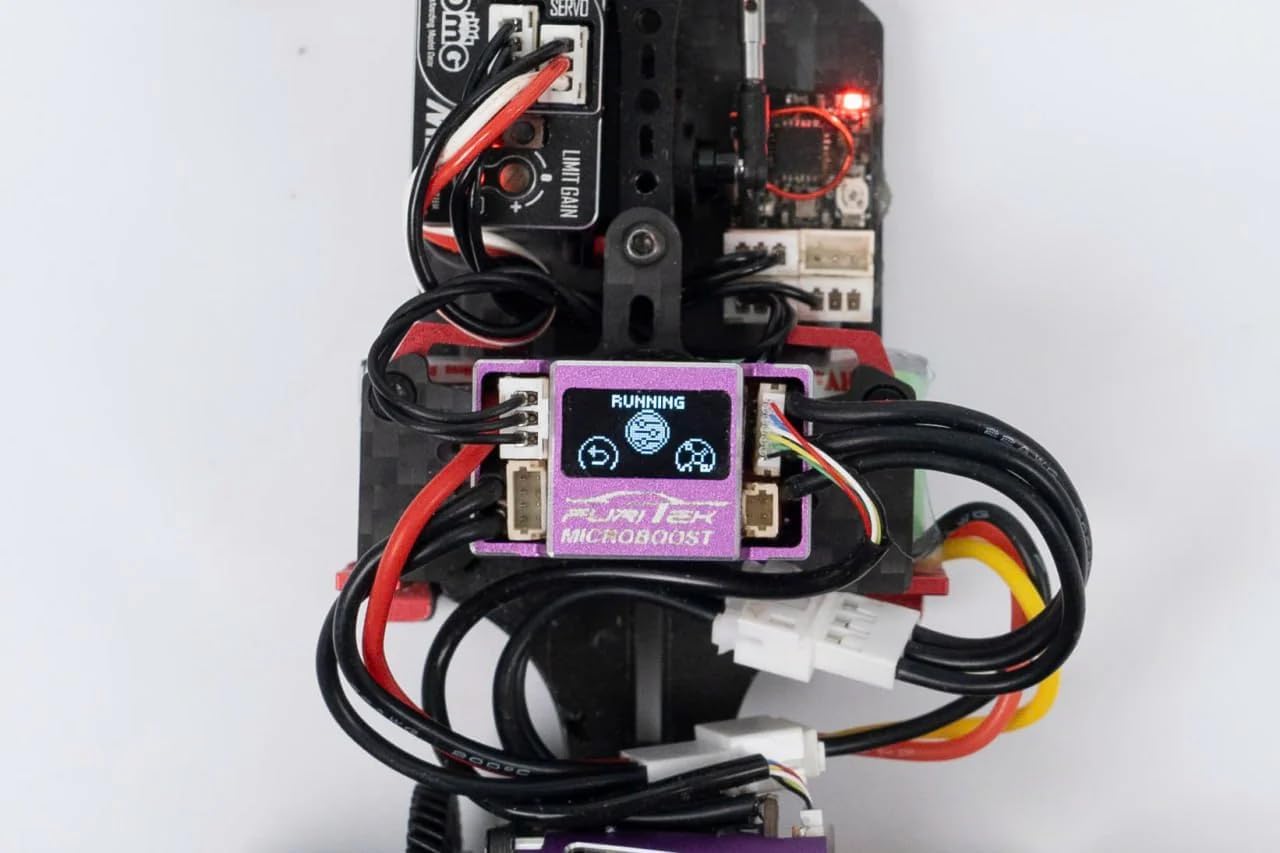
Image 4.1: The LCD display showing the "Running" status and various icons indicating active functions.
4.2 Programming Functions
The ESC can be programmed directly via the LCD display or through a dedicated mobile application (Android and iOS) with a Furitek wireless module (sold separately). Programmable functions include:
- Throttle response curves
- Brake strength and curves
- Boost and Turbo timing settings
- Other advanced motor control parameters
4.3 Advanced Features
- Race Data Logging: Records temperature, curves, histograms, and other race-related data for analysis.
- Integrated Backfire LED System: External control allows for simulating real car exhaust effects using rear-mounted LEDs on the motor (LEDs not included).
- Rev-Limiter Feature: Produces crisp, crackling sounds for an authentic drift experience.
5. Maintenance
Regular maintenance ensures optimal performance and longevity of your Microboost ESC. While specific maintenance procedures are not detailed, general best practices include:
- Keep the ESC clean and free from dust, dirt, and debris. Use a soft brush or compressed air for cleaning.
- Inspect all wiring and connectors periodically for signs of wear, damage, or loose connections.
- Ensure the ESC is not exposed to excessive heat during operation. Proper ventilation is crucial.
- Store the ESC in a dry, cool environment when not in use.
6. Troubleshooting
This section provides general troubleshooting tips. For specific issues not covered here, refer to the Furitek support resources.
- No Power:
- Check battery connection and charge level.
- Ensure the ESC power button is pressed (if RaceReady Mode is off).
- Verify all wiring connections are secure.
- Motor Not Responding:
- Confirm proper throttle calibration with your transmitter.
- Check motor and sensor wire connections.
- Ensure the motor is compatible with the ESC.
- Overheating:
- Check for proper ventilation around the ESC.
- Ensure the motor is not over-geared or experiencing excessive load.
- Verify motor timing settings are appropriate.
7. Specifications
| Feature | Detail |
|---|---|
| Model | MICROBOOST (FUR-2600 / FUR-2601) |
| Battery Support | 2S Lipo |
| Continuous Current | 25A |
| Peak Current | 50A |
| BEC Output | 5.5V/7.4V - 5A (Built-in) |
| Motor Type Support | Brushless Sensored/Sensorless |
| Application | Micro Car 1/24, 1/27, 1/28 (2WD, AWD, RWD RC Drift/Race Car) |
| Length | 26mm (1.02 inch) |
| Width | 15mm (0.59 inch) |
| Height | 12.9mm (0.51 inch) |
| Weight | 10.3g (0.36 oz) |
| Programming | LCD Display, Mobile App (Android/iOS with Furitek wireless module) |
| Firmware Update | Available (requires Furitek wireless module) |
8. Product Video
Video 8.1: An official product video showcasing the Furitek Microboost ESC in action, highlighting its features and performance in a drift car. This video demonstrates the ESC's capabilities and integration within an RC vehicle.
9. Warranty and Support
Specific warranty details are not provided in this manual. For warranty information, technical support, or further assistance, please contact Furitek customer service or visit the official Furitek website.