
1. Introduction
The JOYO AC-40S is a 40W acoustic guitar amplifier designed to provide precise acoustic sound optimization for various frequency ranges. It features a built-in high-performance DSP chip offering three stackable digital effects: Chorus, Delay, and Reverb. This amplifier supports diverse connectivity options including Bluetooth, AUX IN, USB-C OTG for live streaming, and a 3.5mm port. It also includes a dedicated microphone input with independent reverb, bass, and treble adjustments for vocals. The AC-40S is highly portable, featuring a built-in rechargeable battery for up to 6 hours of playing time, and supports guitar stands, making it suitable for outdoor and various performance scenarios.
2. What's in the Box
- Acoustic Combo Amplifier
- AC adapter and Power cable
- USB Type-C Cable
- USB-C to Lightning Adapter
- User Manual
3. Product Overview
3.1. Amplifier Features
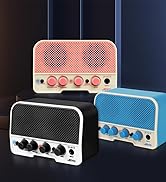
The JOYO AC-40S delivers 40 watts of power through two 6.5-inch full-range speakers, providing Hi-Fi stereo sound. Its robust construction ensures durability and a balanced weight for portability.
3.2. Control Panel Details
The amplifier's top panel features clearly labeled controls for both guitar and microphone inputs, along with master volume and digital effects. Each channel offers independent volume and tone shaping capabilities.

The guitar channel includes controls for Volume, Bass, Middle, Treble, Chorus, Delay, and Reverb. These allow for precise tonal adjustments and effect application to your acoustic guitar sound.

The microphone channel provides dedicated controls for Input, Volume, Bass, Treble, and Reverb, optimized for clear vocal reproduction.

Music playback options include Bluetooth and AUX IN. The amplifier also features a USB-C OTG port and a 3.5mm recording port for direct connection to smartphones or computers for live streaming or internal recording.
4. Setup
4.1. Powering On and Charging
To power on the AC-40S, locate the power switch on the control panel. The amplifier can operate on its built-in rechargeable battery for up to 6 hours. To charge, connect the provided AC adapter and power cable to the DC IN port.
4.2. Connecting Instruments and Microphones
Plug your acoustic guitar into the dedicated guitar input. For microphones, use the XLR/TRS combo jack. Adjust the respective volume knobs for each channel.
4.3. Bluetooth Pairing
Activate Bluetooth mode on the amplifier and search for "AC-40S" on your Bluetooth-enabled device (e.g., smartphone). Pair the devices to stream music or backing tracks wirelessly.
5. Operating
5.1. Guitar Channel Controls
- Volume: Adjusts the output level of the guitar channel.
- Bass, Middle, Treble: Three-band equalizer for shaping the guitar's tone.
- Chorus, Delay, Reverb: Knobs to control the intensity of the built-in digital effects. These effects can be stacked.
5.2. Microphone Channel Controls
- Volume: Adjusts the output level of the microphone channel.
- Bass, Treble: Two-band equalizer for shaping the microphone's tone.
- Reverb: Controls the reverb effect specifically for the microphone.
5.3. Music Playback and Recording
- AUX IN: Connect external audio devices via a 3.5mm cable.
- USB-C OTG / 3.5mm Recording Port: Connect to a smartphone or computer for direct audio recording or live streaming.
- Headphone Out: Use headphones for silent practice.
5.4. Speaker Stand Support
The AC-40S is designed with a mounting socket on the bottom to support standard speaker tripods, allowing for optimal sound projection in various settings.
6. Maintenance
- Keep the amplifier clean by wiping it with a soft, dry cloth.
- Avoid exposing the amplifier to extreme temperatures, humidity, or direct sunlight.
- Do not attempt to open the amplifier casing or perform repairs yourself, as this may void the warranty and cause damage.
- Ensure proper ventilation to prevent overheating.
7. Troubleshooting
| Problem | Possible Cause | Solution |
|---|---|---|
| No sound output | Power off; Volume too low; Cables not connected properly; Instrument/microphone issues. | Check power switch; Increase volume; Verify all cable connections; Test instrument/microphone separately. |
| Distorted sound | Volume too high; EQ settings incorrect; Faulty cable/instrument. | Reduce volume; Adjust EQ settings; Test with different cables/instruments. |
| Bluetooth connectivity issues | Device not in pairing mode; Out of range; Interference. | Ensure amplifier is in Bluetooth pairing mode; Move device closer to amplifier; Avoid sources of interference. |
| Short battery life | Battery not fully charged; High volume usage. | Fully charge the battery before use; Reduce volume for extended battery life. |
8. Specifications
| Feature | Detail |
|---|---|
| Output Wattage | 40 Watts |
| Item Weight | 18.96 pounds |
| Product Dimensions | 11.02 x 16.54 x 7.87 inches |
| Power Source | Battery Powered |
| Battery Type | Lithium Ion |
| Compatible Devices | Acoustic Guitar, Amplifier, Headphone, Microphone, Smartphone and Computer |
| Connector Type | 3.5mm Jack, XLR, AUX IN |
| Material | Metal, Plastic |
9. Official Product Videos
9.1. JOYO AC-40S Unboxing & Testing
9.2. JOYO Acoustic Guitar Amp Tone AC-20S/AC-40S
9.3. AC-40S & Nobes Music Performance
9.4. JOYO Guitar Amp for Acoustic Guitar Overview
9.5. Wireless Amp With Extras - JOYO AC-20s Acoustic Guitar Amp
9.6. JOYO Guitar Amp for Acoustic Guitar AC-20S&40S
10. Warranty and Support
JOYO Technology is committed to providing reliable quality and customer satisfaction. If there is any problem with the use of the product, prompt service will be provided within 24 hours.
- Return Policy: 30 days for refund/replacement.
- Replacement: Available within 12 months.


