
1. Introduction
Thank you for purchasing the EagleStone ES3593 Electronic Target 2-in-1 Floating Ball Shooting Game. This product offers an engaging and interactive shooting experience with two distinct game modes: a static target mode for beginners and a dynamic floating ball mode for advanced players. Designed for both indoor and outdoor use, it provides hours of fun for children and families. Please read this manual carefully before use to ensure proper setup, operation, and maintenance.
2. Product Features
- Two Game Modes: Easily switch between a static target mode, ideal for beginners to practice shooting accuracy, and a challenging floating ball mode where targets hover in the air.
- Dual Power Options: The unit can be powered via a USB charging cable for stable power or by batteries for convenient portability, allowing play anywhere.
- Ample Ammunition: Comes with 20 sponge darts (compatible with Nerf blasters) and 20 floating balls, ensuring extended playtime.
- Durable and Safe Construction: Made from non-toxic, robust materials to ensure longevity and high safety standards during play.
- Interactive Family Fun: Perfect for friendly competitions among friends or as a parent-child bonding activity, enhancing interaction and skill development.

Figure 2.1: Overview of the product's two game modes and dual power supply options.
3. Package Contents
Please check the package to ensure all items are present:
- Owl Target Unit: 1
- Targets: 7
- USB Charging Cable: 1
- Sponge Darts: 20
- Floating Balls: 20
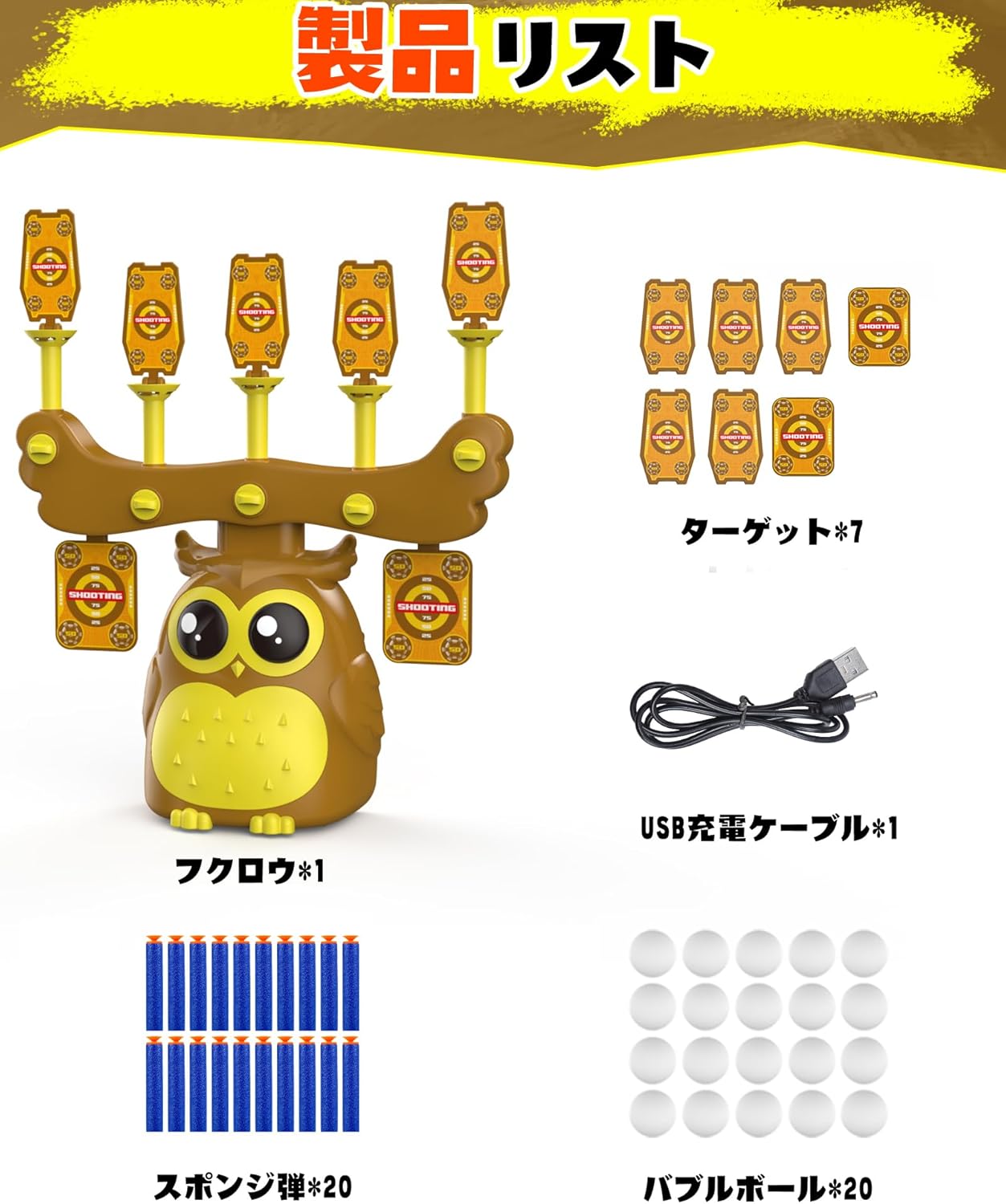
Figure 3.1: All items included in the product package.
4. Setup Instructions
Follow these steps to set up your Electronic Target game:
- Unpack Components: Carefully remove all items from the packaging.
- Assemble Target Unit: Place the owl-shaped base on a stable, flat surface. Attach the target holders and targets as shown in the product images.
- Power Supply:
- USB Power: Connect the provided USB charging cable to the unit's USB port and plug the other end into a compatible USB power source (e.g., wall adapter, power bank).
- Battery Power: Open the battery compartment (usually at the bottom or back of the unit) and insert the required batteries (not included), ensuring correct polarity.
- Load Ammunition: Place the floating balls onto the designated air nozzles for floating ball mode, or prepare the sponge darts for shooting at the static targets.
- Power On: Locate the power switch (usually on the back or side of the unit) and turn it to the "ON" position.

Figure 4.1: Connecting the USB cable for power or inserting batteries.
5. Operating Instructions
Once set up, you can begin playing:
- Select Game Mode: The unit typically has a button or switch to select between the static target mode and the floating ball mode. Refer to the unit's markings for specific controls.
- Floating Ball Mode: In this mode, air jets will cause the lightweight balls to hover above the nozzles. Adjust the airflow strength (if available) to control the height and stability of the floating balls, increasing or decreasing the challenge.
- Target Mode: In this mode, the targets remain static. This is ideal for practicing aim and precision. Some units may feature automatic scoring and target reset functions.
- Shooting: Use a compatible toy blaster (not included) to shoot the sponge darts at the targets or floating balls.
- Scoring: The electronic target unit will automatically track hits and display scores on its LED screen.
Video 5.1: Demonstration of an electronic target system in action, showing targets being hit and resetting.
Video 5.2: Another demonstration of an electronic target, highlighting its features and playability.
6. Maintenance
- Cleaning: Wipe the unit with a soft, dry cloth. Do not use abrasive cleaners or immerse the unit in water.
- Storage: When not in use, store the game in a cool, dry place away from direct sunlight. Remove batteries if storing for extended periods to prevent leakage.
- Ammunition Care: Keep sponge darts and floating balls clean and dry. Replace damaged darts or balls to ensure optimal performance.
7. Troubleshooting
- Unit Not Powering On:
- Check if the power switch is in the "ON" position.
- If using USB, ensure the cable is securely connected and the power source is active.
- If using batteries, check if they are inserted correctly and are not depleted. Replace if necessary.
- Floating Balls Not Hovering:
- Ensure the unit is in floating ball mode.
- Check for any obstructions in the air nozzles.
- Verify that the power supply is sufficient (weak batteries may not provide enough power for strong airflow).
- Targets Not Resetting (if applicable):
- Ensure the targets are properly seated in their holders.
- Check for any debris or damage preventing the reset mechanism from functioning.
- Inaccurate Scoring:
- Ensure targets are hit directly and not just grazed.
- Check for any damage to the target sensors.
8. Specifications
| Feature | Detail |
|---|---|
| Model Number | ES3593 |
| Product Dimensions | 40 x 11 x 13 cm |
| Product Weight | 730 g |
| Recommended Age | 6-18 years |
| Battery Requirement | Yes (Batteries not included) |
| Power Supply Options | USB or Battery |
9. Safety Information
To ensure safe operation and prevent injury, please observe the following safety guidelines:
- Always supervise children during play.
- Do not aim blasters at eyes or face.
- Use only the provided sponge darts and floating balls. Do not modify darts or blasters.
- Keep small parts away from children under 3 years old to prevent choking hazards.
- Do not operate the unit near water or in wet conditions.
- Ensure the play area is clear of obstacles to prevent trips and falls.
- If using batteries, follow all battery safety instructions (e.g., do not mix old and new batteries, do not mix alkaline, standard, or rechargeable batteries).

Figure 9.1: The product is constructed from durable and safe materials.
10. Warranty and Support
This product comes with a standard manufacturer's warranty. For specific warranty details, please refer to the product packaging or contact the retailer where you purchased the item. For technical support, missing parts, or any other inquiries, please contact EagleStone customer service through their official website or the contact information provided with your purchase.