
1. Introduction
This manual provides instructions for the safe and efficient use of your Ferplast ASTRA Wireless Rechargeable Pet Water Fountain. Designed for cats and small dogs, this fountain encourages hydration with its motion-activated water flow and triple-stage filtration system. Please read this manual thoroughly before initial use and retain it for future reference.

Image 1.1: The Ferplast ASTRA pet fountain, shown with a cat and a dog, highlighting its design and suitability for pets.
2. Important Safety Instructions
- Read all instructions before using the appliance.
- Do not immerse the main unit (containing electronics and battery) in water. Only the water reservoir and drinking tray are washable.
- Use only the provided USB-C cable for charging. Ensure the charging port is dry before connecting the cable.
- Keep the fountain away from direct sunlight and heat sources.
- Supervise children to ensure they do not play with the appliance.
- Do not allow pets to chew on the USB-C cable.
- If the fountain is damaged or malfunctions, discontinue use immediately and contact customer support.
- Ensure the fountain is placed on a stable, level surface to prevent tipping.
3. Product Components
The Ferplast ASTRA fountain consists of the following parts:
- Main Unit (with pump, battery, motion sensor, and LED indicators)
- Water Reservoir (3-liter capacity)
- Drinking Tray
- Triple-Stage Filter
- Filter Tray
- Water Spout/Dispenser
- USB-C Charging Cable

Image 3.1: Exploded view of the Ferplast ASTRA fountain, illustrating its main components for assembly and maintenance.
4. Setup Instructions
Follow these steps to set up your Ferplast ASTRA pet water fountain:
- Unpack: Carefully remove all components from the packaging.
- Clean Components: Wash the water reservoir, drinking tray, and water spout with mild soap and water. Rinse thoroughly. Do not wash the main unit.
- Install Filter: Place the triple-stage filter into the filter tray. Ensure it is seated correctly.
- Assemble Main Unit: Attach the main unit to the water reservoir, ensuring a secure fit.
- Place Filter Tray: Insert the filter tray with the filter into the designated slot in the reservoir.
- Fill with Water: Fill the water reservoir with fresh, clean water up to the maximum fill line. Do not overfill.
- Attach Drinking Tray: Place the drinking tray on top of the reservoir, aligning it with the main unit and spout.
- Initial Charge: Before first use, fully charge the fountain using the provided USB-C cable. The LED indicator will show charging status.

Image 4.1: A cat using the Ferplast ASTRA fountain, illustrating the natural drinking position.
5. Operating Instructions
The Ferplast ASTRA fountain offers two operating modes and clear LED indicators:
5.1 Operating Modes
- Motion Sensor Mode: The fountain detects movement within approximately 60 cm (2 feet) and dispenses water for 30 seconds. This conserves battery life and encourages pets to drink when they approach.
- Automatic Mode: In addition to motion detection, the fountain will automatically dispense water for a short period every 2 hours to ensure continuous water circulation and filtration, even when pets are not nearby.
5.2 LED Indicators
The main unit features LED lights to provide important status information:
- Battery Status: Indicates the current battery charge level. A specific color or blinking pattern will signal low battery, prompting a recharge.
- Water Level: Alerts you when the water level in the reservoir is low. The pump will automatically shut off to prevent damage.
- Filter Replacement: An indicator will light up when it's time to replace the triple-stage filter, ensuring optimal water quality.

Image 5.1: Visual representation of the fountain's key features: rechargeable battery, motion sensor, and cordless design.
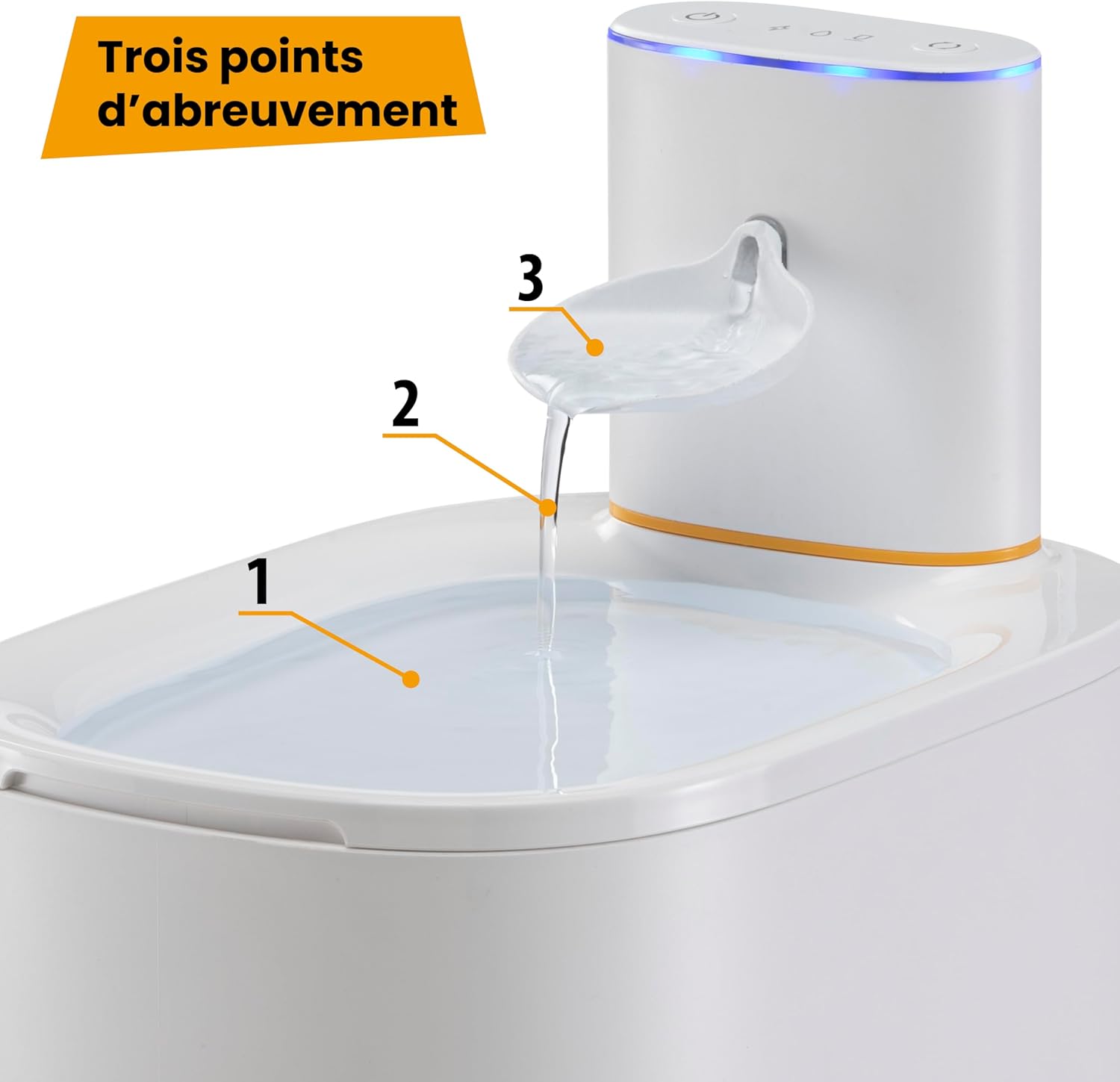
Image 5.2: The fountain provides three accessible drinking points for pets.
6. Maintenance
Regular maintenance ensures the longevity and optimal performance of your pet fountain.
6.1 Cleaning
- Daily: Check water level and refill as needed.
- Weekly: Disassemble the water reservoir, drinking tray, and water spout. Wash them with mild soap and water, then rinse thoroughly. Clean the pump according to its specific instructions (usually involves disassembling and cleaning the impeller).
- Monthly: Perform a deeper clean of all washable parts.
- Do not use abrasive cleaners or harsh chemicals.
6.2 Filter Replacement
The triple-stage filter should be replaced regularly to maintain water quality. The filter indicator LED will alert you when replacement is due.
- Frequency: Replace the filter approximately every 2-4 weeks, depending on usage and water quality.
- Procedure:
- Turn off the fountain and remove the drinking tray.
- Remove the old filter from the filter tray.
- Rinse the new filter under running water to remove any loose carbon dust.
- Place the new filter into the filter tray and reassemble the fountain.

Image 6.1: The triple-stage filter, composed of non-woven fabric, ion-exchange resins, and activated carbon, for comprehensive water purification.
6.3 Battery Charging
- When the low battery LED indicator activates, connect the USB-C cable to the charging port on the main unit and to a suitable USB power adapter (not included).
- Ensure the charging port is dry before connecting the cable.
- A full charge typically lasts several days, depending on usage frequency.
7. Troubleshooting
| Problem | Possible Cause | Solution |
|---|---|---|
| No water flow. | Low water level. Pump clogged. Battery low/dead. | Refill water reservoir. Clean the pump and impeller. Recharge the battery. |
| Fountain not turning on. | Battery depleted. Main unit not properly connected. | Recharge the battery. Ensure the main unit is securely attached to the reservoir. |
| Water appears dirty or has an odor. | Filter needs replacement. Fountain needs cleaning. | Replace the triple-stage filter. Disassemble and thoroughly clean all washable parts. |
| Motion sensor not activating. | Obstruction in front of sensor. Sensor malfunction. | Ensure clear path to sensor. Contact customer support if problem persists. |
8. Technical Specifications
- Model: Ferplast ASTRA (71290299)
- Capacity: 3 Liters
- Dimensions (L x W x H): 22 cm x 16.5 cm x 24 cm (8.7 in x 6.5 in x 9.4 in)
- Power Source: Rechargeable Lithium-ion Battery
- Input Voltage: 5 Volts DC
- Special Features: Motion Sensor, Cordless Operation, Triple Filtration System, Low Water Level Sensor, Filter Replacement Indicator
- Intended Use: Indoor for cats and small dogs

Image 8.1: Dimensions of the Ferplast ASTRA pet fountain.
9. Warranty Information
Ferplast products are manufactured to high-quality standards. This product is covered by a limited warranty against manufacturing defects from the date of purchase. Please retain your proof of purchase for warranty claims. The warranty does not cover damage caused by misuse, neglect, unauthorized modifications, or normal wear and tear.
10. Customer Support
For further assistance, troubleshooting, or to inquire about replacement parts, please contact Ferplast customer support. Visit the official Ferplast website for contact details specific to your region.
Website: www.ferplast.com