
1. Introduction
Thank you for choosing the OKD 60-inch Executive Desk. This manual provides essential information for the safe assembly, proper operation, and effective maintenance of your new desk. Please read all instructions carefully before beginning assembly or use.
This executive desk features a timeless farmhouse design, ample storage, an integrated charging station, and an ergonomic keyboard tray, making it suitable for various home office environments.
2. Safety Information
WARNING: Heavy Object.
Always use caution when moving or assembling this desk. It is recommended that two people assemble this product to prevent injury. Ensure proper assembly to maintain stability and prevent injuries. Do not overload drawers or shelves. Keep small parts away from children during assembly.
3. Package Contents
Verify that all components are present before beginning assembly. If any parts are missing or damaged, please contact customer support.
- Desk components (panels, drawers, hardware)
- Assembly hardware (screws, dowels, cam locks, etc.)
- Instruction manual
- Power cord for charging station

Image: Exploded view of the desk showing various components and storage options.
4. Setup and Assembly
Assembly is required for this product. It is recommended that two people perform the assembly. Tools recommended for assembly include a drill and a screwdriver.
- Unpack Components: Carefully remove all parts from the packaging. Lay them out on a clean, soft surface to prevent scratches.
- Identify Hardware: Separate and identify all hardware components using the included hardware list (not provided in this manual, refer to physical manual).
- Assemble Base Structures: Follow the step-by-step diagrams in your physical assembly guide to construct the main desk frame and pedestals.
- Install Drawers and Cabinet: Assemble the drawer boxes and install them into the desk frame using the ball-bearing glides. Install the cabinet door and adjustable shelf.
- Attach Keyboard Tray: Secure the pull-out, flip-down keyboard tray mechanism to the designated central compartment.
- Install Charging Station: Insert the built-in charging station (with 2 USB ports and 2 AC outlets) into the pre-cut opening on the desktop. Connect the power cord.
- Final Checks: Ensure all screws are tightened, and the desk is stable.

Image: Product dimensions and internal drawer measurements for assembly reference.
5. Operating Instructions
5.1. Using the Charging Station
The desk is equipped with a built-in charging station. To use it:
- Ensure the desk's power cord is securely plugged into a functional wall outlet.
- Plug your devices into the two USB ports or two AC outlets located on the desktop.
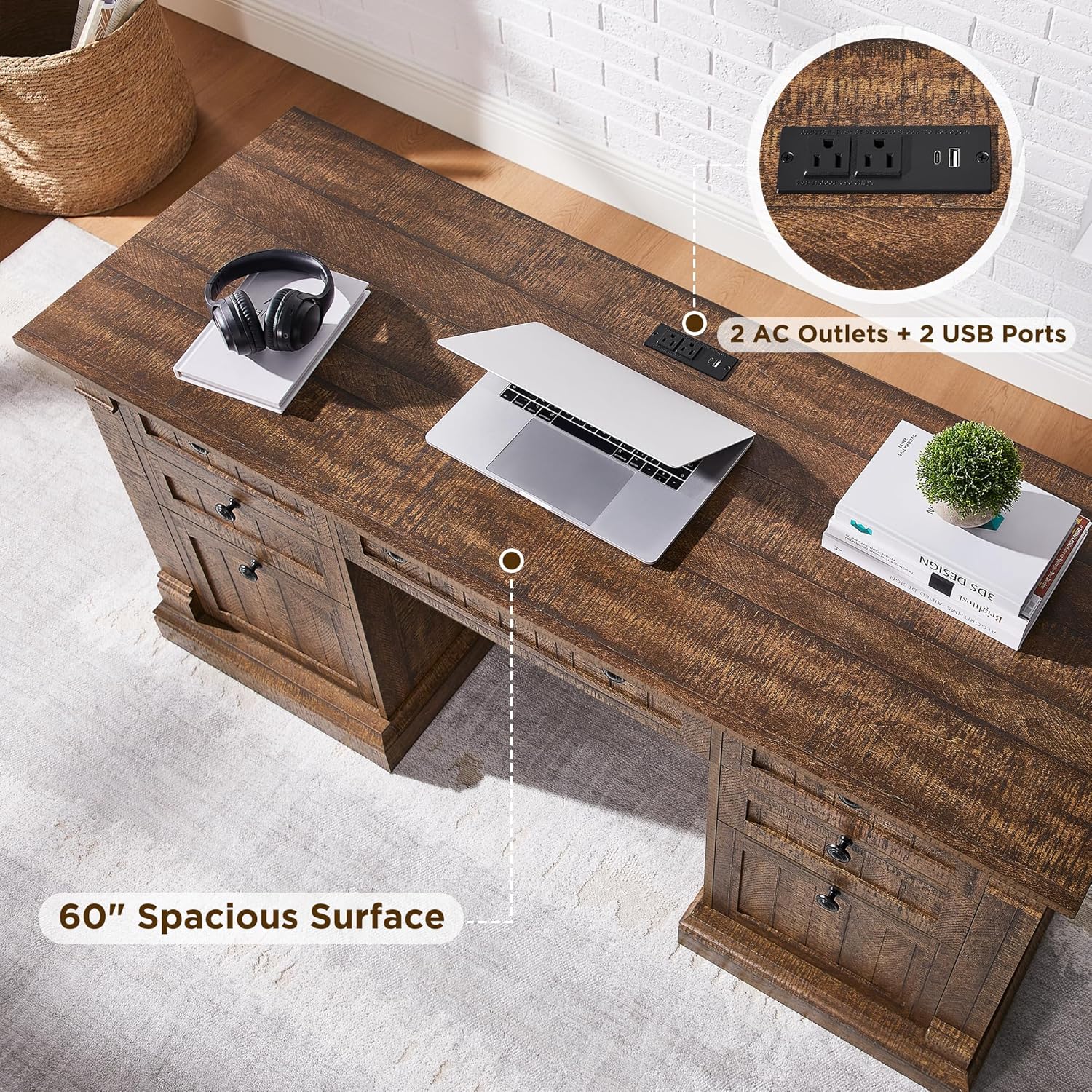
Image: Detail of the integrated charging station with USB and AC outlets.
5.2. Keyboard Tray Operation
The central drawer features a pull-out and flip-down mechanism for use as a keyboard tray.
- Gently pull the central drawer front outwards.
- The front panel will flip down, providing a flat surface for your keyboard and mouse.
- To close, lift the front panel back into position and push the tray inwards until it is flush with the desk.

Image: Demonstrates the keyboard tray, file drawer, and adjustable cabinet storage.
5.3. Storage Features
- File Drawer: The large bottom drawer is designed to accommodate letter-size documents.
- Utility Drawers: Three smaller utility drawers provide storage for office supplies.
- Cabinet Storage: The cabinet includes an adjustable shelf for flexible storage of books, office equipment, or a vertical CPU tower.
6. Maintenance
To ensure the longevity and appearance of your OKD Executive Desk, follow these care instructions:
- Cleaning: Wipe the desk surfaces with a dry cloth. Avoid abrasive cleaners or harsh chemicals that may damage the distressed finish.
- Spills: Immediately wipe up any spills with a soft, dry cloth to prevent water damage or staining.
- Sunlight: Avoid prolonged exposure to direct sunlight to prevent fading or discoloration.
- Heat: Do not place hot items directly on the desk surface. Use coasters or protective pads.
- Hardware: Periodically check and tighten all assembly hardware to maintain stability.
7. Troubleshooting
- Desk Wobbles:
Ensure all screws and fasteners are securely tightened. Check that the desk is on a level surface. Adjust any leveling feet if present.
- Drawers Stick:
Check that the drawer glides are clean and free of obstructions. Ensure drawers are properly aligned on their tracks. Do not overload drawers.
- Charging Station Not Working:
Verify that the desk's main power cord is firmly plugged into a working wall outlet. Check if the outlet itself is functional by plugging in another device. Ensure devices are properly connected to the USB ports or AC outlets.
- Keyboard Tray Does Not Extend/Retract Smoothly:
Check for any obstructions in the tray mechanism. Ensure the tray is aligned correctly. Clean any dust or debris from the glides.
8. Specifications
| Feature | Detail |
|---|---|
| Brand | OKD |
| Model Number | RPCETD-RBW |
| Product Dimensions (D x W x H) | 22"D x 60"W x 30"H |
| Color | Reclaimed Barnwood |
| Style | Country Rustic |
| Base Material | Engineered Wood |
| Top Material Type | Engineered Wood |
| Finish Type | Distressed (chipped, dented, rub through) |
| Special Features | Built-In USB Outlet, Keyboard Tray Included |
| Number of Drawers | 5 (including 1 file drawer) |
| Number of Cabinets | 2 (with 1 adjustable shelf) |
| Drawer Glide Material | Metal (Ball Bearing Glide) |
| Item Weight | 142 Pounds |
| Maximum Weight Recommendation | 350 Pounds |
| Required Assembly | Yes |
| Recommended People for Assembly | 2 |
9. Warranty Information
This OKD Executive Desk comes with a Limited Warranty. For specific terms, conditions, and duration of the warranty, please refer to the warranty documentation included with your purchase or contact OKD customer support.
10. Customer Support
If you have any questions, require assistance with assembly, or need to report missing/damaged parts, please contact OKD customer support.
For support, please visit the OKD Store on Amazon or refer to the contact information provided in your product packaging.