
GDSAFS Hy-T26 Pro
Hy-T26 Pro Wireless Bluetooth Translation Earbuds User Manual
Model: Hy-T26 Pro
Product Overview
The Hy-T26 Pro Wireless Bluetooth Translation Earbuds are designed to provide seamless real-time language translation, high-fidelity audio, and convenient communication features. These earbuds integrate advanced AI technology to facilitate cross-language interactions and enhance daily communication.
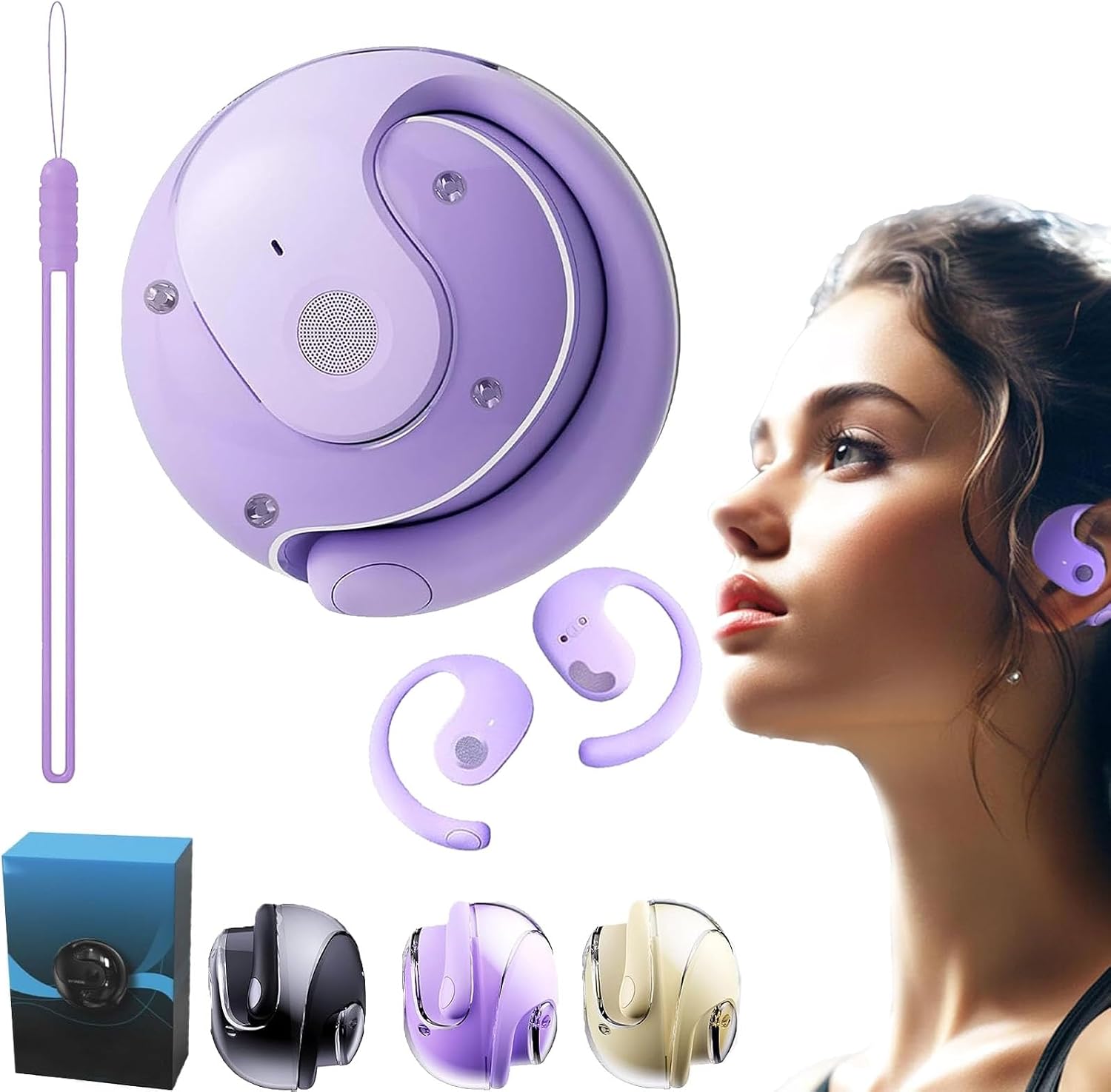
Figure 1: Hy-T26 Pro Earbuds and Charging Case (Purple variant shown).
Key Features:
- Real-Time Translation: Supports online real-time translation with up to 98% accuracy across 75 languages.
- AI Smart Functions: Includes recording, writing, translation, listening, speaking, AI chat, picture generation, and simple music generation.
- High-Fidelity Audio: Built-in 16mm dynamic speaker provides 360° high-fidelity stereo sound.
- Extended Battery Life: Approximately 3 hours of listening time, 480 hours of standby time, and a 300mAh charging compartment capacity.
- Durable Design: IPX5 waterproof level for protection against splashes and sweat.
- Quick Connectivity: Utilizes advanced Bluetooth 5.4 for fast and stable pairing.
Package Contents
Upon unboxing your Hy-T26 Pro Translation Earbuds, please ensure all items listed below are present:
- 1 pair of Hy-T26 Pro Wireless Bluetooth Translation Earbuds
- 1 Charging Case
- 1 Type-C Charging Cable
- 1 Lanyard
- User Manual (this document)
Setup Guide
1. Charging the Earbuds and Case
Before first use, fully charge the earbuds and the charging case. Connect the provided Type-C charging cable to the charging port on the case and plug the other end into a USB power source (e.g., computer, wall adapter).
- The charging indicator lights on the case will show charging status.
- A full charge for the case typically takes approximately 2 hours.
- Once charged, the earbuds can provide up to 4.5 hours of use time, with the charging case extending total playtime to about 15 hours.

Figure 2: Battery Duration and Charging Information.
2. Pairing with Your Device
- Ensure the earbuds are charged and placed in the charging case.
- Open the charging case. The earbuds will automatically enter pairing mode.
- On your smartphone or tablet, go to Bluetooth settings and enable Bluetooth.
- Search for "Hy-T26 Pro" in the list of available devices and select it to connect.
- Once connected, a voice prompt will confirm successful pairing.

Figure 3: Earbuds in use, demonstrating the ear-hanging type design.
3. Installing the Companion Application
To utilize the full translation and AI features, you must download and install the dedicated companion application on your smartphone or tablet. Search for the "Hy-T26 Pro" app in your device's app store (Google Play Store for Android, Apple App Store for iOS).
- Follow the on-screen instructions to complete the app installation.
- Launch the app and follow the prompts to connect your Hy-T26 Pro earbuds within the application.
Operating Instructions
1. Basic Earbud Controls
The Hy-T26 Pro earbuds feature touch controls for various functions:
| Action | Function |
|---|---|
| Single Tap | Play/Pause music, Answer/End call |
| Double Tap (Left Earbud) | Previous Track |
| Double Tap (Right Earbud) | Next Track |
| Triple Tap | Activate Voice Assistant (Siri, Google Assistant) |
| Long Press (2 seconds) | Reject Call |
2. Using the Translation Function
The core feature of the Hy-T26 Pro is its real-time translation. This function is primarily managed through the companion application.
- Open the Hy-T26 Pro application on your connected device.
- Navigate to the "Translation" section within the app.
- Select the source language and target language for translation.
- Follow the app's instructions to initiate translation. Typically, you will speak into the earbud's microphone, and the translated audio will be played back through the earbuds or displayed on the app screen.

Figure 4: Efficient Communication Anytime, Anywhere with the translation feature.

Figure 5: Cross-language communication facilitated by the earbuds as an auxiliary interpreter.
3. AI Smart Functions
The companion application also provides access to various AI-powered features:
- Recording & Writing: Record conversations and have them transcribed into text.
- AI Chat: Engage in conversations with an AI assistant.
- Picture Generation: Utilize AI to generate images based on text prompts.
- Music Generation: Explore simple AI-generated music.
Refer to the in-app tutorials for detailed instructions on using each AI function.

Figure 6: AI Voice Conversation feature in action.
Maintenance and Care
- Cleaning: Regularly clean the earbuds and charging case with a soft, dry, lint-free cloth. Do not use abrasive cleaners or solvents.
- Water Resistance: The earbuds have an IPX5 waterproof rating, meaning they are resistant to splashes and sweat. Do not submerge them in water or expose them to strong jets of water.
- Storage: When not in use, store the earbuds in their charging case to protect them and keep them charged. Store in a cool, dry place away from direct sunlight and extreme temperatures.
- Battery Care: To prolong battery life, avoid fully discharging the earbuds and case frequently. Charge them regularly, even if not in constant use.
Troubleshooting
| Problem | Possible Cause | Solution |
|---|---|---|
| Earbuds not pairing | Low battery, out of range, pairing mode not active | Charge earbuds and case. Ensure Bluetooth is enabled on your device and earbuds are in pairing mode. Move closer to your device. |
| Translation not working | App not connected, incorrect language settings, internet connection issue | Ensure earbuds are connected to the app. Verify language settings. Check your internet connection (required for online translation). |
| Poor audio quality | Earbuds dirty, weak Bluetooth connection, interference | Clean earbuds. Move closer to your device. Avoid strong electromagnetic interference. |
| Earbuds not charging | Cable issue, power source issue, dirty charging contacts | Try a different Type-C cable and power source. Clean the charging contacts on both earbuds and case. |
If you encounter issues not listed here or if the suggested solutions do not resolve the problem, please refer to the support section for further assistance.
Specifications
| Feature | Detail |
|---|---|
| Product Name | Hy-T26 Pro Wireless Bluetooth Translation Earbuds |
| Model | Hy-T26 Pro |
| Bluetooth Version | 5.4 |
| Transmission Distance | 10 meters (33 feet) |
| Waterproof Level | IPX5 |
| Usage Type | Ear-hanging |
| Charging Interface | Type-C |
| Charging Case Capacity | 300mAh |
| Earbud Listening Time | Approx. 3 hours |
| Earbud Use Time (with case) | Approx. 15 hours |
| Standby Time | 480 hours |
| Speaker Size | 16mm Dynamic |
| Country of Origin | China |
Warranty and Support
For warranty information and customer support, please refer to the documentation provided with your purchase or visit the official GDSAFS website. Keep your proof of purchase for any warranty claims.
For technical assistance or further inquiries, please contact GDSAFS customer service through their official channels.
Note: Specific warranty terms and support contact details may vary by region and retailer.
Related documentsHy-T26 Pro

Ask a question about this manual
Ask about setup, troubleshooting, compatibility, parts, safety, or missing instructions. Manuals+ will review the question and use this page’s manual context to help answer it.