
1. Introduction
This manual provides detailed instructions for the safe and efficient operation of your CASABREWS CM5418J Espresso Machine. Please read all instructions carefully before first use and retain this manual for future reference.
2. Safety Instructions
- Always ensure the machine is unplugged before cleaning or maintenance.
- Do not immerse the machine, power cord, or plug in water or other liquids.
- Keep the appliance out of reach of children.
- Do not operate the machine with a damaged cord or plug.
- Avoid touching hot surfaces, such as the brew head, portafilter, or steam wand, during and immediately after operation. Use handles or knobs.
- Ensure the water tank is properly installed and filled before operating.
- Do not brew coffee immediately after frothing milk. Allow the machine to cool down to prevent overheating.
3. What's in the Box
Verify that all components are present upon unpacking:
- 1 x 20 Bar Espresso Machine
- 1 x 51mm Portafilter
- 1 x Cleaning Needle
- 1 x Instruction Manual (this document)
- 1 x Tamper with Spoon
- 1 x Single Cup Filter
- 1 x Double Cup Filter
4. Product Overview
The CASABREWS CM5418J Espresso Machine is designed for ease of use and professional results. Key features include a 20-bar pressure system, milk frothing steam wand, and a user-friendly touchscreen interface.


5. Setup
First-Time Use Preparation
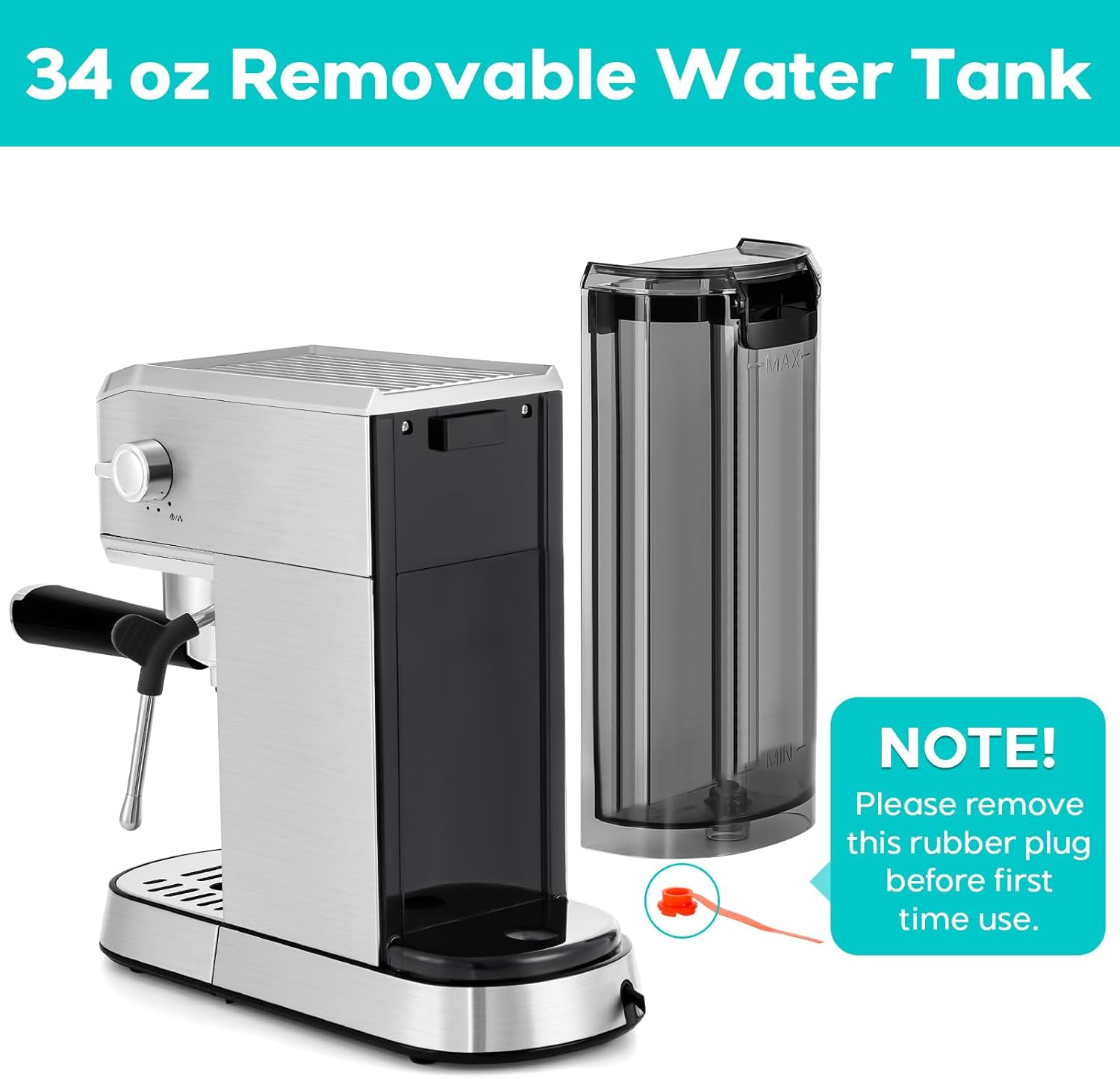
- Remove Orange Plug: Before installing the water tank, locate and remove the orange rubber plug from the bottom of the water tank.
- Install and Fill Water Tank: Install the water tank onto the machine. Fill the water tank with fresh, cold water, ensuring the water level exceeds the MIN line.
- Power On and Preheat: Turn on the machine. Allow it to preheat until the lights on all buttons (1 cup, 2 cup, steam) stay on continuously, indicating it's ready.
- Initial Hot Water Cycle: Place a cup under the steam wand. Turn the steam knob to the WATER position to let hot water flow out for approximately 20 seconds. This primes the system and cools down the machine if it's in overheating protection mode. Turn the knob back to OFF.
For a visual guide on preparing your machine for first-time use, watch this video:
Video: How to Get CM5418J Ready for the First-Time Use? This video demonstrates the initial setup steps, including removing the orange plug, filling the water tank, and performing the first hot water cycle.
Basic Espresso Preparation Steps

6. Operating Instructions
Making Espresso
- Ensure the machine is preheated (all button lights are solid).
- Insert the appropriate filter (single or double) into the portafilter.
- Add freshly ground coffee to the filter and tamp it evenly.
- Attach the portafilter to the brew head by twisting it firmly into place.
- Place your cup(s) under the portafilter spouts.
- Press the '1 cup' button for a single espresso shot or the '2 cup' button for a double espresso shot. The machine will automatically stop when the programmed volume is reached.
Setting Cup Volume
You can customize the volume for your single and double espresso shots:
- 1 Cup Volume Setting Range: 30ml (1oz) - 70ml (2.37oz)
- 2 Cup Volume Setting Range: 80ml (2.7oz) - 120ml (4oz)
- For 1 Cup: Press and hold the '1 cup' button for 3 seconds. The '1 cup' indicator will continuously light up, and the '2 cup' indicator will turn off.
- Press the '1 cup' button again to start dispensing coffee. Press it again when the desired amount is reached to stop. The new volume is now set for the '1 cup' button.
- For 2 Cups: Press and hold the '2 cup' button for 3 seconds. The '2 cup' indicator will continuously light up, and the '1 cup' indicator will turn off.
- Press the '2 cup' button again to start dispensing coffee. Press it again when the desired amount is reached to stop. The new volume is now set for the '2 cup' button.
- To Reset Default Volumes: Simultaneously press and hold the '1 cup' and '2 cup' buttons for 3 seconds. This will restore the default dispensing amounts.
For a visual guide on setting the cup volume, watch this video:
Video: How to Set the Cup Volume for CM5418J? This video demonstrates how to program custom espresso volumes for both single and double shots, and how to reset to default settings.
Frothing Milk
- Ensure the machine is preheated and the 'steam' button light is solid.
- Fill a milk pitcher with cold milk (dairy or non-dairy).
- Purge the steam wand: Place a cloth or empty cup under the steam wand and briefly turn the steam knob to release any condensed water. Turn it off.
- Submerge the steam wand tip just below the surface of the milk.
- Turn the steam knob to the STEAM position.
- Aerate the milk by keeping the tip near the surface for 5-7 seconds to create microfoam.
- Submerge the wand deeper into the milk to heat it to your desired temperature. Hold the pitcher with your hand to gauge the temperature.
- Once heated, turn the steam knob to OFF and remove the pitcher.
- Immediately clean the steam wand by wiping it with a damp cloth and briefly purging steam again to clear any milk residue.
Hot Water Function
To dispense hot water:
- Ensure the machine is turned on and has finished preheating.
- Place a cup under the steam wand.
- Turn the knob on the side to the WATER position. Hot water will dispense from the steam wand.
- Turn the knob back to the OFF position when done.
7. Maintenance
Daily Cleaning
- Steam Wand: After each use, wipe the steam wand with a damp cloth and briefly purge steam to prevent milk residue buildup.
- Portafilter and Filters: Rinse the portafilter and filter baskets with warm water after each use.
- Drip Tray: Empty and clean the drip tray regularly. The stainless steel cover and plastic tray are removable for easy cleaning.
- Water Tank: Clean the water tank periodically with mild detergent and rinse thoroughly.
Descaling
Regular descaling is essential to maintain machine performance and extend its lifespan. The frequency depends on water hardness and usage. Follow the descaling instructions provided in the full user guide or contact customer support for recommended descaling solutions and procedures.
8. Troubleshooting
Refer to the following common issues and their solutions:
| Problem | Possible Cause | Solution |
|---|---|---|
| 1 CUP/2 CUP buttons flashing repeatedly. | Overheating protection triggered (e.g., brewing immediately after frothing milk). | Use the hot water function to let hot water flow out of the steam wand for 20 seconds to cool down the machine. |
| Machine beeps continuously, and 1 CUP/2 CUP/STEAM buttons flash simultaneously. | Steam knob is not in the OFF position. | Turn the steam knob back to the OFF position. |
| Coffee is not hot enough. | Cold brew head, portafilter, filter, or cup reducing extraction temperature. | Run a single or double shot cycle without ground coffee to preheat the brew head, portafilter, and filter. Use hot water from the steam wand to preheat your cup. |
| Pump cannot draw water from the tank. | Water tank not properly installed or airlock. | Re-install the water tank. Use the hot water function to let hot water flow out for 20 seconds to prime the pump. |
For visual troubleshooting guides, please refer to the following videos:
Video: How to Resolve Single and Double Button Flashing Issue? This video explains how to address flashing 1 CUP/2 CUP indicators due to overheating protection.
Video: How to Make the Coffee Hot Enough? This video provides tips on ensuring your coffee is sufficiently hot.
Video: How to Stop Beeping? This video demonstrates how to stop the machine from beeping when all indicators are flashing.
9. Specifications
| Feature | Detail |
|---|---|
| Brand | CASABREWS |
| Model Name | CM5418J |
| Color | Silver |
| Product Dimensions | 12.28"D x 5.47"W x 11.97"H |
| Coffee Maker Type | Espresso Machine |
| Operation Mode | Semi-Automatic |
| Human Interface Input | Touchscreen |
| Water Tank Capacity | 34 oz (approx. 1 liter) |
| Coffee Input Type | Ground Coffee |
| Item Weight | 10.91 pounds |
10. Warranty and Support
For warranty information, product registration, or technical support, please refer to the warranty card included in your product packaging or visit the official CASABREWS website. Our U.S.-based support team is available to assist you with any questions or concerns.
You can also find additional instructional videos and support resources by visiting the CASABREWS Store on Amazon.


