
Victoper V8000
Victoper Headlamp V8000 User Manual
Model: V8000 | Brand: Victoper
Product Overview
The Victoper V8000 Headlamp is a versatile and powerful lighting solution designed for various outdoor and indoor activities. It features multiple LED light sources, a rechargeable battery, and a durable, waterproof design, making it suitable for camping, hiking, running, cycling, and general work.

Image: Victoper V8000 Headlamp and included USB charging cable.
Key Features:
- Ultra-Bright Illumination: Equipped with eight LEDs, providing up to 18,000 lumens for extensive light coverage.
- USB Rechargeable: Built-in rechargeable battery for convenient power, offering 3-6 hours of operation depending on the mode.
- IPX5 Waterproof: Designed to withstand splashes and light rain, suitable for various weather conditions.
- Lightweight Design: Weighs approximately 9.9 ounces (280g), ensuring comfort during extended wear.
- 8 Lighting Modes: Offers a range of modes including strong beam, warm beam, red light, and SOS strobe for diverse needs.
- Adjustable Head Angle: The lamp head can be adjusted up to 90 degrees to direct light precisely.

Image: Demonstrates the headlamp's maximum 18,000 lumens and 100-meter radiation range.

Image: Highlights the headlamp's IPX5 waterproof, snow-resistant, dirt-resistant, and shock-resistant features.
Package Contents
- Victoper V8000 Headlamp
- USB Charging Cable
- User Manual (this document)
Setup
1. Initial Charging
Before first use, fully charge the headlamp. Connect the supplied USB charging cable to the headlamp's charging port and to a standard USB power source (e.g., computer USB port, wall adapter). The charging indicator light will provide feedback on the charging status. A full charge typically takes 3-6 hours.
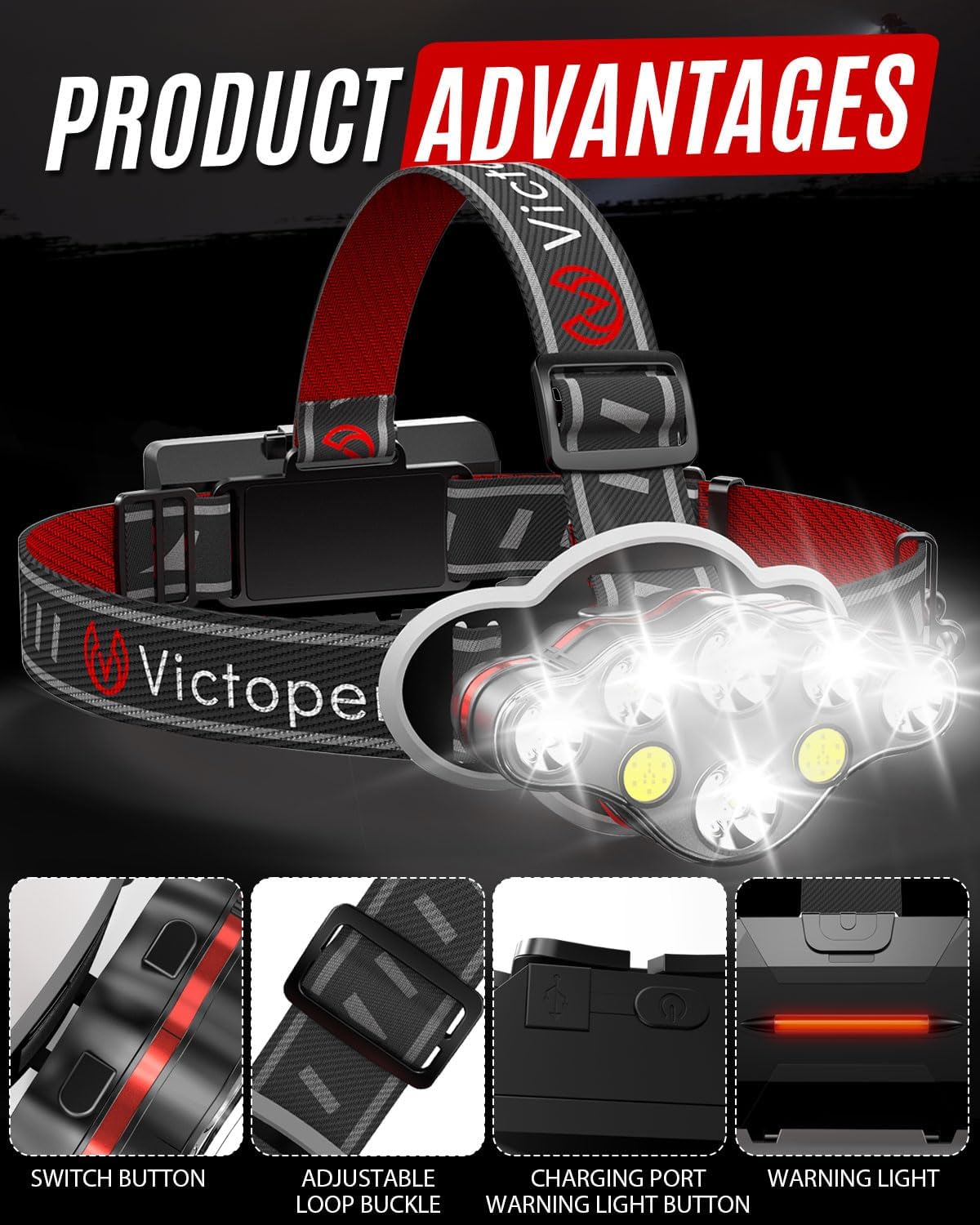
Image: Close-up of the headlamp's charging port and rear warning light button.
2. Adjusting the Headband
The elastic headband is adjustable to fit various head sizes. Use the adjustable loop buckle on the strap to tighten or loosen the band for a comfortable and secure fit. Ensure the headlamp is centered on your forehead.
Image: Detail of the adjustable loop buckle on the headlamp strap.
3. Adjusting the Lamp Angle
The headlamp's light unit can be tilted up to 90 degrees vertically. Gently pivot the lamp unit to direct the light beam precisely where needed, whether for close-up tasks or distant viewing.

Image: Illustration of the headlamp's 90-degree adjustable tilt mechanism.
Operating Instructions
Power Button and Mode Cycling
The main power button is located on the top of the headlamp unit. Press the button to cycle through the various lighting modes.

Image: Visual representation of the 8 distinct lighting modes available on the headlamp.
Available Lighting Modes:
- 2*T6 White: Activates two T6 white LEDs for focused illumination.
- 4*XPE White: Activates four XPE white LEDs for broader light coverage.
- 2*T6+4*XPE White: Combines both T6 and XPE white LEDs for maximum brightness.
- 2*T6+4*XPE White (Strobe): All white LEDs flash rapidly for signaling or emergency.
- 2*COB Red: Activates two COB red LEDs, ideal for preserving night vision or as a warning light.
- 2*COB Red (Strobe): Red COB LEDs flash rapidly.
- 2*COB White (Strong): Activates two COB white LEDs at strong intensity for floodlight illumination.
- 2*COB White (Standard): Activates two COB white LEDs at standard intensity.
To turn off the headlamp, continue pressing the power button until the light turns off, or hold the button down for a few seconds in any mode.
Rear Warning Light
The headlamp features a red warning light on the rear battery compartment for increased visibility from behind. This light can be activated independently by pressing the dedicated button on the rear unit.

Image: Rear view of the headlamp illustrating the warning light in operation.
Usage Scenarios

Image: Examples of activities where the Victoper V8000 Headlamp can be used, including cycling, repair work, camping, fishing, general adventure, and hiking.
Maintenance
Cleaning
Wipe the headlamp body with a soft, damp cloth. Do not use abrasive cleaners or solvents. Ensure the charging port cover is securely closed to prevent dust and water ingress.
Battery Care
- Charge the headlamp fully before long-term storage.
- Recharge the headlamp every 3-6 months, even if not in use, to maintain battery health.
- Avoid completely draining the battery frequently, as this can reduce its lifespan.
Storage
Store the headlamp in a cool, dry place away from direct sunlight and extreme temperatures. Keep it away from corrosive materials.
Troubleshooting
| Problem | Possible Cause | Solution |
|---|---|---|
| Headlamp does not turn on. | Battery is depleted. | Charge the headlamp fully using the provided USB cable. |
| Light is dim or flickers. | Low battery charge. | Recharge the headlamp. |
| Headlamp not charging. | Loose cable connection or faulty USB power source. | Ensure the USB cable is securely connected. Try a different USB port or power adapter. |
| Cannot change modes. | Button malfunction or low battery. | Ensure battery is charged. Press the button firmly. If issue persists, contact customer support. |
Specifications
| Feature | Detail |
|---|---|
| Model Number | V8000 |
| Light Source Type | LED (T6, XPE, COB) |
| Brightness | Up to 18,000 Lumens |
| Power Source | Battery Powered (Rechargeable Lithium Ion) |
| Battery Life | 3-6 hours (depending on mode) |
| Water Resistance Level | IPX5 Waterproof |
| Material | Plastic |
| Product Dimensions | 3.52"D x 4.96"W x 3.54"H |
| Item Weight | 9.9 ounces (approx. 280g) |
| Included Components | USB Cable |
| Special Features | Adjustable Light Modes, Dustproof, Lightweight, Rechargeable |
Warranty and Support
For information regarding product warranty, please refer to the warranty card included with your purchase or contact the seller/manufacturer directly. Victoper aims to provide reliable products and customer service.
Manufacturer: Victoper
For technical support or inquiries, please visit the official Victoper website or contact their customer service department through the retailer where the product was purchased.
Related documentsV8000

Ask a question about this manual
Ask about setup, troubleshooting, compatibility, parts, safety, or missing instructions. Manuals+ will review the question and use this page’s manual context to help answer it.