
Introduction
This user manual provides detailed instructions for the safe and effective operation of your BYGD 2 Amp Car Battery Charger. This smart charger is designed to charge, maintain, and repair 6V and 12V batteries, including lead-acid (Normal, Dry-load, Maintenance-free, AGM, GEL, CA, Wet) and 12V lithium batteries with BMS protection. Please read this manual thoroughly before use to ensure proper functionality and safety.
Important Safety Information
WARNING: Read all safety warnings and instructions. Failure to follow the warnings and instructions may result in electric shock, fire, and/or serious injury.
- Always wear eye protection and protective clothing when working with batteries.
- Ensure adequate ventilation during charging to prevent the accumulation of explosive gases.
- Do not smoke or allow sparks or flames in the vicinity of the battery or charger.
- Connect and disconnect DC output clips only after setting the charger switch to the OFF position and removing the AC cord from the electric outlet.
- Never charge a frozen battery.
- Keep out of reach of children.
- Do not expose the charger to rain or wet conditions.
Product Overview
The BYGD 2 Amp Car Battery Charger is a compact and versatile device designed for optimal battery care. It features an intuitive interface with indicator lights and a mode selection button. Its robust construction ensures durability, and the integrated hook design allows for convenient placement during use.
Key Features:
- Charge and Maintain: Automatically enters trickle charge mode to prevent overcharging and extend battery life.
- Wide Battery Compatibility: Suitable for 12V lithium batteries with BMS protection and 6V/12V lead-acid batteries (Normal, Dry-load, Maintenance-free, AGM, GEL, CA, Wet).
- Memory Function: Returns to the last selected mode upon restart, eliminating the need for manual reset.
- Portable Hook Design: Allows for easy hanging and storage, keeping the unit off the floor.
- Indicator Light Diagnosis: Provides clear visual feedback on charging status, battery percentage, and error conditions.
- Advanced Protection: Built-in safeguards against over-charge, over-current, short-circuit, and reverse polarity.
- IP65 Waterproof Rating: Provides protection against dust and low-pressure water jets.

Figure 1: The BYGD 2 Amp Car Battery Charger with its attached battery clamps.

Figure 2: The charger demonstrating its IP65 waterproof capability.

Figure 3: Illustration of the charger's multi-functional capabilities including desulfation, maintenance, and trickle charging.

Figure 4: Visual representation of the charger's intelligent protection features.
Setup Guide
Follow these steps to safely connect your BYGD battery charger to a battery:
- Prepare the Battery: Ensure the battery terminals are clean and free of corrosion. If necessary, clean them with a wire brush and a baking soda/water solution.
- Connect to Battery: First, connect the RED positive (+) clamp to the positive battery terminal. Then, connect the BLACK negative (-) clamp to the negative battery terminal. For vehicles, connect the negative clamp to the vehicle chassis away from the battery and fuel line if the battery is still in the vehicle.
- Connect to Power: Plug the charger's AC power cord into a standard 120V AC electrical outlet.
- Select Mode: Press the 'MODE' button on the charger to select the appropriate charging mode for your battery type (see Operating Instructions section).
- Monitor Charging: The indicator lights will show the charging progress. The charger will automatically switch to maintenance mode once the battery is fully charged.
- Disconnect: Once charging is complete, first unplug the AC power cord from the outlet. Then, disconnect the BLACK negative (-) clamp, followed by the RED positive (+) clamp.

Figure 5: The charger connected to a battery, demonstrating its ability to charge deeply discharged batteries.

Figure 6: The charger in use, maintaining a 6V/12V battery within a vehicle's engine compartment.
Operating Instructions
Charging Modes:
The charger features multiple charging modes to accommodate various battery types. Press the 'MODE' button repeatedly to cycle through the available modes:
- 6V Mode: For 6-volt lead-acid batteries.
- 12V Mode: For 12-volt lead-acid batteries (Normal, Dry-load, Maintenance-free, CA, Wet).
- 12V AGM Mode: Specifically for 12-volt AGM batteries.
- 12V Lithium Mode: For 12-volt lithium-ion batteries with BMS protection.
- 12V Repair Mode: Uses pulse repair technology to help desulfate and restore slightly damaged 12V lead-acid batteries.
- Low Voltage Repair Mode: Used to charge batteries below 1 volt.
The charger has a memory function, meaning it will return to the last selected mode upon restart, making it convenient for recurring use.
Indicator Lights:
The indicator lights on the charger provide crucial information about the charging process:
- Battery Percentage Lights: Indicate the current charge level of the battery (e.g., 25%, 50%, 75%, 100%).
- Charging Mode Lights: Illuminate to show the currently selected charging mode (e.g., 6V, 12V, AGM, Lithium, Repair).
- Error Lights: Signal potential issues such as reverse polarity, overcharge, or other malfunctions. Refer to the Troubleshooting section for details.
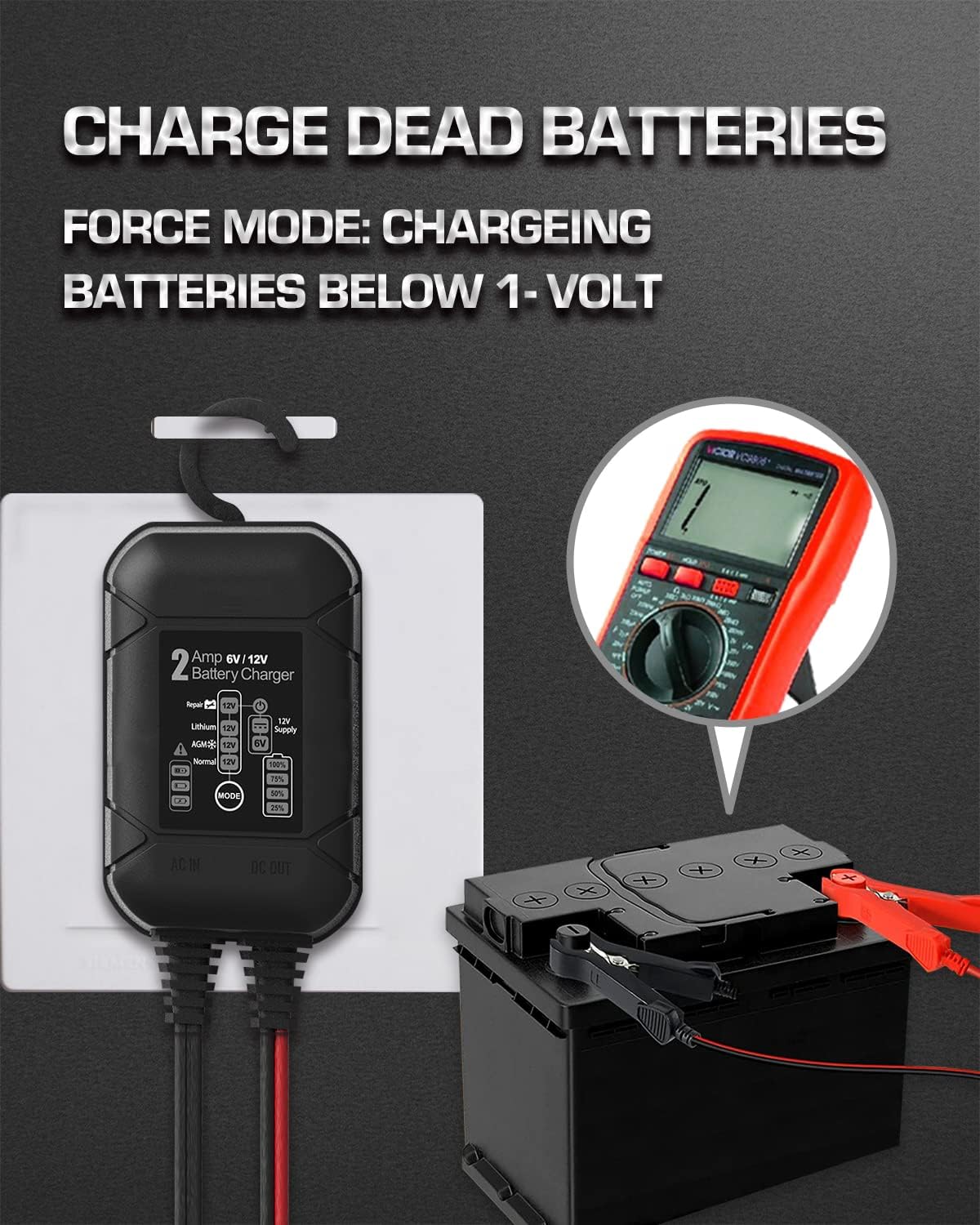
Figure 7: The charger's versatility across different vehicle and battery types.

Figure 8: Detailed overview of the advanced charging modes available.
Maintenance
Proper maintenance ensures the longevity and optimal performance of your BYGD battery charger:
- Cleaning: Disconnect the charger from all power sources and batteries before cleaning. Wipe the exterior with a soft, damp cloth. Do not use harsh chemicals or abrasive cleaners.
- Cable Inspection: Regularly inspect the input and output cables for any signs of damage, fraying, or exposed wires. Do not use the charger if cables are damaged.
- Storage: Store the charger in a cool, dry place when not in use. Avoid extreme temperatures and direct sunlight. Ensure cables are neatly coiled to prevent kinks or damage.
- Terminal Care: Keep the battery clamps clean and free of corrosion.
Troubleshooting
If you encounter issues with your BYGD battery charger, refer to the table below for common problems and solutions:
| Problem | Possible Cause | Solution |
|---|---|---|
| Charger not turning on. | No AC power; Faulty outlet; Damaged charger. | Check AC power connection; Try a different outlet; Contact customer support. |
| Charging indicator lights not active. | Incorrect battery connection; Battery too deeply discharged; Incorrect mode selected. | Ensure correct polarity (+ to +, - to -); Use Low Voltage Repair Mode for very low batteries; Select appropriate mode for battery type. |
| Error light illuminated. | Reverse polarity; Short circuit; Overcharge; Internal fault. | Disconnect and re-connect clamps with correct polarity; Check for short circuits in cables/clamps; Disconnect charger if battery is fully charged; Contact customer support if fault persists. |
| Battery not charging or charging slowly. | Battery sulfation; Battery capacity too large for charger; Damaged battery. | Try 12V Repair Mode for sulfated batteries; Ensure battery capacity is within charger's range (2Ah-40Ah); Have battery tested by a professional. |
Technical Specifications
| Specification | Value |
|---|---|
| Brand | BYGD |
| Model | B0DNLYJRQ6 |
| Output Voltage | 6V / 12V |
| Charging Current | 2 Amp |
| Battery Capacity Range | 2Ah - 40Ah |
| Compatible Battery Types | Lead-acid (Normal, Dry-load, Maintenance-free, AGM, GEL, CA, Wet), 12V Lithium (with BMS protection) |
| Product Dimensions | 4 x 2 x 1 inches (approx. 10.16 x 5.08 x 2.54 cm) |
| Item Weight | 10.6 ounces (approx. 300 grams) |
| Color | BLACK |
| Waterproof Rating | IP65 |

Figure 9: Physical dimensions of the charger.

Figure 10: Contents included in the product packaging.
Warranty and Customer Support
BYGD products are manufactured to high-quality standards. For warranty information, technical support, or any questions regarding your BYGD 2 Amp Car Battery Charger, please refer to the contact information provided with your purchase or visit the official BYGD website. Please have your model number (B0DNLYJRQ6) ready when contacting support.