
Introduction
This manual provides comprehensive instructions for the safe and efficient operation of your Ulefone Note 18 Pro smartphone. Please read this manual thoroughly before using your device to ensure proper functionality and to prevent damage.

Figure 1: Front and rear view of the Ulefone Note 18 Pro, showcasing its design and key specifications like Android 14, 64MP camera, and 256GB ROM.
Setup
1. Unboxing and Initial Inspection
Upon opening the package, verify that all components are present and undamaged. The standard package contents include:
- Ulefone Note 18 Pro Smartphone
- Power Adapter
- USB Type-C Cable
- SIM Ejector Tool
- Protective TPU Phone Case
- Tempered Glass Screen Protector
- User Manual (this document)

Figure 2: Contents typically found within the Ulefone Note 18 Pro retail packaging.
2. SIM Card and MicroSD Card Installation
The Ulefone Note 18 Pro supports dual SIM cards and expandable storage via a microSD card. Use the provided SIM ejector tool to open the SIM tray located on the side of the device.
- Locate the SIM tray on the side of the phone.
- Insert the SIM ejector tool into the small hole next to the tray and press gently until the tray pops out.
- Carefully pull out the SIM tray.
- Place your Nano-SIM cards and/or microSD card into the designated slots on the tray, ensuring correct orientation as indicated on the tray.
- Gently push the tray back into the phone until it clicks into place.

Figure 3: Illustration of the dual SIM and microSD card slot for the Ulefone Note 18 Pro.
3. Initial Power On and Setup Wizard
Press and hold the Power button on the side of the device until the Ulefone logo appears. Follow the on-screen instructions to complete the initial setup, which includes selecting your language, connecting to a Wi-Fi network, and setting up your Google account.
Operating Your Device
1. Display and Navigation
The Ulefone Note 18 Pro features a 6.78-inch HD+ display with a 90Hz refresh rate for smooth visuals. Navigate the interface using touch gestures such as tapping, swiping, pinching, and spreading.

Figure 4: Detailed view of the Ulefone Note 18 Pro's 6.78-inch HD+ display and its key visual specifications.
2. Camera System
Your device is equipped with a versatile camera system:
- 64MP Main Camera: For high-resolution photos with vibrant colors and sharp detail.
- 50MP Ultra-Wide Camera: Expands your field of view for landscapes and group shots.
- 32MP Front Camera: For clear selfies and video calls.
Access various photography modes such as Night Mode, Portrait Mode, HDR, and AI enhancements through the camera application.

Figure 5: Overview of the Ulefone Note 18 Pro's triple camera setup and front camera.
3. Battery and Charging
The Ulefone Note 18 Pro is powered by a 5450mAh battery, providing extended usage times. It supports 18W fast charging. Use the provided charger and cable for optimal charging performance.
- Talk Time: Up to 30 hours
- Standby Time: Up to 295 hours
- Video Playback: Up to 12 hours
- Full Charge Time: Approximately 3.2 hours with 18W fast charging.
4. Customizable Shortcut Key
The device features a customizable key that can be configured for quick access to various functions or applications. You can set it for single click, double click, or long press actions.
- One Click: No operation (default), Start Soundrecording, Open Flashlight, Screenshots, Open Zello, Open SOS, Open Game Mode.
- Double Click: Assignable to various apps or functions.
- Long Press: Assignable to various apps or functions.
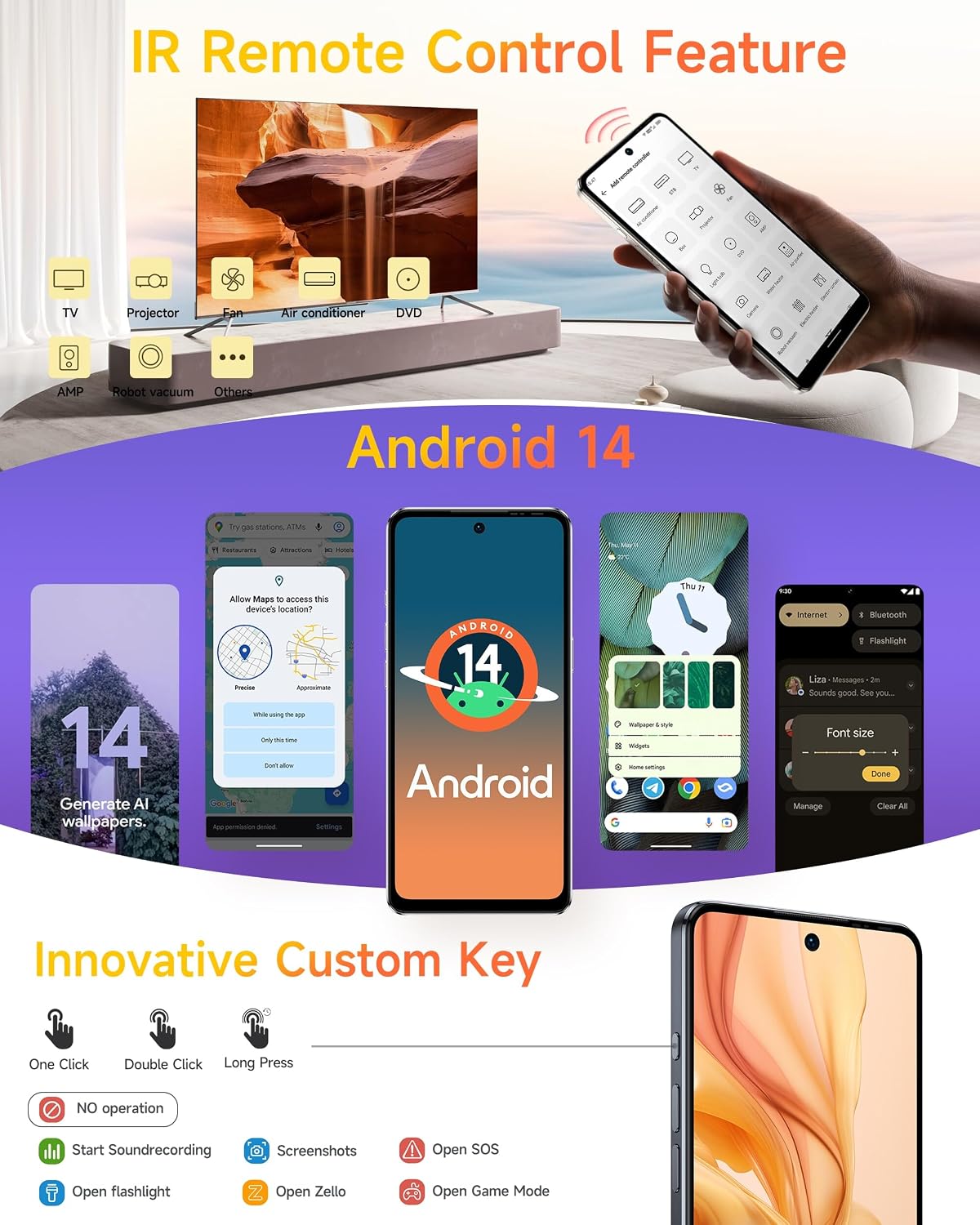
Figure 6: The innovative custom key and its configurable actions on the Ulefone Note 18 Pro.
5. IR Blaster (Infrared Remote Control)
The built-in IR Blaster allows your phone to function as a universal remote control for compatible household appliances such as TVs, air conditioners, projectors, and more. Use the pre-installed remote control application to configure and operate your devices.
6. NFC with Google Pay
The Near Field Communication (NFC) feature enables contactless payments via Google Pay (where available), quick pairing with NFC-enabled accessories, and data exchange. Ensure NFC is enabled in your phone's settings for these functions.
7. Android 14 Operating System
The Ulefone Note 18 Pro runs on Android 14, offering enhanced personalization options, improved privacy controls, and a secure, ad-free user experience. Explore features like AI-generated wallpapers and refined themes.

Figure 7: Visual representation of Android 14's personalized, private, and secure features on the device.
8. Security Features: Face Unlock and Fingerprint ID
Unlock your device securely using either Face Unlock or the integrated Fingerprint ID sensor. Configure these options in the Security settings menu.
9. Global Navigation and FM Radio
The device supports multiple global navigation satellite systems (GPS, GLONASS, BeiDou, Galileo) for accurate positioning. It also includes a headset-free FM radio for listening to local broadcasts.

Figure 8: Additional features including biometric security, navigation, and multimedia capabilities.
Maintenance
1. Charging Guidelines
To prolong battery life, avoid extreme temperatures during charging. Use only Ulefone-approved chargers and cables. Do not leave the device charging for extended periods after it reaches 100%.
2. Storage Management
The Ulefone Note 18 Pro comes with 256GB of internal storage, expandable up to 2TB via a microSD card. Regularly manage your storage by deleting unnecessary files, clearing app caches, and moving large media files to external storage.

Figure 9: Memory and storage configuration of the Ulefone Note 18 Pro.
3. Software Updates
Regularly check for and install system updates to ensure your device has the latest security patches, features, and performance improvements. Updates can be found in the Settings menu under "System" or "About phone."
4. Cleaning the Device
Use a soft, lint-free cloth to clean the screen and body of the phone. Avoid using harsh chemicals or abrasive materials. The device is splash-proof, but it is not fully waterproof; avoid submerging it in liquids.
Troubleshooting
This section addresses common issues you might encounter with your Ulefone Note 18 Pro.
Common Issues and Solutions:
- Device not powering on: Ensure the battery is charged. Connect the charger and wait a few minutes before attempting to power on again.
- Poor network signal: Check if your SIM card is properly inserted. Move to an area with better network coverage. Contact your carrier if the issue persists.
- Apps crashing or freezing: Close background applications. Clear the cache of the problematic app (Settings > Apps > [App Name] > Storage > Clear cache). Restart the device.
- Battery draining quickly: Reduce screen brightness, disable unused features like Wi-Fi, Bluetooth, GPS when not needed. Check battery usage in settings to identify power-hungry apps.
- Device slow or unresponsive: Free up storage space. Restart the device. Consider a factory reset as a last resort (back up your data first).
Factory Reset:
A factory reset will erase all data from your phone and restore it to its original factory settings. Back up all important data before proceeding.
- Go to Settings.
- Select System.
- Tap Reset options.
- Choose Erase all data (factory reset).
- Confirm your decision and enter your PIN/password if prompted.
Specifications
Key technical specifications for the Ulefone Note 18 Pro:
| Feature | Specification |
|---|---|
| Model Name | Ulefone Note 18 Pro Phone Unlocked |
| Operating System | Android 14 |
| Display Size | 6.78 Inches |
| Display Resolution | 1280 x 720 (HD+) |
| Processor | MediaTek Helio G91 Octa Core (up to 2 GHz) |
| RAM | 12 GB (6GB physical + 6GB virtual) |
| Internal Storage | 256 GB |
| Expandable Storage | Up to 2 TB (microSD, sold separately) |
| Main Camera | 64 MP |
| Ultra-Wide Camera | 50 MP |
| Front Camera | 32 MP |
| Battery Capacity | 5450 mAh |
| Charging | 18W Fast Charging (approx. 3.2 hours for full charge) |
| Dimensions | 6.65 x 3.02 x 0.35 inches |
| Weight | 7.4 ounces (211 Grams) |
| Connectivity | 4G LTE, Wi-Fi, Bluetooth, GPS, NFC |
| Audio Jack | 3.5 mm |
| Special Features | Dual SIM, Built-In GPS, IR Blaster, Customizable Key, Face Unlock, Fingerprint ID, Splash Proof |
Warranty and Support
Ulefone provides support and warranty services for your device.
- Warranty: The Ulefone Note 18 Pro comes with a 1-Year Non-artificial damage warranty.
- Technical Support: 24-hour technical support is available.
- Returns: 30-day return policy without reason.
- Efficient Service: 1 Year Efficient Service.
For detailed warranty terms, service requests, or technical assistance, please refer to the official Ulefone website or contact their customer support directly.

Figure 10: Ulefone's customer support and warranty details.


