
1. Introduction
This manual provides detailed instructions for the assembly, operation, and maintenance of your ModernMate 63-inch L-Shaped Electric Height Adjustable Standing Desk. Please read this manual thoroughly before assembly and use to ensure proper function and safety. Keep this manual for future reference.

This image displays the ModernMate 63-inch L-Shaped Electric Height Adjustable Standing Desk in a home office environment, showcasing its design and functionality. The desk features a white finish with rattan accents on the drawers and storage compartments. A computer monitor, keyboard, and various office accessories are visible on the desk surface. The L-shaped configuration provides ample workspace, and the height-adjustable section is clearly visible.
2. Safety Information
Please observe the following safety precautions:
- Do not exceed the maximum weight recommendation of 176 pounds (80 kg) on the desk surface.
- Ensure the desk is stable and anchored properly before use.
- Assembly requires two people for safe handling and installation.
- Keep children and pets away from the desk during operation to prevent injury.
- Ensure all cables are properly managed to avoid tripping hazards or damage during height adjustments.
- Do not place liquids directly on the control panel or power outlets.
3. Package Contents
Your ModernMate standing desk is delivered in multiple packages to ensure safe transport and easier handling. Please verify all components are present before beginning assembly.

This image shows three distinct cardboard boxes, each labeled 'ModernMate', illustrating how the desk components (desk tops, cabinets, and frames) are packaged separately for protection and convenience during delivery and lifting.
Included Components:
- Standing Desk Frame and Components
- Desktop Panels
- File Cabinet with 3 Drawers
- Privacy Panel
- AC/USB Power Outlet Unit
- Hand Control Unit
- Power Adapter
- Assembly Hardware (screws, dowels, etc.)
- Installation Instructions (this manual)
4. Setup and Assembly
Follow the detailed instructions provided in the assembly video and the included printed guide. Ensure you have adequate space and assistance for assembly. A screwdriver is recommended for assembly.
Video 1: ModernMate Standing Desk Installation Guide. This video provides a step-by-step visual guide for assembling the ModernMate L-shaped standing desk, detailing each component and connection point.
Assembly Overview:
- Unpack and Identify Parts: Carefully unbox all packages and identify each component using the parts list in your printed manual.
- Assemble Base Units: Construct the foundational cabinet and storage units according to the diagrams.
- Install Lifting Mechanism: Integrate the electric lifting columns and drive rod into the designated sections. Ensure columns are pressed firmly into place and heights are consistent using the hex drive rod if necessary.
- Attach Desktop Panels: Secure the main desktop and the L-shaped extension to the assembled base and lifting mechanism.
- Connect Electronics: Install the hand control unit, power adapter, and integrated AC/USB outlets. Route cables neatly.
- Insert Drawers: Place the assembled drawers into the file cabinet.
For detailed visual instructions, refer to the official installation video above.
5. Operating Instructions
Height Adjustment:
The desk features an electric height adjustment system, allowing you to transition between sitting and standing positions smoothly. The adjustable height range is from 27.9 inches to 45.7 inches.

This image highlights the hand control unit with up/down arrows and memory presets, along with the integrated AC/USB power outlets on the desk surface.
- Adjusting Height: Use the up (↑) and down (↓) arrow buttons on the hand control unit to raise or lower the desk to your desired height.
- Memory Presets: The control panel includes memory buttons to save your preferred sitting and standing heights. Refer to the printed manual for specific instructions on setting and recalling these presets.
- Real-time Height Display: The control panel features a digital display showing the current desk height.
Integrated Power Outlets:
The desk is equipped with built-in AC and USB power outlets for convenient charging of your devices.
- Ensure the desk is properly connected to a power source.
- Use the AC outlets for standard electronics and the USB ports for charging compatible devices.
Quiet Operation:
The electric motor is designed for quiet operation, with noise levels below 50dB, allowing for a focused work environment.

This diagram visually compares the low noise level of the desk's motor (below 50dB) to other common sounds like falling leaves and drill work, emphasizing its quiet operation.
6. Storage Features
The ModernMate standing desk incorporates a comprehensive storage system to keep your workspace organized.
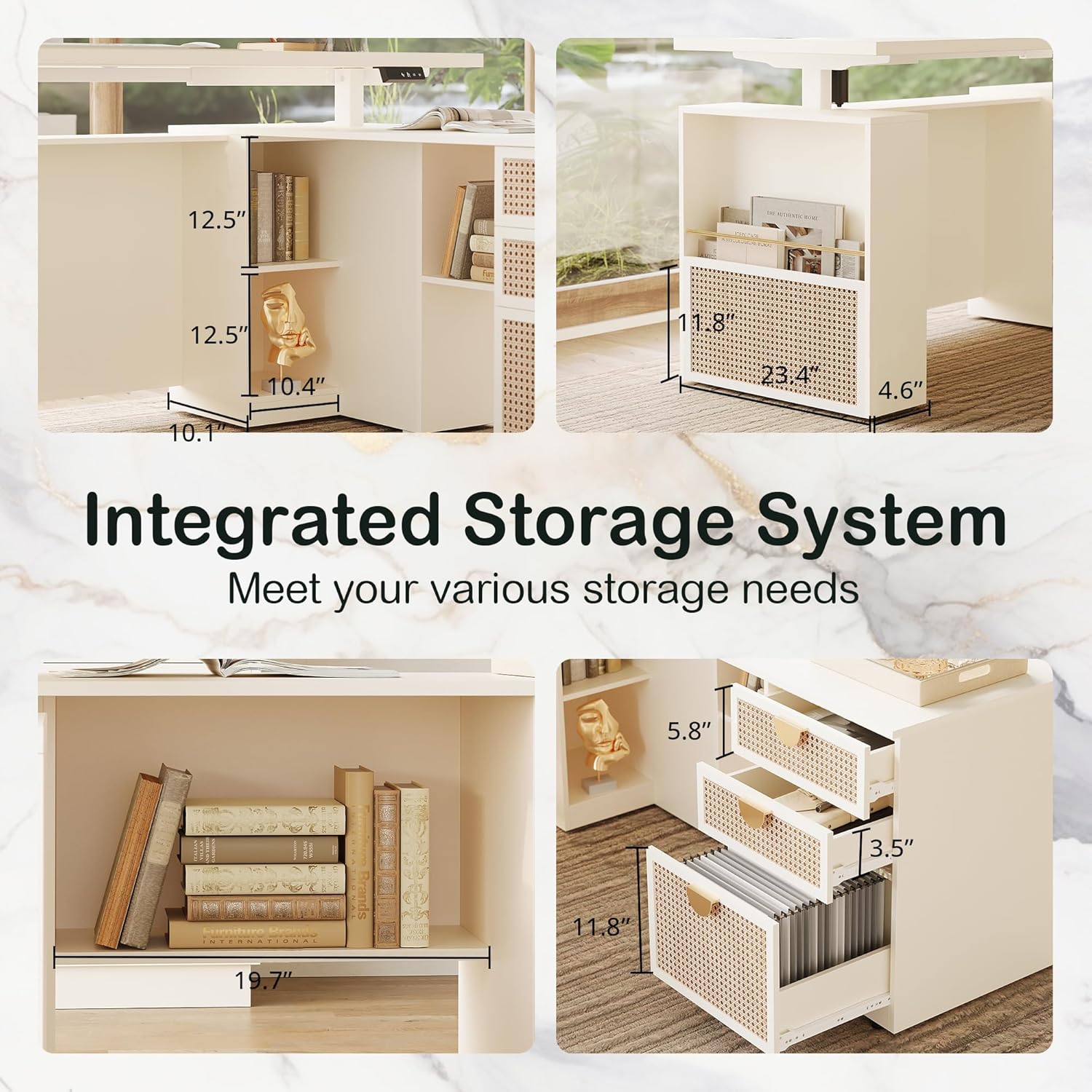
This image provides a detailed view of the desk's integrated storage system, showcasing open shelves for books and decorative items, as well as three drawers, one of which is designed for file storage.
- 3-Drawer Cabinet: The desk includes a three-drawer cabinet for organizing office supplies and personal items. The bottom drawer is designed for file storage.
- File Storage: The bottom drawer supports both Letter size and A4 size hanging files for efficient document organization.
- Lifting Column Storage: Additional storage space is integrated into the lifting column part, suitable for office necessities or decorative items.
- Privacy Panel: A privacy panel is positioned in front of the table, providing a more secluded and comfortable working area.
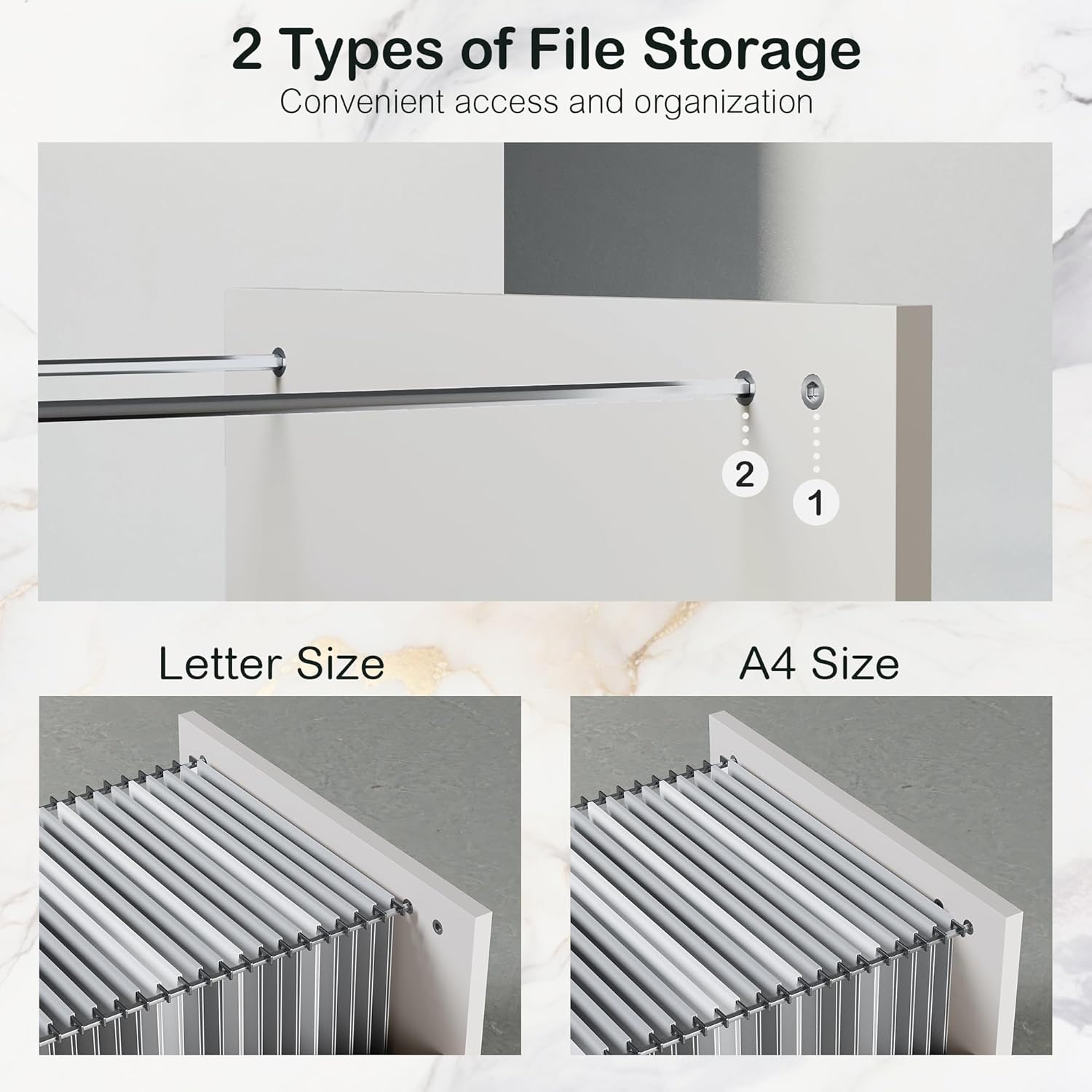
This image illustrates the two types of file storage supported by the desk's drawers: Letter size and A4 size, highlighting the versatility for document organization.
7. Maintenance
Regular maintenance ensures the longevity and optimal performance of your desk.
- Cleaning: Wipe surfaces with a soft, damp cloth. Avoid harsh chemicals or abrasive cleaners that may damage the finish.
- Motor Care: The motor is designed for 50,000 lift cycles. No specific user maintenance is required for the motor.
- Hardware Check: Periodically check all screws and connections to ensure they are tight. Retighten if necessary.
- Cable Management: Ensure power cords and other cables are not pinched or tangled, especially during height adjustments.
8. Troubleshooting
If you encounter any issues with your desk, refer to the following common troubleshooting steps:
- Desk Not Moving: Check if the power adapter is securely plugged into both the desk and a working wall outlet. Ensure no cables are obstructing the lifting mechanism.
- Uneven Height: If the desk appears uneven, ensure the lifting columns are correctly installed and fully engaged. Refer to the assembly instructions or contact customer service.
- Control Panel Unresponsive: Unplug the desk from the power source for 30 seconds, then plug it back in to reset the system.
- Unusual Noises: While the motor is designed for quiet operation, minor sounds during adjustment are normal. If you hear loud grinding or unusual noises, discontinue use and contact customer service.
If these steps do not resolve the issue, please contact ModernMate customer service for further assistance.
9. Specifications
| Feature | Specification |
|---|---|
| Brand | ModernMate |
| Model Number | USAN1055486 |
| Product Dimensions | 60"D x 60"W x 27.9"H |
| Color | White Rattan |
| Style | Modern |
| Base Material | Legs (Metal) |
| Top Material Type | Engineered Wood |
| Special Features | Adjustable Height, 3 Drawers, Power Outlets (AC/USB), Privacy Panel, Integrated Storage |
| Item Weight | 185 Pounds (83.9 kg) |
| Tabletop Thickness | 1.18 Inches (30mm) |
| Minimum Height | 27.9 Inches |
| Maximum Height | 45.7 Inches |
| Maximum Weight Recommendation | 176 Pounds (80 kg) |
| Number of Drawers | 3 |
| Number of Cabinets | 1 (integrated) |
| Required Assembly | Yes |
| Tools Recommended For Assembly | Screwdriver |
| Motor Lift Cycles | Tested for 50,000 cycles |
10. Warranty and Support
Your ModernMate standing desk comes with a Limited Warranty. For specific details regarding warranty coverage and terms, please refer to the warranty information included with your purchase or contact ModernMate customer service.
If you have any questions, require assistance with assembly, or need to report a defect, please do not hesitate to contact our customer service team. Contact information can be found on the ModernMate website or in your purchase documentation.


