
1. Introduction
This manual provides essential instructions for the installation, operation, and maintenance of your WOWUSEFUL Digital Instrument Cluster. This aftermarket digital dashboard is designed to enhance your driving experience by providing a modern, high-definition display for vehicle information.
Compatibility: This unit is specifically designed for Mercedes-Benz C-Class (W205) and GLC-Class (W253) models manufactured between 2015 and 2018. Please verify your vehicle's model and year before proceeding with installation.
Key Features:
- 12.3-inch HD Display: Features a 1920x720 resolution for clear visual information.
- Multifunctional Display: Shows original tire pressure, oil temperature, water temperature, oil level, fuel consumption, and body balance.
- High Performance: Powered by a LINUX system with a 4-core CPU (1.5 GHz), 1GB RAM, and 4GB ROM.
- Multi-Language Support: Includes English, German, Spanish, Japanese, Russian, Chinese (Simplified/Traditional), Arabic, Turkish, Korean, French, and Italian.
- Multiple UI Styles: Offers classic, sporty, and off-road display themes.
- Steering Wheel Control Integration: Retains original steering wheel control functionality for audio and settings adjustments.
2. Installation
Important Safety Notice: Installation of this digital instrument cluster requires technical expertise and familiarity with automotive electrical systems. It is highly recommended that installation be performed by a qualified professional to prevent damage to the product or your vehicle, and to ensure proper functionality and safety.
General Installation Steps (Professional Installation Recommended):
- Preparation: Ensure the vehicle's ignition is off and the battery is disconnected to prevent electrical shorts.
- Remove Original Cluster: Carefully remove the existing instrument cluster from the dashboard. Refer to your vehicle's service manual for specific instructions on dashboard disassembly.
- Connect Wiring: Connect the provided wiring harness from the new digital instrument cluster to the vehicle's existing connectors. Ensure all connections are secure and correctly seated.
- Mount New Cluster: Install the WOWUSEFUL Digital Instrument Cluster into the dashboard opening, ensuring it is securely fastened.
- Reconnect Battery: Reconnect the vehicle's battery.
- Initial Test: Turn on the ignition and verify that the digital instrument cluster powers on and displays information correctly. Check all functions, including steering wheel controls.
If you encounter any issues during installation, refer to the troubleshooting section or contact customer support.
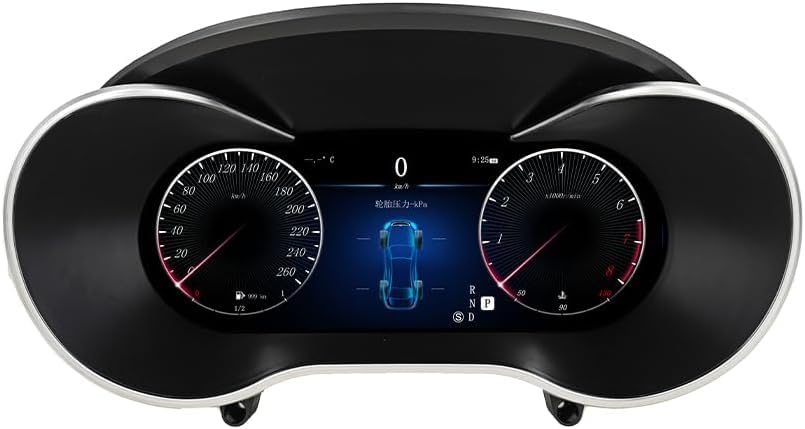
Image 1: The WOWUSEFUL Digital Instrument Cluster showcasing its main display interface with speed, RPM, and a central vehicle status graphic.
3. Operation
Once installed and powered on, the digital instrument cluster will display various vehicle parameters. Navigation and settings adjustments are typically performed using the vehicle's original steering wheel controls.
Display Modes and Settings:
- UI Styles: The cluster supports multiple user interface styles (Classic, Sporty, Off-road). These can be switched via the settings menu, usually accessed through the steering wheel controls.
- Language Selection: Navigate to the language settings to choose your preferred display language from the supported options.
- Vehicle Information: The display provides real-time data for:
- Original Tire Pressure
- Oil Temperature
- Water Temperature
- Oil Level Display
- Fuel Consumption
- Body Balance
- Steering Wheel Controls: Utilize your vehicle's existing steering wheel buttons to navigate menus, switch songs, adjust volume, and change channels, ensuring a safe and focused driving experience.

Image 2: A promotional image highlighting the "LCD Digital Dashboard" with various UI styles and features such as blue light anti-glare screen and 1920x720 resolution.
4. Maintenance
Proper maintenance ensures the longevity and optimal performance of your digital instrument cluster.
- Cleaning: Use a soft, lint-free cloth slightly dampened with water or a screen-safe cleaner to wipe the display. Avoid abrasive materials or harsh chemicals that could damage the screen.
- Software Updates: Periodically check the manufacturer's website or contact support for any available software updates. Updates can improve performance, add features, or fix bugs.
- Environmental Conditions: Avoid exposing the unit to extreme temperatures or direct sunlight for prolonged periods when the vehicle is parked, as this can affect display longevity.
5. Troubleshooting
If you encounter issues with your digital instrument cluster, refer to the following common problems and solutions:
- No Power/Display Not Turning On:
- Check all wiring connections to ensure they are secure.
- Verify the vehicle's battery is properly connected and charged.
- Inspect relevant fuses in the vehicle's fuse box.
- Incorrect Readings/Data Not Displaying:
- Ensure the unit is correctly configured for your specific vehicle model and year.
- A factory reset (if available in settings) might resolve software glitches.
- Confirm that all vehicle sensors are functioning correctly.
- Steering Wheel Controls Not Responding:
- Verify the wiring harness connections related to the steering wheel controls.
- Check for any software settings that might disable or reconfigure these controls.
- Display Freezes or Glitches:
- Try restarting the vehicle.
- If persistent, a software update or factory reset may be required.
For issues not covered here, or if troubleshooting steps do not resolve the problem, please contact WOWUSEFUL customer support.
6. Specifications
| Feature | Detail |
|---|---|
| Model Number | Digital Dash - 12.3 inch W205 |
| Applicable Models | Mercedes-Benz C/GLC (W205/W253) 2015-2018 |
| Display Size | 12.3 inches |
| Resolution | 1920x720 HD |
| Operating System | LINUX |
| CPU | 4-core, 1.5 GHz |
| Memory (RAM) | 1GB |
| Storage (ROM) | 4GB |
| Supported Languages | English, German, Spanish, Japanese, Russian, Chinese (Simplified/Traditional), Arabic, Turkish, Korean, French, Italian |
| Package Dimensions | 16.14 x 9.04 x 8.65 inches |
| Item Weight | 3.96 Pounds |
| Manufacturer | Shenzhen Cheshitong Electronics Co., Ltd. |
| ASIN | B0DNJZ7BSN |
7. Warranty and Support
For warranty information, technical support, or service inquiries, please contact the seller or manufacturer directly. Keep your purchase receipt and product model number handy for faster assistance.
Manufacturer: Shenzhen Cheshitong Electronics Co., Ltd.
Brand: WOWUSEFUL
You can visit the WOWUSEFUL Store for more information: WOWUSEFUL Store on Amazon