
1. Introduction
Thank you for choosing the Mulcort AHC812 2-Channel Programmable Digital Timer Switch. This device is designed for precise and reliable control of electrical circuits based on a programmable weekly schedule. Please read this manual carefully before installation and operation to ensure correct usage and to maximize the lifespan of your timer switch.
2. Safety Information
WARNING: Electrical shock hazard. Installation and maintenance should only be performed by qualified personnel. Disconnect power before installing or servicing this device.
- Ensure the power supply matches the specifications of the timer switch (AC 230V, 50Hz).
- Do not exceed the maximum current rating of 16A or the specified terminal load power.
- Install the device in a dry, well-ventilated area, away from direct sunlight, heat sources, and corrosive substances.
- Ensure all wire connections are secure and properly insulated.
- This device is designed for Din Rail mounting.
3. Product Overview
The Mulcort AHC812 is a robust 2-channel digital timer switch designed for various timing applications. It features a clear LCD display and intuitive controls for easy programming.
Key Features:
- Durable ABS plastic construction for long-term use.
- Digital LCD display showing date, time, and calendar.
- Programmable by day/week with up to 58 program memory locations.
- Automatic summer/winter time switching function.
- Supports 6 display languages: English, French, German, Italian, Spanish, Portuguese.
- Built-in lithium battery for power reserve mode, allowing operation and programming without external power.
- Relay contacts operate only when supply voltage is applied.
- Manual ON/OFF control capability.
- High precision industrial grade chip for accurate timing control.
Components:

The timer switch features a clear LCD display for showing time, date, and programming status. Below the display are control buttons: "Menu", "Res" (Reset), "+", "-", and "OK". The top and bottom sections house the electrical terminals for power input and load output.

The compact design allows for easy integration into electrical panels. The dimensions are approximately 85mm (3.34in) height, 65mm (2.56in) width, and 36mm (1.41in) depth.
4. Specifications
| Parameter | Value |
|---|---|
| Model | AHC812 |
| Material | ABS Plastic |
| Voltage | AC 230V, 50Hz |
| Current Rating | 16A |
| Number of Channels | 2 |
| Terminal Load Power (Incandescent/Halogen) | ≤ 2300W |
| Terminal Load Power (Energy-saving lamps) | ≤ 170W |
| Accuracy | <±2 sec./day at 25°C |
| Program Memory Locations | 58 times |
| Item Size (L*W*H) | 85 * 65 * 36mm (3.34 * 2.56 * 1.41in) |
| Item Weight | 154g (5.43oz) |
5. Setup
5.1 Initial Setup and Power Reserve Mode:
The digital timer is supplied in Hibernation Mode. To operate without an external power supply, press the "Menu" button. Three blinking dots will appear in the center of the screen, indicating Power Reserve Mode. This allows for initial programming before wiring.
To operate with an external power supply, first connect the supply voltage to the terminals labeled L (Live) and N (Neutral). When the supply voltage is applied, two dots will blink on the display.
The relay contacts only operate when the supply voltage is applied. The timer can be programmed before linking the supply voltage. If the timer is already programmed, the actual time, weekday, summer/winter time switching setting, and channel status will be displayed. If the timer is not programmed, you must select the language before setting the time and date.
5.2 Wiring Instructions:
Refer to the wiring diagram on the device and consult a qualified electrician for installation. Ensure power is disconnected before wiring.
- L (Live) and N (Neutral): Connect the AC 230V, 50Hz power supply to these terminals.
- C1, C2, M, 4, 5, 6, 8: These terminals are for connecting the load(s) to be controlled. The timer has 2 independent channels. Refer to the specific wiring diagram printed on the device for correct load connections. Typically, 'C' terminals are common, and numbered terminals are normally open/closed contacts.

The timer is designed for standard DIN rail mounting, allowing for easy and secure installation in electrical distribution boards or control cabinets.
6. Operation
6.1 Language, Time, and Date Setting:
Upon first use or after a full reset, you must set the language, time, and date.
- Select language by pressing the "+"/"-" buttons to move through the country selection list (languages: EN/FR/DE/IT/ES/PT). Press "OK" to save your selection.
- Set the year by pressing the "+"/"-" buttons. Press "OK" to confirm.
- Set the month, followed by the day, hour, and minute. Press "OK" after each setting.
- Set summer/winter time switching (daylight saving time function) if desired. If you don't need to set this, press "+" to select "END" and press "OK" to confirm.
6.2 Programming Timer Schedules:
The AHC812 allows for up to 58 program memory locations, enabling detailed weekly scheduling for two channels.
- Press the "Menu" button to enter programming mode.
- Use "+"/"-" to navigate through program numbers (e.g., 1 ON, 1 OFF, 2 ON, 2 OFF, etc.). Press "OK" to select a program.
- Set the desired ON time (hour and minute) for the selected program. Press "OK".
- Select the day(s) of the week for this program to be active. You can choose individual days, weekdays, weekends, or all days. Press "OK".
- Repeat for the OFF time for the same program number.
- Continue setting additional ON/OFF programs as needed for both channels.
- To exit programming mode and save settings, press "Menu" repeatedly until the main display appears.

6.3 Manual Control:
The timer switch typically allows for manual override of the programmed schedule. Consult the specific button functions on your device for manual ON/OFF switching. This usually involves pressing a dedicated button (e.g., a mode button or a combination of +/-) to cycle through AUTO, ON, and OFF modes.
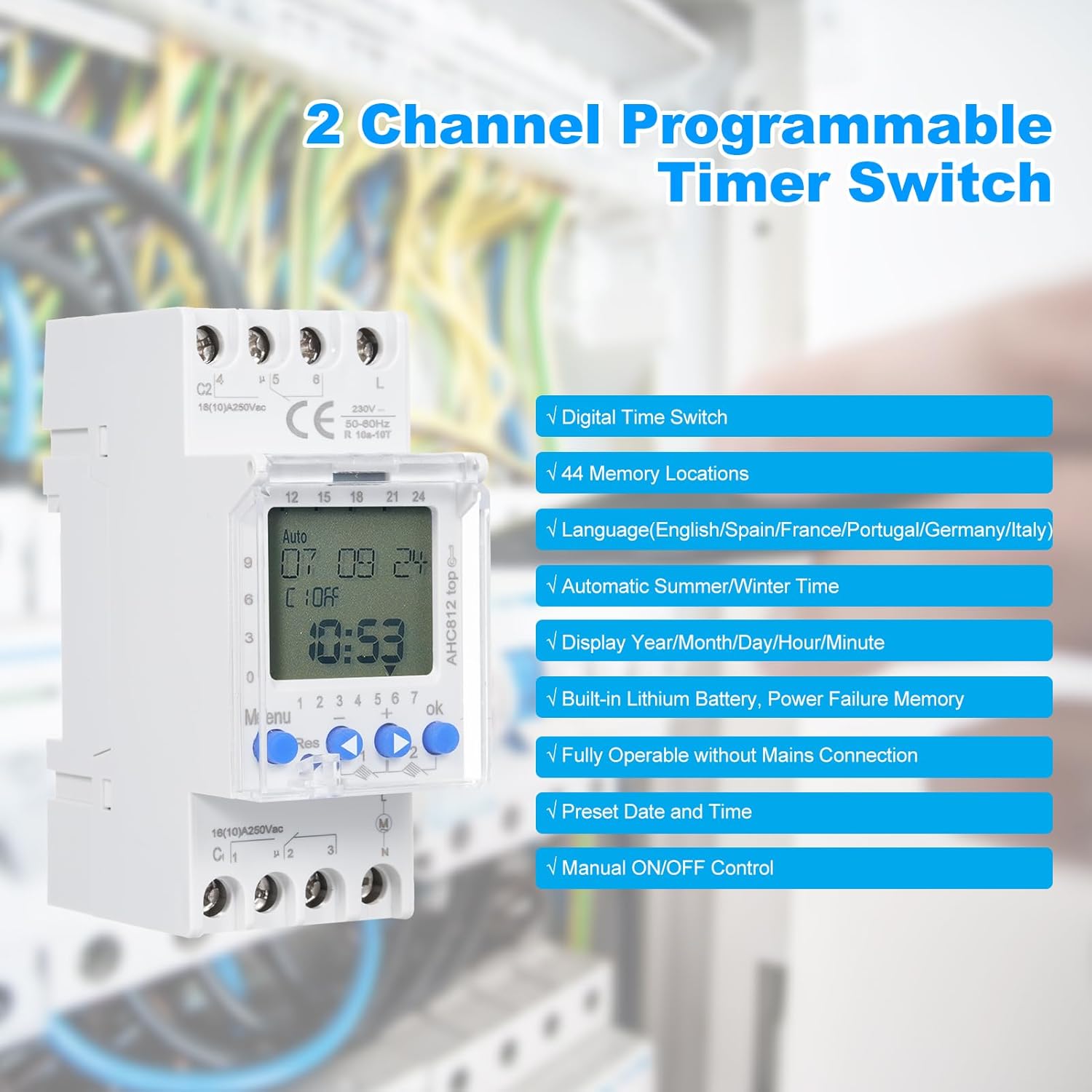
The device supports various features to enhance usability, including multiple memory locations for complex schedules and multi-language support for user interface.
7. Maintenance
The Mulcort AHC812 timer switch requires minimal maintenance. To ensure optimal performance and longevity:
- Keep the device clean and free from dust. Use a soft, dry cloth for cleaning.
- Do not use abrasive cleaners or solvents, as these can damage the plastic housing and display.
- Ensure proper ventilation around the device to prevent overheating.
- Periodically check electrical connections for tightness, especially after initial installation.
8. Troubleshooting
| Problem | Possible Cause | Solution |
|---|---|---|
| Display is blank or dim. | No external power supply; timer in hibernation mode; internal battery low. | Connect external AC 230V power. If in hibernation, press "Menu" button. Allow time for internal battery to charge if connected to power. |
| Timer not switching load. | No external power supply; incorrect wiring; program error; manual override active. | Ensure AC 230V power is connected. Verify wiring according to diagram. Check program settings for correct ON/OFF times and days. Ensure timer is in AUTO mode, not manual ON/OFF. |
| Time/Date incorrect after power loss. | Internal battery depleted or not fully charged. | Connect the timer to external power for several hours to allow the internal battery to charge. Reset time and date if necessary. |
| Cannot set language/time. | Timer not initialized or in an incorrect mode. | Ensure the timer is powered. If not programmed, language selection is the first step. Follow initial setup instructions. |
9. Warranty and Support
Mulcort products are manufactured to high-quality standards. For information regarding warranty coverage, technical support, or service, please refer to the product packaging or contact your retailer/distributor. Keep your purchase receipt as proof of purchase.