
1. Introduction
This manual provides detailed instructions for the installation, operation, and maintenance of your Binardat 28 Port PoE Switch, Model 24 PoE + 4G. This unmanaged Power over Ethernet (PoE) switch is designed to simplify network deployment by providing both data and power over a single Ethernet cable to compatible devices. Please read this manual thoroughly before using the product to ensure proper functionality and safety.
2. Key Features
- 28 Ports: Includes 24 x 100Mbps PoE ports, 2 Gigabit Uplink Ports (non-PoE), and 2 Gigabit SFP ports for versatile connectivity.
- IEEE 802.3af/at 450W: Compliant with IEEE 802.3af/at PoE standards, offering a total power budget of 450W with up to 30W per PoE port. Automatically detects and supplies power to PoE devices.
- Unmanaged Plug & Play: Features power detection for automatic device recognition and compatibility with non-PoE devices. Requires no configuration for basic operation.
- Easy Installation: Supports wall and rack mounting with included mount ears, suitable for various environments.
- Extender Function: Extends PoE transmission distance up to 250m at 10Mbps rate.
- VLAN Isolation: Ports 1-24 support VLAN isolation, allowing communication only with the uplink port.
- Durable Metal Housing: Robust metal case ensures longevity and efficient heat dissipation.
- LED Indicators: Provides clear status updates for power, PoE status, link/activity, and speed.
3. Package Contents
Please verify that all items are present and in good condition:
- Binardat 28 Port PoE Switch
- Mount Kit (for wall/rack mounting)
- User Manual
- Power Cord
4. Product Overview (Hardware)

Figure 4.1: An overhead view of the Binardat 28 Port PoE Switch, showcasing its 24 100Mbps PoE ports, 2 Gigabit Uplink ports, and 2 Gigabit SFP ports on the front panel.
4.1 Front Panel
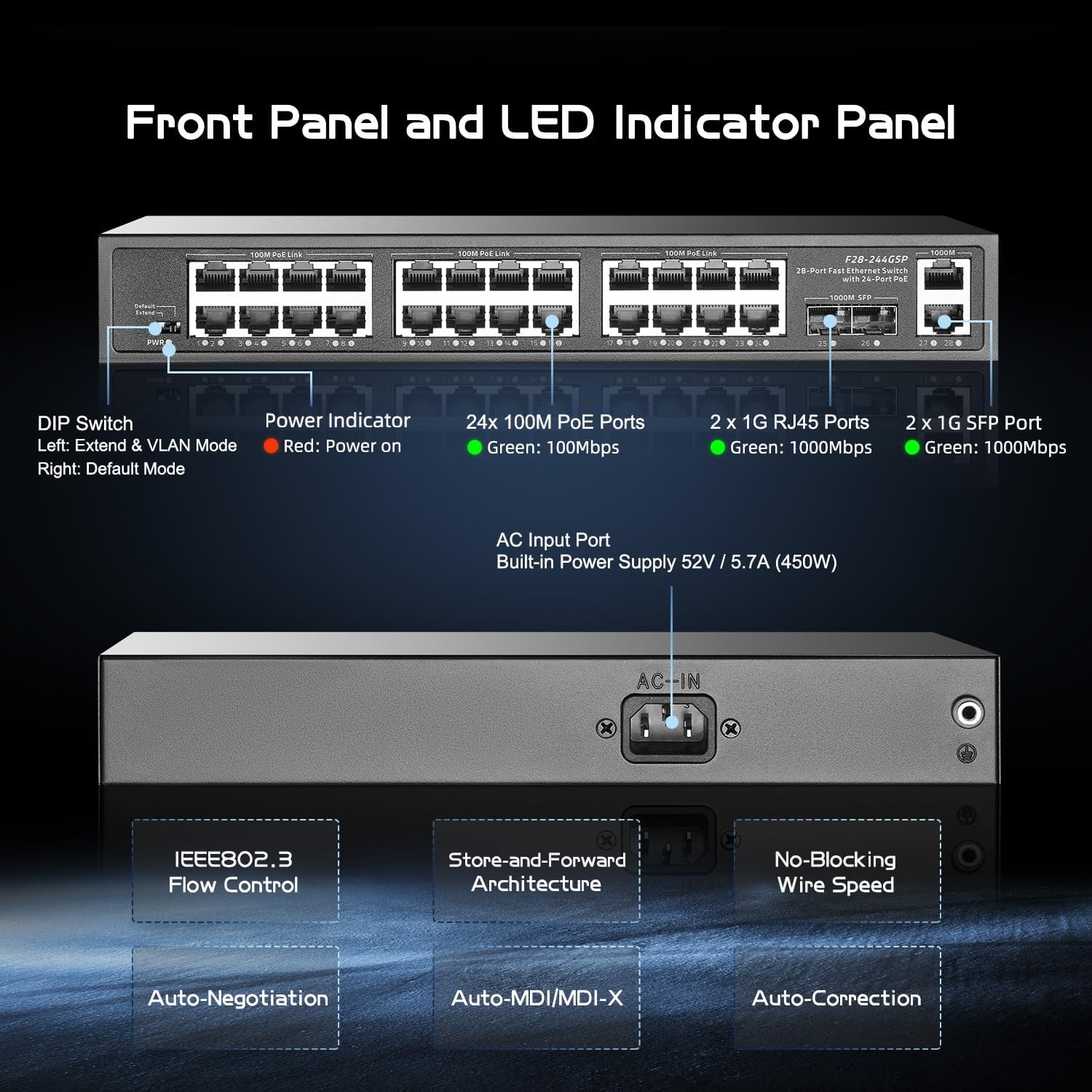
Figure 4.2: This image provides a detailed view of the switch's front panel, indicating the DIP switches (Extend & VLAN Mode, Default Mode), Power Indicator, 24x 100M PoE ports, 2x 1G RJ45 ports, and 2x 1G SFP ports. The rear panel shows the AC Input Port with a built-in 52V/5.7A (450W) power supply.
- PoE Ports (1-24): 100Mbps ports supporting IEEE 802.3af/at for Power over Ethernet devices.
- Gigabit Uplink Ports (25-26): Two 1000Mbps RJ45 ports for connecting to your router or main network. These ports do not provide PoE.
- Gigabit SFP Ports (27-28): Two 1000Mbps SFP slots for fiber optic connections.
- DIP Switches: Control advanced features like Extend Mode and VLAN isolation.
- LED Indicators: Provide visual status for Power, PoE Status, Link/Act (Link/Activity), and 1000Mbps speed.
4.2 Rear Panel
- AC Input Port: Connects to the power cord for the built-in 450W power supply.
4.3 Design and Construction

Figure 4.3: This visual highlights key design aspects: 4KV Lightning Protection, Strong Heat Dissipation, Wall Mount & Rack Mount options, and its Plug and Play functionality.
The switch features a durable metal housing designed for strong heat dissipation and 4KV lightning protection, ensuring reliable operation. It is suitable for both desktop placement and rack/wall mounting.
5. Setup Instructions
The Binardat 28 Port PoE Switch is designed for plug-and-play operation, requiring no complex software configuration for basic use.
5.1 Basic Connection Steps
- Power Connection: Connect the provided power cord to the AC input port on the rear panel of the switch and then to a power outlet.
- Uplink Connection: Connect one of the Gigabit Uplink (RJ45) ports (25 or 26) or Gigabit SFP ports (27 or 28) to your router, modem, or main network device using an Ethernet cable or SFP module/fiber cable.
- PoE Device Connection: Connect your PoE-compatible devices (e.g., IP cameras, Wireless Access Points, VoIP phones) to the 100Mbps PoE ports (1-24) using standard Ethernet cables. The switch will automatically detect and power these devices.
- Non-PoE Device Connection: You can also connect non-PoE network devices (e.g., computers, NVRs) to the PoE ports (1-24) or the Gigabit Uplink ports (25-26). The switch will provide data connectivity without power to these devices.
Video 5.1: This video provides an overview of a 24-port PoE switch, demonstrating its features, port types, and power supply. It highlights the plug-and-play functionality and support for IEEE 802.3af/at standards.
6. Operating Instructions
6.1 DIP Switch Functions

Figure 6.1: A diagram explaining the advanced features controlled by the DIP switch. It shows 'Default Mode' (100 Meters, 100Mbps) and 'Extend Mode' (250 Meters, 10Mbps), along with a visual representation of Port-based VLAN isolation for ports 1-24.
The front panel features DIP switches to enable specific operating modes:
- Default Mode: In this mode, all ports operate at 100Mbps with standard PoE transmission up to 100 meters.
- Extend Mode: When enabled, this mode extends the PoE transmission distance for ports 1-24 up to 250 meters. Note that in Extend Mode, the data rate for these ports will be reduced to 10Mbps. This is ideal for long-distance surveillance camera deployments.
- VLAN Mode: This mode isolates ports 1-24 from each other, allowing them to communicate only with the uplink ports. This enhances network security and prevents broadcast storms in large deployments.
Important: Always power off the switch before changing DIP switch settings to ensure proper application of the new configuration.
6.2 LED Indicators
The LED indicators on the front panel provide real-time status information:
- Power LED (Red): Indicates the power status of the switch. Lit when the switch is powered on.
- PoE Status LEDs (Green): For each PoE port, indicates if power is being supplied to a connected PoE device.
- Link/Act LEDs (Green): For each port, indicates a network link (solid light) and data activity (flashing light).
- 1000Mbps LEDs (Green): For Gigabit ports, indicates a 1000Mbps connection speed.
7. Network Configuration (Unmanaged)
As an unmanaged switch, the Binardat 28 Port PoE Switch operates on a plug-and-play basis. It does not require any software configuration or management interface. Simply connect your devices as described in the Setup section, and the switch will automatically handle data forwarding and PoE power delivery according to its default settings or selected DIP switch modes.
8. Maintenance
To ensure optimal performance and longevity of your switch, follow these maintenance guidelines:
- Cleaning: Regularly clean the exterior of the switch with a soft, dry cloth. Avoid using liquid or aerosol cleaners.
- Ventilation: Ensure that the ventilation openings on the switch are not blocked to allow for proper airflow and heat dissipation.
- Environment: Operate the switch in a cool, dry environment, away from direct sunlight, excessive heat, and moisture.
- Cable Management: Keep network cables organized to prevent strain on ports and improve airflow.
9. Troubleshooting
If you encounter issues with your Binardat 28 Port PoE Switch, refer to the following common problems and solutions:
- No Power:
- Ensure the power cord is securely connected to both the switch and a working power outlet.
- Check if the power outlet is functional by plugging in another device.
- Verify the Power LED on the front panel is lit.
- No Link/Activity on a Port:
- Check the Ethernet cable connection between the switch and the device. Try a different cable.
- Ensure the connected device is powered on and functioning correctly.
- If using Extend Mode, confirm the device is compatible with 10Mbps speed.
- PoE Device Not Powering On:
- Verify that the device is PoE-compatible (IEEE 802.3af/at standard).
- Check the PoE Status LED for the connected port. If it's not lit, there might be an issue with the cable or the device.
- Ensure the total power consumption of all connected PoE devices does not exceed the switch's 450W power budget.
- Try connecting the device to a different PoE port.
- Slow Network Speed:
- If Extend Mode is enabled, ports 1-24 will operate at 10Mbps. Disable Extend Mode if higher speeds are required for devices within 100m.
- Ensure your uplink connection is to a Gigabit port (25-28) for maximum throughput to your main network.
- Check for faulty cables or network congestion.
10. Specifications
| Feature | Specification |
|---|---|
| Brand | Binardat |
| Model | 24 PoE + 4G |
| Part Number | F28-244GSP |
| Number of Ports | 28 |
| PoE Ports | 24 x 100Mbps PoE+ (IEEE 802.3af/at) |
| Uplink Ports | 2 x Gigabit RJ45 (non-PoE) |
| SFP Ports | 2 x Gigabit SFP |
| PoE Power Budget | 450W (Max 30W per port) |
| Output Voltage | 44~57V (DC) |
| Data Transfer Rate | 1 Gigabits Per Second (Uplink/SFP), 100Mbps (PoE ports) |
| Backplane Bandwidth | 12.8Gbps |
| Packet Forwarding Rate | 10.842Mpps |
| MAC Address Table | 4K |
| Case Material | Metal |
| Color | Black |
| Dimensions | 32.59 x 25.6 x 7.39 cm |
| Weight | 2.29 kg |
| Compatible Devices | Camera, Desktop, Gaming Console, Laptop, Printer |
11. Warranty and Support
Binardat is committed to providing high-quality products and customer satisfaction. This product comes with lifelong technical support. For any technical assistance, troubleshooting, or inquiries, please contact our support team at support@binardat.com.