
R2G R25RNZ03
R2G MATE HYBRID Golf Laser Rangefinder User Manual
Model: R25RNZ03
1. Product Overview
The R2G MATE HYBRID is an advanced golf laser rangefinder designed to provide precise distance measurements and course information. It integrates laser technology with GPS and a geomagnetic sensor for comprehensive data, enhancing your golf experience.

Figure 1.1: R2G MATE HYBRID Golf Laser Rangefinder with included golf ball.
Key features include:
- Laser + GPS & Geomagnetic Sensor Integration: Fuses laser, GPS, and geomagnetic sensors to provide accurate distance and pin position information.
- Worldwide Golf Course Map Data: Pre-loaded with map data for over 40,000 courses globally, including 23,299 in America, 1,196 in Korea, and 4,875 in Japan.
- 2-Color OLED & FOV 7.5° Viewfinder: Offers a wide 7.5° field of view with a red & green 2-color OLED viewfinder for bright and clear targeting.
- 1.78 inch AMOLED Side Display: A large, vibrant AMOLED display provides clear information even in bright golf course conditions.
- Bluetooth Connectivity: Connects to your smartphone for features like scorecard registration, map downloads, and device loss prevention.
- Multi-MATE MODE: Utilizes world-first triangulation technology, allowing continuous measurement for up to 4 players after an initial target measurement.
2. Package Contents
Please ensure all items are present in the package:
- R2G MATE HYBRID Main Unit
- Dedicated Pouch (Case)
- USB-C Type Charging Cable
- Carabiner
- Lens Cleaner
- Instruction Manual (this document)
- HONMA D1 Golf Balls (Orange, 3 pcs) - Note: These golf balls are included as part of a set.
3. Safety Information
Please read and understand the following safety precautions before using the device to ensure safe and proper operation.
- Laser Safety: This device uses a Class 1 laser (905nm). Do not stare directly into the laser beam or point it at others.
- Battery Safety: The device contains a built-in lithium-ion battery. Do not disassemble, puncture, or expose the battery to extreme temperatures or fire. Use only the provided charging cable.
- Water Resistance: The device is life waterproof. Avoid submerging it in water or exposing it to heavy rain for extended periods.
- Operating Environment: Use the device within specified temperature and humidity ranges. Avoid extreme heat or cold.
- Cleaning: Use only the provided lens cleaner or a soft, dry cloth to clean the device. Avoid abrasive materials or harsh chemicals.
4. Setup
4.1 Charging the Device
Before first use, fully charge the device. Connect the supplied USB-C Type charging cable to the device's charging port and a compatible USB power adapter (5V/1A). A full charge takes approximately 100 minutes.

Figure 4.1: The device display showing the main menu with 'Golf Play' and 'Settings' options, along with battery and Bluetooth indicators.
4.2 Initial Power On and Bluetooth Connection
To power on the device, press and hold the power button. For full functionality, connect the device to your smartphone via Bluetooth 5.1. Download the dedicated R2G application from your smartphone's app store. Follow the in-app instructions to pair your device. This connection enables features like scorecard registration, map downloads, and device loss prevention.
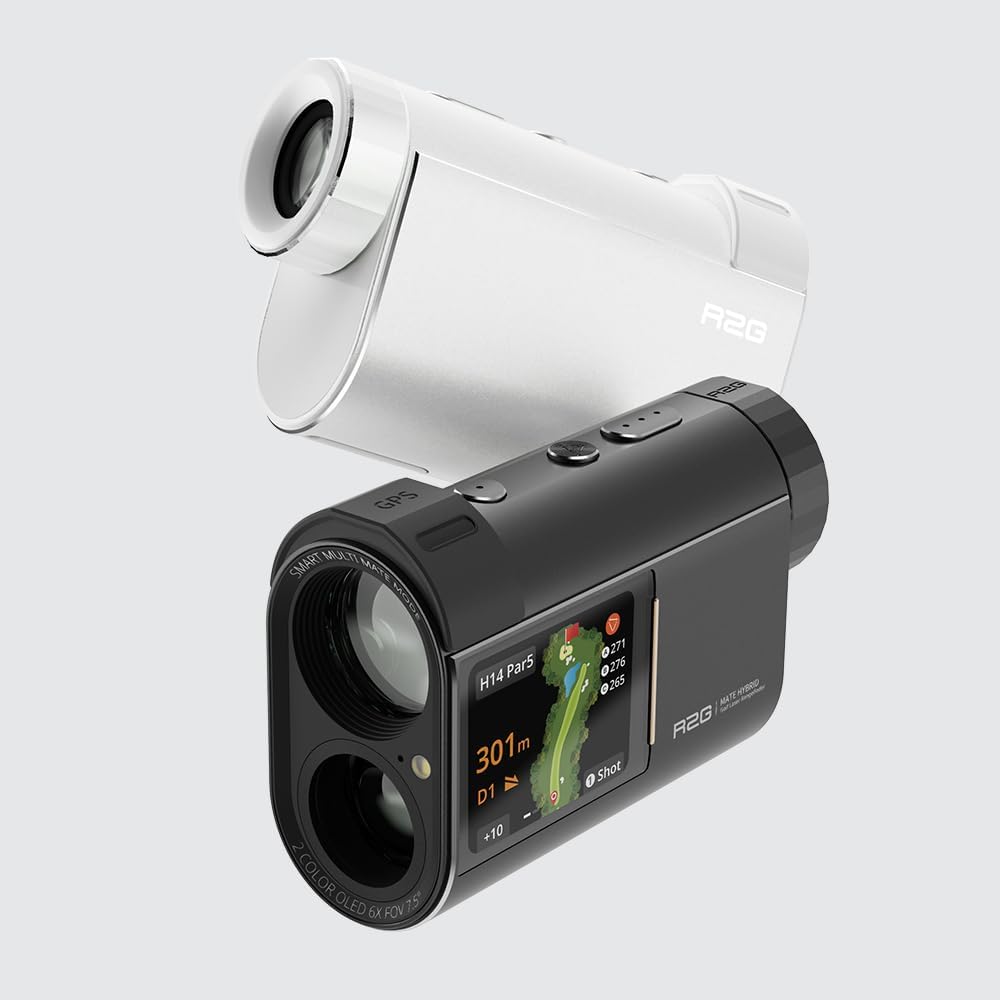
Figure 4.2: Both white and black versions of the R2G MATE HYBRID, highlighting the GPS module on the top of the device.
5. Operating Instructions
5.1 Laser Measurement Mode
Point the device at your target and press the measurement button. The laser will quickly provide the distance within 0.3 seconds. The measurement range is 3 to 1,000 yards (or meters). You can switch between meters (M) and yards (Y) as the measurement unit in the device settings.

Figure 5.1: The device's AMOLED side display showing a detailed golf course map with distances to various points, including the pin.
5.2 GPS and Map Features
When connected to GPS, the device displays detailed course maps on its 1.78-inch AMOLED side display. This includes distances to the front, middle, and back of the green, as well as hazards. The device automatically recognizes the course you are playing on from its extensive pre-loaded database.

Figure 5.2: Both color variants of the R2G MATE HYBRID showcasing the clear display of golf course information, including distances and hole layout.
5.3 Multi-MATE MODE
The Multi-MATE MODE utilizes triangulation technology to allow continuous distance measurement for multiple players. After measuring the initial target point, up to four individuals, including companions, can sequentially measure distances without needing to re-target the initial point.

Figure 5.3: The black R2G MATE HYBRID displaying a golf course map with current distance and shot tracking information on its screen.
6. Maintenance
- Cleaning Lenses: Use the provided lens cleaner cloth to gently wipe the optical lenses. Do not use paper towels or rough cloths, which can scratch the lens.
- Cleaning Body: Wipe the device body with a soft, dry cloth. For stubborn dirt, a slightly damp cloth can be used, but ensure no moisture enters openings.
- Storage: Store the device in its dedicated pouch in a cool, dry place away from direct sunlight and extreme temperatures.
- Battery Care: To prolong battery life, avoid fully discharging the battery frequently. If storing for an extended period, charge the battery to about 50% every few months.
7. Troubleshooting
| Problem | Possible Cause | Solution |
|---|---|---|
| Device does not power on. | Low battery. | Charge the device using the supplied USB-C cable. |
| Inaccurate distance readings. | Obstructed laser path; dirty lens; target too far/close. | Ensure clear line of sight. Clean the lens. Verify target is within 3-1000Y(m) range. |
| Bluetooth connection fails. | Device not in pairing mode; Bluetooth off on smartphone; app issue. | Ensure device is in pairing mode. Turn smartphone Bluetooth off/on. Restart the R2G app. |
| GPS map not loading. | No GPS signal; map data not downloaded; device not connected to app. | Move to an open area for GPS signal. Download maps via the R2G app. Ensure Bluetooth connection is active. |
8. Specifications
| Feature | Detail |
|---|---|
| Model | R25RNZ03 |
| Dimensions | 98.5 x 62 x 37 mm |
| Weight | 205g |
| Magnification | 6x |
| Laser Class | Class 1, 905nm |
| Measurement Range | 3 ~ 1,000 Yards (Meters) |
| Measurement Speed | Within 0.3 seconds |
| Measurement Error | Laser ±1.0 Yard (Meter) |
| Field of View (FOV) | 7.5° |
| Waterproof Rating | Life Waterproof |
| Viewfinder Display | 2-color OLED (Red & Green) |
| Side Display | 1.78 inch AMOLED |
| Battery | 3.85V 1,000mAh Lithium-ion (built-in) |
| Charging Method | USB C-Type, 5V/1A |
| Full Charge Time | Approx. 100 minutes |
| Bluetooth | Bluetooth 5.1 |
| Usage Time (Laser only) | Approx. 50 rounds |
| Usage Time (Laser + GPS) | 4-5 rounds (varies by usage/environment) |
| Country of Manufacture | China |
9. Warranty and Support
This product is covered by a manufacturer's warranty. For specific warranty terms and conditions, please refer to the warranty card included with your product or visit the official R2G website. For technical support, troubleshooting assistance, or service inquiries, please contact the retailer where you purchased the product or the R2G customer service department.
Note: As per Amazon's regulations, the brand name for set products may be listed as 'No Brand Product'. However, please be assured that the product itself is a genuine item from the manufacturer.
Related documentsR25RNZ03


Ask a question about this manual
Ask about setup, troubleshooting, compatibility, parts, safety, or missing instructions. Manuals+ will review the question and use this page’s manual context to help answer it.