
1. Product Overview
The Vortex V30 is a versatile Everyday Carry (EDC) flashlight designed for various lighting needs and emergency situations. It features multiple light modes, a magnetic tail, a 180-degree twistable head, and a double-direction clip for flexible use.
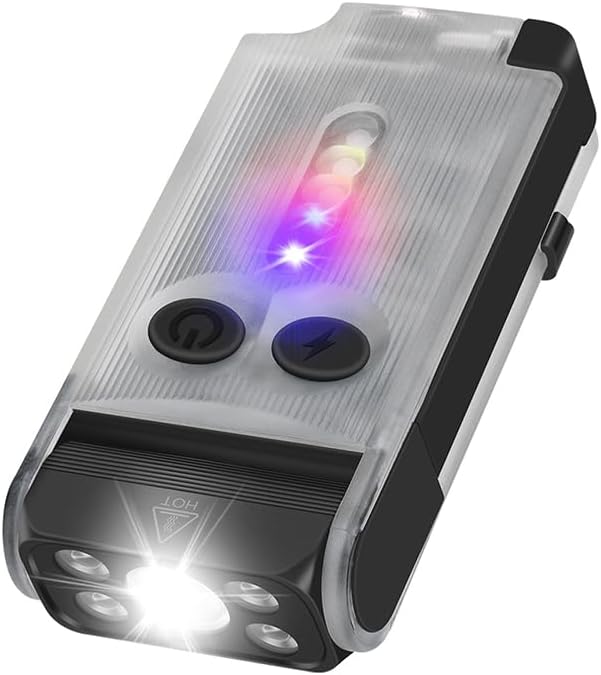
Image 1: Front view of the Vortex V30 EDC Flashlight, showcasing its main light and side LEDs.

Image 2: Back view of the Vortex V30 EDC Flashlight, showing the double-direction clip and USB-C charging port.
2. Package Contents
- Vortex V30 EDC Flashlight
- USB Charging Cable
- Lanyard (may be included)
3. Setup
3.1 Initial Charging
Before first use, fully charge the flashlight. Connect the included USB charging cable to the USB-C port on the side of the flashlight and to a standard USB power source (e.g., computer, wall adapter). The charging indicator lights will show the charging status.
3.2 Attaching the Clip
The V30 features a double-direction clip. This allows you to attach the flashlight to your pocket, belt, or gear in two different orientations for versatile carrying options. Simply slide the clip onto the desired location.
4. Operating Instructions
The Vortex V30 features two control buttons: a power button (left) and a mode button (right).
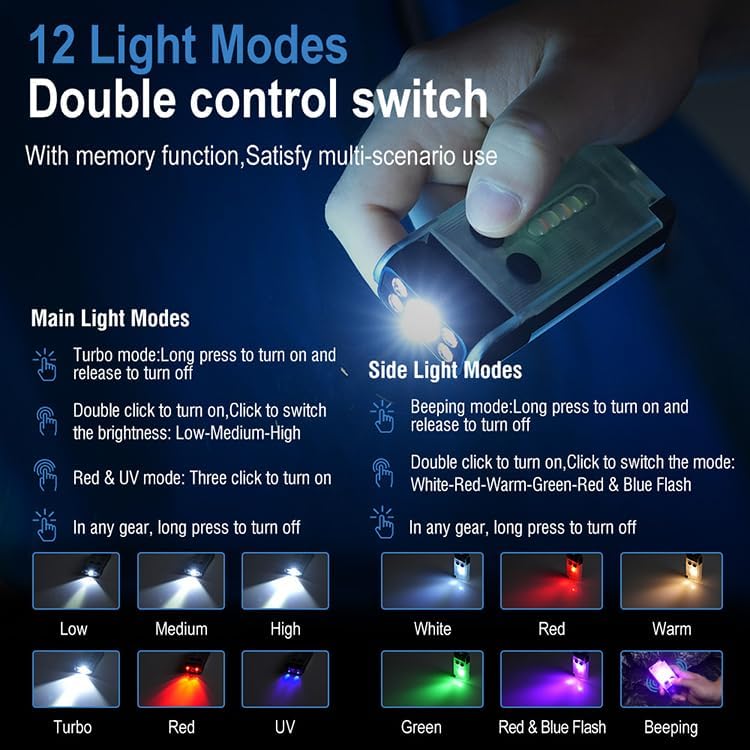
Image 3: Detailed diagram illustrating the 12 light modes and corresponding button operations for the main and side lights.
4.1 Main Light Modes (Front LED)
- Turn On/Off (Turbo Mode): Long press the power button to turn on the main light in Turbo mode. Release to turn off.
- Cycle Brightness (Low-Medium-High): Double-click the power button to turn on the main light. Single-click to cycle through Low, Medium, and High brightness levels. Long press to turn off.
- Red & UV Mode: Triple-click the power button to activate the Red and UV light modes.
4.2 Side Light Modes (Side LEDs)
- Beeping Mode: Long press the mode button to activate the beeping mode. Release to turn off.
- Cycle Colors (White-Red-Warm-Green-Red & Blue Flash): Double-click the mode button to turn on the side lights. Single-click to cycle through White, Red, Warm, Green, and Red & Blue Flash modes. Long press to turn off.
4.3 Special Functions
- Buzzer Function: The flashlight includes a buzzer for emergency signaling. This can be used to attract attention in situations where sound can help locate someone needing assistance.
- UV Light Usage: The Ultraviolet (UV) light can be used for tasks such as detecting counterfeit currency, checking for pet stains, identifying certain minerals, or for specific inspections.
- Red Light Usage: Red light is suitable for low-light situations to preserve night vision, beneficial for activities like astronomy, hunting, or military operations, as it is less disruptive to eye adaptation in the dark.
- Green Light Usage: Green light is often used in hunting and tactical scenarios as it can be less harsh on the eyes than white light. It is also useful for map reading and signaling.
- 180° Twistable Head: The flashlight head can be rotated 180 degrees, allowing for multi-angle lighting and directing the beam precisely where needed.
- Magnetic Tail: The integrated tail magnet allows the flashlight to be securely attached to metal surfaces, providing hands-free illumination or serving as a fixed warning light.
- Power Bank Function: The V30 can function as a power bank, allowing you to charge other small electronic devices via its USB-C port.

Image 4: Illustration of the 180-degree rotating head, demonstrating its flexibility for various lighting angles.

Image 5: Demonstration of the Red Highlight for night vision preservation and 365nm UV Light for detection purposes.

Image 6: The flashlight activating its 120dB buzzer alarm and red and blue flashing lights for emergency signaling.

Image 7: The magnetic tail feature in use, allowing the flashlight to be attached to a metal surface for hands-free operation.
5. Maintenance
5.1 Cleaning
Wipe the flashlight with a soft, damp cloth to remove dirt or debris. Do not use harsh chemicals or abrasive cleaners, as these can damage the finish or internal components.
5.2 Battery Care
The V30 uses a Lithium Polymer battery. For optimal battery life, avoid fully discharging the battery frequently. Recharge the flashlight regularly, especially if it has not been used for an extended period. Store in a cool, dry place.
5.3 Water Resistance
The flashlight is rated as waterproof (IP65). While it can withstand splashes and light rain, avoid submerging it in water for extended periods or exposing it to high-pressure water jets.
6. Troubleshooting
- Flashlight not turning on: Ensure the battery is charged. Connect to a power source and check if the charging indicator lights activate.
- Light output is dim: The battery may be low. Recharge the flashlight.
- Charging not working: Check the USB cable and power source. Try a different cable or adapter. Ensure the USB-C port is clean and free of debris.
- Buttons unresponsive: Ensure the flashlight is not in a locked mode (if applicable, though not specified for this model). If issues persist, contact customer support.
7. Specifications
| Feature | Specification |
|---|---|
| Model | V30 |
| Brightness (White Light) | Up to 900 Lumens |
| Light Source Type | LED |
| Power Source | Battery Powered (Lithium Polymer) |
| Material | Aluminum |
| Product Dimensions | 3.15 x 0.79 x 1.57 inches (approx. 3"D x 1"W x 2"H) |
| Item Weight | 5.6 ounces (0.16 Kilograms) |
| Water Resistance Level | Waterproof (IP65) |
| Special Features | UV/RED/GREEN lights, Fluorescent body, Emergency Signaling, Magnetic end, 180° Twistable Head, Double-direction clip, Power Bank function |
| Included Components | USB Cable |

Image 8: Diagram illustrating the physical dimensions of the Vortex V30 EDC Flashlight.
8. Warranty and Support
For warranty information and customer support, please refer to the documentation provided with your purchase or contact the seller directly. Keep your proof of purchase for any warranty claims.


