
Introduction
Thank you for choosing the ENGFYADSY Wireless Earbuds. These true wireless earphones are designed for daily use, sports, and gaming, offering a seamless audio experience. They feature a digital display for battery levels, touch operation, and IPX7 waterproof functionality for enhanced durability.
What's in the Box
- Wireless Earbuds (Left and Right)
- Wireless Charging Case
- USB Charging Cable
- User Manual
Product Overview

Figure 1: The ENGFYADSY Wireless Earbuds and their charging case, showcasing the prominent digital battery display on the case.

Figure 2: Close-up of the charging case's intelligent digital display, showing individual battery percentages for the left (L) and right (R) earbuds, along with the charging case's own battery level.

Figure 3: The earbuds placed within the open charging case, highlighting Bluetooth connectivity and IPX7 waterproof rating. The case also features a digital display.
Key Features:
- Multi-Functional Digital Display: Provides real-time battery levels for both the charging case and individual earbuds. The mirror-like surface of the case is specially processed.
- Ergonomic Design: Silicone earplugs ensure a stable and comfortable fit, suitable for extended wear and during physical activities.
- Immersive Audio: High-quality sound unit with graphene diaphragm delivers powerful stereo effects for an immersive listening experience.
- One-Step Pairing: Earbuds automatically power on and connect to each other upon removal from the charging case. First-time pairing with your device is required.
- Intelligent Touch Control: Convenient touch-sensitive areas on the earbuds allow for various operations including call management (answer/reject/hang up), voice assistant activation, music playback (play/pause, previous/next track), and volume adjustment (swipe).
- IPX7 Waterproof: Designed to withstand splashes and sweat, making them suitable for sports and outdoor activities.
Setup
Charging the Earbuds and Case:
Before first use, fully charge the earbuds and the charging case. The digital display on the case will show the charging status and battery levels.

Figure 4: The charging case with its micro-USB charging port, indicating where to connect the charging cable.
- Place the earbuds into the charging case, ensuring they are correctly seated. The earbuds will begin charging automatically.
- Connect the provided USB charging cable to the micro-USB port on the charging case and the other end to a USB power source (e.g., wall adapter, computer USB port).
- The digital display on the case will illuminate and show the charging progress. When fully charged, the display will indicate 100%.
Pairing with Your Device:
The earbuds feature one-step pairing for convenience.
- Ensure your device's Bluetooth is turned on.
- Open the charging case and remove both earbuds. They will automatically power on and attempt to pair with each other.
- On your device (smartphone, tablet, laptop), go to the Bluetooth settings and search for available devices.
- Select "YD03" (or similar name) from the list of found devices to complete the pairing process.
- Once successfully paired, the earbuds will automatically connect to your device whenever they are removed from the case and Bluetooth is enabled on your device.
Operating Instructions
Intelligent Touch Controls:
The earbuds are equipped with touch-sensitive areas for easy control of various functions. The controls are generally mirrored on both earbuds unless specified.
| Action | Function |
|---|---|
| Single Tap | Play/Pause Music; Answer/End Call |
| Double Tap (Left Earbud) | Previous Track |
| Double Tap (Right Earbud) | Next Track |
| Triple Tap | Activate Voice Assistant |
| Long Press (2 seconds) | Reject Call |
| Swipe Up (on earbud) | Increase Volume |
| Swipe Down (on earbud) | Decrease Volume |
Maintenance
Cleaning:
- Regularly clean the earbuds and charging case with a soft, dry, lint-free cloth.
- Do not use abrasive cleaners, alcohol, or chemical solvents.
- Gently remove any earwax or debris from the ear tips and speaker mesh using a small, soft brush or cotton swab.
Storage:
- When not in use, always store the earbuds in their charging case to protect them and keep them charged.
- Store the device in a cool, dry place, away from extreme temperatures and direct sunlight.
Water Resistance (IPX7):
The earbuds are IPX7 waterproof, meaning they can withstand immersion in water up to 1 meter for 30 minutes. However, this rating does not apply to the charging case. Do not submerge the charging case in water. Ensure earbuds are dry before placing them back into the charging case to prevent damage.
Troubleshooting
| Problem | Solution |
|---|---|
| Earbuds not pairing with device. |
|
| Only one earbud has sound. |
|
| Charging case display is off or not charging. |
|
Specifications
| Feature | Detail |
|---|---|
| Model Name | YD03 |
| Brand | ENGFYADSY |
| Connectivity Technology | Wireless (Bluetooth 5.3) |
| Color | Black |
| Item Weight | 3.84 ounces (approx. 108.87 grams) |
| Package Dimensions | 3.23 x 3.23 x 1.46 inches (approx. 8.2 x 8.2 x 3.7 cm) |
| Waterproof Rating | IPX7 (earbuds only) |
| UPC | 760752913699 |
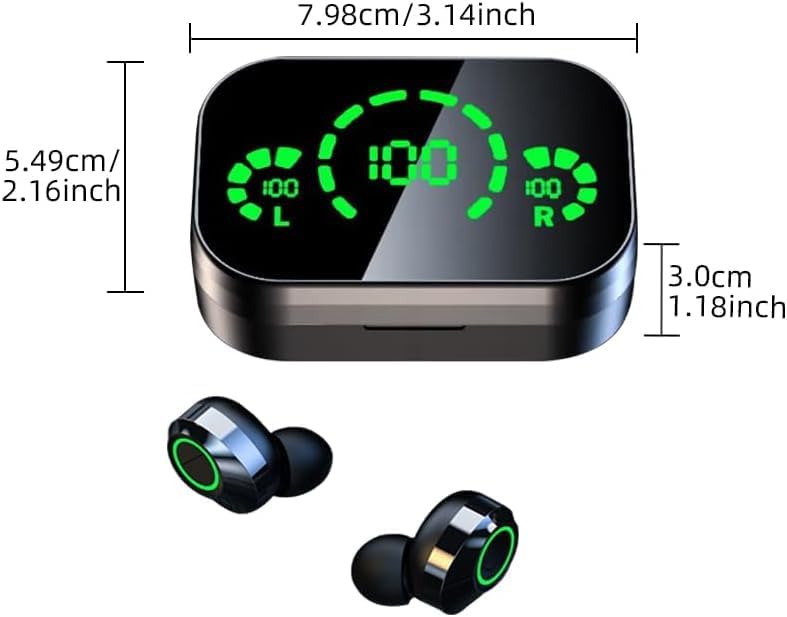
Figure 5: Diagram illustrating the dimensions of the charging case: 7.98cm/3.14inch in length, 5.49cm/2.16inch in width, and 3.0cm/1.18inch in height.
Customer Support
Should you have any questions about the product after delivery, please reach out to us by message. We are committed to providing a solution within 24 hours.
For further assistance, please refer to the contact information provided with your purchase or visit the official ENGFYADSY support page.