
Primevolve TM-520
Primevolve Battery Operated Fan Instruction Manual
Model: TM-520 | Brand: Primevolve
Product Overview
The Primevolve Battery Operated Fan is a versatile and portable cooling solution designed for various environments, including bedrooms, camping trips, and travel. Its unique foldable and telescopic design allows it to function as a desk fan, floor fan, or pedestal fan, adapting to your needs. Equipped with a large-capacity rechargeable battery and multiple speed settings, it provides efficient and quiet airflow wherever you go.

Image: The Primevolve fan showcasing its ability to be used as a tall pedestal fan or folded into a compact desk fan, highlighting its versatility.
Package Contents
- Primevolve Battery Operated Fan (Model TM-520)
- USB-C Charging Cable
- Remote Control
- User Manual

Image: The fan's USB-C charging port and various compatible power sources, including a power adapter, power bank, and laptop, demonstrating its flexible charging options.
Setup and Assembly
Unfolding and Adjusting Height
- Place the fan base on a stable, flat surface.
- Gently pull the fan head upwards from the base to extend the telescopic pole.
- Adjust the pole to your desired height, ranging from 3.54 inches (90 mm) to 39.37 inches (1000 mm). Ensure the pole is securely locked in place at the chosen height.
- Adjust the fan head's tilt angle up to 180 degrees to direct airflow as needed.
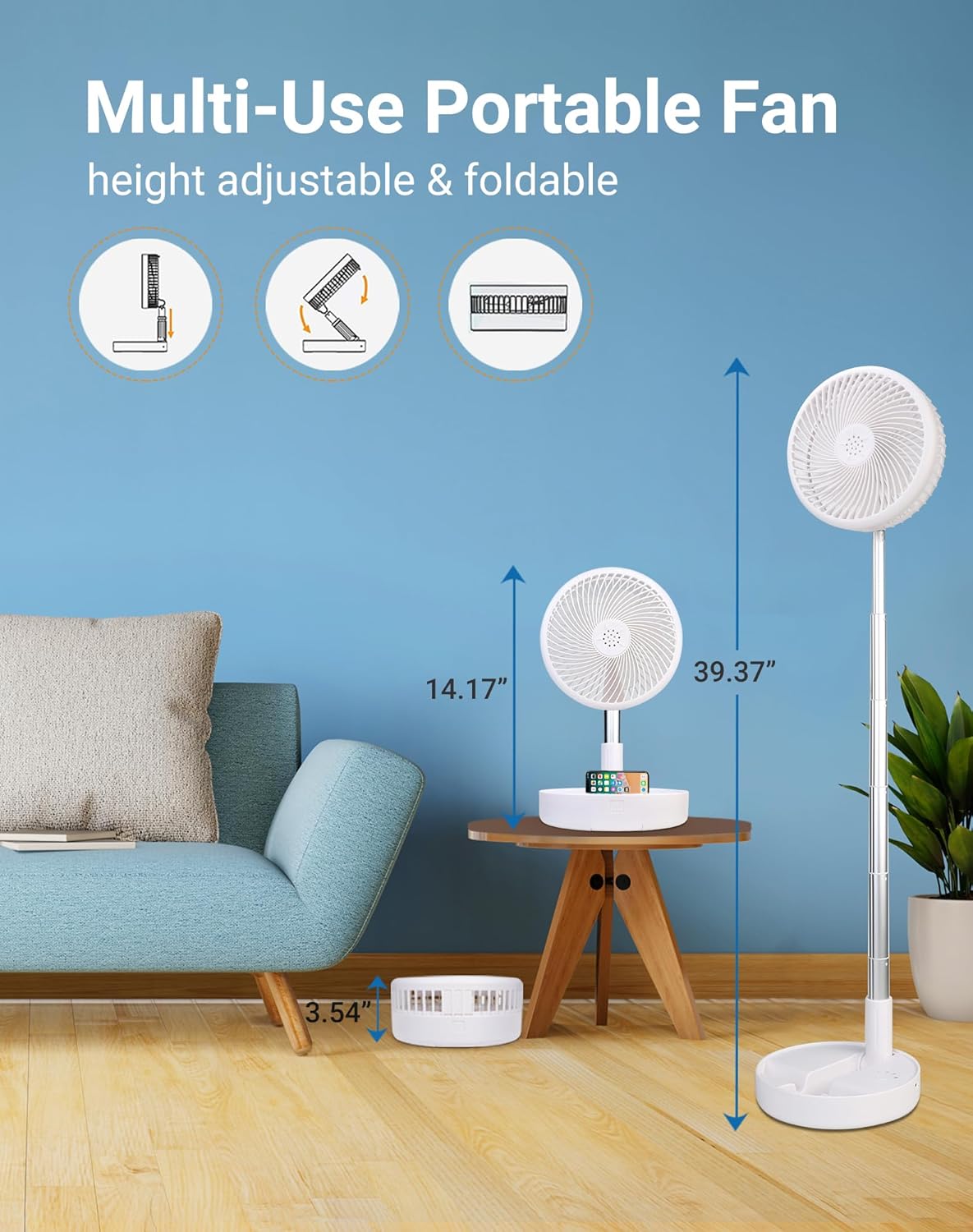
Image: The fan demonstrating its adjustable height capabilities, transitioning from a compact desk fan to a full-height pedestal fan, with measurements for each configuration.
Charging the Fan
Before first use, fully charge the fan. The fan is powered by USB (5V/2A) and compatible with various USB-enabled power sources.
- Connect the USB-C charging cable to the fan's charging port.
- Connect the other end of the cable to a compatible USB power source (e.g., PC/laptop, power bank, AC adapter, car charger).
- A full charge takes approximately 5 hours. The battery indicator lights on the base will show charging status.
A fully charged 7200mAh battery provides 6-21 hours of operation, depending on the speed setting.
Operating Instructions
Powering On/Off and Speed Settings
The fan features 4 speed settings, providing a range of airflow from a gentle breeze to a strong wind (2.3m/s-4m/s).
- Power Button: Press the power button on the base or the remote control to turn the fan on or off.
- Speed Adjustment: Press the speed adjustment button on the base or the remote control to cycle through the 4 speed settings.

Image: The fan in an outdoor setting, demonstrating its four speed levels (Low, Mid, High, Natural) and their respective battery life durations, emphasizing its long-lasting performance.
Head Rotation and Stability
- The fan head can be manually tilted up to 180 degrees to direct airflow.
- The base is equipped with anti-slip silicone pads for enhanced stability on various surfaces.
- Ensure the fan is placed on a stable surface to prevent tipping, especially when fully extended.

Image: Close-up of the fan's base highlighting its anti-slip silicone pads and the 180-degree adjustable head, along with a visual cue for locking the fan's position.
Maintenance
Cleaning the Fan
To maintain optimal performance and hygiene, regular cleaning of the fan blades and grille is recommended.
- Ensure the fan is turned off and unplugged before cleaning.
- To detach the front fan hood, turn it counterclockwise.
- Carefully remove the front hood and clean the fan blades and inside of the hood with a soft, damp cloth. Do not use abrasive cleaners or immerse the fan in water.
- Once clean and dry, reattach the front hood by aligning it and turning clockwise until secure.

Image: A visual guide demonstrating how to detach the fan's front hood by turning it counterclockwise, allowing for easy cleaning of the blades and grille.
Troubleshooting
- Fan not turning on: Ensure the fan is charged. Connect it to a power source using the USB-C cable.
- Weak airflow: Check the speed setting and increase it if necessary. Ensure the fan blades and grille are clean and free of dust.
- Unusual noise: Turn off the fan and check for any obstructions in the fan blades. Ensure the fan head is securely attached.
- Remote control not working: Check the battery in the remote control. Ensure there are no obstructions between the remote and the fan's sensor.
Specifications
| Feature | Detail |
|---|---|
| Brand | Primevolve |
| Model Number | TM-520 |
| Color | White |
| Power Source | Battery Powered (7200mAh) |
| Voltage | 5 Volts (DC) |
| Charging Time | Approx. 5 hours |
| Working Hours | 6-21 hours (depending on speed) |
| Adjustable Height | 3.54" to 39.37" (90-1000 mm) |
| Folded Dimensions | 7.72" x 7.72" x 3.54" |
| Head Tilt Angle | 180 degrees |
| Speed Settings | 4 Levels |
| Noise Level | 30-40 dB |
| Control Method | Remote, Touch |
| Blade Material | Aluminum alloy & ABS plastic |
| Item Weight | 2.59 pounds |
| Indoor/Outdoor Usage | Indoor, Outdoor |

Image: The fan in a home setting, illustrating its quiet operation (30-40 dB) and multiple wind modes, suitable for various activities like applying makeup.
Warranty and Support
For warranty information, technical support, or any product-related inquiries, please refer to the contact details provided on the product packaging or visit the official Primevolve website.
Keep your purchase receipt as proof of purchase for warranty claims.
Related documentsTM-520


Ask a question about this manual
Ask about setup, troubleshooting, compatibility, parts, safety, or missing instructions. Manuals+ will review the question and use this page’s manual context to help answer it.