
Primevolve TM-520
Primevolve Portable Oscillating Standing Fan
Model: TM-520
Brand: Primevolve
1. Introduction
Thank you for choosing the Primevolve Portable Oscillating Standing Fan. This manual provides essential information for the safe and efficient use of your new fan. Please read it thoroughly before operation and retain it for future reference.
This versatile fan is designed for both indoor and outdoor use, featuring a rechargeable battery, USB-C power option, adjustable height, oscillation, and remote control for convenience.

Image 1.1: Overview of the fan's key features including portability, foldability, remote control, rechargeable battery, multiple speeds, and low noise operation.
2. Safety Instructions
- Read all instructions before using the fan.
- Do not insert fingers or any objects into the fan grille when it is operating.
- Keep the fan away from water or other liquids to avoid electric shock.
- Do not use the fan in excessively humid or dusty environments.
- Ensure the fan is placed on a stable, flat surface to prevent tipping.
- Unplug the fan before cleaning or performing any maintenance.
- Keep out of reach of children and pets.
- Use only the provided USB-C cable for charging.
- Do not attempt to disassemble or repair the fan yourself. Contact customer support for assistance.
3. Package Contents
Please check the package for the following items:
- 1 x Primevolve Portable Oscillating Standing Fan
- 1 x Remote Control
- 1 x USB-C Charging Cable
- 1 x User Manual (this document)

Image 3.1: Illustration of the items included in the product package.
4. Product Overview
The Primevolve Portable Oscillating Standing Fan features a compact, foldable design that allows it to transform from a small desk fan to a full-sized standing fan. It includes a fan head, an adjustable telescopic rod, and a stable base housing the controls and battery.

Image 4.1: The fan displayed in its various adjustable forms: standing, table-top, and folded.
5. Setup and Assembly
5.1 Unfolding the Fan
- Place the fan base on a flat, stable surface.
- Locate the 'OPEN' position indicator on the base. Gently twist the top part of the base counter-clockwise to unlock.
- Carefully pull the telescopic rod upwards from the base until it reaches the desired height.
- Adjust the angle of the fan head as needed. The fan head can tilt up to 180 degrees.

Image 5.1: Step-by-step visual guide for expanding the fan from its folded state.
5.2 Adjusting Height and Angle
- The fan's height can be adjusted from 3.93 inches (folded) to 39.3 inches (fully extended).
- The fan head can be manually tilted up to 180 degrees to direct airflow.

Image 5.2: The fan's adjustable height and foldaway design for versatile placement.
6. Operating Instructions
6.1 Powering On/Off and Speed Settings
The fan can be controlled via the touch buttons on the base or the included remote control.
- Power Button: Press once to turn on the fan. Press and hold to turn off.
- Speed Button: Press repeatedly to cycle through 4 speed settings: Low, Mid, High, and Natural mode.

Image 6.1: The fan operating with an indication of its four speed settings and corresponding battery life.
6.2 Oscillation Function
The fan features a 90° auto-oscillation function to distribute airflow across a wider area.
- Oscillation Button: Press to activate or deactivate the 90° automatic oscillation.
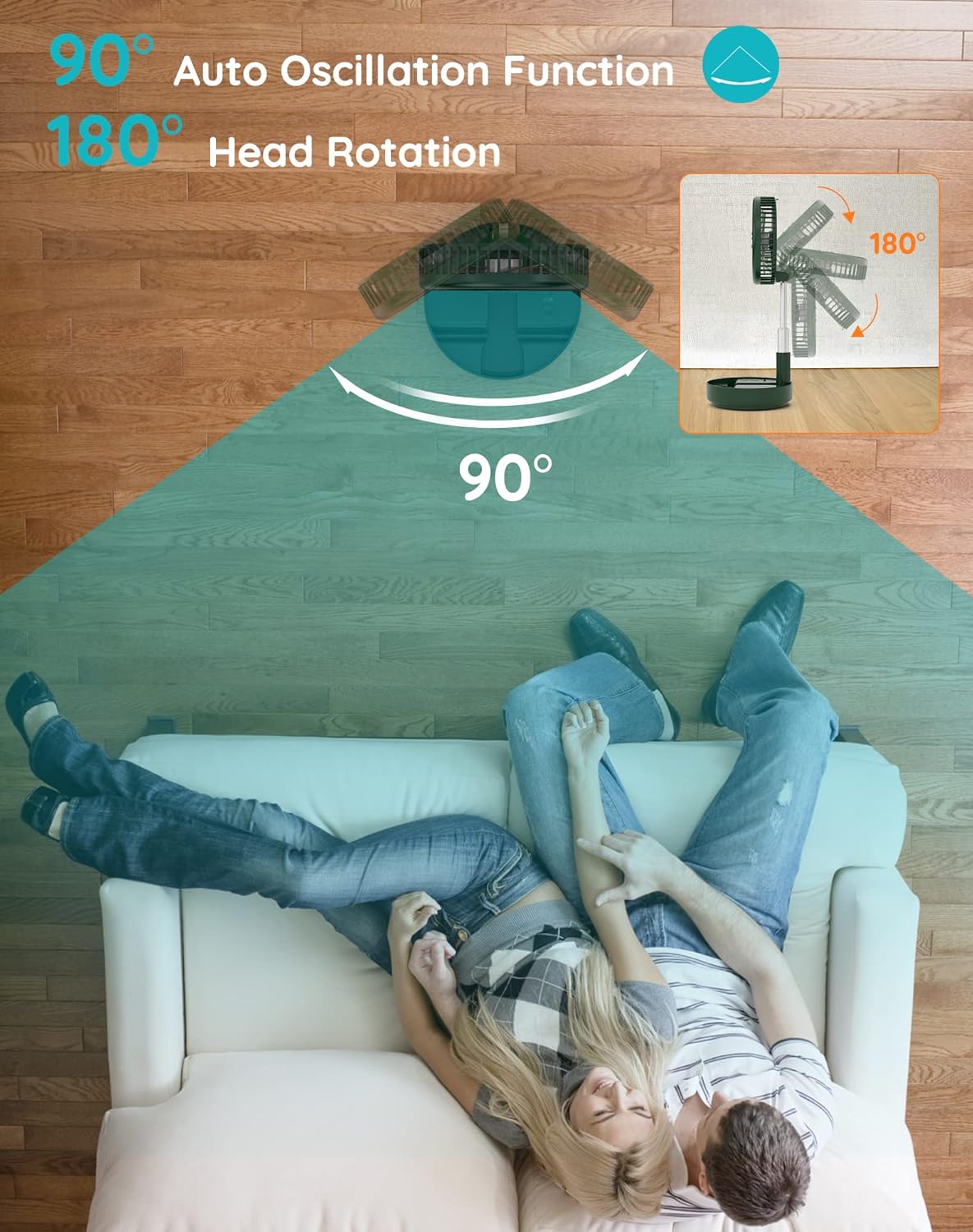
Image 6.2: Visual representation of the fan's 90-degree auto oscillation and 180-degree manual head rotation.
6.3 Remote Control Operation
The infrared remote control allows you to operate all fan features from up to 13 feet away.
- The remote has buttons for Power, Speed, and Oscillation, mirroring the functions on the fan base.
- Ensure the remote control has a working AAAA battery (included).

Image 6.3: Details of the fan's control methods, including the remote and integrated buttons.
7. Charging and Battery Information
The fan is equipped with a large rechargeable battery and is powered by USB-C (5V/2A).
- First Use: Please fully charge the fan before its first use.
- Charging Time: A full charge typically takes approximately 5 hours.
- Battery Life: Provides 6 to 21 wireless working hours, depending on the speed setting and oscillation usage.
- Compatibility: Compatible with PC/laptop, power bank, AC adapter, car charger, and other USB-enabled power sources.

Image 7.1: The fan's USB-C charging port and examples of compatible power sources.
8. Maintenance
8.1 Cleaning the Fan
- Ensure the fan is turned off and unplugged before cleaning.
- The front fan hood is detachable for easy cleaning. Gently twist and remove the front grille.
- Wipe the fan blades and grille with a soft, damp cloth. Do not use abrasive cleaners or solvents.
- Ensure all parts are completely dry before reassembling and using the fan.

Image 8.1: Instructions for detaching the fan hood for cleaning and information on the aromatherapy feature.
8.2 Aromatherapy Feature
The fan includes a special scent box. You can place your favorite aromatherapy in this box to diffuse a pleasant fragrance while the fan operates.
9. Troubleshooting
| Problem | Possible Cause | Solution |
|---|---|---|
| Fan does not turn on | Battery is depleted Not properly plugged in (if wired) | Charge the fan using the USB-C cable Ensure the USB-C cable is securely connected to a power source and the fan. |
| Weak airflow | Low speed setting Fan blades are dirty | Increase the speed setting Clean the fan blades and grille (refer to Maintenance section) |
| Oscillation not working | Oscillation function is off | Press the oscillation button on the fan or remote to activate. |
| Remote control not working | Battery is depleted Obstruction between remote and fan | Replace the AAAA battery in the remote Ensure a clear line of sight to the fan's receiver. |
| Fan makes unusual noise | Obstruction in fan blades Fan not on a stable surface | Turn off and unplug the fan, then check for and remove any obstructions Place the fan on a flat, stable surface. |
10. Specifications
| Feature | Detail |
|---|---|
| Brand | Primevolve |
| Model Number | TM-520 (PF11S) |
| Color | Green |
| Power Source | Battery Powered, USB-C (5V/2A) |
| Product Dimensions (Folded) | 9.06"D x 4.33"W x 9.06"H |
| Adjustable Height | 3.93" to 39.3" |
| Fan Head Tilt | 180 degrees (manual) |
| Oscillation | 90 degrees (auto) |
| Speed Settings | 4 (Low, Mid, High, Natural) |
| Noise Level | 30-40 dB (at max speed) |
| Number of Blades | 5 |
| Control Method | Remote, Touch |
| Item Weight | 2.75 pounds |
| Remote Battery | 1 AAAA battery (included) |
| Indoor/Outdoor Usage | Yes |
11. Warranty and Support
This Primevolve fan comes with a One-Year After-sales Service.
If you have any questions, concerns, or require assistance with your product, please do not hesitate to contact Primevolve customer support. We are committed to resolving your inquiries within 24 hours.
For support, please refer to the contact information provided on the product packaging or the official Primevolve website.
Related documentsTM-520


Ask a question about this manual
Ask about setup, troubleshooting, compatibility, parts, safety, or missing instructions. Manuals+ will review the question and use this page’s manual context to help answer it.