
1. Introduction
The AROMASOUL A800 Waterless Scent Diffuser is designed to provide a luxurious and efficient aromatherapy experience. Utilizing advanced cold-air diffusion technology, this device disperses essential oils into a fine, pure mist without the need for water, ensuring the integrity of the fragrance and eliminating residue. Its elegant metal body and smart app control offer both aesthetic appeal and convenient operation for various environments.

Figure 1: AROMASOUL A800 Diffuser and accessories.
2. Package Contents
Upon opening your AROMASOUL A800 package, please verify that all the following items are included:
- 1 x AROMASOUL A800 Waterless Essential Oil Diffuser
- 1 x 120ml Bottle of Hotel Fragrance Oil
- 2 x Essential Oil Refill Bottles
- 1 x Elegant Envelope (containing Detailed Instruction Manual, After-Sales Service Card, and Bluetooth Connection Guide)
- 1 x Cleaning Cloth
- 1 x USB-C Cable
- 1 x Charging Adapter

Figure 2: All items included in the AROMASOUL A800 package.
3. Product Overview and Features
The AROMASOUL A800 is crafted with a luxurious metal body, featuring an anodized surface finish for durability and aesthetic appeal. Its design incorporates advanced cold-air diffusion technology to atomize essential oils into a fine mist, preserving their purity and scent profile.
Key Features:
- Material: Premium Aluminum Alloy construction.
- Diffusion Technology: Waterless cold-air diffusion for pure essential oil atomization.
- Coverage: Effectively scents areas up to 1,000 square feet.
- Control: Smart App Control via AROMA PRO app and intuitive touch buttons on the device.
- Portability: Built-in rechargeable Lithium Ion battery provides up to 10 days of wireless operation.
- Quiet Operation: All-metal body design helps isolate operational noise.
- Timer & Intensity Settings: Customizable operating times and three intensity levels (High, Mid, Low).
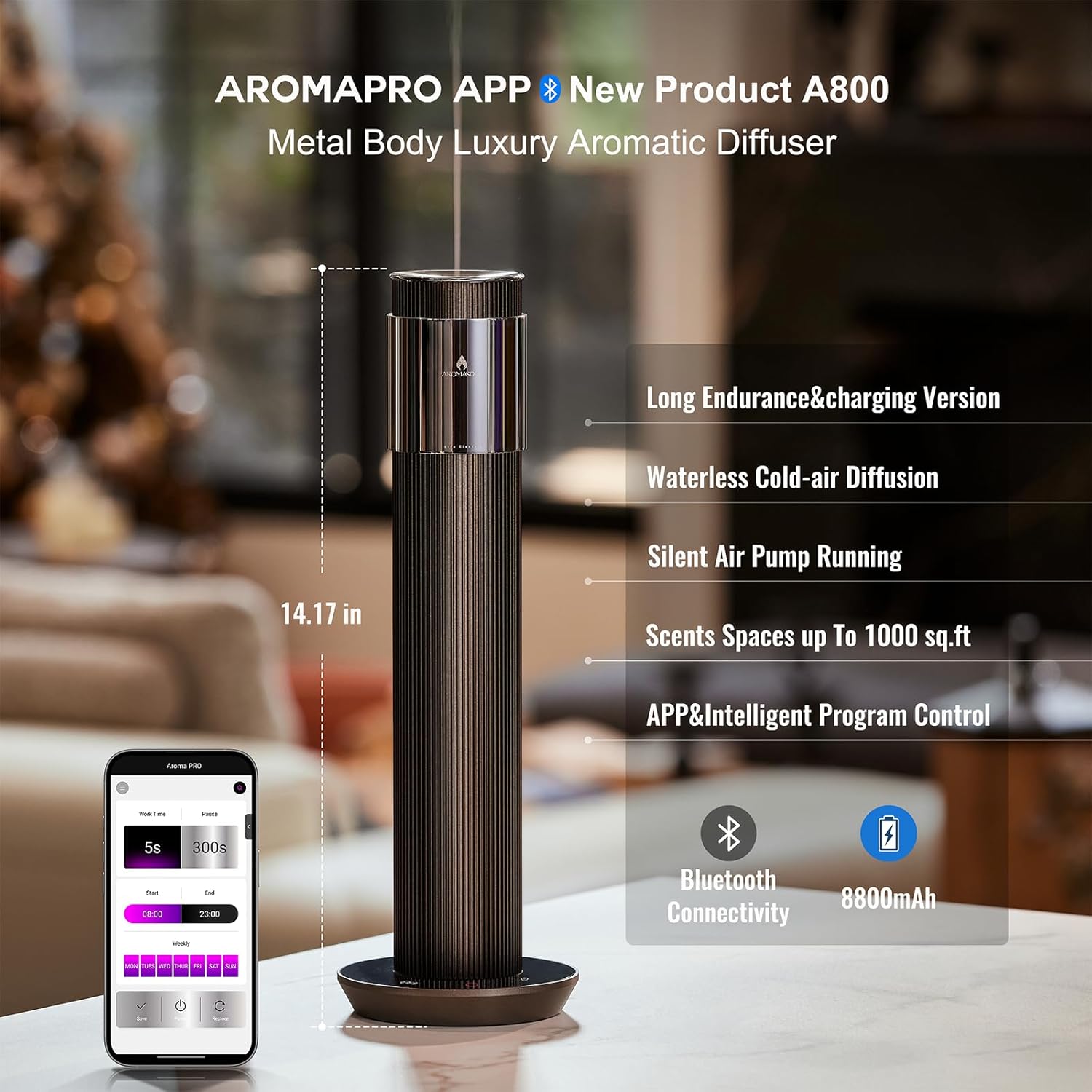
Figure 3: AROMASOUL A800 features overview.

Figure 4: AROMASOUL A800 design and dimensions.
4. Setup
- Charge the Device: Before first use, fully charge the diffuser using the provided USB-C cable and charging adapter. The device is battery-powered and can operate wirelessly.
- Prepare Essential Oil: Unscrew the top cap of the diffuser to access the essential oil reservoir. Fill one of the provided essential oil refill bottles with your desired essential oil. The bottles have a capacity of 100ml.
- Insert Essential Oil Bottle: Carefully screw the filled essential oil bottle into the designated slot within the diffuser. Ensure it is securely fastened to prevent leaks.
- Replace Top Cap: Once the essential oil bottle is in place, securely screw the top cap back onto the diffuser.

Figure 5: Inserting the essential oil bottle.
5. Operating Instructions
The AROMASOUL A800 offers two primary control methods: direct touch buttons on the device and smart control via the AROMA PRO mobile application.
5.1. Manual Control (Touch Buttons)
The base of the diffuser features touch-sensitive buttons for basic operation:
- Power Button: Press to turn the diffuser On/Off.
- Mode/Bluetooth Button: Short press to cycle through intensity modes (Low, Mid, High). Long press to activate Bluetooth pairing mode.
- Timer Button: Press to set an operating timer for 1 hour, 2 hours, 4 hours, or 8 hours.

Figure 6: Diffuser touch control panel.
5.2. Smart App Control (AROMA PRO App)
For advanced customization and scheduling, download the AROMA PRO app. Scan the QR code on the back of the diffuser or refer to the Bluetooth Connection Guide in your package for download instructions.
- Download App: Scan the QR code for iOS or Android to download the AROMA PRO app.
- Pair Device: Turn on Bluetooth on your mobile phone and long-press the Mode/Bluetooth button on the diffuser to enter pairing mode. Follow the in-app instructions to connect your device.
- Customize Settings: Within the app, you can:
- Adjust fragrance intensity (Low, Mid, High).
- Set precise operating times and pause intervals.
- Create custom daily or weekly schedules for automatic operation.
- Monitor device status and battery level.

Figure 7: AROMA PRO App interface for scheduling and control.

Figure 8: Diffuser usage in different environments.
6. Maintenance
The AROMASOUL A800 features waterless and residue-free diffusion technology, minimizing the need for extensive cleaning. However, regular maintenance ensures optimal performance and longevity.
- Exterior Cleaning: Use the provided cleaning cloth to gently wipe the exterior of the diffuser. Avoid abrasive cleaners or solvents.
- Essential Oil Bottle: When changing essential oils, you may clean the refill bottle with a small amount of rubbing alcohol to remove any residual scent, then allow it to air dry completely before refilling.
- No Water Required: This diffuser operates without water, eliminating the need for water tank cleaning.
7. Troubleshooting
If you encounter any issues with your AROMASOUL A800 diffuser, please refer to the following common troubleshooting steps:
- Device Not Turning On: Ensure the device is fully charged. Connect it to the charging adapter and cable, and allow it to charge for a few hours.
- No Scent Emission: Verify that the essential oil bottle is correctly installed and contains sufficient oil. Check that the atomization nozzle is not clogged.
- Weak Scent: Adjust the intensity setting to a higher level using either the touch buttons or the AROMA PRO app. Ensure the diffuser is placed in an appropriate location for optimal scent distribution within the room size.
- App Connection Issues: Ensure Bluetooth is enabled on your smartphone and the diffuser is in pairing mode (long-press Mode/Bluetooth button). Restart both the app and the diffuser if connection fails.
- Unusual Noise: While the device is designed for quiet operation, ensure it is placed on a stable, flat surface. If unusual noises persist, contact customer support.
8. Specifications
| Feature | Specification |
|---|---|
| Brand | AROMASOUL |
| Model Name | A800 |
| Color | Brown |
| Material | Aluminum |
| Product Dimensions | 4.72"L x 4.72"W x 14.17"H |
| Item Weight | 3.26 Pounds |
| Power Source | Battery Powered (4 Lithium Ion batteries included) |
| Capacity | 100 Milliliters (essential oil) |
| Coverage Area | Up to 1000 Sq.ft |
| Wattage | 10 watts |
| Special Feature | App Control, Auto Shutoff |
9. Important Safety Information
Please read and adhere to the following safety guidelines:
- Avoid direct skin contact with undiluted essential oils.
- Keep the diffuser and essential oils out of reach of children and pets.
- Ensure proper ventilation in the area where the diffuser is used.
- Do not attempt to disassemble or modify the device.
- Use only essential oils recommended for cold-air diffusion.
10. Warranty and Support
Your AROMASOUL A800 diffuser comes with an After-Sales Service Card included in the package. Please refer to this card for detailed warranty information and contact details for customer support. For any inquiries or assistance, please reach out to AROMASOUL customer service.
