
1. Product Overview
The Shimbol CP5 is a 5-inch Full HD 1080P touch screen monitor designed to enhance mobile videography and photography. It allows real-time synchronization with your phone's rear camera, enabling high-quality selfies, vlogs, live streams, and group photos by providing a clear view of your frame.
Key features include a vibrant 1080P touch screen with 500 nits brightness for outdoor visibility, wireless video transmission up to 50 meters with ultra-low latency (0.04s), and a magnetic silicone case for easy attachment and protection. The device also integrates a 2000mAh rechargeable battery for up to 3.5 hours of use and built-in Bluetooth remote control for convenient photo and video capture.

Image: Shimbol CP5 monitor attached to a smartphone, displaying a selfie.
2. Setup Guide
2.1 Charging the Device
Before initial use, fully charge your Shimbol CP5 monitor using the provided USB-C cable. The charging indicator light will be red during charging and turn green when fully charged.
2.2 Magnetic Attachment
The CP5 features a magnetic silicone case for easy and secure attachment to your smartphone. Ensure your phone is compatible with magnetic accessories or use the provided magnetic ring for non-compatible devices.
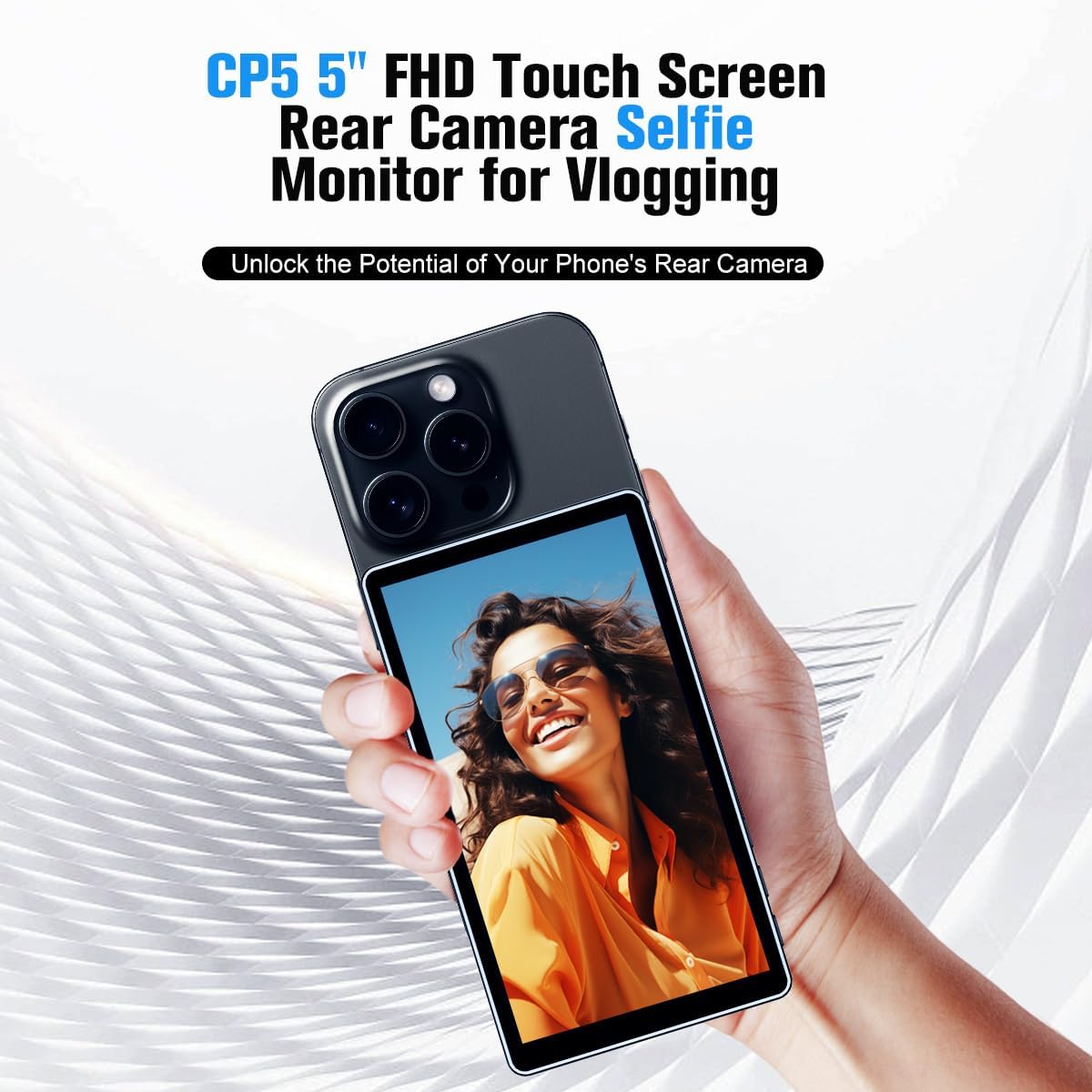
Image: The Shimbol CP5 monitor magnetically attached to the back of a smartphone.
2.3 Wireless Connection (Screen Mirroring)
The CP5 connects to your smartphone via Wi-Fi screen mirroring. Follow these general steps:
- Turn on the Shimbol CP5 monitor by long-pressing the power button for 3 seconds.
- On your smartphone, open the Wi-Fi settings and connect to the CP5's Wi-Fi network (SSID: CP5_Lite_XXXXXX, Password: 12345678).
- For iPhone: Swipe down from the top-right corner to open Control Center, tap 'Screen Mirroring', and select the CP5 device.
- For Android: Swipe down from the top to open Quick Settings, tap 'Wireless Projection' or 'Smart View', and select the CP5 device.
For a detailed visual guide on connecting your Shimbol CP5, please watch the video below:
Video: Shimbol CP5 Connection Guide. This video demonstrates the step-by-step process of connecting the Shimbol CP5 monitor to a smartphone via screen mirroring for both iPhone and Android devices.
3. Operating Instructions
3.1 Power On/Off and Brightness Adjustment
- To power on/off the device, long-press the power button located on the side.
- Adjust screen brightness using the dedicated brightness buttons on the side of the monitor.
3.2 Photo/Video Capture and Zoom
Once connected, you can use the built-in Bluetooth remote control to remotely take photos or start/stop video recording on your phone. The monitor also supports pinch-to-zoom functionality for proportional screen scaling with three adjustable levels.
Video: CP5 Supports Zoom. This video demonstrates the pinch-to-zoom feature on the Shimbol CP5 monitor, allowing users to adjust the screen scaling.
3.3 Screen Rotation and Orientation
The CP5 monitor automatically switches between horizontal and vertical aspect ratios based on your phone's orientation. You can also manually rotate the screen 180 degrees using a dedicated button for flexible viewing.

Image: The Shimbol CP5 monitor displaying both vertical and horizontal shooting modes.
3.4 External Recording and Playback
The CP5 is equipped with a recording and playback function, allowing you to capture and review content directly on the monitor. It also includes a headphone jack for real-time audio monitoring.

Image: The Shimbol CP5 monitor displaying a recording effect and a playback effect.
For a comprehensive demonstration of the Shimbol CP5's operation, please refer to the video below:
Video: Shimbol CP5 Operation. This video provides a detailed overview of the Shimbol CP5's various functions and how to use them.
4. Maintenance
To ensure the longevity and optimal performance of your Shimbol CP5 monitor, follow these maintenance guidelines:
- Cleaning: Use a soft, dry, lint-free cloth to clean the screen and body of the device. Avoid using harsh chemicals or abrasive materials.
- Storage: Store the monitor in a cool, dry place away from direct sunlight and extreme temperatures. When not in use, it is recommended to keep it in its protective case.
- Battery Care: For optimal battery life, avoid fully discharging the battery frequently. Charge the device regularly, even if not in active use, to maintain battery health.
- Handling: Handle the device with care to prevent drops or impacts, especially given its magnetic attachment design.
5. Troubleshooting
If you encounter issues with your Shimbol CP5 monitor, consider the following:
- Connectivity Issues: Ensure both the monitor and your smartphone's Wi-Fi and Bluetooth are enabled. Re-establish the screen mirroring connection if it drops. Check for any obstructions that might interfere with the wireless signal.
- Lag or Delay: While the device boasts ultra-low latency, some users have reported occasional lag, especially when shooting in higher resolutions (e.g., 4K on iPhone). Ensure your phone's software is up to date and try restarting both devices.
- Magnetic Attachment: If the monitor does not attach securely, ensure your phone has a compatible magnetic surface or use the provided magnetic ring. Verify that the magnetic case is correctly installed.
- App Compatibility: The monitor is designed to mirror your phone's screen, so it should work with most camera apps. However, some advanced features or specific app behaviors might vary. For iPhone users requiring 4K shooting, using a third-party app like Blackmagic Camera is recommended.
- Screen Orientation: If the screen orientation is incorrect or zoomed, check your phone's display settings and the monitor's rotation buttons.
6. Specifications
| Feature | Detail |
|---|---|
| Model | CP5 |
| Screen Size | 5 inches |
| Resolution | 1080P Full HD |
| Brightness | 500 nits |
| Wireless Transmission Distance | Up to 50 meters |
| Latency | 0.04s |
| Battery Capacity | 2000mAh |
| Usage Time | Up to 3.5 hours |
| Connectivity | Wi-Fi, Bluetooth |
| Weight | 4.3 ounces |
| Package Dimensions | 5.5 x 4 x 1.2 inches |
7. Warranty and Support
The Shimbol CP5 monitor comes with a standard manufacturer's warranty. Please refer to the warranty card included in your product packaging for specific terms and conditions.
For technical support, troubleshooting assistance, or to inquire about replacement parts, please visit the official Shimbol website or contact their customer service.
Manufacturer: Shimbol
Official Store: Visit the Shimbol Store on Amazon


