
1. Important Safety Information
Please read all instructions carefully before assembly and use. Keep this manual for future reference.
- Assembly may require two people due to the weight of the product.
- Exercise caution with sharp edges during assembly and use.
- Keep all electrical components, including the charging station and light wiring, away from water or damp environments.
- Always unplug the vanity from the power source when not in use or before cleaning.
- Do not exceed the weight limit of the vanity top or shelves. Refer to specifications for details.
- Ensure the anti-toppling device is securely installed to prevent accidental tipping, especially in households with children or pets.
2. Product Overview
The DICTAC Makeup Vanity Desk (Model VDND-01) is designed to provide a functional and illuminated space for personal grooming. It features a large mirror with adjustable LED lighting, an RGB-lit glass cabinet, a built-in charging station, and extensive storage options.
Key Features:
- LED Lighted Mirror: HD large makeup mirror with 11 LED bulbs. Offers 3 color modes (cool white, natural light, warm yellow) and adjustable brightness.
- RGB Glass Cabinet: Features a height-adjustable laminate and an RGB lighting system. Control via app or switch, with over 60,000 static colors and multiple lighting modes, including music synchronization.
- Integrated Charging Station: Built-in power strip with 2 USB ports (5V/2.1A) and 2 AC outlets (125V/12A). Includes a 5.9-foot power cord and an ON/OFF switch.
- Ample Storage: Includes 7 drawers, 4 open storage shelves, 1 RGB light with glass cabinet, and 1 cabinet with adjustable shelving.
- Durable Construction: Features smooth, silent drawer sliders, golden metal handles, and an anti-toppling device for stability.

Image 2.1: The DICTAC Makeup Vanity Desk, showcasing its mirror, lighting, and storage components.
3. Setup and Assembly
The vanity desk set includes comprehensive hardware and instructions. All parts and accessories are labeled to facilitate assembly. It is recommended to have two people for assembly due to the product's size and weight.
3.1 Unpacking and Preparation:
- Open the packaging carefully and lay out all components on a clean, soft surface (e.g., a blanket or carpet) to prevent scratches.
- Verify all parts against the included parts list in the separate assembly manual. Contact customer support immediately if any parts are missing or damaged.
- Keep all small hardware (screws, dowels, etc.) in a separate container to prevent loss.
3.2 Assembly Steps:
Follow the detailed step-by-step instructions provided in the separate assembly manual. Key steps typically include:
- Assemble the main desk frame.
- Install the drawer slides and assemble the drawers.
- Attach the mirror and LED light assembly.
- Install the RGB glass cabinet and other shelving units.
- Connect the charging station and route its power cord.
- Secure the anti-toppling device to a wall stud using appropriate hardware (not always included, check manual).

Image 3.1: Dimensional diagram of the vanity desk, illustrating overall size and drawer measurements.

Image 3.2: Details of the drawer mechanism, handle, and anti-toppling device for secure installation.
4. Operating Instructions
4.1 LED Mirror Lights:
The mirror is equipped with 11 LED bulbs offering adjustable lighting for various makeup needs.
- Power On/Off: Use the dedicated switch or touch sensor on the mirror to turn the lights on or off.
- Color Modes: Cycle through 3 color modes (Cool White, Natural Light, Warm Yellow) by pressing the mode button.
- Brightness Adjustment: Hold down the brightness button to increase or decrease the light intensity.

Image 4.1: Illustration of the three LED light modes (Cold, Natural, Warm) and the brightness adjustment feature.
4.2 RGB Glass Cabinet Lighting:
The glass cabinet features dynamic RGB lighting, controllable via an app or physical switch.
- Switch Control: Use the integrated switch to turn the RGB lights on/off and cycle through basic color presets.
- App Control: Download the specified mobile application (refer to the separate RGB lighting manual for app name and QR code). Connect your device via Bluetooth to access over 60,000 static colors, multiple lighting modes, and music synchronization features.
- Adjustable Shelving: The cabinet's internal shelves can be adjusted to different heights to accommodate various item sizes.

Image 4.2: The RGB LED cabinet displaying various colors and indicating music synchronization capability.

Image 4.3: Detailed view of the RGB glass cabinet and adjustable shelving within the vanity.
4.3 Charging Station:
The integrated charging station provides convenient power access for electronic devices.
- Power Connection: Plug the vanity's main power cord into a standard 125V AC wall outlet.
- Using AC Outlets: The two AC outlets (125V/12A) are suitable for hair dryers, curling irons, or other small appliances.
- Using USB Ports: The two USB ports (5V/2.1A) are designed for charging smartphones, tablets, and other USB-powered devices.
- On/Off Switch: Use the red switch on the charging station to control power to all outlets and USB ports.

Image 4.4: The integrated charging station, showing its AC outlets and USB ports in use.
4.4 Storage Drawers and Shelves:
Organize your cosmetics, jewelry, and other items using the various storage options.
- Drawers: Utilize the 7 drawers for organized storage. The smooth, silent sliders ensure easy access.
- Open Shelves: The 4 open shelves provide quick access and display space for frequently used items.
- Glass Cabinet: Store delicate items or jewelry in the RGB-lit glass cabinet, which includes 5 metal hooks for necklaces or bracelets.
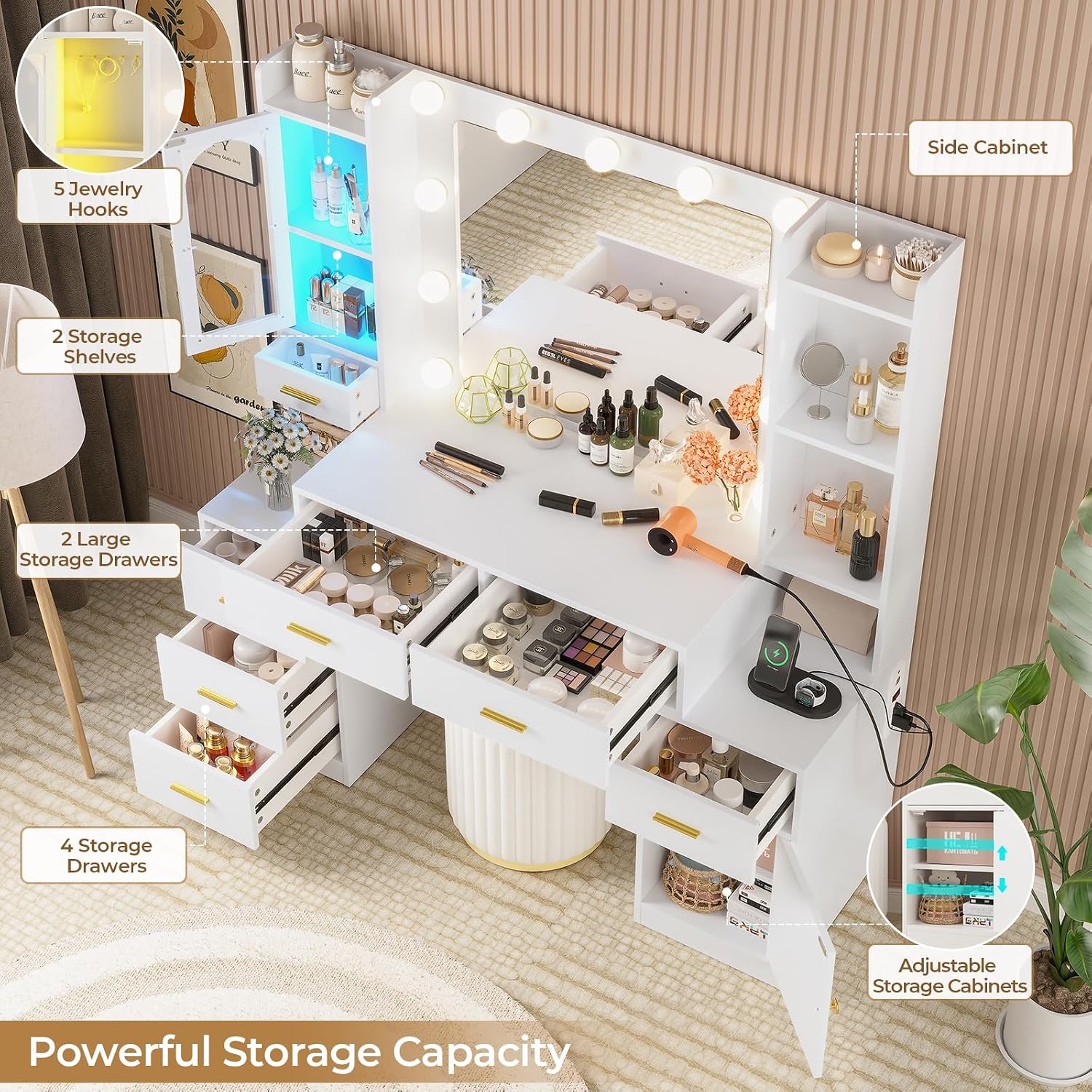
Image 4.5: An overhead view illustrating the extensive storage capacity with drawers and shelves.
4.5 Product Video:
Video 4.6: An official product video demonstrating the DICTAC White Large Vanity Desk Table with Mirror and Lights, highlighting its features and functionality.
5. Maintenance
- Cleaning: Wipe surfaces with a soft, damp cloth. Avoid abrasive cleaners or harsh chemicals that may damage the finish. For the mirror, use a glass cleaner.
- Dusting: Regularly dust all surfaces to prevent buildup.
- Electrical Components: Ensure all electrical connections are secure. If any wiring appears damaged, discontinue use and contact customer support.
- Drawer Slides: Periodically check drawer slides for smooth operation. If they become stiff, a small amount of silicone lubricant can be applied.
- Anti-Toppling Device: Regularly check the anti-toppling device to ensure it remains securely fastened to the wall.
6. Troubleshooting
6.1 LED Mirror Lights Not Working:
- Check Power: Ensure the vanity is plugged into a working power outlet and the main power switch (if any) is on.
- Mirror Switch: Verify the mirror's touch sensor or switch is activated.
- Connections: Inspect the wiring connections to the LED bulbs and mirror for any loose connections.
6.2 RGB Cabinet Lights Not Responding:
- Switch Control: Try using the physical switch to see if basic functions work.
- App Connection: If using the app, ensure Bluetooth is enabled on your device and it is properly paired with the vanity's RGB system. Restart the app and try reconnecting.
- Power Cycle: Unplug the vanity for 30 seconds and then plug it back in to reset the system.
6.3 Charging Station Not Providing Power:
- Main Power: Confirm the vanity is plugged in and receiving power.
- Charging Station Switch: Ensure the red ON/OFF switch on the charging station is in the "ON" position.
- Device Compatibility: Verify the device you are trying to charge is compatible with the voltage/amperage provided by the outlets/USB ports.
- Overload: Avoid overloading the charging station. If too many high-power devices are connected, it may trip an internal breaker (if equipped). Unplug devices and try again.
6.4 Drawers are Stiff or Catching:
- Check Alignment: Ensure the drawer is properly seated on its slides.
- Obstructions: Look for any objects or debris obstructing the drawer's path.
- Lubrication: Apply a small amount of silicone spray lubricant to the drawer slides.
7. Specifications
| Feature | Detail |
|---|---|
| Brand | DICTAC |
| Model Number | VDND-01 |
| Product Dimensions (D x W x H) | 15.8" x 49.8" x 55.7" |
| Item Weight | 108 pounds |
| Frame Material | Metal |
| Furniture Finish | White |
| LED Mirror Lights | 11 bulbs, 3 color modes (Cool White, Natural Light, Warm Yellow), adjustable brightness |
| RGB Cabinet Lights | App/Switch control, >60,000 static colors, multiple modes, music sync |
| Charging Station | 2 AC Outlets (125V/12A), 2 USB Ports (5V/2.1A), 5.9-foot power cord, ON/OFF switch |
| Storage Capacity | 7 drawers, 4 open shelves, 1 RGB glass cabinet, 1 adjustable cabinet |
| Assembly Required | Yes |
8. Warranty and Support
For specific warranty information, please refer to the documentation included with your purchase or contact DICTAC customer service directly. In case of any issues, missing parts, or questions regarding assembly or operation, please contact the seller or manufacturer for assistance.
You can typically find contact information on the product packaging, the seller's page, or the official DICTAC website.
As per the product description: "In case of any issues, clicking on 'Contact Seller' will provide you with a satisfactory solution without the need for a return."