
BOMGE BM-05 5 canales
BOMGE BM-05 Audio Mixer User Manual
Model: BM-05 5 canales | Brand: BOMGE
Introduction
This user manual provides detailed instructions for the operation and maintenance of your BOMGE BM-05 Audio Mixer. Please read this manual thoroughly before using the device to ensure proper functionality and to prevent damage.
Safety Instructions
- Ensure the power supply matches the device's requirements (5V DC).
- Do not expose the mixer to water or excessive moisture.
- Avoid placing the device near heat sources or in direct sunlight.
- Do not attempt to disassemble or repair the unit yourself. Refer all servicing to qualified personnel.
- Keep out of reach of children.
Product Overview
The BOMGE BM-05 is a compact 5-channel audio mixing console designed for various applications including recording, live streaming, and podcasting. It features digital USB and Bluetooth connectivity, echo and delay effects, and 48V phantom power for condenser microphones.

Figure 1: Front view of the BOMGE BM-05 Audio Mixer, showcasing its compact design and various controls.
Key Features:
- Mic Line + Stereo Line Inputs: Three XLR inputs for microphones or guitars, plus L/R 6.35mm and L/R RCA stereo inputs for keyboards, CD players, or computers.
- USB-B Interface for Recording: Built-in sound card for easy connection to computers, mobile phones, or tablets for mixing and recording.
- Headphone Monitor: 3.5mm headphone jack for real-time audio monitoring.
- USB-A Interface for Playback/Recording: Connect a USB stick to play MP3 music or record audio output.
- Bluetooth Wireless Connection: Stream music wirelessly from various Bluetooth-enabled devices.
- 48V Phantom Power: Available on XLR inputs for condenser microphones, ensuring ultra-low noise.
- EQ/Gain Controls & Effects: Onboard 2-band EQ, gain controls, and adjustable delay/echo effects for each channel.

Figure 2: Detailed panel description of the BOMGE BM-05, highlighting various inputs, outputs, and controls.
Setup
Powering the Mixer
The BOMGE BM-05 mixer supports a 5V universal voltage power supply. It can be powered via a USB to Type-C power cable (included) from various sources.
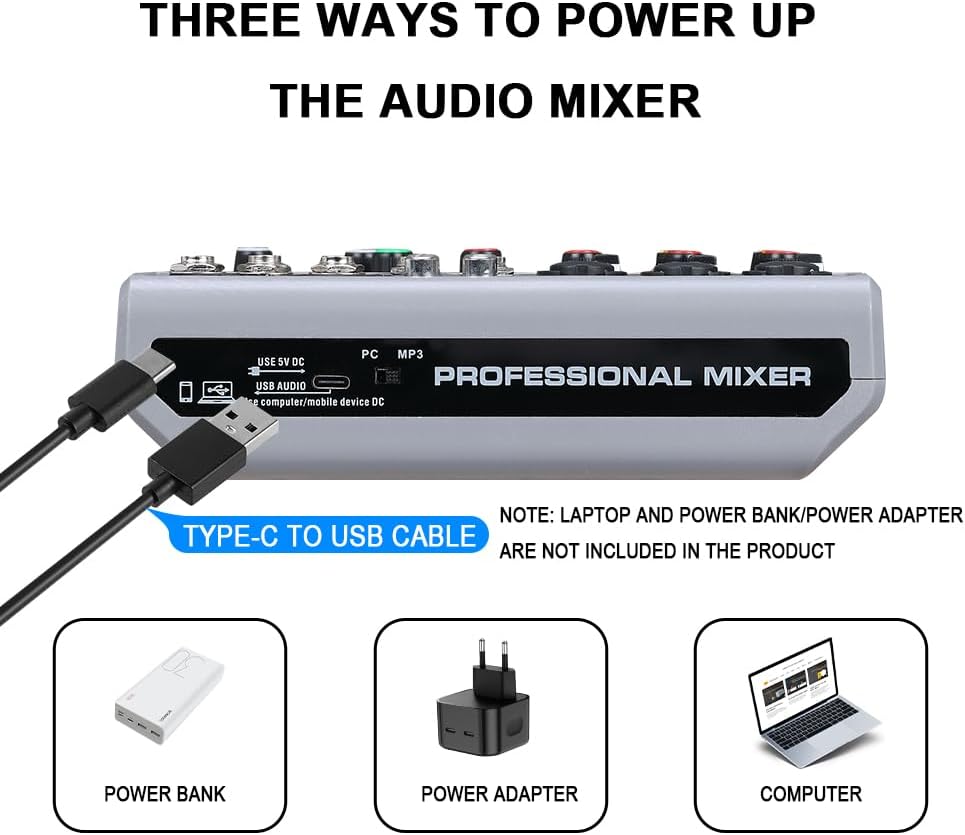
Figure 3: The mixer can be powered by a power bank, a power adapter, or a computer via the USB-C port.
Connecting Inputs
- Microphones/Instruments: Connect microphones or instruments to the XLR/6.35mm combo jacks (CH1, CH2, CH3). Ensure 48V phantom power is enabled for condenser microphones.
- Stereo Devices: Use the L/R 6.35mm or L/R RCA stereo inputs (CH4/5) for devices like CD players, keyboards, or computers.

Figure 4: The 48V phantom power supply provides the necessary voltage for condenser microphones, indicated by the red lights above each channel.
Connecting Outputs
- Main Output: Connect active speakers, power amplifiers, or active sound systems to the L/R XLR or 6.35mm Main Output jacks.
- Headphones: Plug your headphones into the 3.5mm headphone jack for monitoring.

Figure 5: Real-time monitoring is available through the 3.5mm headphone jack, allowing for clear audio feedback.
Connecting to Computer/Mobile Devices
The mixer features a USB-B jack for direct connection to a computer, mobile phone, or tablet for audio transmission and recording. For mobile phones, a USB to Phone OTG Adapter is required for data transfer.
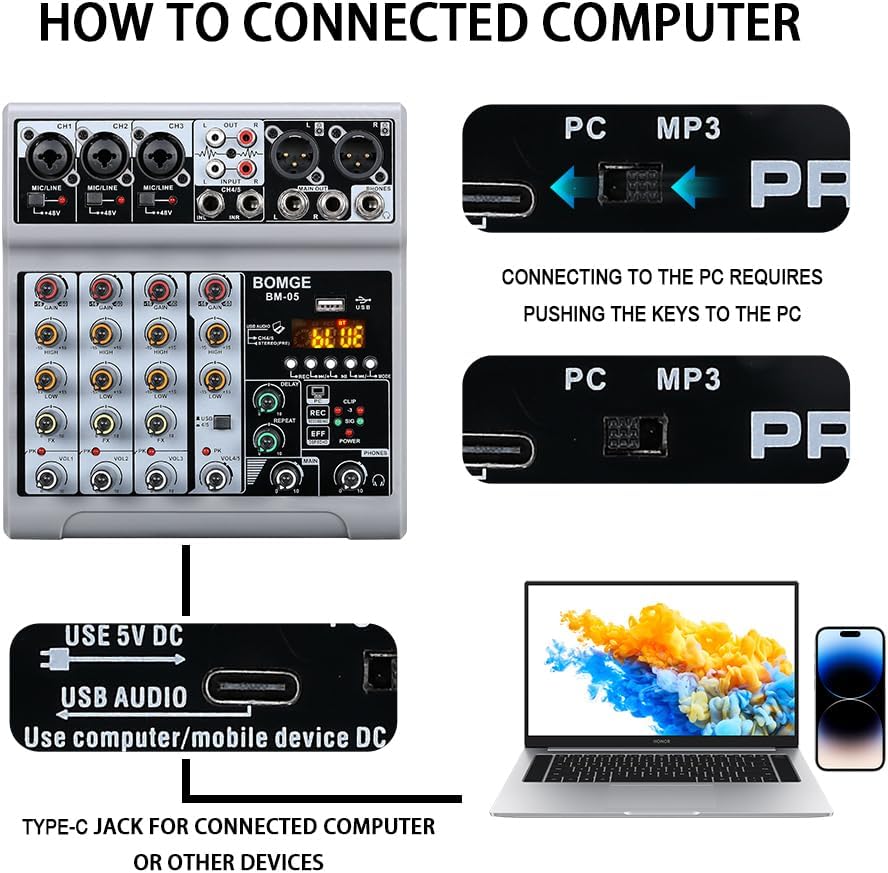
Figure 6: Connection diagram for the BOMGE BM-05 to a computer, utilizing the USB-B port for audio input and output.
Operating Instructions
Channel Controls
- Gain Knob: Adjusts the input sensitivity for each channel.
- High/Low EQ: 2-band equalizer to adjust the treble and bass frequencies of each channel.
- FX Knob: Controls the amount of effect (delay/echo) applied to each channel.
- Volume Control: Adjusts the output level for each individual channel.
USB-A Playback and Recording
Insert a USB flash drive into the USB-A port to play MP3 music directly through the mixer or to record the mixed audio output onto the USB drive.

Figure 7: The USB-A interface allows for convenient MP3 playback and direct recording to a USB flash drive.
Bluetooth Wireless Connection
Activate Bluetooth on your mobile device (phone, tablet, computer) and search for the mixer's Bluetooth signal (BM-05). Pair the devices to wirelessly stream audio to the mixer. The Bluetooth range is approximately 1.5 feet.
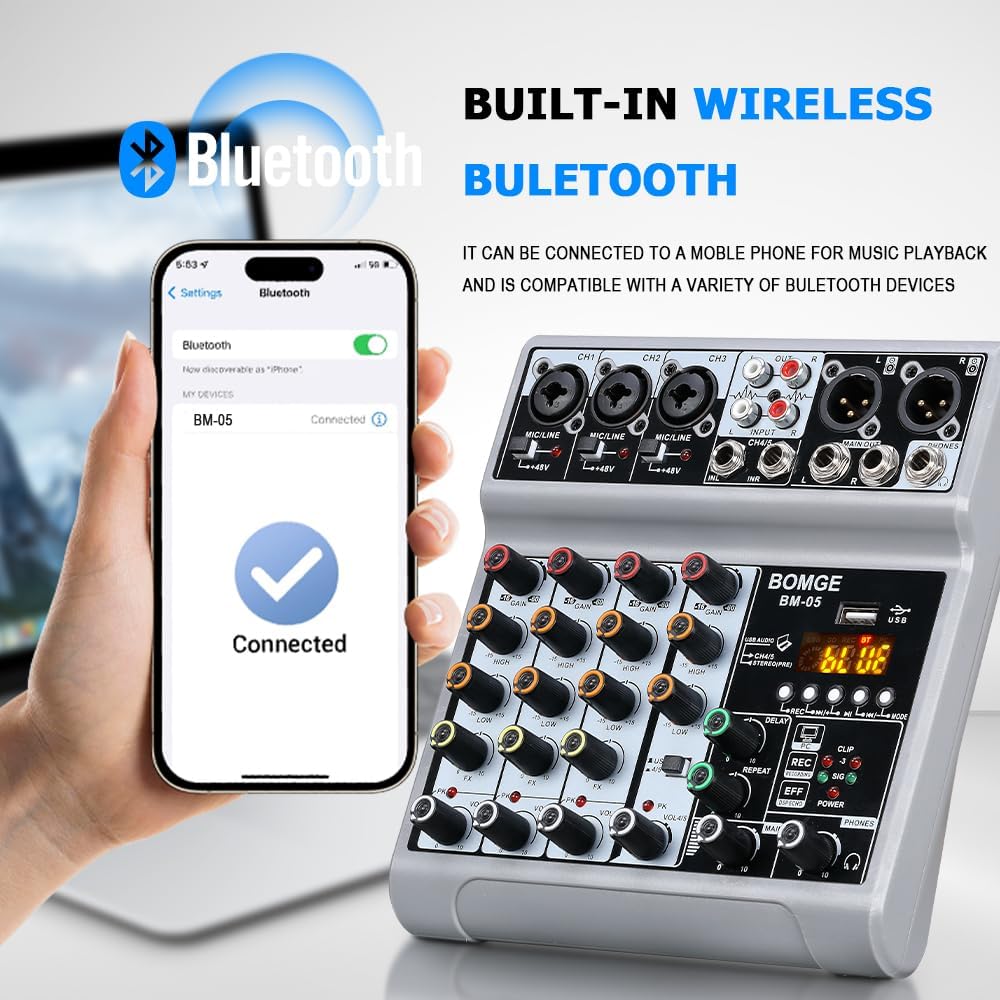
Figure 8: The mixer's built-in Bluetooth function allows for seamless wireless audio streaming from compatible devices.
Echo and Delay Effects
The mixer includes adjustable delay and repeat effects. Use the dedicated knobs to fine-tune the effect parameters to enhance your audio mix.
Video Demonstration
Video 1: An official demonstration of the BOMGE Audio Mixer, highlighting its features and functionality, including the 5-channel setup.
Troubleshooting
- No Power: Ensure the USB-C power cable is securely connected to a 5V power source.
- No Sound Output: Check all input and output cable connections. Verify volume levels on channels, main output, and connected speakers/headphones. Ensure correct input selection (e.g., USB, Bluetooth).
- Microphone Not Working: For condenser microphones, ensure 48V phantom power is activated. Check microphone cable and connection.
- Bluetooth Connection Issues: Ensure the mixer is in Bluetooth mode and within the 1.5ft range. Disconnect and reconnect Bluetooth on your device.
- USB Recording/Playback Issues: Ensure the USB stick is formatted correctly and has sufficient storage. Note that Bluetooth, USB, and 4/5 channel functions cannot be used simultaneously.
Specifications
| Feature | Detail |
|---|---|
| Brand | BOMGE |
| Model Number | BM-05 5 canales |
| Number of Channels | 5 |
| Connectivity Technology | Bluetooth, Auxiliary, USB |
| Power Source | Corded Electric |
| Voltage | 5 Volts |
| Item Weight | 1.76 pounds (800 Grams) |
| Product Dimensions | 1.8"D x 5.9"W x 7.4"H (1.8 x 5.9 x 7.4 inches) |
| Country of Origin | China |
| Phantom Power | 48V (on XLR inputs) |
| Effects | Echo, Delay |
Maintenance
To ensure the longevity and optimal performance of your BOMGE BM-05 Audio Mixer, follow these maintenance guidelines:
- Cleaning: Use a soft, dry cloth to clean the exterior of the mixer. Do not use liquid cleaners or abrasive materials.
- Storage: Store the mixer in a cool, dry place away from direct sunlight and extreme temperatures when not in use.
- Handling: Handle the mixer with care to avoid dropping or impacting the unit, which could damage internal components or controls.
Warranty and Support
For warranty information or technical support, please refer to the official BOMGE website or contact your local distributor. Keep your purchase receipt as proof of purchase for any warranty claims.
Related documentsBM-05 5 canales


Ask a question about this manual
Ask about setup, troubleshooting, compatibility, parts, safety, or missing instructions. Manuals+ will review the question and use this page’s manual context to help answer it.