
Introduction
This manual provides comprehensive instructions for the safe and efficient operation, setup, and maintenance of your Pecron E1000LFP Solar Generator and the accompanying EP3000-48V Extra Battery Trolley Kit. Please read this manual thoroughly before using the product to ensure optimal performance and longevity.
Important Safety Information
Observe the following safety guidelines to prevent injury or damage to the product:
- Do not disassemble, repair, or modify the unit.
- Keep the unit away from fire or direct heat sources.
- Avoid exposure to water or high humidity.
- Use only specified charging cables and accessories.
- Ensure proper ventilation during operation and charging.
- Keep out of reach of children and pets.
- Do not insert foreign objects into the ports.
- In case of abnormal operation, discontinue use immediately and contact customer support.
Package Contents
Verify that all items are present in your package:
- Pecron E1000 LFP Power Station (x1)
- EP3000-48V Extra Battery (x1)
- Trolley (x1)
- AC Charging Cable (x1)
- Solar Charging Cable (x1)
- Car Charging Cable (x1)
- Accessory Bag (x1)
- User Manual (x1)

Image: Pecron E1000LFP Solar Generator with EP3000-48V Extra Battery and Trolley Kit.
Product Overview
The Pecron E1000LFP is a portable power station designed for various applications, from outdoor adventures to home backup. It features a 1024Wh LiFePO4 battery and an 1800W AC output. The system is expandable with the EP3000-48V Extra Battery, increasing total capacity to 4096Wh.
Main Unit (E1000LFP)
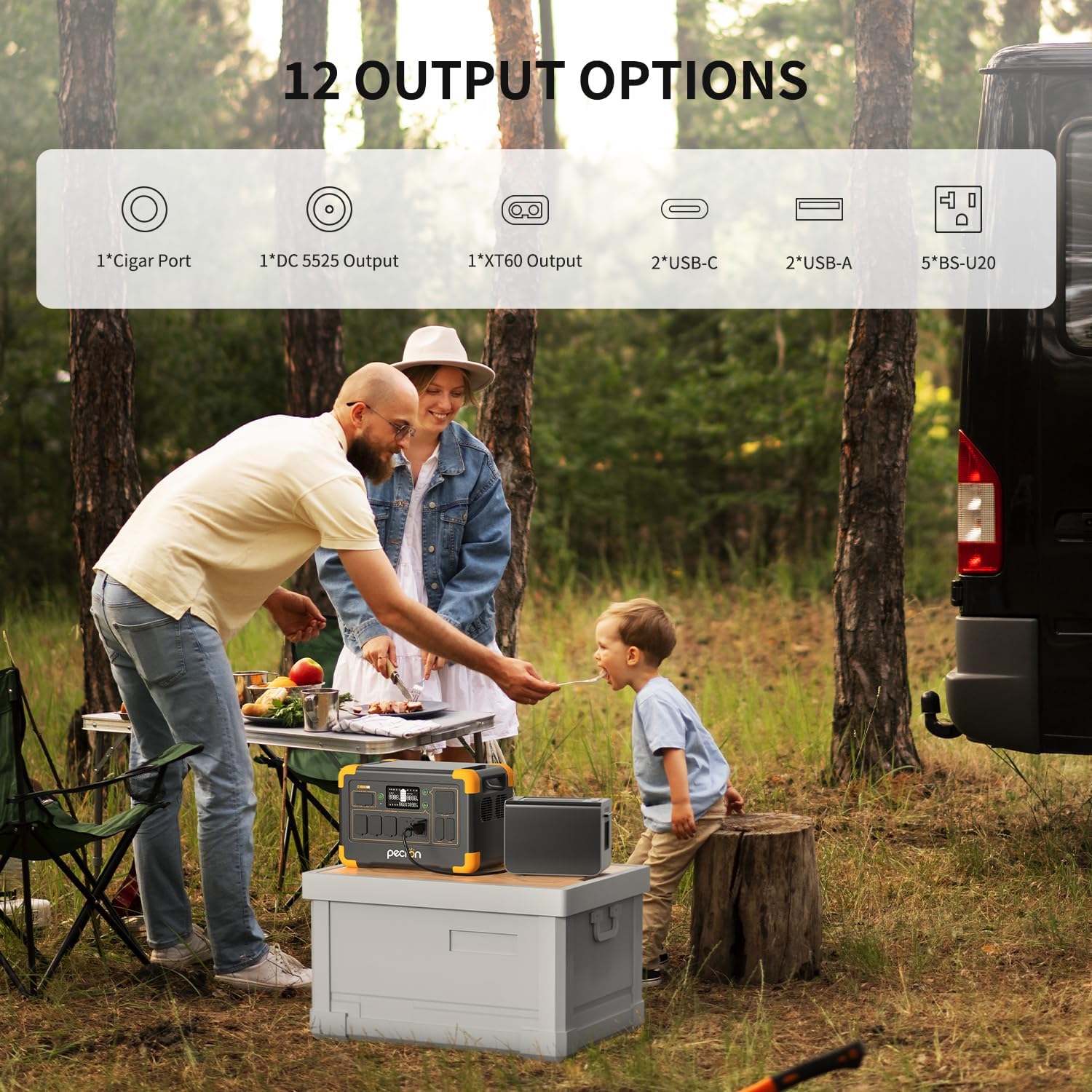
Image: Front panel of the Pecron E1000LFP showing various output ports and the LCD display.
The front panel includes:
- LCD Display: Shows battery level, input/output wattage, and other status indicators.
- Power Button: To turn the unit on/off.
- AC Output Ports (x5): Standard AC outlets for household appliances.
- USB-C Ports (x2): For fast charging compatible devices.
- USB-A Ports (x2): For charging various USB devices.
- XT60 Output (x1): High-power DC output.
- Cigar Port (x1): 12V DC output for car accessories.
- DC 5525 Output (x1): Standard DC output.
- DC Input Port: For charging the unit via AC adapter, solar panels, or car charger.
EP3000-48V Extra Battery
The EP3000-48V Extra Battery expands the total capacity of your E1000LFP. It connects to the main unit via a dedicated port.
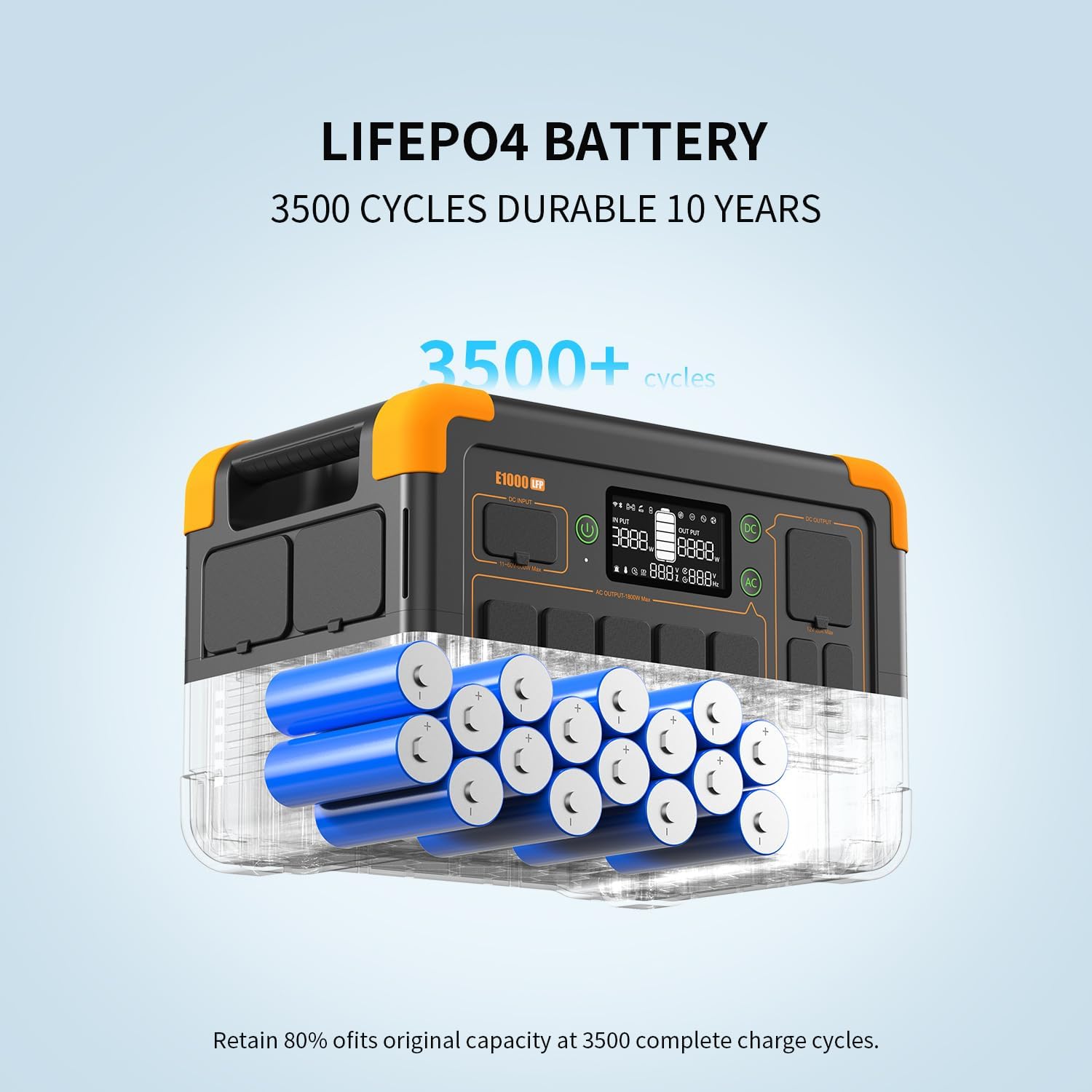
Image: Illustration of the durable LiFePO4 battery cells within the Pecron E1000LFP.
Setup
Initial Charging
Before first use, fully charge your Pecron E1000LFP. Connect the AC charging cable to the AC input port on the unit and then to a wall outlet. The LCD display will indicate charging status. A full charge takes approximately 1.3 hours.

Image: The Pecron E1000LFP connected to an AC wall outlet for fast charging.
Connecting the Extra Battery and Trolley Kit
To expand the capacity, connect the EP3000-48V Extra Battery to the E1000LFP using the provided cable. The trolley kit facilitates easy transport of the combined units.
Video: This video illustrates the process of connecting the EP3000-48V Extra Battery to the E1000LFP and assembling the trolley kit for enhanced portability and increased power capacity up to 4096Wh.
Operation
Turning On/Off
- Press and hold the main power button for a few seconds to turn the unit on or off.
- Individual AC and DC output buttons control power to specific port groups.
Charging the E1000LFP
The E1000LFP offers multiple charging options:
- AC Wall Outlet: Connect the AC charging cable to a standard wall outlet. Full charge in approximately 1.3 hours.
- Solar Panels: Connect compatible solar panels (up to 600W) to the DC input port using the solar charging cable. Charging time varies based on solar intensity and panel wattage (e.g., 200W panel takes about 8 hours, 600W takes 2-2.5 hours).
- Car Charger: Use the car charging cable to charge from your vehicle's 12V outlet. Charging time is approximately 12 hours.
- Pecron 500W Car Charger: For faster car charging, use a Pecron 500W car charger (sold separately). This reduces charging time to about 2.5 hours.

Image: Various charging methods for the E1000LFP, including AC fast charge, solar panel charging, 12V car charging, and Pecron 500W car charging.
Powering Devices
Connect your devices to the appropriate output ports. Ensure the total wattage of connected devices does not exceed the E1000LFP's 1800W output limit.

Image: The Pecron E1000LFP providing power for various electronic devices in an outdoor setting.
Smart App Control
Download the Pecron app to monitor and control your E1000LFP remotely. The app allows you to view output/input power, check power levels, customize charging power, and remotely switch AC/DC outputs.

Image: A smartphone screen showing the Pecron app, which provides smart control features for the power station.
UPS Function (Uninterruptible Power Supply)
The E1000LFP can function as an Uninterruptible Power Supply (UPS). When connected to an AC wall outlet and powering devices, it can automatically switch to battery power within 8-20ms during a power outage, providing continuous power to connected electronics.
Battery Heating Feature
For optimal performance in cold environments, the E1000LFP includes a battery heating module. When charging at temperatures between -20°C and 0°C, the battery will automatically activate this module to warm up to above 0°C, ensuring efficient charging and discharge.

Image: Diagram illustrating the battery heating mechanism of the E1000LFP, active in cold temperatures.
Maintenance
- Cleaning: Use a dry, soft cloth to clean the exterior of the unit. Do not use abrasive cleaners or solvents.
- Storage: Store the unit in a cool, dry place, away from direct sunlight and extreme temperatures. For long-term storage, charge the battery to 50-80% every 3-6 months to maintain battery health.
- Battery Care: The LiFePO4 battery is designed for durability with over 3500 charge cycles to retain 80% of its original capacity. Avoid fully discharging the battery frequently to prolong its lifespan.
Troubleshooting
If you encounter issues with your Pecron E1000LFP, refer to the following common problems and solutions:
- Unit not turning on: Ensure the battery is charged. Press and hold the power button for a longer duration.
- No output from ports: Check if the AC/DC output buttons are activated. Verify that the connected device is functioning correctly and its power draw is within the unit's limits.
- Slow charging: Ensure you are using the correct charging cable and power source. For solar charging, optimize panel placement for maximum sunlight exposure.
- Overload warning: Disconnect some devices to reduce the load. The unit will automatically shut down if overloaded to prevent damage.
For further assistance, please contact Pecron customer support.
Specifications
| Feature | Detail |
|---|---|
| Brand | Pecron |
| Model Name | E1000LFP |
| Battery Type | LiFePO4 |
| Capacity (E1000LFP) | 1024Wh |
| Expandable Capacity | Up to 4096Wh (with EP3000-48V Extra Battery) |
| AC Output | 1800W (Rated) |
| Total Power Outlets | 12 (5xAC, 2xUSB-C, 2xUSB-A, 1xXT60, 1xCigar Port, 1xDC 5525) |
| AC Charging Time | Approx. 1.3 hours |
| Solar Charging Input | Up to 600W |
| Item Weight | 29 Pounds |
| Product Dimensions | 14.9"L x 9.4"W x 10"H |
| Special Features | Portable, Fast Charging, Large Capacity, Long Lasting, Safety, Smart Control, UPS, Battery Heating |
Warranty and Support
The Pecron E1000LFP Solar Generator comes with a 2+1 year worry-free warranty. For technical support, warranty claims, or any inquiries, please contact Pecron customer service. Our team is available 24 hours a day, 7 days a week to assist you.
For the latest information and support resources, please visit the official Pecron website or refer to the contact details provided in your accessory bag.


