1. Introduction
Thank you for choosing the Coleshome L-Shaped Desk. This manual provides essential information for the safe assembly, operation, and maintenance of your new desk. Designed for versatility and functionality, this desk features ample storage, integrated LED lighting, and convenient power and USB outlets, making it ideal for home offices, study areas, or gaming setups.
2. Safety Information
WARNING: Please follow all instructions in this manual carefully to ensure safe assembly and use of the desk. Failure to do so may result in injury or damage to the product. Keep all small parts and packaging materials away from children. Ensure all connections are secure before use. Do not overload the desk or shelves beyond their stated weight capacity.
3. Product Overview
The Coleshome L-Shaped Desk is designed to maximize your workspace and storage. Key features include:
- Ample Storage: 5 drawers and 4 shelves provide extensive space for books, documents, and office accessories.
- Integrated LED Lighting: Features 10 brightness levels and 10 modes to create an inspiring atmosphere.
- Convenient Power Hub: Equipped with 2 power outlets (each with 2 ports) and USB ports for direct charging of devices.
- Flexible Design: Reversible L-shaped configuration allows adaptation to left or right room layouts.
- Spacious Work Surface: Generous dimensions (180x100cm) offer plenty of room for multiple monitors and equipment.

Detailed view of the five storage drawers, designed for organizing office supplies and documents.
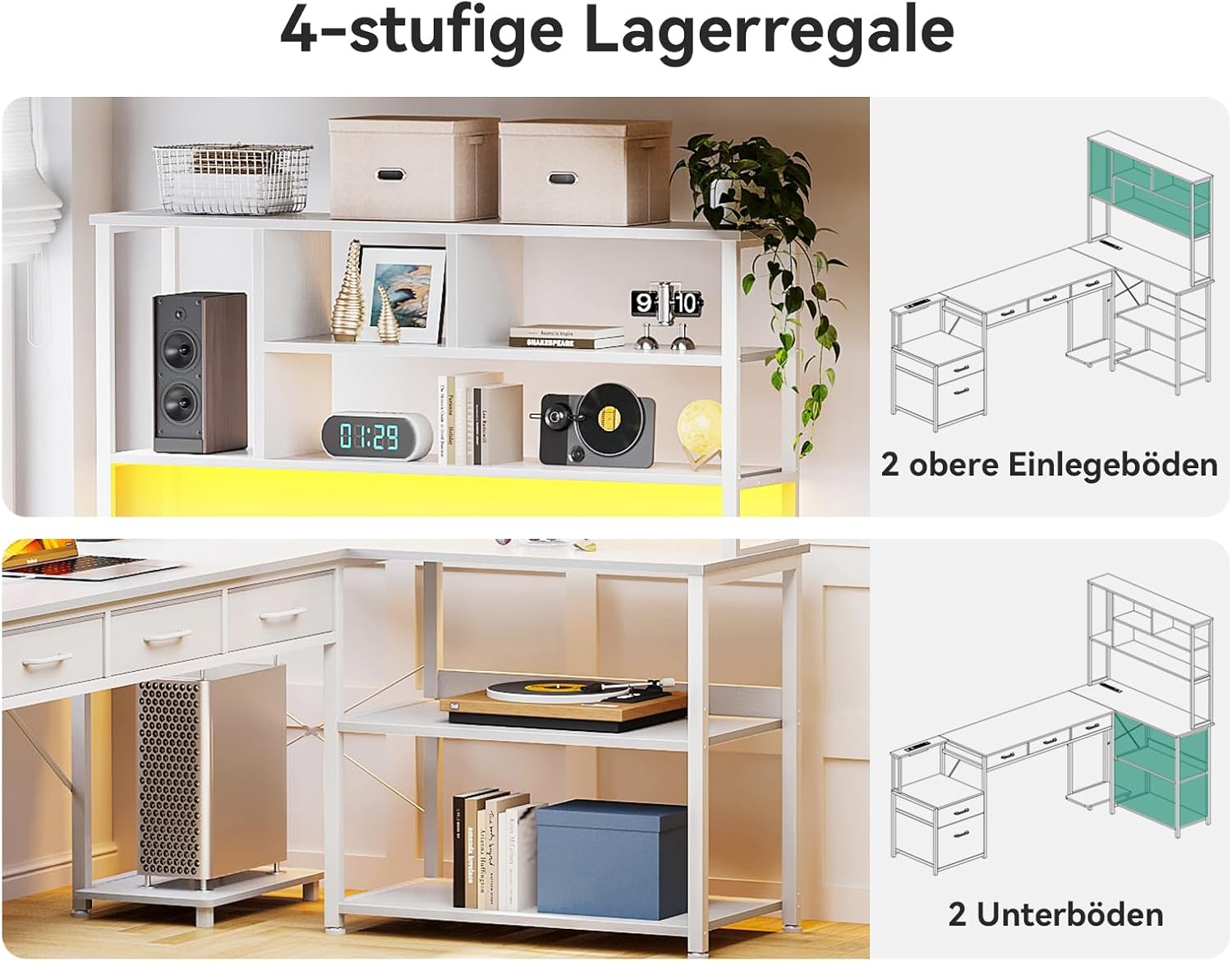
Illustration of the four-tier storage shelves, providing open storage for various items.

Example of an organized desk setup showcasing the desk's design and storage capabilities.
4. Package Contents
Before assembly, please ensure all parts and hardware listed in the included parts list are present and undamaged. If any parts are missing or damaged, do not proceed with assembly and contact customer support.
5. Assembly Instructions (Setup)
Assembly typically requires two people. Clear a spacious area and lay out all components before starting. Follow the numbered steps in the provided assembly diagram.
- Identify All Parts: Match each component with the parts list and label them if necessary.
- Assemble the Main Frame: Begin by attaching the primary support beams and legs according to the diagram.
- Construct Storage Units: Assemble the 5 drawers and 4 shelves, ensuring all connections are tight.
- Attach Desktop Panels: Securely fasten the desktop panels to the assembled frame.
- Install LED and Power Unit: Integrate the LED strip and power outlet/USB hub into their designated slots.
- Final Adjustments: Ensure the desk is level and all screws are tightened.

Diagram showing the overall dimensions and individual components of the desk for assembly reference.
6. Operating Instructions
6.1. LED Lighting System
The integrated LED lighting system offers customizable illumination. Locate the control panel or remote (if included) to adjust settings.
- Power On/Off: Press the power button to turn the LEDs on or off.
- Brightness Adjustment: Use the '+' and '-' buttons to cycle through 10 brightness levels.
- Mode Selection: Press the 'Mode' button to switch between 10 different lighting modes (e.g., static colors, dynamic effects).

Close-up of the RGB LED lighting strip, illustrating its placement and potential effects.
6.2. Integrated Power Outlets and USB Ports
The desk includes a built-in power strip with 2 AC outlets (110V-240V/6A) and 2 USB ports (5V/2A) for convenient charging.
- Connecting to Power: Plug the desk's main power cord (200cm) into a wall outlet.
- Using AC Outlets: Plug your devices (e.g., laptop, monitor) directly into the AC outlets.
- Using USB Ports: Connect your USB-powered devices (e.g., smartphone, tablet) to the USB ports for charging.

Image detailing the integrated power outlets and USB ports for easy device charging.
7. Maintenance and Care
Proper care will extend the life of your desk.
- Cleaning Surfaces: Wipe surfaces with a soft, damp cloth. Avoid harsh chemicals or abrasive cleaners.
- Drawer Maintenance: Periodically check drawer slides for smooth operation.
- Electrical Components: Ensure power cords are not pinched or damaged. Keep liquids away from outlets and USB ports.
- Tighten Fasteners: Occasionally check and tighten all screws and bolts to maintain stability.
8. Troubleshooting
If you encounter issues, refer to the following common problems and solutions:
- LED Lights Not Working:
- Check if the desk's main power cord is securely plugged into a wall outlet.
- Ensure the LED strip's connection to the power unit is firm.
- Verify the LED control panel is receiving power and is not damaged.
- Power Outlets/USB Ports Not Charging:
- Confirm the desk's main power cord is plugged in and the wall outlet is functional.
- Test with a different device or cable to rule out device-specific issues.
- Ensure the total power draw does not exceed the rated capacity of the outlets.
- Desk Wobbles:
- Check that all assembly screws and bolts are securely tightened.
- Ensure the desk is placed on a flat, even surface.
- Adjust any leveling feet if present.
If problems persist, please contact customer support.
9. Specifications
| Brand | Coleshome |
| Model Number | ZSJYCWJG |
| Color | White |
| Product Dimensions (L x W x H) | 180 x 100 x 154.2 cm |
| Material | Engineered Wood |
| Features | Integrated USB Outlet, Integrated LED Lighting |
| Item Weight | 33.5 Kilograms |
| Shape | L-Shape |
| Desk Design | Executive Desk |
| Style | Modern |
| Country of Origin | China |
10. Warranty and Support
10.1. Warranty Information
Coleshome products are manufactured to high-quality standards. This product comes with a limited warranty against manufacturing defects. Please retain your proof of purchase for warranty claims. Specific warranty terms and duration may vary by region. For detailed warranty information, please refer to the documentation included with your purchase or contact customer support.
10.2. Customer Support
If you have any questions, require assistance with assembly, or need to report a missing/damaged part, please contact Coleshome customer support. Contact details can typically be found on the product packaging or the official Coleshome website. Please have your model number (ZSJYCWJG) and purchase information ready when contacting support.