
1. Introduction and Overview
This manual provides essential information for the safe and efficient installation, operation, and maintenance of your Dawnice 16kWh LiFePO4 Solar Battery System. This system is designed for home energy storage, providing reliable power backup and optimizing solar energy utilization.
The Dawnice DWPF-LCT16N-3S is a high-performance 51.2V 314Ah (16kWh) lithium iron phosphate battery, engineered for durability and long service life. It features advanced battery management and intelligent monitoring capabilities.
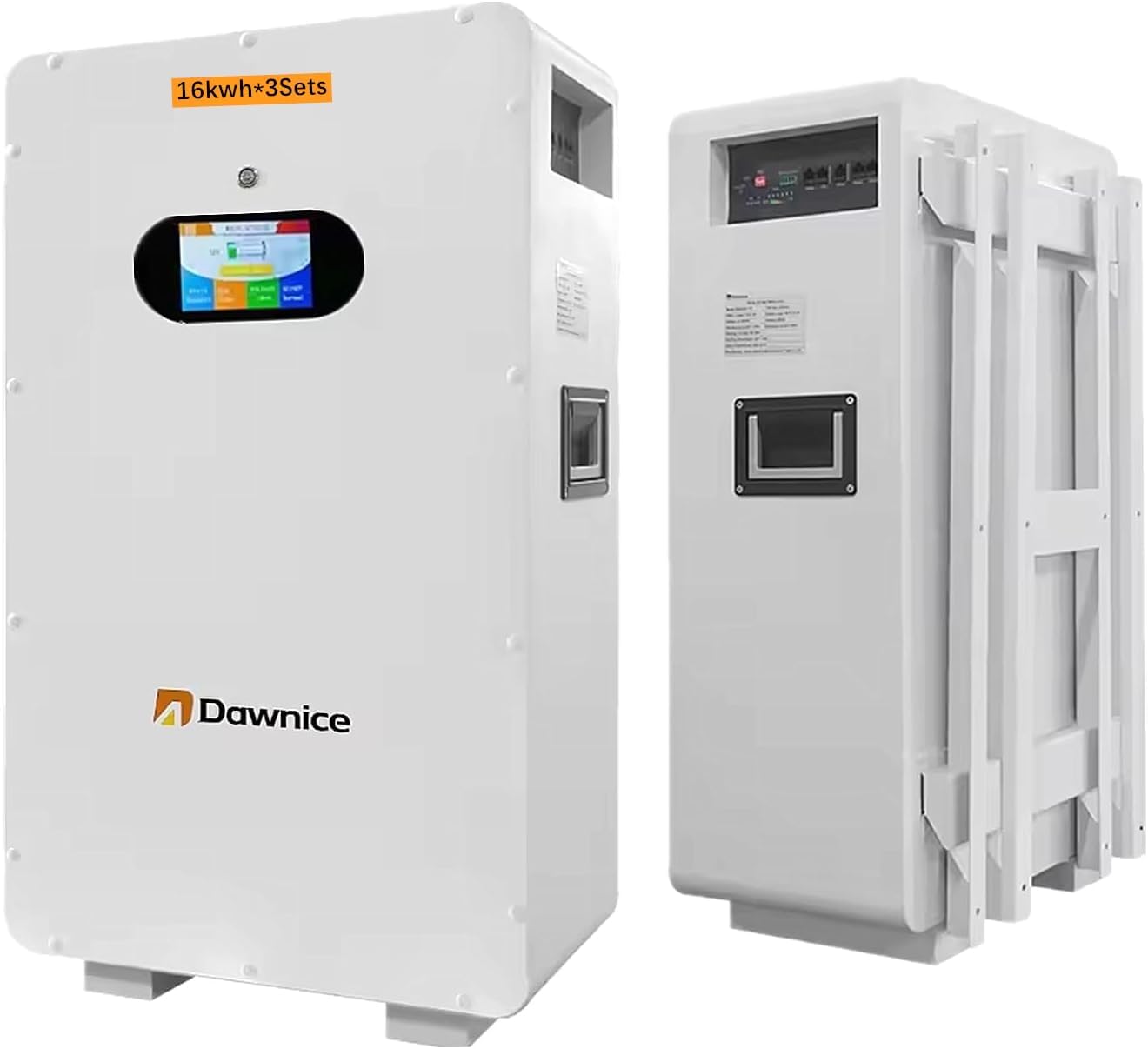
Image 1.1: Overview of the Dawnice 16kWh LiFePO4 Solar Battery System (one unit shown).
2. Safety Instructions
WARNING: Failure to follow these safety instructions may result in serious injury, death, or property damage.
- Qualified Personnel: Installation and maintenance must be performed by qualified and trained personnel only.
- Electrical Hazard: This system operates at high voltage. Do not open the battery enclosure or attempt to repair it. Risk of electric shock.
- Fire Hazard: Do not expose the battery to open flames, high temperatures, or direct sunlight for extended periods. Ensure adequate ventilation.
- Water Exposure: Do not immerse the battery in water or expose it to excessive moisture. The unit has an IP54 rating, protecting against splashes, but not submersion.
- Physical Damage: Avoid dropping, puncturing, or subjecting the battery to severe impact.
- Inverter Compatibility: This product must be used with a compatible inverter. Refer to your inverter's manual for connection guidelines.
- Ventilation: Ensure the installation area has proper ventilation to prevent heat buildup.
- Emergency Shutdown: Familiarize yourself with the emergency shutdown procedures for both the battery system and the connected inverter.
3. Package Contents
The Dawnice 48kWh Solar Battery System package includes the following components:
- Three (3) Dawnice 16kWh LiFePO4 Battery Units (Model: DWPF-LCT16N-3S)
- User Manual (this document)
- Mounting Brackets (for wall-mounted installation)
- Necessary connection cables (may vary, refer to packaging)
Inspect all components upon receipt for any signs of damage. Contact your supplier immediately if any items are missing or damaged.
4. Product Features
The Dawnice 16kWh LiFePO4 Solar Battery System incorporates advanced technology for reliable and efficient energy storage:
- High Capacity: Each unit provides 16kWh of energy storage (51.2V, 314Ah). The system can be expanded by paralleling up to 15 units for a total of 240kWh.
- Long Service Life: Utilizes Grade A LiFePO4 battery cells, offering over 6000 cycles at 25°C and 80% Depth of Discharge (DOD), resulting in a design life of over 15 years.
- Integrated BMS: A built-in 100A Battery Management System (BMS) protects against overcharging, over-discharging, over-current, overheating, and short circuits, ensuring safety and optimizing performance.
- Intelligent Monitoring: Monitor your solar system in real-time via a dedicated mobile application using Bluetooth connectivity.
- Smart LED Touchscreen: An intuitive LED touchscreen on the unit allows for direct management and checking of battery conditions and parameters.
- Flexible Installation: Designed for wall-mounted or ground-mounted installation. Features a fully removable bracket and freewheeling casters for ease of positioning.
- Robust Design: IP54 rated, providing protection against dust and splashing water.

Image 4.1: Key features including the removable bracket, smart LED touchscreen, and freewheeling casters.

Image 4.2: The LED touchscreen interface displaying BMS management system data and battery parameters.

Image 4.3: Mobile control features for viewing current data via Bluetooth and WiFi app.
5. Setup and Installation
Proper installation is crucial for the safety and performance of your battery system. Consult a qualified electrician or solar installer for assistance.
5.1 Site Selection
- Install the battery in a cool, dry, and well-ventilated area.
- Avoid direct sunlight, heat sources, and flammable materials.
- Ensure the mounting surface (wall or floor) can support the battery's weight (approximately 280 pounds per unit).
- Maintain adequate clearance around the unit for ventilation and access.
5.2 Mounting the Battery
The battery can be wall-mounted or ground-mounted. Use the provided brackets and hardware according to the installation guide included with your specific unit.
5.3 Electrical Connections
The Dawnice battery system requires connection to a compatible inverter. The system is designed to integrate with mainstream brand inverters available on the market.
- Inverter Connection: Connect the battery's positive and negative terminals to the corresponding DC input terminals on your inverter. Ensure correct polarity.
- Solar Panel Connection: Connect your solar panels to the solar charge controller input of your inverter.
- Grid/Generator Connection: Connect the inverter to the utility grid or a backup generator as per your system design.
- Load Connection: Connect your household appliances or loads to the AC output of the inverter.
- Communication: Establish communication between the battery and the inverter using the RS485 or CAN ports for optimal performance and monitoring.
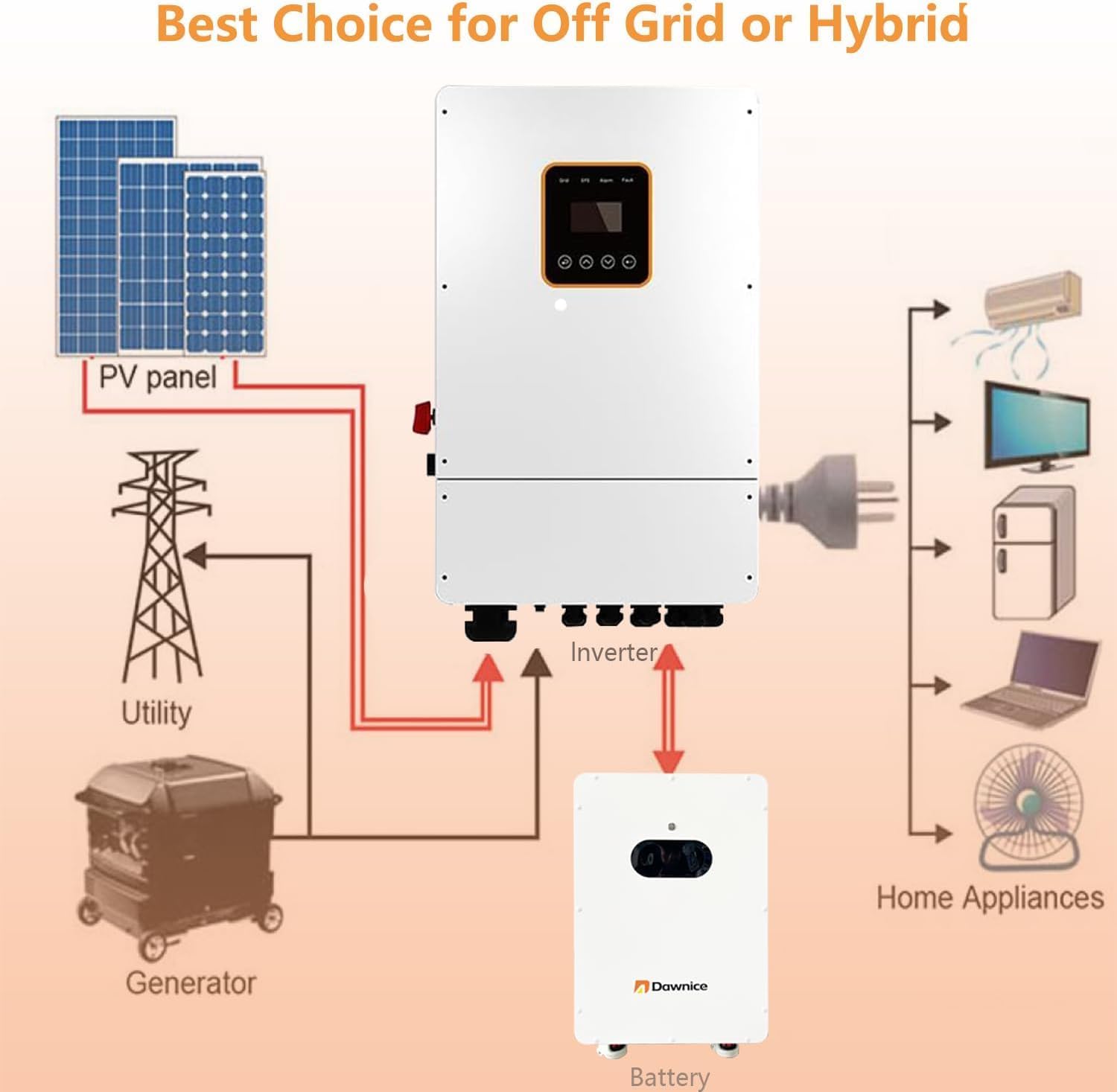
Image 5.1: Basic wiring diagram showing connections between PV panel, utility, generator, inverter, battery, and home appliances.

Image 5.2: Detailed wiring diagram illustrating connections for solar panels, wall-mounted battery, smart meter, and hybrid solar inverter.

Image 5.3: Close-up of the signal communication panel and battery power interface, showing various ports and indicators.
6. Operation
6.1 Initial Startup
- Ensure all electrical connections are secure and correct.
- Turn on the battery switch. The LED touchscreen should illuminate.
- Follow the startup procedure for your connected inverter.
6.2 Monitoring
The battery system can be monitored via the integrated LED touchscreen or through the mobile application.
- LED Touchscreen: Access real-time data such as State of Charge (SOC), voltage, current, and capacity directly on the unit's display.
- Mobile App: Download the Dawnice monitoring application to your smartphone or tablet. Connect via Bluetooth to view system status, historical data, and manage settings.
6.3 Parallel Operation
Multiple Dawnice 16kWh units can be connected in parallel to increase total energy storage capacity. Refer to the detailed wiring diagrams and communication protocols in the full installation guide for proper parallel setup.
7. Maintenance
The Dawnice LiFePO4 battery system is designed for minimal maintenance. However, regular checks are recommended to ensure optimal performance and longevity.
- Visual Inspection: Periodically inspect the battery units and connections for any signs of damage, corrosion, or loose wiring.
- Cleaning: Keep the battery units clean and free from dust and debris. Use a dry, soft cloth for cleaning. Do not use liquid cleaners.
- Ventilation: Ensure that ventilation openings are not obstructed.
- Temperature: Operate the battery within its specified temperature range to maximize lifespan.
- Firmware Updates: Check for any available firmware updates for the battery management system via the mobile app or manufacturer's website.
8. Troubleshooting
If you encounter issues with your Dawnice battery system, refer to the following general troubleshooting steps. For complex problems, contact technical support.
- No Power Output:
- Check if the battery switch is ON.
- Verify all cable connections are secure.
- Check the inverter status and error codes.
- Ensure the battery is sufficiently charged. - Abnormal Readings on Display/App:
- Restart the battery unit and the monitoring app.
- Ensure Bluetooth connection is stable.
- If issues persist, record the readings and contact support. - Overheating:
- Ensure adequate ventilation around the battery units.
- Check ambient temperature. If operating in extreme heat, reduce load or improve cooling. - BMS Protection Activated:
- The BMS will activate protection in case of overcharge, over-discharge, over-current, or high/low temperature. Identify the cause and rectify it. The system may automatically reset once conditions return to normal.
9. Specifications
Detailed technical specifications for the Dawnice 16kWh LiFePO4 Battery Module (DWPF-LCT16N-3S):

Image 9.1: Table showing performance and mechanical specifications for various Dawnice battery modules, including the 16kWh model.
| Specification | Value |
|---|---|
| Model | DWPF-LCT16N-3S |
| Nominal Voltage | 51.2 Volts |
| Capacity (Ah) | 314 Ah |
| Rated Energy | 16.08 kWh |
| Max. Charge/Discharge Current | 150 A |
| Voltage Range | 44.8 - 57.6 V |
| Scalability | Up to 15 units parallel |
| Communication | CAN/RS485 |
| Cycle Life (@25°C, 80% DOD) | ≥6000 Cycles |
| Design Life | ≥15 Years (25°C) |
| Item Weight (per unit) | 280 pounds (approx. 127 kg) |
| Product Dimensions (L x W x H) | 19.69 x 11.81 x 31.5 inches (approx. 500 x 300 x 800 mm) |
| Installation Mode | Wall / Ground-mounted |
| IP Grade | IP54 |
| Battery Cell Composition | Lithium Iron Phosphate (LiFePO4) |
10. Warranty and Support
Dawnice is committed to providing high-quality products and customer service.
- Warranty: Your Dawnice 16kWh LiFePO4 Solar Battery System comes with a 10-Year Limited Warranty. Please retain your proof of purchase.
- Technical Support: Lifetime technical support is provided for this product.
- Contact: For any questions, technical assistance, or warranty claims, please contact Dawnice customer support through the official website or your point of purchase.


