
1. Product Overview
The Rraycom S-W1B-SP is a 2K solar-powered wireless outdoor security camera designed for comprehensive outdoor surveillance. It features dual-band Wi-Fi connectivity (2.4G and 5G), a built-in solar panel for continuous power, advanced human detection, color night vision, two-way audio, and compatibility with Amazon Alexa.

Image: Rraycom S-W1B-SP Solar Security Camera with smartphone app interface.
2. What's in the Box
- Rraycom S-W1B-SP Security Camera with integrated Solar Panel
- Rechargeable Battery (pre-installed)
- Mount & Screws Set
- USB Cable (for initial charging)
- User Manual

Image: Contents of the Rraycom S-W1B-SP security camera package, including camera, solar panel, and accessories.
3. Setup Guide
3.1 Initial Charging
Before installation, fully charge the camera using the provided USB cable. Connect the USB-C end to the camera's charging port (located under the rubber cover at the bottom) and the USB-A end to a standard USB power adapter (not included).
3.2 App Installation and Pairing
- Download the O-Kam Pro app from your smartphone's app store.
- Create an account and log in.
- Follow the in-app instructions to add a new device. The camera supports Bluetooth pairing for easy one-touch setup.
- Select your 2.4G or 5G Wi-Fi network and enter the password.

Image: Screenshots showing the O-Kam Pro app interface for easy Bluetooth setup.
3.3 Mounting the Camera
Choose a location that receives ample sunlight for the solar panel and provides the desired surveillance view. Use the provided mounting bracket and screws to securely attach the camera to a wall or other suitable surface. The camera is IP65 waterproof, ensuring reliable performance in various weather conditions.

Image: Rraycom S-W1B-SP camera mounted outdoors, demonstrating its IP65 waterproof rating.
4. Operating Instructions
4.1 Live View and Recording
Access the live feed through the O-Kam Pro app. The camera captures video in 2K QHD resolution. You can manually record or set up motion-triggered recordings.

Image: Comparison of 2K QHD resolution versus 720P resolution from the security camera.
4.2 Motion Detection and Alerts
The camera features advanced human detection and PIR motion detection. Configure activity zones within the app to minimize false alarms. Receive instant notifications on your smartphone when motion is detected.

Image: AI human detection feature of the Rraycom security camera.
4.3 Night Vision
The camera offers full-color night vision, providing clear and detailed footage even in low-light conditions. It also supports traditional infrared night vision.
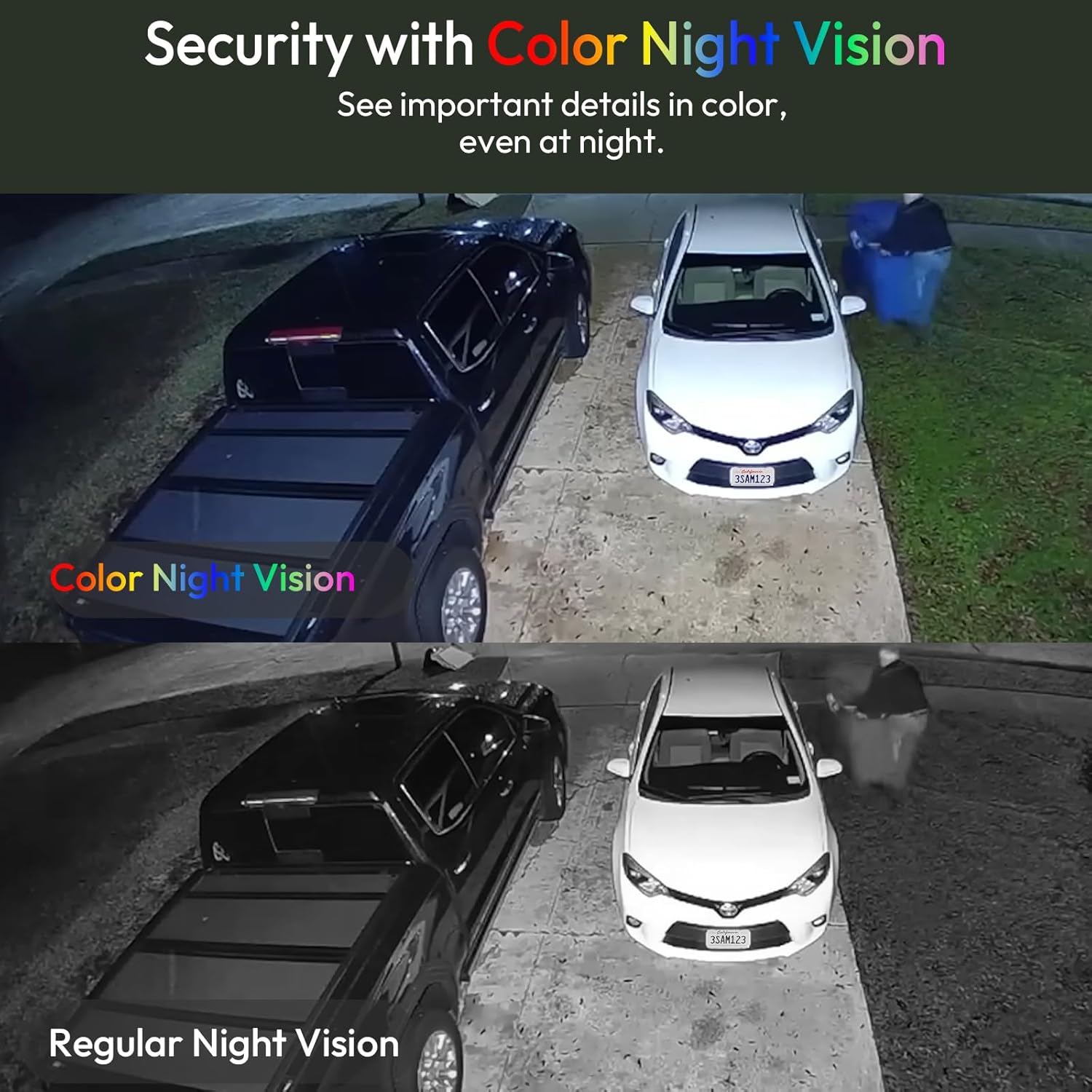
Image: Comparison of color night vision versus regular night vision from the security camera.
4.4 Two-Way Audio and Siren
Utilize the built-in microphone and speaker for two-way communication. You can speak to visitors or deter intruders. The camera also features a siren alarm that can be activated manually or automatically upon detection.

Image: Rraycom S-W1B-SP camera demonstrating two-way talk functionality.
Video: Demonstration of the two-way audio function, allowing communication through the camera.
Video: Demonstration of the siren alarm feature for deterrence.
4.5 Storage Options
The camera supports both cloud storage and local SD card storage (up to 256GB, SD card not included). Enjoy free 1-day loop cloud storage for motion-triggered events (6-second clips, retained for 7 days).

Image: Diagram illustrating cloud and SD card storage options for the camera.
4.6 Alexa Integration
The camera is compatible with Amazon Alexa. You can use voice commands to view the live feed on compatible Alexa devices (e.g., "Alexa, show me the backyard").

Image: Amazon Alexa device displaying the live feed from the Rraycom security camera.
5. Maintenance
- Solar Panel: Regularly clean the solar panel surface to ensure maximum charging efficiency. Dust, dirt, or debris can reduce its effectiveness.
- Lens: Keep the camera lens clean for optimal image clarity. Use a soft, lint-free cloth to gently wipe away any smudges or dirt.
- Firmware Updates: Check the O-Kam Pro app periodically for firmware updates to ensure your camera has the latest features and security enhancements.
- Battery Health: While solar-powered, monitor battery levels in the app, especially during prolonged periods of low sunlight. Recharge via USB if necessary.
6. Troubleshooting
- Camera Not Connecting to Wi-Fi:
- Ensure your Wi-Fi network is 2.4GHz or 5GHz and the password is correct.
- Place the camera closer to your Wi-Fi router during setup.
- Reset the camera using the reset button (under the rubber cover) and try pairing again.
- Poor Video Quality:
- Check your Wi-Fi signal strength in the camera's location.
- Ensure the camera lens is clean and free from obstructions.
- Adjust video resolution settings in the app if your network bandwidth is limited.
- Battery Not Charging:
- Verify the solar panel is receiving direct sunlight for several hours daily.
- Clean the solar panel surface.
- If the issue persists, charge the camera directly using the USB cable.
- False Motion Alerts:
- Adjust the motion detection sensitivity in the app.
- Configure specific activity zones to exclude areas with frequent irrelevant motion (e.g., swaying trees).
7. Specifications
| Model Name | S-W1B-SP |
| Video Capture Resolution | 2K QHD (2304 x 1296 pixels) |
| Effective Still Resolution | 3 MP |
| Connectivity Technology | Wireless (5G/2.4G Wi-Fi, Bluetooth) |
| Power Source | Solar Powered, Rechargeable Battery |
| Indoor/Outdoor Usage | Outdoor |
| Water Resistance Level | IP65 Waterproof |
| Viewing Angle | 130 Degrees |
| Night Vision Range | 33 Feet |
| Compatible Devices | Amazon Alexa, Smartphone |
| Storage Options | Cloud Storage, Micro SD Card (up to 256GB) |
| Item Dimensions (L x W x H) | 3.7 x 4 x 4.7 inches |
| Item Weight | 1.01 pounds |
8. Warranty and Support
Your Rraycom S-W1B-SP camera comes with a warranty as detailed on the included warranty card. For technical support, troubleshooting assistance, or warranty claims, please refer to the contact information provided in your user manual or visit the official Rraycom website.