
Sky-Watcher S30905
Sky-Watcher Wave 150i Strainwave Mount Instruction Manual
Model: S30905
Brand: Sky-Watcher
1. Introduction
The Sky-Watcher 150i Strain Wave Mount is a revolutionary portable equatorial and alt-azimuth tracking system. Built with advanced strain wave drive technology, it's a lightweight GoTo mount head offering precision and payload flexibility usually seen in larger, heavier systems. Ideal for imagers or visual observers seeking a streamlined setup without sacrificing performance, the Wave 150i delivers impressive capability in a compact, 12.8-pound package.

Figure 1: The Sky-Watcher Wave 150i Strainwave Mount, showcasing its compact design and the Sky-Watcher logo.
2. Key Features
The Wave 150i Strainwave Mount incorporates several advanced features designed for superior astronomical observation and imaging:
- High Torque, Smooth Tracking: Utilizes advanced Strain Wave Drive technology for precise and consistent tracking.
- Dual Modes: Operates in both Equatorial (EQ) and Alt-Azimuth (AZ) modes with defined RA/Dec Home Positions.
- Payload Capacity: Supports up to 33 lbs (15 kg) without counterweight, and up to 55 lbs (25 kg) with an optional counterweight.
- Lightweight Design: The mount head weighs only 12.8 lbs (5.8 kg) for enhanced portability.
- Integrated Cable Management: Features a powered hub for streamlined cable routing.
- OTA Balancing: Unique capability for Optical Tube Assembly (OTA) balancing in both Right Ascension (RA) and Declination (Dec).
- Wireless Connectivity: Built-in Wi-Fi and Bluetooth for convenient control.
- Satellite Tracking: Capable of high-speed slewing up to 10 degrees per second for satellite tracking.
- Broad Compatibility: Compatible with popular control systems such as SynScan, ASIAir, StellarMate, and more.
- Wide Latitude Range: Operates effectively across a latitude range of 0 to 90 degrees.

Figure 2: A detailed view of the rear panel of the Wave 150i mount, highlighting the integrated power hub and various connectivity ports for accessories and control.
3. Setup Guide
Follow these steps for the initial setup of your Wave 150i Strainwave Mount:
- Unpacking: Carefully remove all components from the packaging and verify against the packing list.
- Mounting to Tripod: Securely attach the Wave 150i mount head to a sturdy astronomical tripod using the appropriate mounting screws. Ensure the mount is level.
- Power Connection: Connect the provided power supply to the mount's power input port.
- Accessory Connection: Connect any necessary accessories such as guide cameras, focusers, or other devices to the integrated powered hub ports.
- Optical Tube Assembly (OTA) Attachment: Attach your telescope's optical tube assembly to the mount's dovetail saddle. Ensure it is securely fastened.
- Balancing: Perform initial balancing of the OTA in both RA and Dec axes. While the strainwave drive is robust, proper balancing improves tracking accuracy and reduces motor strain.
- Initial Alignment: For equatorial tracking, perform a polar alignment. For alt-azimuth mode, a simple two-star alignment is typically sufficient. Refer to your specific control software (e.g., SynScan) for detailed alignment procedures.
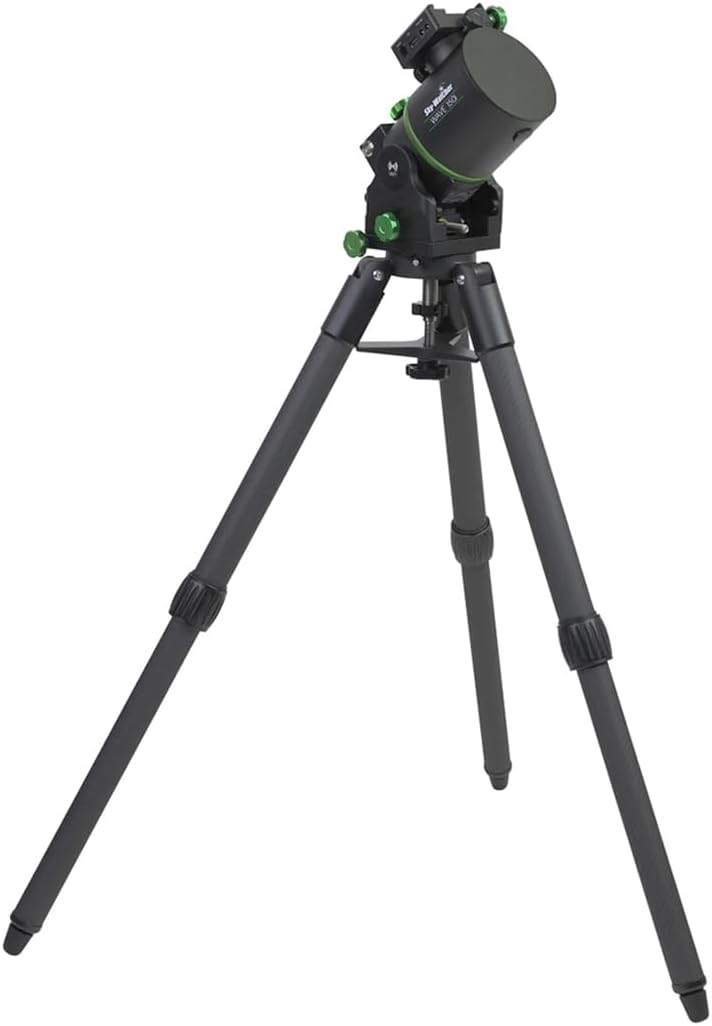
Figure 3: The Wave 150i mount shown mounted on a compatible tripod, illustrating its stable base for astronomical observations or imaging.
4. Operating Instructions
Operating the Wave 150i mount involves utilizing its advanced GoTo capabilities and connectivity features:
- Power On: Ensure the mount is powered on. The status indicator lights will confirm readiness.
- Connect Wirelessly: Use a Wi-Fi or Bluetooth enabled device (smartphone, tablet, computer) to connect to the mount. The mount's Wi-Fi network name will typically be "Sky-Watcher_WAVE_XXXX".
- Control Software: Launch your preferred control application (e.g., SynScan Pro App, ASIAir, StellarMate).
- Mode Selection: Select either Equatorial (EQ) or Alt-Azimuth (AZ) mode within the software, depending on your observation or imaging requirements.
- GoTo Functionality: Use the software to select celestial objects from the database. The mount will automatically slew to the target.
- Tracking: Once an object is acquired, the mount will automatically track its movement across the sky, compensating for Earth's rotation.
- Manual Adjustments: Fine adjustments can be made using the software's directional controls or, if applicable, a connected hand controller.
- OTA Balancing (Advanced): The Wave 150i allows for precise OTA balancing in both RA and Dec, which can be fine-tuned through the control software for optimal performance.

Figure 4: The Wave 150i mount supporting a telescope, demonstrating its capacity to hold optical tube assemblies for tracking and GoTo operations.
5. Maintenance
Proper maintenance ensures the longevity and optimal performance of your Wave 150i Strainwave Mount:
- Cleaning: Use a soft, dry, lint-free cloth to clean the exterior surfaces of the mount. Avoid abrasive cleaners or solvents.
- Dust Protection: When not in use, store the mount in a clean, dry environment, preferably covered, to protect it from dust and moisture.
- Environmental Conditions: Avoid exposing the mount to extreme temperatures, high humidity, or direct sunlight for prolonged periods.
- Cable Inspection: Periodically inspect all cables for signs of wear or damage. Replace any damaged cables immediately.
- Firmware Updates: Check the Sky-Watcher official website periodically for firmware updates. Keeping the firmware current can improve performance and add new features.
- Avoid Overloading: Do not exceed the specified payload capacity of the mount to prevent damage to the drive system.
6. Troubleshooting
This section addresses common issues you might encounter with your Wave 150i mount:
| Problem | Possible Cause | Solution |
|---|---|---|
| Mount does not power on. | Power cable disconnected; faulty power supply; power outlet issue. | Check power cable connections. Ensure power supply is working. Try a different power outlet. |
| Cannot connect via Wi-Fi/Bluetooth. | Mount's Wi-Fi/Bluetooth off; incorrect network selected; interference. | Ensure mount is powered on. Verify correct network name. Move closer to the mount or reduce interference. Restart mount and device. |
| Inaccurate tracking or GoTo. | Poor alignment; unbalanced OTA; incorrect location/time settings. | Perform a precise polar alignment (EQ mode) or multi-star alignment (AZ mode). Re-balance the OTA. Verify location, date, and time settings in your control software. |
| Motors make unusual noise. | Overloaded mount; mechanical obstruction. | Reduce payload if exceeding capacity. Check for any physical obstructions preventing smooth movement. |
7. Technical Specifications
| Specification | Detail |
|---|---|
| Product Dimensions | 9.92 x 7.24 x 6.22 inches |
| Item Weight | 22 pounds |
| ASIN | B0DN6SX3S4 |
| Item Model Number | S30905 |
| Color | Metallic Black |
| Manufacturer | S30905 |
| Date First Available | November 14, 2024 |
| Compatible Devices | Camcorders, Cameras |
| Mounting Type | Surface Mount |
| Special Feature | Lightweight |
| Payload Capacity (without CW) | 33 lbs (15 kg) |
| Payload Capacity (with CW) | 55 lbs (25 kg) |
| Mount Head Weight | 12.8 lbs (5.8 kg) |
| Latitude Range | 0 to 90 degrees |
8. Warranty and Support
The Sky-Watcher Wave 150i Strainwave Mount is covered by a manufacturer's warranty. For specific warranty terms and conditions, please refer to the documentation included with your product or visit the official Sky-Watcher website.
For technical support, service, or inquiries regarding your product, please contact Sky-Watcher customer service through their official channels. Always provide your product model number (S30905) and ASIN (B0DN6SX3S4) when seeking support.
You can find more information and support resources on the Sky-Watcher Store on Amazon.
Related documentsS30905

Ask a question about this manual
Ask about setup, troubleshooting, compatibility, parts, safety, or missing instructions. Manuals+ will review the question and use this page’s manual context to help answer it.