
EUHOMY PAC002-10KWH-USZX-AZ
EUHOMY 10,000 BTU Portable Air Conditioner User Manual
Model: PAC002-10KWH-USZX-AZ | Brand: EUHOMY
Introduction
This manual provides comprehensive instructions for the safe and efficient operation, installation, and maintenance of your EUHOMY 10,000 BTU Portable Air Conditioner. This versatile unit offers 3-in-1 functionality, serving as an air conditioner, dehumidifier, and fan, designed to provide optimal comfort in spaces up to 450 sq. ft.
Please read this manual thoroughly before using the appliance and retain it for future reference.
Important Safety Information
Always follow basic safety precautions when using electrical appliances to reduce the risk of fire, electric shock, or injury.
- Ensure the unit is placed on a stable, level surface.
- Do not operate the unit with a damaged cord or plug.
- Keep the air intake and exhaust vents clear of obstructions.
- Do not insert fingers or foreign objects into the air vents.
- Unplug the unit before cleaning or performing any maintenance.
- This appliance is for indoor use only.
Product Overview
The EUHOMY Portable Air Conditioner is designed for ease of use and mobility. Below are the main components and their descriptions.

Figure 1: Main unit and included accessories.

Figure 2: Contents of the product package.
Components List:
- AC Unit: The main portable air conditioner unit.
- Window Kit (Windows Boards): Adjustable panels for window installation.
- Exhaust Hose: Flexible hose to vent hot air outside.
- Drainage Pipe: For continuous drainage in dehumidifier mode.
- Hose Coupler To Machine: Connects exhaust hose to the AC unit.
- Hose Coupler: Connects exhaust hose to the window kit.
- Remote Control: For convenient operation from a distance.
Setup and Installation
Follow these steps to set up your portable air conditioner for optimal performance.
Window Kit Installation:
Video: Demonstrates the installation process for the window kit and exhaust hose.

Figure 3: Step-by-step guide for window kit and hose installation.
- Prepare the Window Kit: Adjust the window kit panels to fit the length of your window opening. Secure them with the provided screws.
- Install Window Kit: Place the assembled window kit into the window track and close the window securely against it.
- Connect Exhaust Hose to Unit: Attach the hose coupler to one end of the exhaust hose, then connect this assembly to the exhaust port on the back of the AC unit.
- Connect Exhaust Hose to Window Kit: Attach the other hose coupler to the remaining end of the exhaust hose, then connect this to the opening in the window kit. Ensure all connections are secure to prevent air leakage.
Important Note: The window kit is designed for standard sliding windows. If your window falls between 25.6 inches and 36 inches, you may need to trim the mounting kit for a proper fit and seal.

Figure 4: Examples of suitable and unsuitable window types.
Operating Instructions
Your EUHOMY Portable Air Conditioner can be operated using the control panel on top of the unit or the included remote control.
Video: Overview of the EUHOMY Portable Air Conditioner's features and operation.
Control Panel:
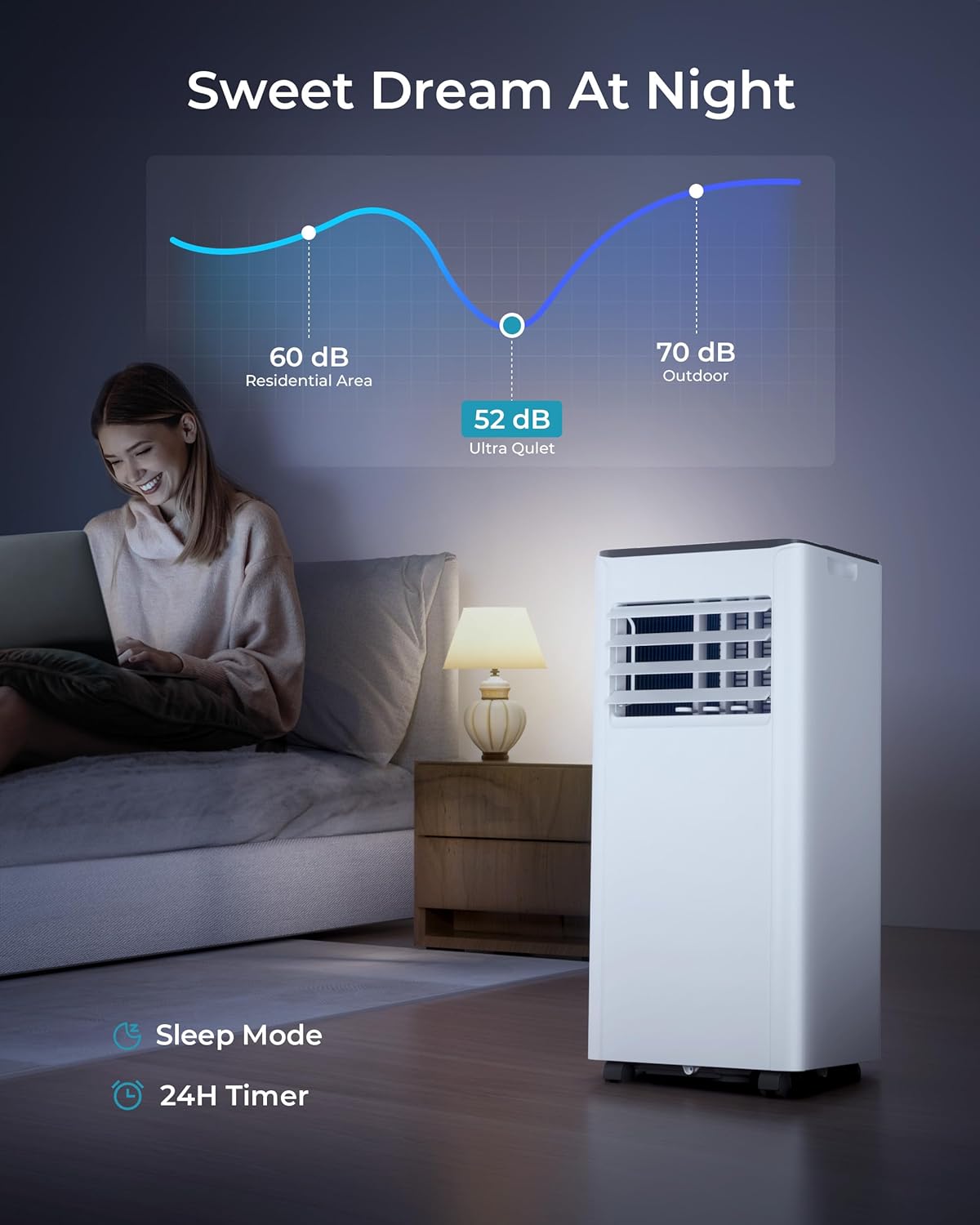
Figure 5: Detailed view of the control panel.
The control panel features an LED display and touch-sensitive buttons for various functions:
- Power: Turns the unit on or off.
- Mode: Cycles through Cooling, Dehumidifier, and Fan modes.
- Up/Down Arrows: Adjusts temperature settings or timer duration.
- Speed: Selects fan speed (Low/High).
- Timer: Sets the auto-on or auto-off timer (up to 24 hours).
Remote Control:

Figure 6: Remote control for convenient operation.
The remote control allows you to operate all functions of the air conditioner from up to 23 feet away. It includes buttons for power, mode selection, temperature adjustment, fan speed, and timer settings. You can also switch between Celsius and Fahrenheit temperature units and activate sleep mode directly from the remote.
Operating Modes:
- Cool Mode: Provides powerful cooling with a temperature range of 61°F to 90°F.
- Dehumidifier Mode: Effectively removes up to 51 pints of moisture per day. Ensure the drainage pipe is connected for continuous operation in this mode.
- Fan Mode: Circulates air without cooling, offering two wind speeds (low/high).
Special Features:
- Sleep Mode: Optimizes settings for quiet operation (52-54 dB) and dims the display for comfortable sleep.
- 24-Hour Timer: Allows you to program the unit to turn on or off at a preset time. Features an auto-restart function.
- Adjustable Louvers: Manually adjust the fan blades to direct airflow as desired.
Maintenance
Regular maintenance ensures the longevity and efficient performance of your air conditioner.
Filter Cleaning:
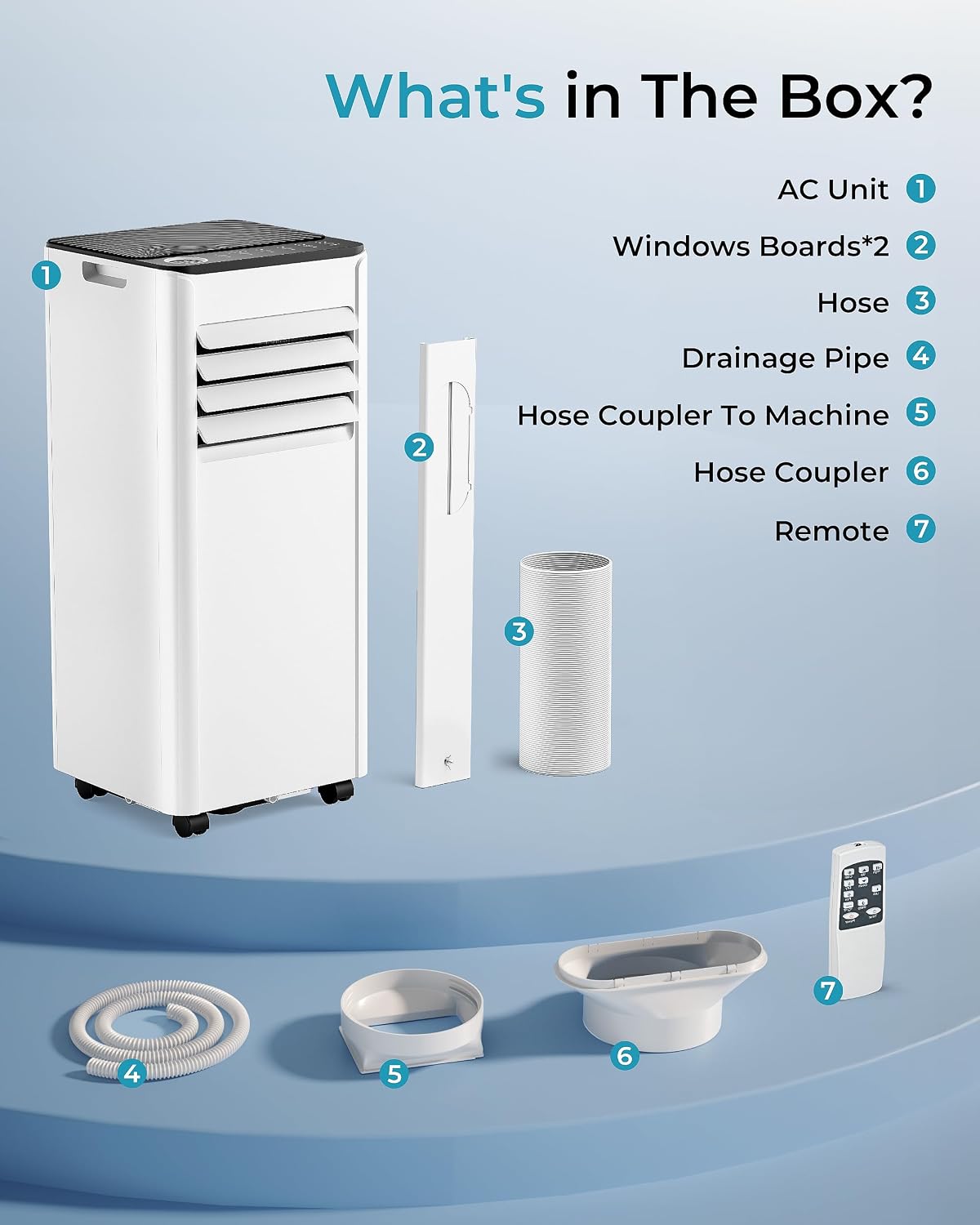
Figure 7: Removable and washable air filter.
The air filter should be cleaned regularly (every two weeks or more often depending on usage) to maintain cooling efficiency.
- Unplug the unit from the power outlet.
- Remove the air filter from the back of the unit.
- Wash the filter with warm, soapy water. Rinse thoroughly.
- Allow the filter to air dry completely before reinserting it into the unit.
Drainage:
In dehumidifier mode or high humidity conditions, water will accumulate. The unit has drainage outlets for continuous drainage.
- Connect the provided drainage pipe to the designated drainage outlet (middle or bottom) on the back of the unit.
- Ensure the pipe is directed to a suitable drain or container to prevent water overflow.
Troubleshooting
If you encounter issues with your air conditioner, refer to the following common problems and solutions:
| Problem | Possible Cause | Solution |
|---|---|---|
| Unit does not turn on. | No power, power cord unplugged, circuit breaker tripped. | Check power connection, reset circuit breaker. |
| Unit does not cool effectively. | Dirty air filter, blocked air intake/exhaust, room too large, doors/windows open. | Clean air filter, clear obstructions, ensure room size is within capacity, close doors/windows. |
| Water leakage. | Drainage pipe not connected properly or clogged, water tank full (if not using continuous drain). | Ensure drainage pipe is secure and clear, empty water tank if applicable. |
| Noisy operation. | Unit not on a level surface, fan speed too high. | Place unit on a level surface, reduce fan speed. |
If the problem persists after attempting these solutions, please contact customer support.
Technical Specifications
| Feature | Specification |
|---|---|
| Model Number | PAC002-10KWH-USZX-AZ |
| Cooling Capacity | 10,000 BTU (ASHRAE) / 6,000 BTU (SACC) |
| Coverage Area | Up to 450 sq. ft. |
| Power Source | Corded Electric |
| Voltage | 115 Volts |
| Wattage | 1050 watts |
| Noise Level | 52 dB |
| Refrigerant | R-32 |
| Product Dimensions | 11.9 x 11.4 x 26.5 inches |
| Item Weight | 46.3 pounds |
| Color | White |
| Material | Plastic |
Warranty and Support
Your EUHOMY Portable Air Conditioner comes with a 1-Year Warranty from the date of purchase, covering defects in materials and workmanship under normal use.
For detailed warranty information, troubleshooting beyond this manual, or to purchase replacement parts, please refer to the official user manual or contact EUHOMY customer support.
You can access the official User Guide and User Manual PDFs for more in-depth information:
Related documentsPAC002-10KWH-USZX-AZ


Ask a question about this manual
Ask about setup, troubleshooting, compatibility, parts, safety, or missing instructions. Manuals+ will review the question and use this page’s manual context to help answer it.