
HOOBRO BF11WJ01
HOOBRO File Cabinet BF11WJ01 Instruction Manual
Model: BF11WJ01
Introduction
This manual provides detailed instructions for the assembly, operation, and maintenance of your HOOBRO BF11WJ01 File Cabinet. Designed for home and office use, this rolling file cart offers efficient storage for A4 and Letter-sized documents. Please read these instructions carefully before assembly and use to ensure proper function and longevity of your product.
Safety Information
Important Safety Guidelines:
- When stacking multiple units, always use the provided lever locks on the back to ensure a secure fit. This prevents tipping and ensures stability.
- Maintain stability and balance when using the cabinet to avoid potential injuries.
- Do not overload the drawer or the top surface beyond the recommended weight capacity (15 pounds).
- Keep small parts away from children during assembly.
- Ensure all screws and fasteners are tightened securely before use. Periodically check and re-tighten if necessary.
Package Contents
Before beginning assembly, verify that all components listed below are present in your package:
- 1 x File Cabinet Unit
- 5 x Universal Casters (wheels)
- 4 x Adjustable Feet
- 1 x Accessory Kit (screws, tools, etc.)
- 1 x Illustrated Instructions Manual
Assembly Instructions
Follow these steps for proper assembly. It is recommended to assemble the unit on a soft, clean surface to prevent scratches.
Step 1: Prepare Components
Unpack all components and identify them using the included parts list. Ensure all parts are present and undamaged.
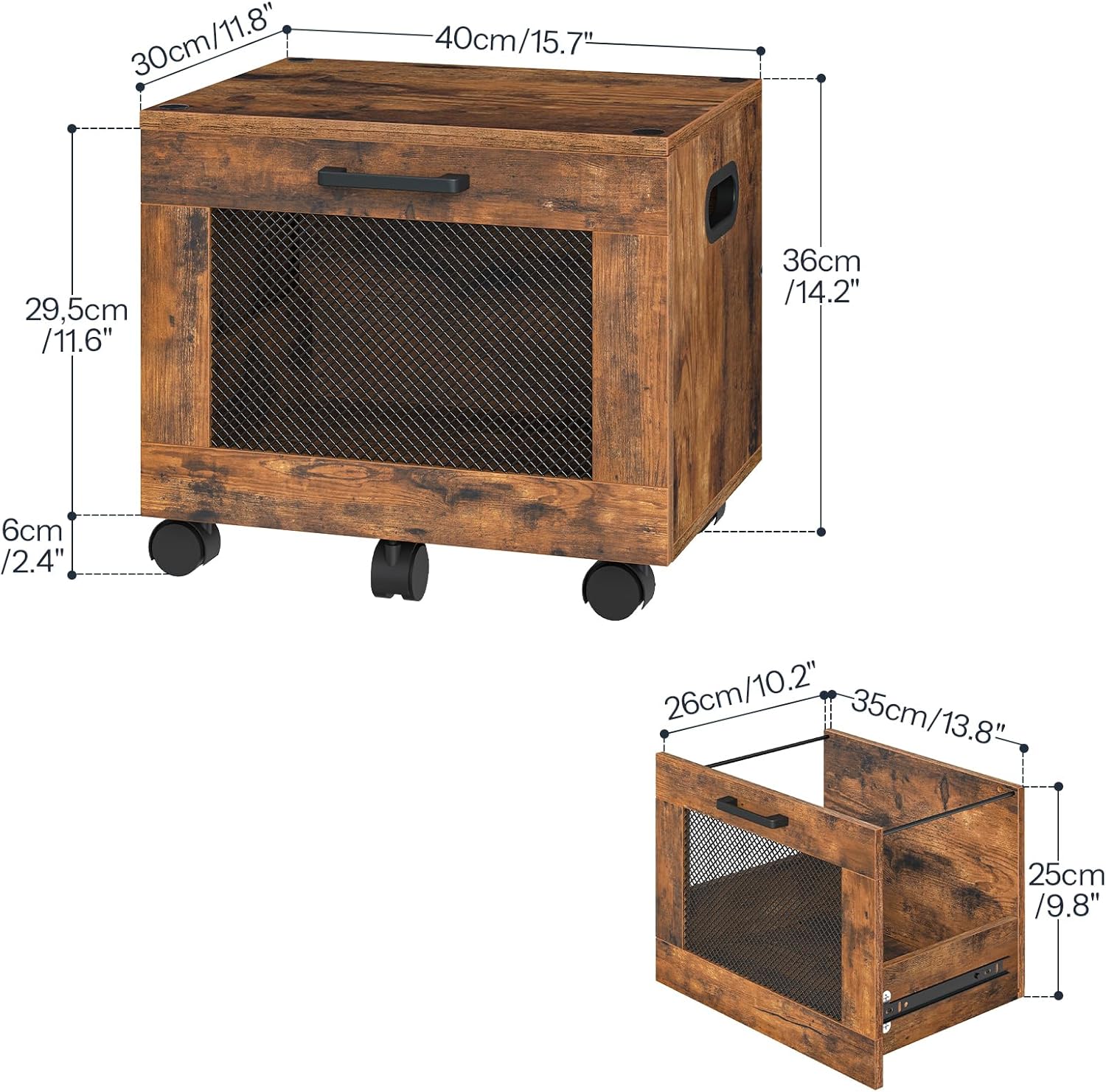
Image: Overview of cabinet dimensions and components.
Step 2: Assemble the Cabinet Frame
Connect the side panels to the top and bottom panels using the provided screws and fasteners. Ensure all connections are secure.
Step 3: Install Drawer Slides
Attach the drawer slides to the interior of the cabinet frame and to the sides of the drawer. Ensure they are aligned correctly for smooth operation.

Image: Detail of smooth sliding tracks.
Step 4: Assemble the Drawer
Assemble the drawer components, including the front panel with the mesh design and the handle. Insert the adjustable hanging rod into the designated slots.

Image: Placing a file into the drawer.
Step 5: Install Casters or Adjustable Feet
Decide whether you prefer a mobile or stationary setup. Attach the five universal casters (two with locks) for mobility, or the four adjustable feet for a stationary unit, to the bottom of the cabinet.

Image: Options for mobile casters or stationary feet.
Step 6: Insert Drawer into Cabinet
Carefully slide the assembled drawer onto the installed drawer slides within the cabinet frame.
Step 7: Stacking Multiple Units (Optional)
If stacking multiple units, align the top unit with the bottom unit's top slot design. Secure them using the lever locks on the back for stability.

Image: File cabinet in use under a desk, demonstrating its compact size and functionality.
Operating Instructions
Adjusting File Bar for A4 and Letter Sizes
The drawer features an adjustable hanging rod to accommodate both A4 and Letter-sized documents. To adjust, simply reposition the rod into the appropriate slots located on the inside of the drawer sides.

Image: Adjustable file bar for A4 and Letter sizes.
Using Mobile Casters
If you have installed the casters, the cabinet can be easily moved. Two of the casters are lockable. To secure the cabinet in place, press down on the locking mechanism on these two casters. To unlock and move, lift the locking mechanism.
Drawer Operation
The drawer is designed with premium slides for smooth opening and closing. Pull the handle gently to open and push to close. Avoid forcing the drawer if it encounters resistance.
Maintenance
To ensure the longevity and appearance of your file cabinet, follow these maintenance guidelines:
- Cleaning: Wipe surfaces with a soft, damp cloth. Avoid harsh chemicals or abrasive cleaners that may damage the finish.
- Dusting: Regularly dust the cabinet with a dry, soft cloth.
- Hardware: Periodically check all screws and fasteners to ensure they remain tight. Re-tighten if any looseness is detected.
- Drawer Slides: If the drawer movement becomes stiff, a small amount of silicone-based lubricant can be applied to the slides.
- Avoid Moisture: Protect the cabinet from excessive moisture and direct sunlight to prevent warping or fading.
Troubleshooting
If you encounter issues with your HOOBRO File Cabinet, refer to the following common solutions:
| Problem | Possible Cause | Solution |
|---|---|---|
| Drawer does not slide smoothly. | Misaligned drawer slides, loose screws, or debris in tracks. | Check that drawer slides are correctly installed and screws are tight. Clean tracks of any debris. Apply silicone lubricant if necessary. |
| Cabinet feels unstable or wobbly. | Loose assembly screws or uneven floor. | Ensure all assembly screws are fully tightened. If using adjustable feet, adjust them to compensate for uneven flooring. If stacking, ensure lever locks are engaged. |
| Missing parts during assembly. | Packaging error. | Contact HOOBRO customer support with your purchase details and a list of missing parts. |
Specifications
- Brand: HOOBRO
- Model Number: BF11WJ01
- Color: Rustic Brown + Black
- Material: Engineered Wood
- Product Dimensions (D x W x H): 11.8" x 15.7" x 14.2" (30cm x 40cm x 36cm)
- Item Weight: 15 pounds
- Weight Capacity (Top Surface): 15 pounds (approximate)
- Number of Drawers: 1
- Mobility: 5 Universal Casters (2 lockable) or 4 Adjustable Feet
- File Compatibility: A4, Letter
Official Product Video
Video: HOOBRO File Cabinet, Rolling File Cart, Under Desk Small Filing Cabinet. This video demonstrates the features and functionality of the file cabinet.
Warranty and Support
HOOBRO products are designed for quality and durability. For warranty information, technical support, or to inquire about replacement parts, please contact HOOBRO customer service through their official website or the retailer where the product was purchased. Please have your model number (BF11WJ01) and purchase date available when contacting support.
For more information, visit the HOOBRO Store on Amazon.
Ask a question about this manual
Ask about setup, troubleshooting, compatibility, parts, safety, or missing instructions. Manuals+ will review the question and use this page’s manual context to help answer it.