
Soundcore A3388
Contents
Soundcore AeroClip Open-Ear Earbuds User Manual
Model: A3388 | Brand: Soundcore
Introduction
The Soundcore AeroClip Open-Ear Earbuds are designed to provide a comfortable and immersive audio experience. Featuring an open-ear, clip-on design, these earbuds allow you to enjoy high-quality sound while remaining aware of your surroundings. They incorporate advanced technology for clear calls and powerful bass, ensuring a versatile listening experience for various activities.
- Hi-Res Audio, Rich Bass: Enjoy Hi-Res sound and rich bass with in-ear-level quality. Advanced virtual bass technology enriches the lows, complemented by a 12mm titanium-coated driver for clear listening.
- Adaptive Ultra-Comfort: Designed to relieve in-ear discomfort, soundcore AeroClip open-ear clip-on earbuds let you enjoy music pressure-free for every outdoor venture.
- Flexible, Secure Fit: Soundcore AeroClip clip-on earbuds boast an adaptive open-ring design that endures 20,000 bends. Feather-light and flexible, they stay secure for all-day wear.
- AI-Boosted Clear Calls: With 4 beamforming mics, wind-blocking meshes, and advanced AI, experience flawless calls, even in the busiest street.
- Effortlessly Chic: Your style, your vibe. In three vibrant looks, these open-ear clip-on earbuds deliver incredible audio with a touch of flair.
What's in the Box
Verify that all components are present in your Soundcore AeroClip package:
- Soundcore AeroClip Earbuds (x1 pair)
- Charging Case (x1)
- M/L Ear Grips (x2 pairs)
- USB-C Cable (x1)

Image: Soundcore AeroClip package contents.
Video: "How to Use soundcore AeroClip" - This video demonstrates the unboxing and initial setup of the Soundcore AeroClip earbuds.
Setup
Charging
Before first use, ensure your Soundcore AeroClip earbuds and charging case are fully charged. Connect the provided USB-C cable to the charging case and a power source. The indicator lights on the case will show the charging status.
A full charge provides up to 8 hours of listening time, with an additional 24 hours from the charging case. A quick 10-minute charge can provide up to 3 hours of listening time.
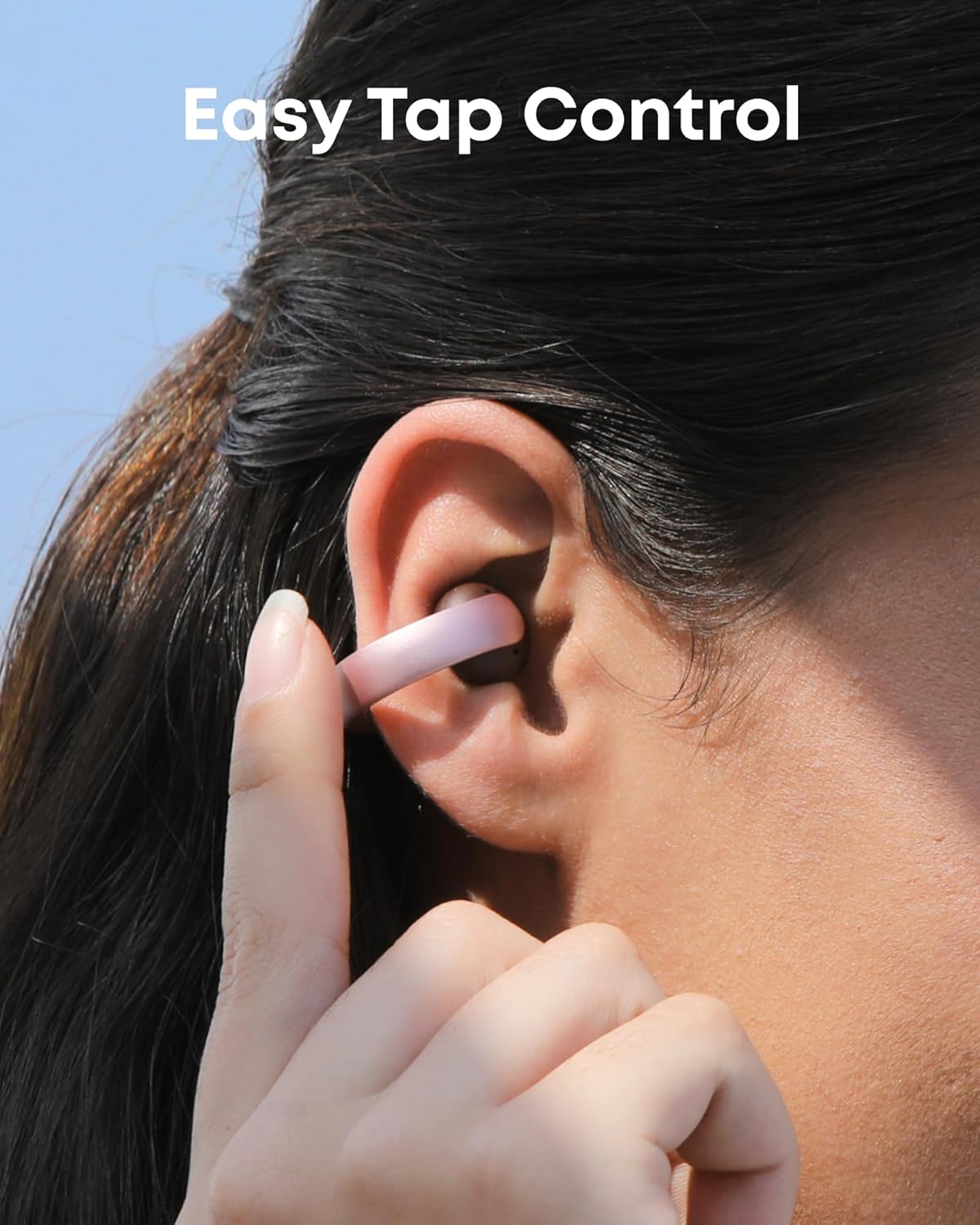
Image: Earbuds and charging case highlighting battery life.
First-time Pairing
- Take the earbuds out of the case and remove the insulation film from the charging contacts.
- Return the earbuds to the case, close the lid, and then reopen it. The earbuds will automatically enter pairing mode.
- On your device (smartphone, tablet, etc.), enable Bluetooth and select "soundcore AeroClip" from the list of available devices.
- Once connected, you will hear an audible confirmation, and the indicator lights on the earbuds will change.
Video: "How to Use soundcore AeroClip" - Demonstrates the initial pairing process.
Dual Connections (Multipoint)
The Soundcore AeroClip supports connecting to two devices simultaneously (Bluetooth 5.4). This allows for seamless switching between audio sources, such as a laptop and a phone.
- Place the earbuds back in the case, keeping the lid open.
- Press and hold the case button for 3 seconds until the indicator lights flash, indicating pairing mode for a second device.
- On your second device, select "soundcore AeroClip" from the Bluetooth list.
- Note: Pairing a third device will disconnect the device that was paired first.
Image: Multipoint Connection feature illustration.
Video: "How to Use soundcore AeroClip" - Demonstrates connecting to a second device.
Resetting the Earbuds
If you experience connectivity issues or other malfunctions, you may need to reset the earbuds:
- Return the earbuds to the case and leave the case open.
- Press and hold the case button for 10 seconds. The earbuds will then enter pairing mode, indicating a successful reset.
Video: "How to Use soundcore AeroClip" - Demonstrates how to reset the earbuds.
Operating
Wearing AeroClip
For optimal sound and call quality, wear the left (L) and right (R) earbuds on the correct sides. Ensure the speaker is in front. Clip the earbuds onto the thinnest point of the outer edge of your ears, then play audio and reposition to achieve the best sound and comfort.

Image: Person wearing Soundcore AeroClip earbuds.

Image: Adaptive Comfort design.
Image: Snug and Secure fit during activity.
Video: "How to Use soundcore AeroClip" - Demonstrates wearing the earbuds.
Using the Tap Controls
The Soundcore AeroClip earbuds feature intuitive tap controls for managing audio playback, calls, and voice assistance. You can customize these controls via the Soundcore app for a personalized experience.

Image: Easy Tap Control.
Image: App for Customization.
Video: "How to Use soundcore AeroClip" - Demonstrates using the tap controls.
Call Functions
Equipped with 4 beamforming microphones, wind-blocking meshes, and an advanced AI algorithm, Soundcore AeroClip ensures your voice is 3x clearer in calls, eliminating the need to raise your voice even in busy street environments.
Image: 3x Clearer Calls feature.
Sound Quality
Experience punchy lows with virtual bass technology and natural sound across all frequencies. The 12mm titanium-coated drivers and dual magnetic units deliver Hi-Res wireless audio for in-ear-level performance, minimizing sound leakage.

Image: Unmatched Sound, Powerful Bass.
Maintenance
Installing and Removing Ear Grips
If the fit feels loose, use the included ear grips to enhance stability. The larger size offers a more stable fit. Choose the size that fits you best (M/L sizes provided).
- To attach an ear grip, align one end with the earbud and secure it.
- Stretch the other end to wrap around the earbud, then adjust for a snug fit.
- The earbuds with ear grips fit into the charging case.
- To remove the ear grips, peel them off from one side.

Image: Choose Your Own Fit with ear grips.
Video: "How to Use soundcore AeroClip" - Demonstrates installing the ear grips.
Cleaning the Earbud Mesh
Regular cleaning of the earbud mesh helps maintain optimal sound quality and hygiene:
- Gently scrub the mesh with a soft-bristled toothbrush or small brush 3-5 times to dislodge debris.
- Dampen a cotton swab with isopropyl alcohol and carefully clean the mesh to remove any trapped debris.
- If needed, press and lift any remaining debris from the mesh using adhesive tape. Repeat 2-3 times.
Video: "How to Use soundcore AeroClip" - Demonstrates cleaning the earbud mesh.
Troubleshooting
If you encounter issues with your Soundcore AeroClip earbuds, try the following steps:
- No Sound: Ensure the earbuds are charged and properly connected to your device. Check the volume levels on both the earbuds and your device.
- Connection Issues: Try resetting the earbuds as described in the "Resetting the Earbuds" section. Ensure Bluetooth is enabled on your device and the earbuds are within range.
- Poor Sound Quality: Clean the earbud mesh as described in the "Cleaning the Earbud Mesh" section. Ensure the earbuds are worn correctly and the ear grips are properly installed for a secure fit.
- Microphone Issues: Ensure the microphones are not obstructed. Check your device's privacy settings to ensure the Soundcore app has microphone access.
- Earbuds Not Charging: Ensure the charging contacts on both the earbuds and the case are clean and dry. Use the original USB-C cable and a compatible power adapter.
Specifications
| Feature | Detail |
|---|---|
| Model Name | A3388 |
| Connectivity Technology | Wireless (Bluetooth 5.4) |
| Audio Driver Size | 12 Millimeters |
| Frequency Response | 20 Hz - 20 KHz |
| Sensitivity | 84 dB |
| Impedance | 16 Ohm |
| Battery Life (Earbuds) | 8 Hours (per charge) |
| Battery Life (with Case) | 32 Hours (total) |
| Charging Time | 2 Hours |
| Water Resistance Level | IPX4 Water Resistant |
| Item Weight | 51.6 Grams (1.82 ounces) |
| Product Dimensions | 2.45 x 1.17 x 1.69 inches |
| Material | Acrylonitrile Butadiene Styrene (ABS), Polycarbonate (PC) |
| Control Type | Tap Control, App, Voice |
Warranty and Support
For detailed warranty information and further support, please refer to the official Soundcore website or the provided User Guide PDF.
You can download the full User Guide PDF here.
Documents and downloads
Ask a question about this manual
Ask about setup, troubleshooting, compatibility, parts, safety, or missing instructions. Manuals+ will review the question and use this page’s manual context to help answer it.