
Rolanstar hq-dshg027-02
Rolanstar Fireplace TV Stand User Manual
Model: hq-dshg027-02
Introduction
This manual provides detailed instructions for the assembly, operation, and maintenance of your Rolanstar Fireplace TV Stand. This entertainment center features integrated LED lighting, built-in power outlets, and a 26-inch electric fireplace, designed to accommodate TVs up to 70 inches. Please read this manual thoroughly before assembly and use to ensure safe and proper functionality.

Image: The Rolanstar Fireplace TV Stand, white in color, featuring a central electric fireplace and two side cabinets with glass doors. The LED lights inside the cabinets and above the fireplace are illuminated with a warm glow. The stand is positioned in a living room with a wreath and framed art on the wall.
Safety Information
Your safety is paramount. Adhere to all safety guidelines to prevent injury or damage to the product.
- Always follow assembly instructions carefully.
- Keep the electric fireplace clear of flammable materials such as curtains, bedding, and furniture. Maintain a minimum clearance of 3 feet (0.9 meters) from the front of the heater.
- Do not place heavy objects on the shelves that exceed their weight capacity, as this could cause instability or tipping.
- Ensure the TV stand is placed on a flat, stable, and level surface to prevent wobbling or tipping.
- Do not overload the built-in power outlets. Ensure the total current draw of connected devices does not exceed the rated capacity of the power strip.
- Unplug the unit from the power outlet before cleaning or performing any maintenance.
- Do not operate the fireplace if the power cord is damaged or if the unit malfunctions. Contact customer support for assistance.
- Keep children and pets away from the electric fireplace when it is operating, as surfaces can become hot.
Package Contents
Before beginning assembly, verify that all components are present and undamaged. Refer to the parts list provided in your assembly guide. Typically, your package should include:
- All wooden panels and shelves for the TV stand structure.
- Electric fireplace insert.
- Glass doors and associated hardware.
- LED light strips and controller (remote control and/or app compatibility).
- Built-in power strip with 4 AC outlets.
- Assembly hardware (screws, dowels, cam locks, etc.).
- Assembly tools (e.g., Allen wrench, screwdriver).
- Instruction manual.
If any parts are missing or damaged, do not proceed with assembly. Contact Rolanstar customer service for replacement parts.
Assembly Instructions (Setup)
Assembly of the Rolanstar Fireplace TV Stand is designed to be straightforward with clear, numbered instructions. It is recommended to have two people for assembly.
- Prepare Your Workspace: Clear a spacious, clean, and level area for assembly. Lay out all parts and hardware, organizing them by their corresponding labels.
- Assemble the Base Frame: Begin by connecting the main base panels according to the diagrams in the instruction manual. Ensure all connections are secure.
- Install Side Cabinets: Attach the side cabinet panels, including the adjustable shelves. The shelves can be positioned at various heights to accommodate different items.

Image: A diagram illustrating the adjustable shelf positions within the cabinet, highlighting the 1.3-inch increments for height adjustment.
- Integrate the Electric Fireplace Section: Carefully insert the electric fireplace unit into the central compartment. Ensure it fits snugly and is properly aligned.
- Attach the Top Panel: Secure the top panel of the TV stand to the assembled frame.
- Install Glass Doors: Attach the glass doors to the side cabinets using the provided hinges. Ensure they open and close smoothly. Magnetic catches are included for secure closure.

Image: A close-up view of the magnetic door catch mechanism, ensuring the cabinet doors remain securely closed.
- Install LED Lighting: Adhere the LED light strips to the designated areas within the cabinets and central shelf. Connect them to the controller unit.
- Connect Power Outlets: Ensure the built-in power strip is securely installed and its power cord is accessible for connection to a wall outlet. Utilize the cable management holes to keep wires tidy.

Image: A detailed view of a circular cable management hole, designed to route power cords and other cables neatly.
- Final Check: Verify that all screws are tightened, and the stand is stable.

Image: A visual representation of the TV stand's dimensions (58" L x 13.8" W x 26" H) and the recommended TV size (up to 65 inches), along with its 350 lbs load capacity.
Operating Instructions
1. Electric Fireplace Operation
The 26-inch electric fireplace offers realistic flame effects and adjustable heating. It can be controlled via the unit's panel or the included remote control.
- Power ON/OFF: Press the power button on the unit or remote to turn the fireplace on or off.
- Temperature Control: Adjust the temperature from 62°F to 90°F (17°C to 32°C) using the temperature up/down buttons.
- Flame Colors: Cycle through 7 different flame colors to match your ambiance.
- Ember Bed Colors: Select from 5 ember bed colors.
- Brightness Settings: Adjust the flame and ember bed brightness with 3 available settings.
- Timer Function: Set a timer for automatic shut-off, enhancing safety and energy efficiency.
- Overheating Protection: The unit is equipped with an automatic shut-off feature if it overheats.
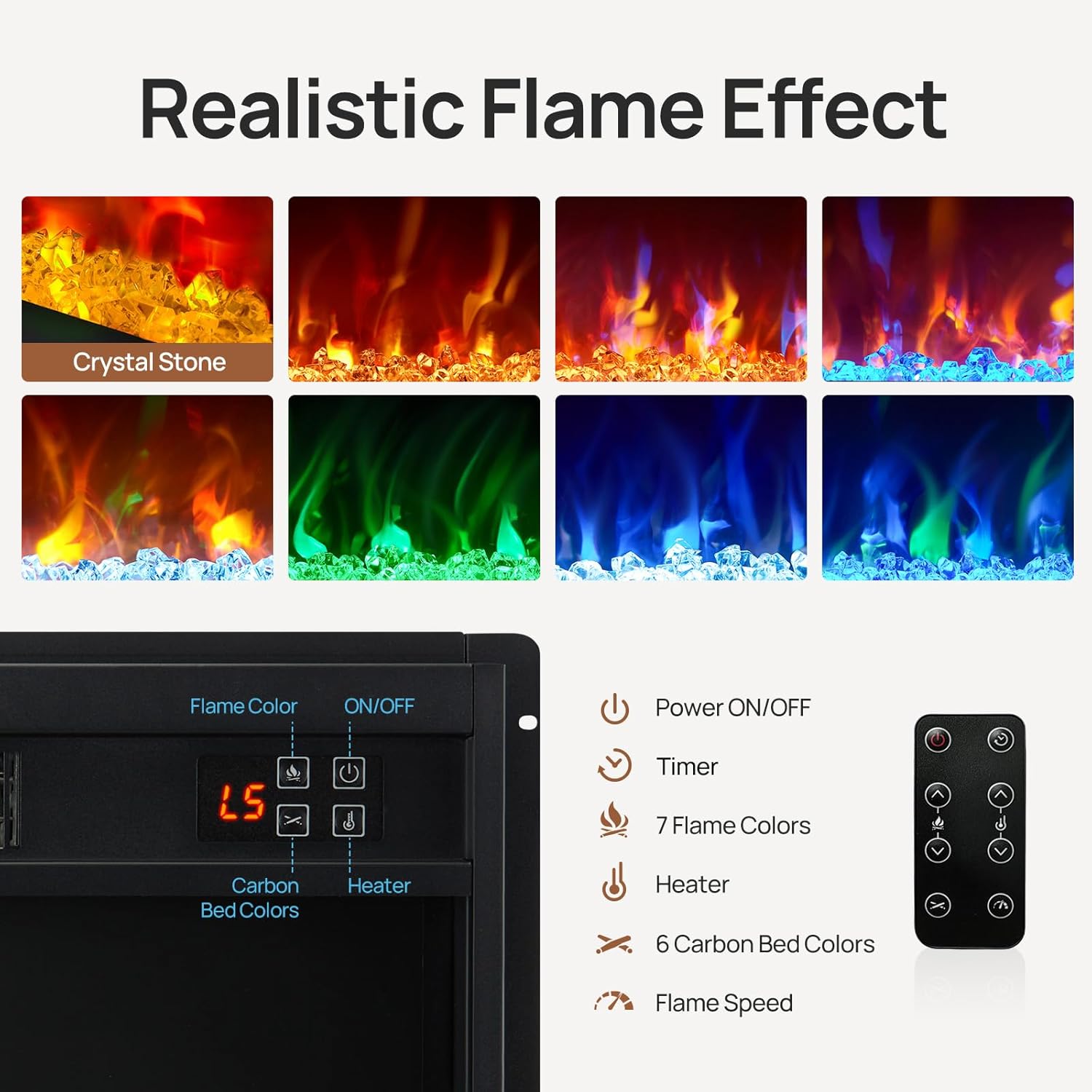
Image: A detailed view of the electric fireplace's control panel, displaying options for flame color, temperature, and timer, alongside the corresponding remote control.
2. LED Light & Power Outlet Operation
The integrated LED lighting and power outlets enhance the functionality of your TV stand.
- LED Lighting Control: The RGB LED lights offer over 60,000 color options. Control them via the included remote or a compatible mobile application.
- Adjustable Settings: Personalize brightness, select specific colors, choose from various lighting modes (e.g., static, fade, strobe), and set a timer for the LED lights.
- Music Sync Mode: The LED lights can synchronize with music, creating dynamic lighting effects for entertainment.
- Power Outlets: The built-in power strip provides 4 AC outlets for convenient charging and powering of your TV, gaming consoles, sound systems, and other electronic devices.
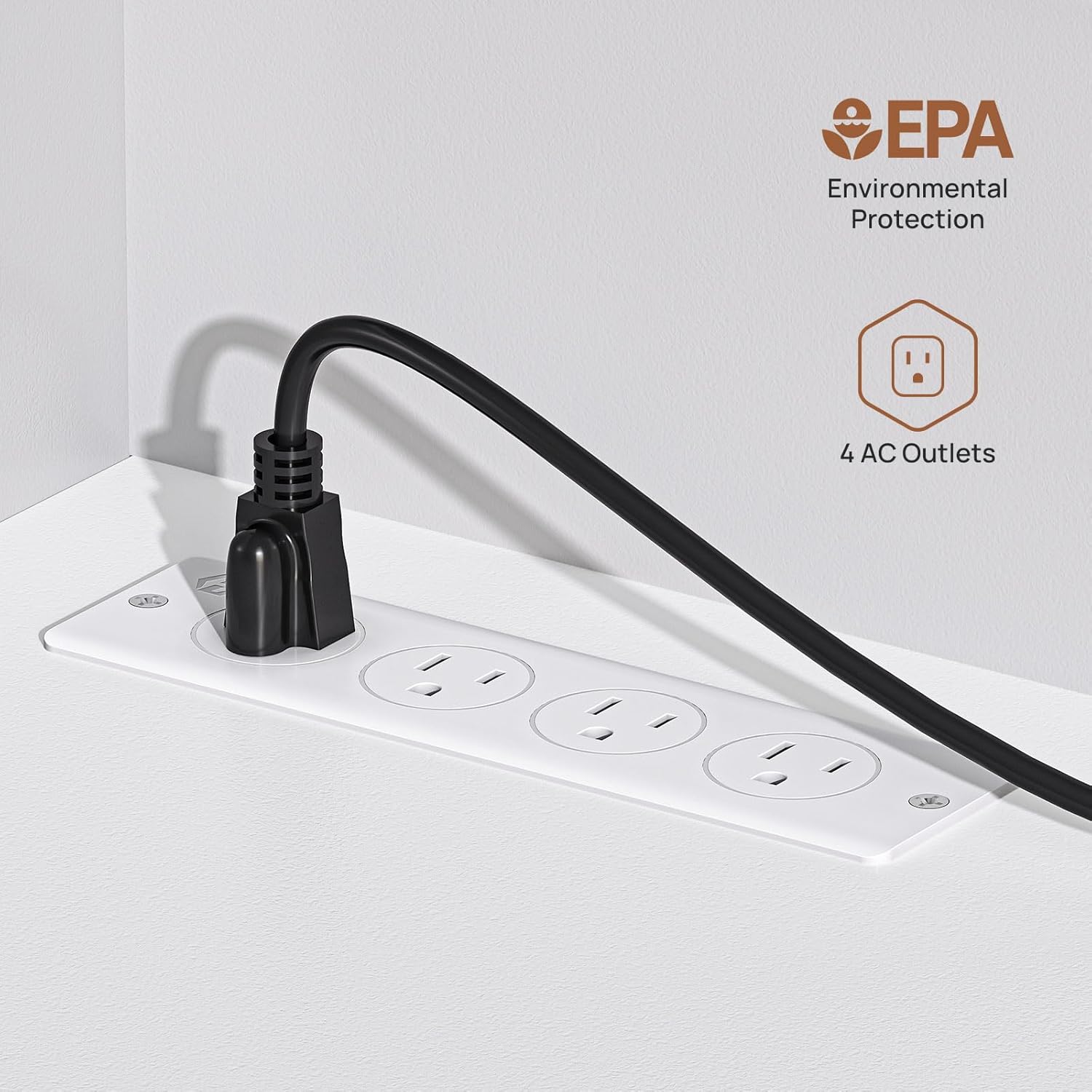
Image: A close-up view of the integrated power strip, showing four AC outlets ready for device connection.
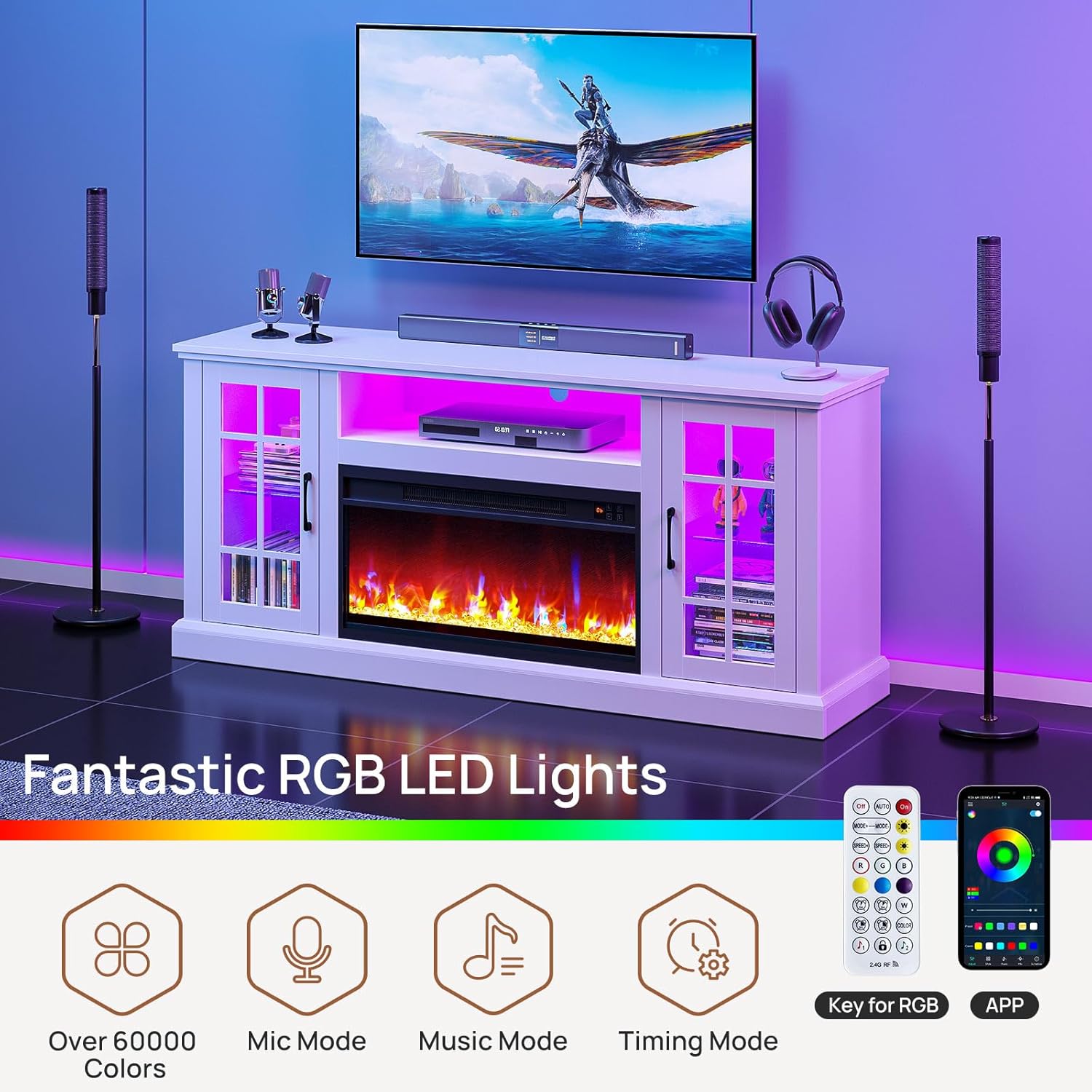
Image: The TV stand with its LED lights glowing purple, illustrating the "Fantastic RGB LED Lights" feature. Icons for "Over 60000 Colors," "Mic Mode," "Music Mode," and "Timing Mode" are displayed, along with images of the remote control and mobile app interface.
Maintenance
Proper care will extend the life and appearance of your Rolanstar Fireplace TV Stand.
- Cleaning: Wipe surfaces with a soft, damp cloth. Avoid harsh chemicals or abrasive cleaners that could damage the finish.
- Dusting: Regularly dust the unit to prevent buildup, especially around the fireplace vents and LED strips.
- Product Care Instructions: Keep the unit dry and away from direct sunlight to prevent warping or discoloration of the engineered wood.
- Fireplace Maintenance: Ensure the air intake and exhaust vents of the electric fireplace are clear of obstructions. Periodically check the power cord for any signs of wear or damage.
Troubleshooting
If you encounter issues with your Rolanstar Fireplace TV Stand, refer to the following common troubleshooting steps:
| Problem | Possible Cause | Solution |
|---|---|---|
| Fireplace not turning on. | Not plugged in; power switch off; circuit breaker tripped; overheating protection activated. | Ensure the unit is securely plugged into a working outlet. Check the main power switch on the fireplace. Reset the circuit breaker if necessary. Allow the unit to cool down if overheating protection was triggered. |
| No heat from fireplace. | Heater function off; temperature setting too low. | Activate the heater function using the control panel or remote. Increase the temperature setting. |
| LED lights not working. | Loose connection; remote battery dead; app not connected. | Check all LED strip connections. Replace remote batteries. Ensure your mobile device is properly paired with the LED controller via the app. |
| Power outlets not providing power. | Unit not plugged in; power strip overloaded; internal fuse tripped. | Verify the main power cord of the TV stand is plugged in. Reduce the number of devices connected to the power strip. Check for a reset button on the power strip if available. |
| Stand is wobbly/unstable. | Uneven surface; loose assembly hardware. | Move the stand to a level surface. Re-tighten all assembly screws and connections. |
If the problem persists after attempting these solutions, please contact Rolanstar customer support for further assistance.
Specifications
| Feature | Detail |
|---|---|
| Brand | Rolanstar |
| Model Number | hq-dshg027-02 |
| Material | Engineered Wood (FSC-Certified) |
| Color | White |
| Dimensions (L x W x H) | 147.32 x 35.05 x 66.04 cm (58 x 13.8 x 26 inches) |
| Item Weight | 38.01 kg (83.8 lbs) |
| Load Capacity | Up to 350 lbs (for TV stand top) |
| Compatible TV Size | 32 inches up to 70 inches (optimal for 45-70 inches) |
| Electric Fireplace Size | 26 inches (inset) |
| Fireplace Temperature Range | 62°F to 90°F |
| Fireplace Features | 7 Flame Colors, 5 Ember Bed Colors, 3 Brightness Settings, Timer, Overheating Protection |
| LED Lighting | Multi-color RGB (60,000+ options), adjustable brightness, modes, music sync, timer. |
| Power Outlets | Built-in 4 AC outlets |
| Assembly Required | Yes |
| Special Features | Classical Design, LED Light, Power Outlet, Adjustable Shelves, Cable Management |

Image: The FSC (Forest Stewardship Council) logo, indicating that the wood used in the product is sourced from responsibly managed forests.
Warranty and Support
Rolanstar is committed to providing high-quality products and customer satisfaction. For specific warranty details, please refer to the warranty card included with your product or visit the official Rolanstar website.
If you have any questions, require assistance with assembly, or need to report missing/damaged parts, please contact Rolanstar customer support. Have your model number (hq-dshg027-02) and purchase information ready when contacting support.
You can find more information and contact details on the Rolanstar Store on Amazon.
Ask a question about this manual
Ask about setup, troubleshooting, compatibility, parts, safety, or missing instructions. Manuals+ will review the question and use this page’s manual context to help answer it.