
Introduction
This manual provides detailed instructions for the assembly, operation, maintenance, and troubleshooting of your DICTAC Large White Vanity Desk. Please read this manual thoroughly before assembly and use to ensure proper function and safety. Keep this manual for future reference.
Important Safety Information
Failure to follow these safety instructions may result in injury or damage to the product.
- Always secure the vanity to the wall using the provided anti-toppling device to prevent tipping. This is crucial for the safety of children and pets.
- Keep all electrical components clean and dry. Avoid exposure to water or excessive humidity.
- Unplug and turn off all electrical components when not in use or during cleaning.
- Keep the vanity area clear of flammable materials.
- Do not use the vanity if any electrical components are damaged or malfunctioning. Contact customer support immediately.
- Always follow the manufacturer's instructions for assembly, usage, and maintenance.
- Ensure all screws and fasteners are tightened securely during assembly and periodically check for looseness.

Image: Detail of the anti-toppling device, showing how it secures the vanity to the wall for stability.
Package Contents
Please verify that all components are present before beginning assembly. If any parts are missing or damaged, contact customer support.
- Vanity Desk Frame and Panels
- Mirror with Integrated LED Lights
- RGB Glass Cabinet
- Drawers (7 total, various sizes)
- Charging Station (2 USB ports, 2 AC outlets)
- Golden Metal Handles
- Anti-Toppling Device
- Assembly Hardware (screws, dowels, etc.)
- Instruction Manual

Image: Overview of the DICTAC Large White Vanity Desk, showcasing its main features and components.
Assembly and Setup
Assembly is required for this vanity desk. All parts and accessories are carefully marked for identification. It is recommended to assemble the desk in the room where it will be used.
- Unpack and Identify Parts: Carefully unpack all components and lay them out on a clean, soft surface to prevent scratches. Refer to the parts list in your separate assembly guide to identify each piece.
- Assemble the Main Frame: Follow the step-by-step instructions in the provided assembly guide to construct the main frame of the vanity desk. Ensure all connections are secure.
- Install Drawers: Assemble the drawers according to the instructions. Install the smooth silent sliders onto the desk frame and drawers. Insert the assembled drawers into their respective slots.
- Attach Golden Metal Handles: Secure the golden metal handles to all drawers and cabinet doors.
- Mount Mirror and Shelves: Attach the mirror unit and the open shelves to the main desk frame as indicated in the assembly guide.
- Install RGB Glass Cabinet: Secure the RGB glass cabinet to the designated position. Ensure the wiring for the RGB lights is accessible for connection.
- Connect Electrical Components: Integrate the charging station and connect the wiring for the LED mirror lights and RGB cabinet lights. Ensure all electrical connections are firm and correctly routed.
- Secure Anti-Toppling Device: Attach the anti-toppling device to the back of the vanity desk and secure it to a wall stud or appropriate anchor point. This step is critical for safety.
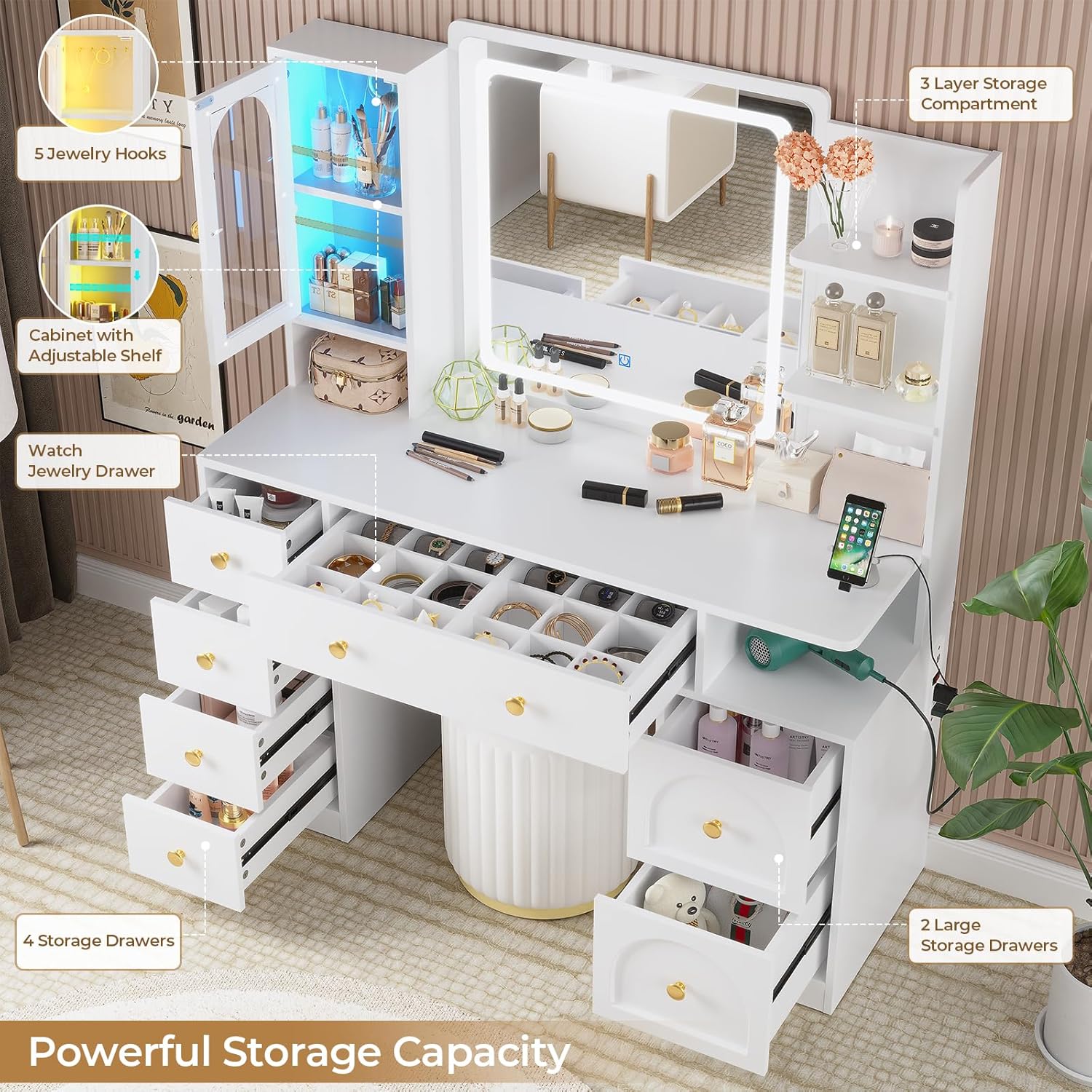
Image: The vanity desk with various storage compartments and drawers open, illustrating its design for organization.
Operating Instructions
LED Mirror Lights
The integrated mirror features LED lighting with three adjustable modes and brightness levels.
- Power On/Off: Locate the touch switch on the mirror surface. Tap once to turn the lights on or off.
- Change Light Mode: With the lights on, click the switch to cycle through the three lighting modes: Warm Light (3500K), Natural Light (4500K), and Cold Light (6500K).
- Adjust Brightness: To adjust brightness, long-press the switch. The brightness will gradually increase or decrease. Release the switch when the desired brightness is reached.
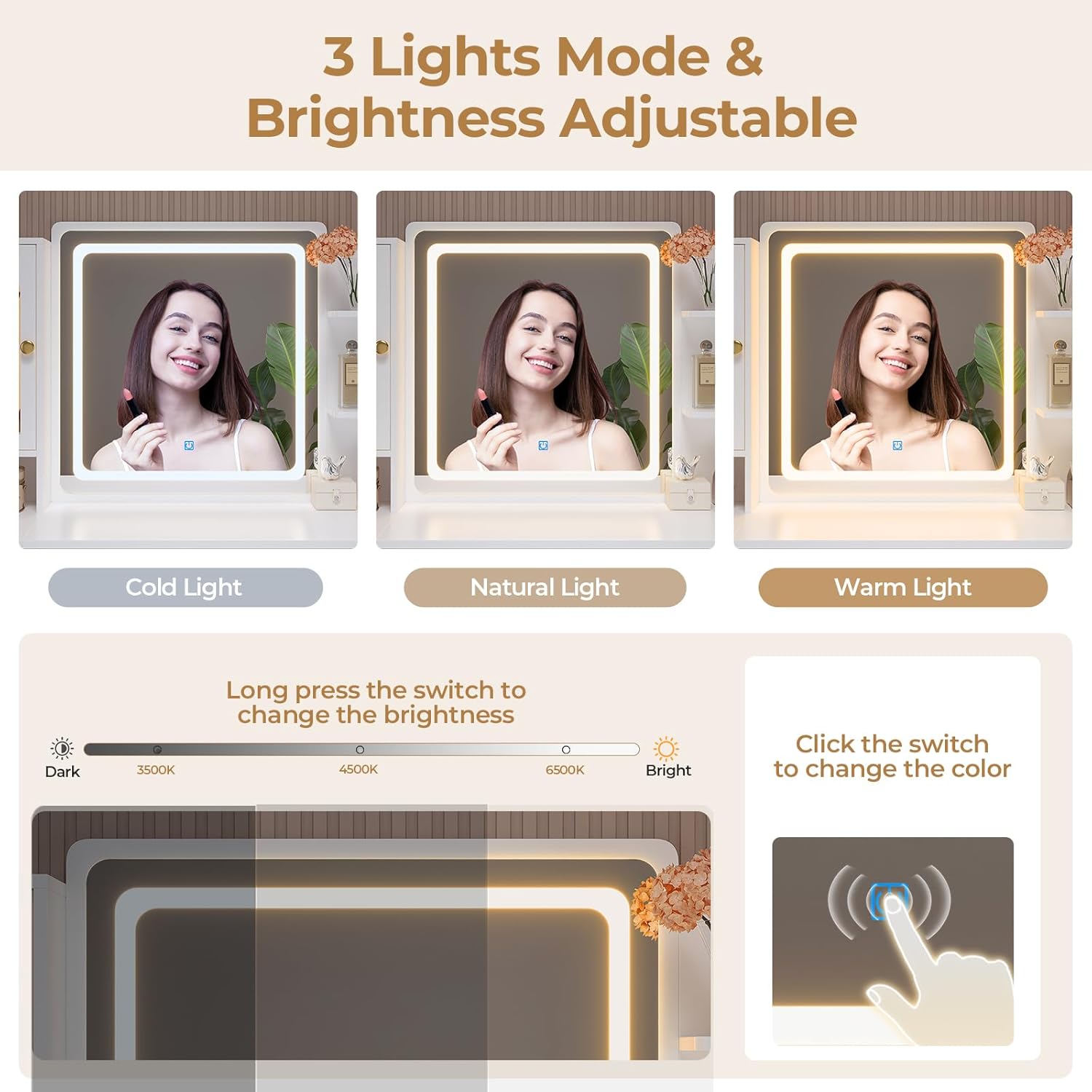
Image: Visual guide for operating the LED mirror lights, demonstrating the three color temperatures and brightness adjustment.
RGB Glass Cabinet Lights
The glass cabinet features RGB LED ambient lighting with multiple control options.
- Control Methods: The RGB lights can be controlled via an app on your smartphone or through a key control unit.
- Color Selection: Access over 60,000 colorful LED light options through the app.
- Lighting Modes: Available modes include timing function, music synchronization, and microphone synchronization. Refer to the specific RGB light controller manual for detailed app pairing and mode selection instructions.

Image: The vanity desk with the RGB glass cabinet displaying different colors, highlighting the app and key control features.
Built-in Charging Station
The vanity desk includes a built-in charging station for convenience.
- Power On/Off: The charging station has a dedicated power switch. Ensure it is in the 'ON' position to activate the outlets and USB ports.
- AC Outlets: Two 125V / 12A AC outlets are available for powering devices such as hair dryers, curling irons, or other small appliances.
- USB Ports: Two 5V / 2.1A USB ports are provided for charging mobile phones, tablets, and other USB-powered devices.
- Power Cord: The charging station is connected via a 5.9-foot power cord. Plug this cord into a standard wall outlet.

Image: Detailed view of the charging station, showing the AC outlets, USB ports, and power switch.
Maintenance
- Cleaning: Wipe the vanity desk surfaces with a soft, damp cloth. Avoid abrasive cleaners or harsh chemicals that may damage the melamine veneer finish.
- Mirror Cleaning: Use a glass cleaner specifically designed for mirrors and a lint-free cloth to clean the mirror surface. Do not spray cleaner directly onto the mirror to avoid liquid seeping into the LED components.
- Electrical Components: Ensure all electrical connections remain dry and free of dust. Periodically check the power cord for any signs of damage.
- Drawer Slides: If drawers become stiff, a small amount of silicone lubricant can be applied to the drawer slides.
- Hardware Check: Periodically check all screws and fasteners to ensure they remain tight. Retighten as necessary to maintain stability.
Troubleshooting
| Problem | Possible Cause | Solution |
|---|---|---|
| LED Mirror Lights not working | Power cord unplugged; loose connection; touch switch malfunction | Ensure power cord is securely plugged in. Check all internal wiring connections. If problem persists, contact customer support. |
| RGB Cabinet Lights not working or unresponsive | Power cord unplugged; loose connection; app not paired; controller malfunction | Verify power connection. Check wiring to the RGB controller. Re-pair the app with the RGB controller. Consult the RGB light controller manual. |
| Charging Station (USB/Outlets) not providing power | Power switch off; power cord unplugged; circuit breaker tripped | Ensure the charging station's power switch is ON. Check if the main power cord is plugged into a live outlet. Reset the household circuit breaker if necessary. |
| Drawers are difficult to open/close | Misaligned slides; debris in slides; overloaded drawer | Empty the drawer and check for obstructions. Ensure drawer slides are correctly aligned and lubricated. Do not overload drawers. |
| Vanity feels wobbly | Loose assembly hardware; anti-toppling device not secured | Check and tighten all assembly screws. Ensure the anti-toppling device is properly installed and secured to the wall. |
Product Specifications
- Brand: DICTAC
- Model Number: VDND
- Product Dimensions: 15.8"D x 43.3"W x 53.15"H
- Item Weight: 105.8 pounds
- Frame Material: Metal
- Furniture Finish: Melamine veneer
- Color: White
- Assembly Required: Yes
- Mirror Lights: 3 LED Light Modes (Warm, Natural, Cool) with Adjustable Brightness
- RGB Cabinet Lights: RGB LED with App Control, Music Sync, Mic Sync, Timing Function
- Charging Station: 2 USB Ports (5V/2.1A), 2 AC Outlets (125V/12A)

Image: Technical drawing illustrating the precise measurements of the vanity desk and its various drawer sizes.
Warranty Information
DICTAC products typically come with a manufacturer's warranty. For specific details regarding the warranty period and coverage for your vanity desk, please refer to the warranty card included in your package or contact the seller directly. Keep your proof of purchase for warranty claims.
Customer Support
If you encounter any issues during assembly or operation, or if you have questions about your DICTAC Large White Vanity Desk, please contact the seller or manufacturer's customer support. When contacting support, please have your model number (VDND) and purchase information ready.
You can often find contact information by clicking "Contact Seller" on the product's purchase page or by visiting the official DICTAC store page on Amazon.