
1. Introduction and Overview
Thank you for choosing the Hagibis 380W USB C Charger 8-Port GaN PD 3.1 Charging Station. This device is designed to provide efficient and fast charging for multiple electronic devices simultaneously. Featuring advanced GaN (Gallium Nitride) technology and PD 3.1 support, it offers high power output in a compact form factor. This manual provides essential information for safe and optimal use of your charging station.
2. Product Features
- 8-Port Charging Station: Supports charging up to 8 devices concurrently, including 6 USB-C ports and 2 USB-A ports.
- High Power Output: Delivers a total of 380W. Single USB-C ports (C1/C2) can provide up to 140W, suitable for high-power laptops.
- GaN Technology: Utilizes 3rd generation Gallium Nitride materials for efficient power delivery, reduced heat, and a compact design.
- Advanced Cooling System: Features a built-in AI chip for intelligent temperature control and a cooling fan, along with bottom and side cooling holes, to ensure safe operation.
- Multiple Fast Charging Protocols: Compatible with PD3.1, PPS, QC4+, QC3.0, FCP, SCP, AFC, and more, ensuring broad compatibility with various devices.
- Comprehensive Protection: Equipped with temperature protection, over-current protection, over-voltage protection, overcharge protection, overload protection, overheat protection, and short circuit protection.
- Wide Compatibility: Supports a vast range of devices including MacBook Pro/Air, iPad Pro, iPhone 15/16 series, Dell XPS, Samsung Galaxy devices, and other USB-C and USB-A powered electronics.
3. Package Contents
Please verify that all items are present in your package:

Image: Contents of the Hagibis 380W GaN Charger package, showing the charger, power cable, and manual.
- Hagibis 380W GaN Charger Unit
- Instruction Manual
- Power Cable (Type A - 2 pin, North American)
- Retail Box
4. Setup Instructions
- Unpack the Charger: Carefully remove the Hagibis 380W USB C Charger and all accessories from the packaging.
- Connect the Power Cable: Insert the included power cable into the AC input port on the back of the charging station. Ensure it is firmly seated.
- Connect to Power Outlet: Plug the other end of the power cable into a standard 110V AC wall outlet. The charging station is now ready for use.
- Position the Charger: Place the charging station on a stable, flat surface with adequate ventilation to allow for proper heat dissipation.
5. Operating Instructions
The Hagibis 380W charging station is designed for ease of use. Follow these steps to charge your devices:
- Identify Ports: The charging station features 6 USB-C ports (C1-C6) and 2 USB-A ports (A1-A2). Refer to the port labels on the device.
- Connect Your Devices: Use appropriate charging cables (not included) to connect your devices to the desired ports on the charging station. For optimal fast charging, use high-quality USB-C to USB-C cables for USB-C devices and USB-A to device-specific cables for USB-A devices.
- Automatic Power Distribution: The charging station intelligently detects the connected devices and automatically adjusts the power output to provide the fastest and safest charge.
- Monitor Charging: The LED indicators on the charger will illuminate to show active charging.

Image: The Hagibis 380W charger simultaneously charging a laptop, smartphone, and wireless earbuds.

Image: The Hagibis 380W charger providing simultaneous fast charging to four laptops.
6. Power Output Configurations
The Hagibis 380W charging station dynamically allocates power based on the number and type of connected devices. Below are common output configurations:
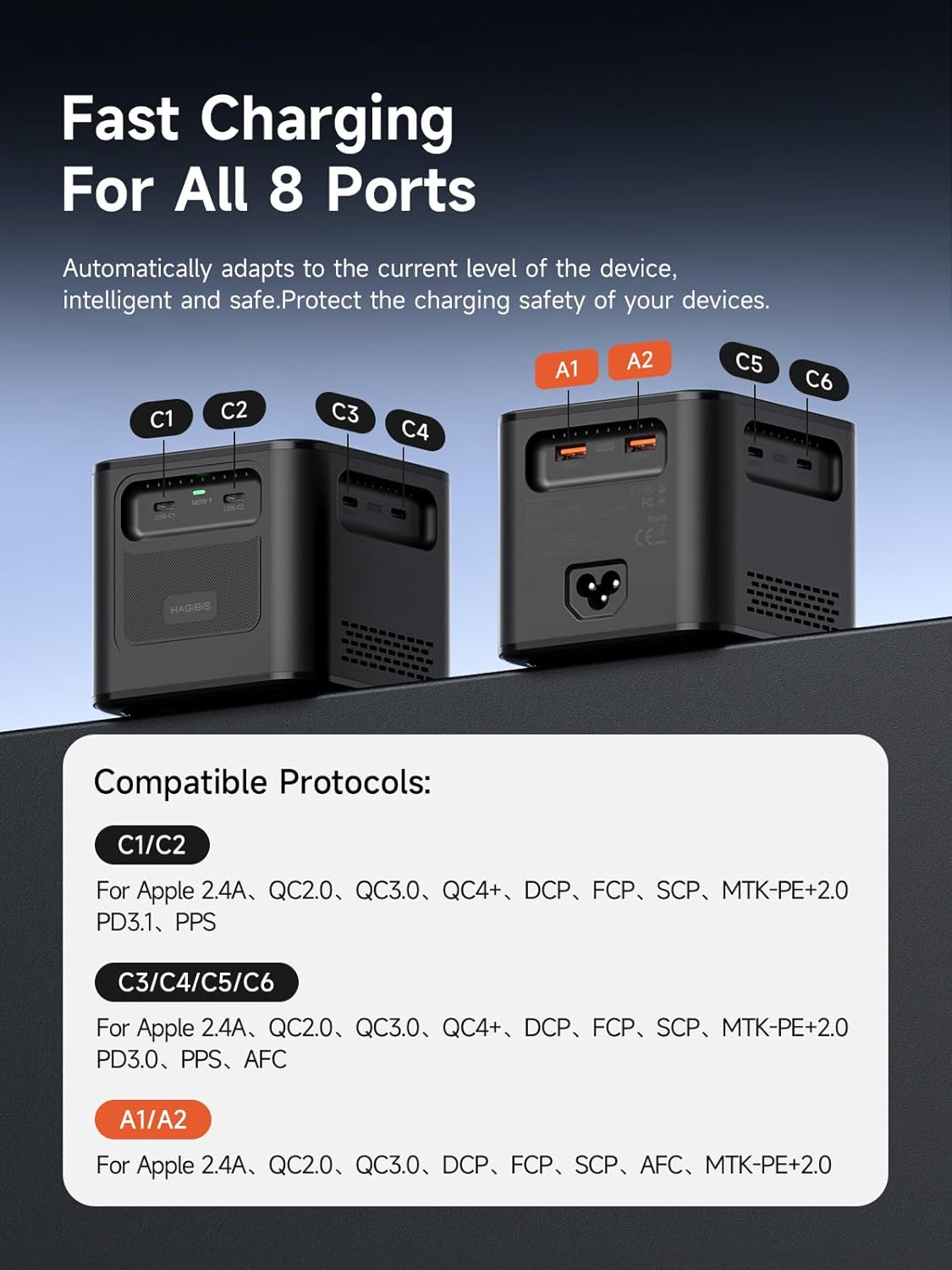
Image: Port identification and compatible charging protocols for C1/C2, C3/C4/C5/C6, and A1/A2 ports.
Compatible Protocols:
- C1/C2 Ports: Apple 2.4A, QC2.0, QC3.0, QC4+, DCP, FCP, SCP, MTK+PE+2.0, PD3.1, PPS
- C3/C4/C5/C6 Ports: Apple 2.4A, QC2.0, QC3.0, QC4+, DCP, FCP, SCP, MTK+PE+2.0, PD3.1, PPS, PD3.0, AFC
- A1/A2 Ports: Apple 2.4A, QC2.0, QC3.0, DCP, FCP, SCP, AFC, MTK+PE+2.0
Output Combinations:
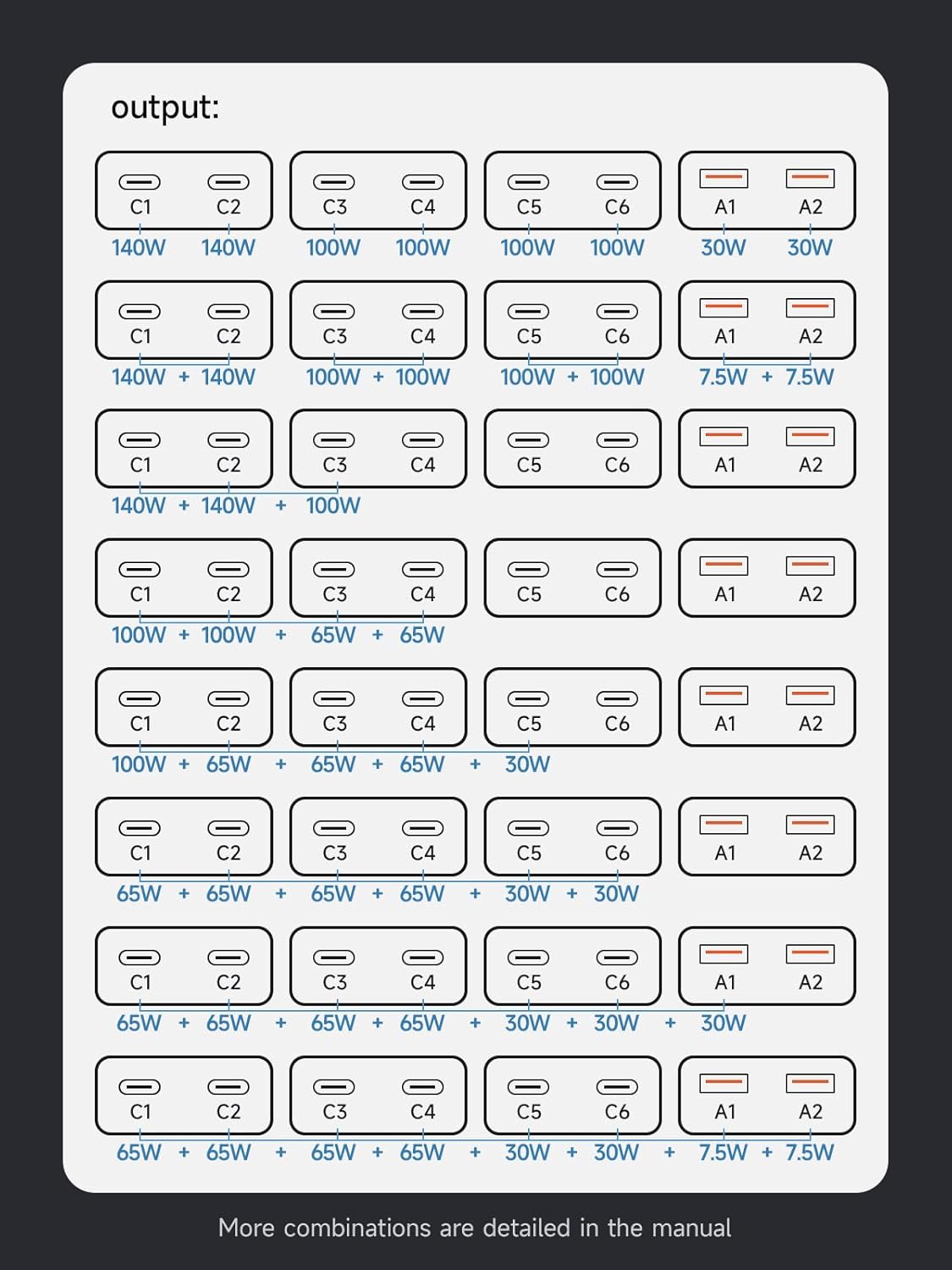
Image: Visual representation of power distribution across multiple ports.
- Single Port Max Output: C1/C2 up to 140W (28V/5A); C3/C4/C5/C6 up to 100W (20V/5A); A1/A2 up to 7.5W.
- Dual Port Output:
- C1+C2 = 140W+140W
- C3+C4 = 100W+100W
- C5+C6 = 100W+100W
- A1+A2 = 7.5W+7.5W
- Multiple Port Output Examples:
- C1+C2+C3 = 140W+140W+100W
- C1+C2+C3+C4 = 100W+100W+65W+65W
- C1+C2+C3+C4+C5 = 100W+65W+65W+65W+30W
- C1+C2+C3+C4+C5+C6 = 65W+65W+65W+65W+30W+30W
- C1+C2+C3+C4+C5+C6+A1 = 65W+65W+65W+65W+30W+30W+30W
- C1+C2+C3+C4+C5+C6+A1+A2 = 65W+65W+65W+65W+30W+30W+7.5W+7.5W
7. Maintenance
Proper maintenance ensures the longevity and optimal performance of your charging station.
- Cleaning: Disconnect the charger from the power outlet before cleaning. Use a soft, dry cloth to wipe the exterior. Do not use liquid cleaners or aerosols.
- Storage: When not in use for extended periods, store the charger in a cool, dry place away from direct sunlight and extreme temperatures.
- Ventilation: Ensure the cooling vents are not obstructed during operation to prevent overheating.
- Cable Care: Avoid bending or crimping charging cables excessively, as this can damage them and affect charging performance.
8. Troubleshooting
If you encounter issues with your Hagibis charging station, please refer to the following common problems and solutions:
| Problem | Possible Cause | Solution |
|---|---|---|
| Device not charging | Loose connection, faulty cable, power outlet issue, device compatibility. | Ensure power cable is securely plugged in. Try a different charging cable. Test the power outlet with another device. Verify device compatibility with the charger's output specifications. |
| Slow charging | Cable not supporting fast charging, too many devices connected, device not supporting fast charging protocol. | Use a high-quality cable that supports fast charging. Refer to the 'Power Output Configurations' section to ensure sufficient wattage for your device. Check if your device supports the charger's fast charging protocols. |
| Charger feels hot | Heavy load, obstructed ventilation. | This is normal under heavy load due to high power output. Ensure the charger is placed in a well-ventilated area and vents are not blocked. The built-in cooling system will manage temperature. If it becomes excessively hot or shuts down, disconnect devices and power, then allow it to cool. |
| Charger not powering on | No power from outlet, faulty power cable. | Check if the power outlet is functional. Ensure the power cable is fully inserted into both the charger and the wall outlet. |
9. Specifications
Detailed technical specifications for the Hagibis 380W USB C Charger:

Image: Product dimensions and key technical parameters.
| Brand | Hagibis |
| Model Number | PD380 |
| Total USB Ports | 8 (6x USB-C, 2x USB-A) |
| Total Wattage | 380W |
| Input Voltage | 110-120V~50/60Hz 5.0A Max (US) |
| Output (C1/C2) | 3.3V~21V=5A, 5V=3A, 9V=3A, 12V=3A, 15V=3A, 20V=5A (100W Max), 28V=5A (140W Max), PPS: 3.3-21V=5A (105W Max) |
| Output (C3/C4/C5/C6) | 3.3V~21V=5A, 5V=3A, 9V=3A, 12V=3A, 15V=3A, 20V=5A (100W Max), PPS: 3.3-21V=5A (105W Max) |
| Output (A1/A2) | 4.5V=5A, 5V=4.5A, 9V=3A, 12V=2.5A, 20V=1.5A (30W Max) |
| Connector Type | USB Type A, USB Type C |
| Material | Polycarbonate |
| Color | Black |
| Item Weight | 23 Ounces (approx. 650g) |
| Dimensions | Approx. 95mm x 88mm x 95mm |
| Power Source | Corded Electric |
| Safety Certification | UL Compliant |
10. Safety Information
To ensure safe operation and prevent damage to the device or injury, please observe the following safety guidelines:
- Do not expose the charger to water, moisture, or extreme temperatures.
- Avoid dropping or subjecting the charger to severe impacts.
- Do not disassemble, modify, or attempt to repair the charger. This will void the warranty and may cause hazards.
- Keep the charger away from flammable materials.
- Ensure proper ventilation around the charger during use. Do not cover it with cloths or other materials.
- Use only the provided power cable or a certified replacement.
- Disconnect the charger from the power outlet when not in use or during electrical storms.
- This device is equipped with multiple protection functions including temperature, over-current, over-voltage, overcharge, overload, overheat, and short circuit protection to ensure safe charging.
11. Warranty and Support
The Hagibis 380W USB C Charger (Model PD380) comes with a 1-year warranty from the date of purchase, covering manufacturing defects.
For technical support, warranty claims, or any questions regarding your product, please contact the retailer where you purchased the item or visit the official Hagibis website for customer service information.
Manufacturer: Shanghai Xinxie Industrial Co., Ltd.