
1. Product Overview
The Kaedear KDR-M3-CC is a waterproof motorcycle USB power supply designed for charging mobile devices on the go. It features dual USB Type-C ports with ultra-fast charging capabilities, a cap-activated power switch for energy saving, and a light-guided USB port for easy connection in low light conditions. This device is built for durability and ease of installation on motorcycles.
Package Contents
Verify that all components are present in your package:
- USB Main Body (Type C) x2
- Base Mount (0.87"/1") x2
- SAE Harness (Y-shaped with 2 connectors)
- Conversion Harness
- Fuse
- Tie Wraps x4
- User Manual
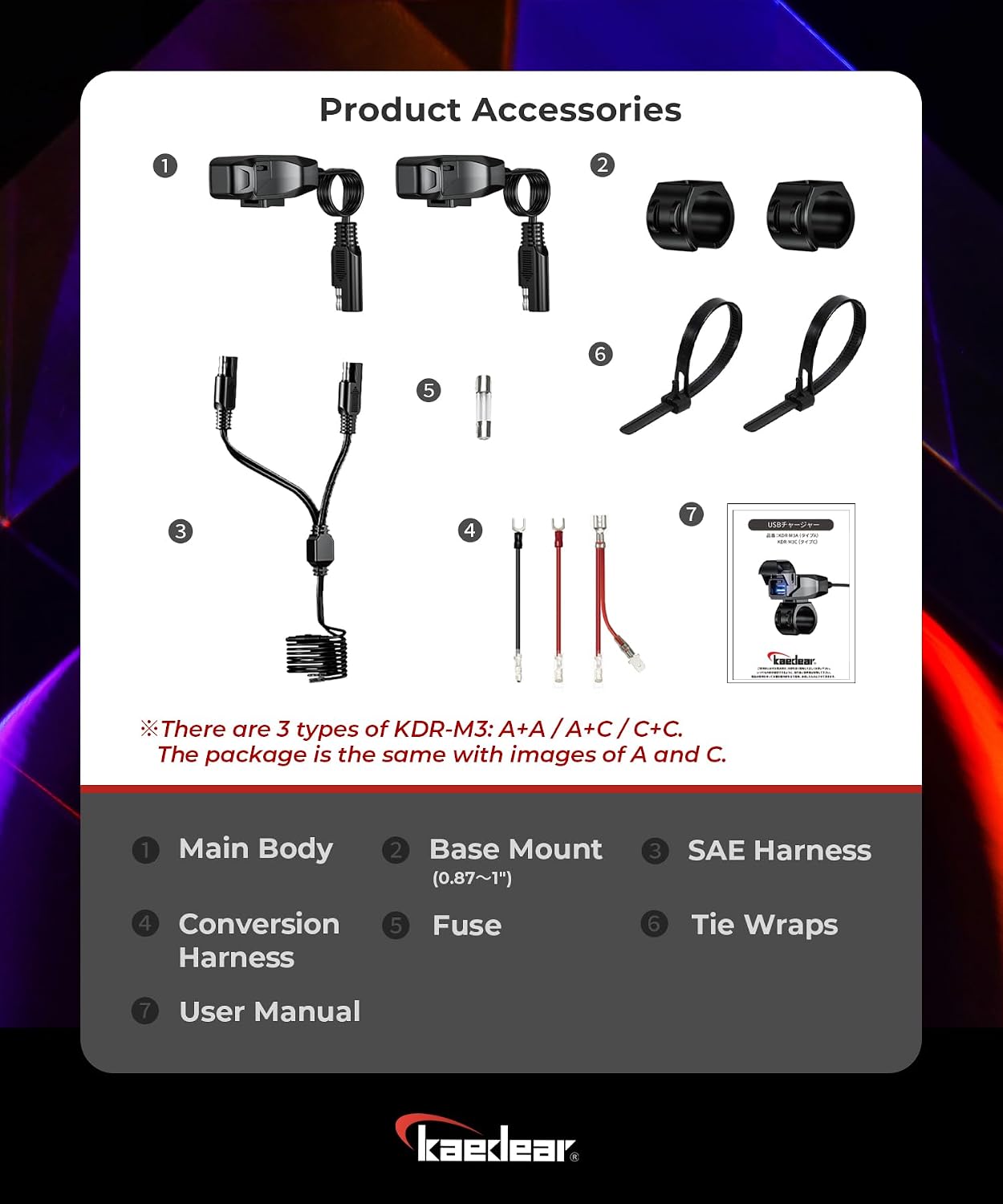
Figure 1: Product Accessories. This image displays the complete set of components included with the Kaedear KDR-M3-CC Motorcycle USB Power Supply, including the main USB units, mounting hardware, wiring harnesses, and fuse.
2. Safety Information
Please read and understand all safety instructions before installation and use. Failure to follow these instructions may result in electric shock, fire, or serious injury.
- Electrical Safety: Ensure the motorcycle's power is off before attempting any wiring. Incorrect wiring can damage the device or the motorcycle's electrical system.
- Fuse Protection: Always use the provided fuse to protect against overcurrent. Do not bypass or replace with a fuse of a different rating.
- Water Resistance: The device is IP66 water-resistant. Ensure the cap is securely closed when not in use to maintain water resistance. Avoid submerging the device.
- Installation: Mount the device securely to prevent it from becoming loose during operation, which could cause distraction or damage.
- Operating Temperature: Do not operate the device outside its specified temperature range.
3. Setup and Installation
Follow these steps for proper installation of your Kaedear KDR-M3-CC USB Power Supply.
3.1 Mounting the USB Unit
- Choose Location: Select a suitable location on your motorcycle's handlebar. The device is designed for discreet, low-profile placement.
- Secure with Tie Wraps: Use the provided tie wraps to firmly secure the USB main body to the handlebar. For handlebars with a narrow 0.87" diameter, use the included base mount for a secure fit.

Figure 2: Handlebar Mounting. The image demonstrates how the USB charger can be centrally mounted on a handlebar, compatible with a standard 0.87-inch diameter.
3.2 Power Connection
The KDR-M3-CC uses an SAE harness for power connection, compatible with various motorcycle electrical systems.
- Connect SAE Harness: Connect the Y-shaped SAE harness to your motorcycle's 12V power supply. The SAE connector is located 20 cm (7.87") from the main unit for flexible placement.
- Use Conversion Harness (if needed): If your motorcycle's power supply requires a different connector type (round, flat, or branched), use the provided conversion harness to adapt the SAE connection.
- Install Fuse: Ensure the fuse is correctly installed in the SAE harness to protect the circuit.
- Secure Wiring: Route and secure all wiring to prevent interference with moving parts or exposure to damage.

Figure 3: Wiring Diagram. This image details the integrated adapter, SAE harness, and conversion harness, showing how they connect to the USB charger body and the motorcycle's power supply.
3.3 Video Guide for Installation
For a visual guide on installation and features, please watch the official product video below.
Video 1: KDR-M3 Series Double USB Charger Overview. This video demonstrates the features, installation process, and usage of the Kaedear KDR-M3 series USB charger, including its waterproof design and power-saving functions.
4. Operating Instructions
Learn how to effectively use your Kaedear KDR-M3-CC USB Power Supply.
4.1 Power On/Off
The device features a cap-activated power switch for convenient control and energy saving.
- To Power ON: Open the waterproof cap. The USB port light will illuminate, indicating power is active.
- To Power OFF: Close the waterproof cap. The power will automatically turn off, reducing power consumption.

Figure 4: Cap-Activated Power Switch. This image highlights the power-saving feature where the device automatically powers on when the cap is opened and powers off when closed.
4.2 Charging Devices
The KDR-M3-CC provides ultra-fast charging through its dual USB Type-C ports.
- Connect Device: Open the waterproof cap. The light-guided USB port will assist in connecting your USB-C cable in the dark.
- Charging: Plug your compatible device into one of the USB-C ports. The charger will automatically adjust the voltage output (5V/3A, 9V/3A, 12V/3A) to provide optimal charging for your device, supporting PD (Power Delivery) and QC (Quick Charge) 4.0 protocols.
- Disconnect: Once charging is complete, disconnect your device and close the waterproof cap to turn off the power and maintain water resistance.

Figure 5: Quick Charging in Use. This image illustrates a smartphone being fast-charged by the Kaedear USB charger, highlighting its Type-C output capabilities.
5. Maintenance
Proper maintenance ensures the longevity and optimal performance of your USB power supply.
- Keep Clean: Regularly wipe the exterior of the device with a soft, damp cloth. Avoid abrasive cleaners.
- Check Cap Seal: Periodically inspect the waterproof cap and its O-ring for any signs of wear or damage. Ensure the cap closes tightly to maintain the IP66 water-resistant rating.
- Wiring Inspection: Check all wiring connections for tightness and signs of fraying or corrosion.
- Fuse Check: If the device stops working, check the fuse in the SAE harness. Replace it with a fuse of the same rating if blown.

Figure 6: Waterproof Cap Detail. This image emphasizes the robust waterproof design, including the O-ring that ensures a tight seal against water entry.
6. Troubleshooting
If you encounter issues with your Kaedear KDR-M3-CC, refer to the following common problems and solutions.
| Problem | Possible Cause | Solution |
|---|---|---|
| Device not charging / No power light |
|
|
| Slow charging |
|
|
| Water inside USB port |
|
|
If the problem persists after trying these solutions, please contact Kaedear customer support.
7. Specifications
| Kaedear KDR-M3-CC USB Power Supply | |
|---|---|
| Model | KDR-M3-CC |
| Body Size | 2.05" long, 1.1" wide, 0.87" thick |
| Input Voltage | DC 9V-24V (12V battery, 6V-30V range) |
| Output Power (Dual USB C) | 5V/3A, 9V/3A, 12V/3A (Max 36W) |
| Charging Protocols | PD (Power Delivery), QC (Quick Charge) 4.0 |
| Water Resistance Rating | IP66 (device), IP67 (standards) |
| Protection Features | Heat protection, Over-voltage protection, Over-current protection, Short circuit protection |
| Material | Polycarbonate |
| Weight | 30g (0.07 Pounds) |
| Certifications | CE, FCC, ROHS |
8. Warranty and Support
Kaedear provides comprehensive support for its products.
8.1 Manufacturer's Warranty
The Kaedear KDR-M3-CC comes with a 1-year warranty from the date of purchase for consumer use. For business use, the warranty period is 6 months. This warranty covers defects arising from malfunctions. Free repairs or exchanges will be provided after assessment, in accordance with our warranty policy. Please refer to the official Kaedear website for full details on warranty terms and conditions.
8.2 Customer Support
For any product or installation questions, our certified staff is available to provide expert assistance. Even after installation or use, we offer support. As a Japanese manufacturer, Kaedear prioritizes customer service. Please feel free to contact us for any inquiries.
Contact information can be found on the official Kaedear website: Kaedear Official Store
