
Introduction
Thank you for choosing the EFFORTWAY 3000W Power Inverter. This device efficiently converts 12V DC power from your battery into 110V/120V AC power, suitable for a wide range of applications including RVs, motorhomes, trucks, camping, and off-grid solar systems. With a continuous power output of 3000W and a peak power of 6000W, it provides reliable energy for your electronic devices and appliances. Please read this manual thoroughly before use to ensure safe and optimal operation.

Image: The EFFORTWAY 3000W Power Inverter connected to a coffee machine and charging a smartphone, illustrating its wide range of compatibility for various uses.
What's in the Box
Upon unpacking your EFFORTWAY 3000W Power Inverter, please ensure all the following items are included:
- 3000 Watt Power Inverter
- Wireless Remote Control
- 2 Battery Cables (1 black, 1 red)
- Instruction Manual
Video: Unboxing the 3000W Power Inverter, showing the contents including the inverter unit, remote control, instruction manual, and battery cables.
Product Features
- High Power Output: Provides 3000W continuous power and 6000W peak power, converting DC 12V to AC 110V/120V 60HZ with over 90% conversion efficiency.
- Remote Control & LCD Display: Features an LCD display showing input/output voltage, battery capacity, load capacity, and error codes. A 16-foot wireless remote control allows convenient operation.
- Versatile Applications: Ideal for charging various devices in cars, boats, RVs, motorhomes, trucks, and off-grid solar systems. Suitable for emergencies during power outages.
- Advanced Safety Protection: Equipped with a cooling fan, LED indicator, and built-in fuse to prevent overcurrent, short circuit, low load, overload, overheat, and overvoltage.
- Durable Construction: Made with durable aluminum alloy material for efficient and reliable operation.
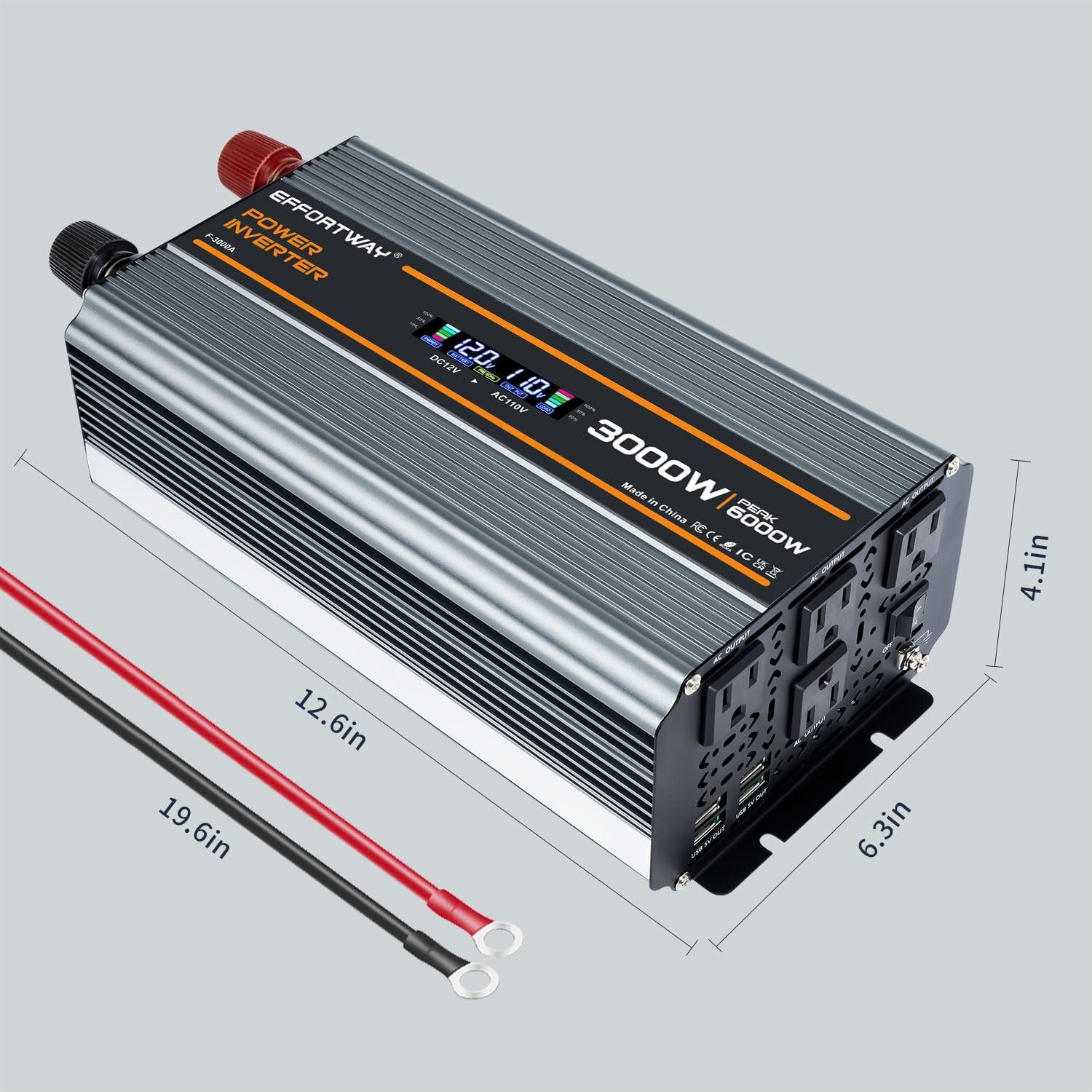
Image: A detailed view of the EFFORTWAY 3000W Power Inverter with its dimensions labeled, showing its compact size.
Setup Instructions
Follow these steps to correctly set up your power inverter:
- Prepare the Inverter: Ensure the inverter is placed on a stable, dry, and well-ventilated surface. Keep it away from direct sunlight, heat sources, and flammable materials.
- Connect Battery Cables:
- Connect the red battery cable to the positive (+) terminal of your 12V DC battery.
- Connect the black battery cable to the negative (-) terminal of your 12V DC battery.
- Connect the other end of the red cable to the positive (+) input terminal on the inverter.
- Connect the other end of the black cable to the negative (-) input terminal on the inverter.
- Ensure all connections are tight and secure to prevent arcing or overheating.
- Grounding: Connect a grounding wire (not included) from the inverter's grounding terminal to a proper earth ground.
- Remote Control Setup: If using the wireless remote control, remove the plastic sheet from the battery compartment to activate it.
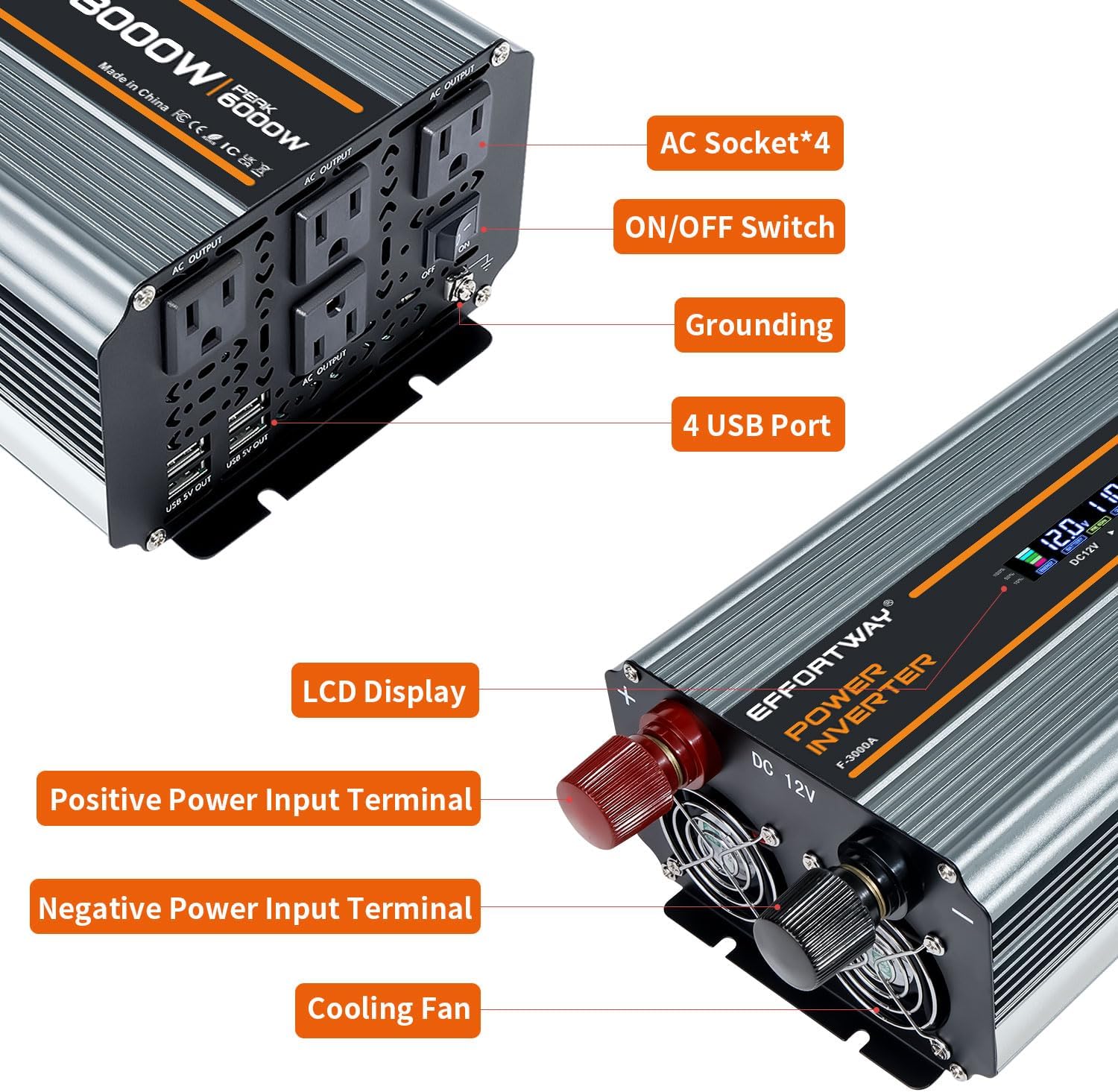
Image: A close-up view of the inverter's front and rear panels, highlighting the AC sockets, USB ports, and battery connection terminals.
Video: Demonstrates the connection of battery cables to the inverter and battery, followed by the setup of the remote control.
Operating Instructions
Once the inverter is properly connected, you can begin using it:
- Power On: Turn on the inverter using the main power switch on the unit or the wireless remote control. (Note: If using the remote, ensure the inverter's main switch is OFF before turning it ON with the remote).
- Monitor LCD Display: The LCD display will show real-time information such as input voltage (from battery), output voltage (AC), battery capacity, load capacity, and any error codes.
- Connect Devices: Plug your AC-powered devices into the 4 AC outlets and your USB-powered devices into the 4 USB ports. Ensure the total wattage of your devices does not exceed the inverter's continuous power rating (3000W).
- Power Off: When finished, turn off all connected devices, then turn off the inverter using the main power switch or the remote control.

Image: The smart LCD display of the inverter, providing real-time data on battery status, voltage, load, and frequency.

Image: The wireless remote controller for the inverter, highlighting its 150-foot range for convenient operation.
Video: Demonstrates the remote control functionality and the inverter powering various household appliances like a kettle, air purifier, and lighting.
Safety Information
Your EFFORTWAY Power Inverter is designed with multiple safety features. Adhering to these guidelines is crucial for safe operation:
- Overcurrent Protection: Automatically shuts down if current exceeds safe limits.
- Short Circuit Protection: Prevents damage from short circuits.
- Low Load Protection: Protects the inverter from damage when operating with very low loads.
- Overload Protection: Shuts down if connected devices draw too much power.
- Overheat Protection: Built-in cooling fan and durable aluminum alloy material dissipate heat effectively. The inverter will shut down if internal temperature becomes too high.
- Overvoltage Protection: Safeguards against excessive input voltage.
- Reverse Polarity Protection: Prevents damage if battery connections are reversed.
Always ensure proper ventilation around the inverter to allow the cooling fan to operate effectively.

Image: Visual representation of the inverter's comprehensive safety features, including protection against various electrical faults.
Maintenance
To ensure the longevity and optimal performance of your EFFORTWAY Power Inverter, follow these maintenance tips:
- Keep Clean: Regularly clean the exterior of the inverter with a dry, soft cloth. Ensure ventilation openings and cooling fans are free from dust and debris.
- Check Connections: Periodically inspect all cable connections (battery and output) to ensure they are tight and free from corrosion.
- Storage: If storing the inverter for an extended period, disconnect it from the battery and store it in a cool, dry place.
Troubleshooting
If you encounter issues with your inverter, the LCD display can provide error codes to help diagnose the problem. Refer to the specific error code section in the included instruction manual for detailed troubleshooting steps. Common issues often relate to loose connections, overloaded circuits, or insufficient battery voltage.
Video: Shows the inverter powering various high-demand tools like a drill, hair dryer, and shop vacuum, demonstrating its capability and the real-time wattage display.
Specifications
| Model Name | 3000W Power Inverter |
| Item Model Number | F-3000A |
| Wattage | 3000 watts (Continuous) / 6000 watts (Peak) |
| Input Voltage | DC 12V |
| Output Voltage | AC 110V/120V |
| Output Frequency | 60Hz |
| Product Dimensions | 12.6 x 6.3 x 4.13 inches |
| Item Weight | 5.4 pounds |
| Power Source | Solar and Battery Powered |
Video: Demonstrates the pure sine wave output of the inverter using an oscilloscope, highlighting its stable and clean power delivery.
Warranty & Support
Your EFFORTWAY 3000W Power Inverter comes with a 12-month warranty. For any questions, technical assistance, or warranty claims, please contact EFFORTWAY customer service. Our friendly and patient customer after-sales service team is ready to assist you.