
OLEVS G2945
OLEVS Men's Quartz Chronograph Watch G2945 User Manual
Model: G2945 | Brand: OLEVS
1. Introduction
This manual provides detailed instructions for the OLEVS G2945 Men's Quartz Chronograph Watch. Please read this manual carefully to ensure proper use and maintenance of your watch. This watch features a quartz movement, chronograph functions, moon phase display, date display, and luminous hands/markers.
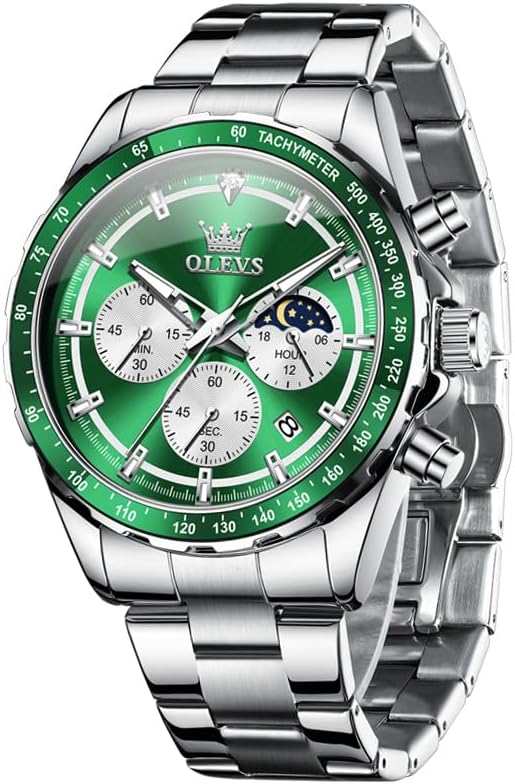
Image: Front view of the OLEVS G2945 watch with a green dial and stainless steel band, showcasing its design and features.
2. Watch Components
Familiarize yourself with the main components of your OLEVS G2945 watch:
- Crown: Used for setting time and date.
- Pushers (A & B): Used for chronograph start/stop and reset functions.
- Main Dial: Displays hours, minutes, and seconds.
- Sub-dials:
- 60-minute counter (at 9 o'clock)
- 60-second counter (at 6 o'clock)
- 24-hour display / Moon Phase (at 3 o'clock)
- Date Window: Displays the current date (at 4 o'clock position).
- Tachymeter Bezel: Used for measuring speed over a known distance.
- Luminous Markers: For visibility in low light conditions.
- Stainless Steel Case and Band: Durable and water-resistant construction.

Image: Detailed diagram of the OLEVS G2945 watch dial, highlighting the chronograph sub-dials, moon phase, date window, crown, and pushers with their respective functions.
3. Setup and Initial Adjustment
3.1 Setting the Time
- Pull the crown out to position 2.
- Rotate the crown to set the hour and minute hands. Ensure the 24-hour sub-dial (moon phase) is correctly aligned for AM/PM.
- Push the crown back to position 0 to start the watch.
3.2 Setting the Date
- Pull the crown out to position 1.
- Rotate the crown clockwise to adjust the date. Avoid setting the date between 9 PM and 3 AM, as this may interfere with the automatic date change mechanism.
- Push the crown back to position 0.
3.3 Adjusting the Band
The metal band can be adjusted by removing links. It is recommended to have this done by a professional watchmaker to prevent damage. A band adjustment tool may be included for self-adjustment; refer to its specific instructions.
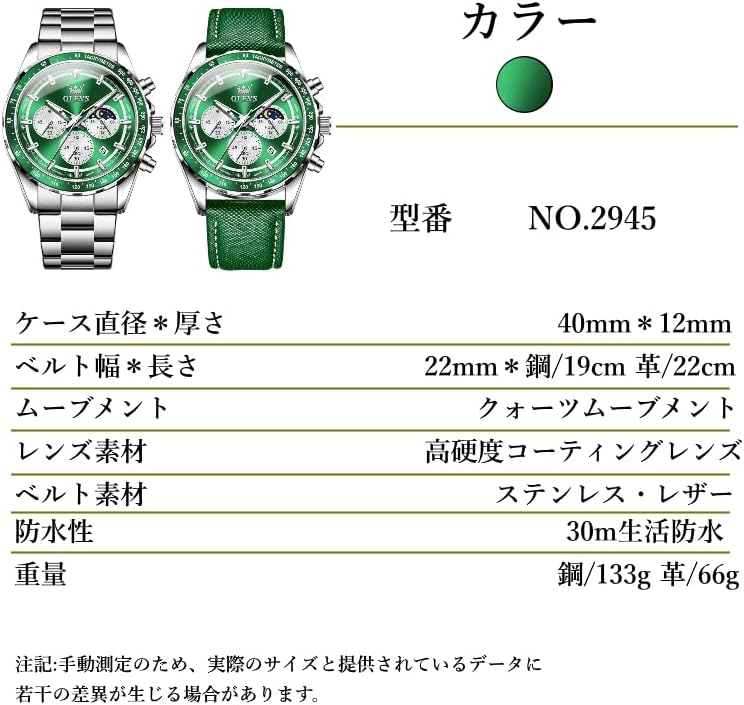
Image: Close-up view of the watch's stainless steel band and its butterfly clasp mechanism, which can be adjusted for wrist size.
4. Operating the Chronograph
The chronograph function allows for precise timing of events.
- Start: Press pusher A to start the chronograph. The chronograph second hand (large central second hand) and minute sub-dial will begin to move.
- Stop: Press pusher A again to stop the chronograph. The elapsed time will be indicated by the chronograph hands.
- Reset: After stopping, press pusher B to reset the chronograph hands to their zero positions.
4.1 Using the Tachymeter
The tachymeter scale on the bezel can be used to measure speed based on travel time over a known distance (e.g., 1 kilometer or 1 mile).
- Start the chronograph at the beginning of the measured distance.
- Stop the chronograph when the distance is completed.
- The position of the chronograph second hand on the tachymeter scale indicates the average speed per hour.
5. Care and Maintenance
- Water Resistance: This watch is 30M (3ATM) water-resistant, suitable for daily use like hand washing, sweat, and light rain. It is not suitable for swimming, diving, or showering with hot water. Ensure the crown is fully pushed in before any contact with water.
- Cleaning: Wipe the watch regularly with a soft, dry cloth. For metal bands, a slightly damp cloth can be used, followed by drying.
- Temperature: Avoid exposing the watch to extreme temperatures (hot or cold) or sudden temperature changes.
- Chemicals: Keep the watch away from chemicals such as solvents, detergents, perfumes, and cosmetics, as they can damage the case, band, or seals.
- Magnetic Fields: Avoid strong magnetic fields, which can affect the accuracy of the quartz movement.
- Impact: Protect the watch from strong impacts or drops.

Image: The OLEVS G2945 watch shown with water splashes, illustrating its 30M water resistance suitable for daily exposure but not submersion.
6. Troubleshooting
| Problem | Possible Cause | Solution |
|---|---|---|
| Watch stops or runs inaccurately | Low battery | Replace the battery (recommended by a professional). |
| Date does not change | Incorrect time setting (AM/PM) or date set during restricted hours. | Re-set the time, ensuring correct AM/PM. Avoid setting date between 9 PM and 3 AM. |
| Chronograph hands do not reset to zero | Requires calibration. | Consult a professional watchmaker for adjustment. |
| Condensation inside the watch | Exposure to extreme temperature changes or compromised water resistance. | Immediately take the watch to a professional for inspection and repair to prevent internal damage. |
7. Product Specifications
- Model Number: G2945
- Movement: Quartz
- Case Material: Stainless Steel
- Band Material: Stainless Steel (also available in Leather for other variants)
- Water Resistance: 30M (3ATM)
- Functions: Chronograph, Date, Moon Phase, Luminous Hands/Markers, Tachymeter
- Case Diameter: 40mm
- Case Thickness: 12mm
- Band Width: 22mm
- Weight (Steel Band): Approximately 133g

Image: A diagram detailing the physical specifications of the OLEVS G2945 watch, including case dimensions, band size, movement type, and material.
8. Warranty and Support
Your OLEVS G2945 watch comes with a 30-day exchange guarantee and a 1-year quality warranty from the date of purchase on Amazon. If you encounter any issues with your product, please contact customer support via email. We aim to respond within 24 hours to assist you.
For warranty claims or technical assistance, please refer to your purchase documentation or contact the seller directly through the Amazon platform.
9. Important Notes
- The luminous material on the hands and markers requires exposure to light to glow in the dark. The intensity and duration of the glow depend on the exposure time and light source.
- While the watch is designed for durability, proper care as outlined in this manual will extend its lifespan and maintain its appearance.

Image: Close-up of the OLEVS G2945 watch dial demonstrating the luminous hands and hour markers glowing in low light conditions.
Related documentsG2945


Ask a question about this manual
Ask about setup, troubleshooting, compatibility, parts, safety, or missing instructions. Manuals+ will review the question and use this page’s manual context to help answer it.