
Tech Drive TD-BF-15L
Tech Drive Bathroom Exhaust Fan with Light User Manual
Model: TD-BF-15L
Introduction
This manual provides detailed instructions for the installation, operation, and maintenance of your Tech Drive Bathroom Exhaust Fan with Light. Please read this manual thoroughly before installation and use to ensure proper function and safety.
The Tech Drive Bathroom Exhaust Fan with Light (Model TD-BF-15L) is designed to provide efficient ventilation and illumination for bathrooms up to 75 square feet. It features a super quiet 1.5 Sone operation, a powerful 70 CFM air movement, and an 800lm 3CCT LED light with selectable color temperatures (3000K, 4000K, 5000K). This Energy Star qualified unit is ETL and HVI certified, ensuring high performance and energy efficiency.
Key Features
- Quiet Operation: Operates at a super quiet 1.5 Sones, minimizing noise in your bathroom.
- Powerful Ventilation: Provides 70 CFM (Cubic Feet per Minute) airflow, suitable for bathrooms up to 75 sq. ft.
- Integrated LED Lighting: Features a bright 800 lumen LED light.
- 3-Color Temperature (3CCT) Selectable: Choose between 3000K (Warm White), 4000K (Natural White), and 5000K (Cool White) to match your preference.
- Easy Installation: Designed for straightforward installation in new construction or as a replacement for most standard fans with a housing size of 7.5in x 7.25in.
- Energy Efficient: Energy Star qualified, ETL, and HVI certified for performance and energy savings.
- Durable Construction: Features a galvanized steel housing that resists corrosion and an efficient motor designed for at least 25,000 hours of operation, utilizing 100% copper and silicon steel for stator and rotor, with ball bearings for excellent durability.
- Shower/Bathtub Safe: Acceptable for use over a bathtub or shower when installed in a GFCI-protected branch circuit.
Package Contents
Upon opening the package, please verify that all components listed below are present and undamaged:
- Fan Housing Assembly
- LED Light Grille
- Installation Manual
- Mounting Screws (4 pcs)

Image: Illustration of the package contents, showing the fan housing, LED light grille, installation manual, and four mounting screws.
Installation Instructions
Important Safety Information: Before beginning installation, ensure the power supply to the installation area is turned OFF at the circuit breaker. Always consult with a qualified electrician if you are unsure about any electrical wiring procedures.
This fan is designed for easy installation in both new construction and existing ceiling openings. The housing size is 7.5 inches x 7.25 inches x 4 inches, with a recommended ceiling mounting opening of 7.6 inches x 7.3 inches. It uses a 3-inch duct.
Installation Steps (No Attic Access)
For existing construction where attic access is not available, installation can be performed from the room below:
- Step 1: Take the Blower Out
Carefully remove the blower assembly from the fan housing. - Step 2: Insert the Housing
Insert the fan housing into the prepared ceiling opening. Ensure the housing is properly aligned. - Step 3: Secure the Housing with Screws
Secure the fan housing to the ceiling joists using the provided mounting screws. Ensure it is firmly in place. - Step 4: Install the Blower
Reinstall the blower assembly back into the secured fan housing. Connect all electrical wiring according to the wiring diagram in the full installation manual.
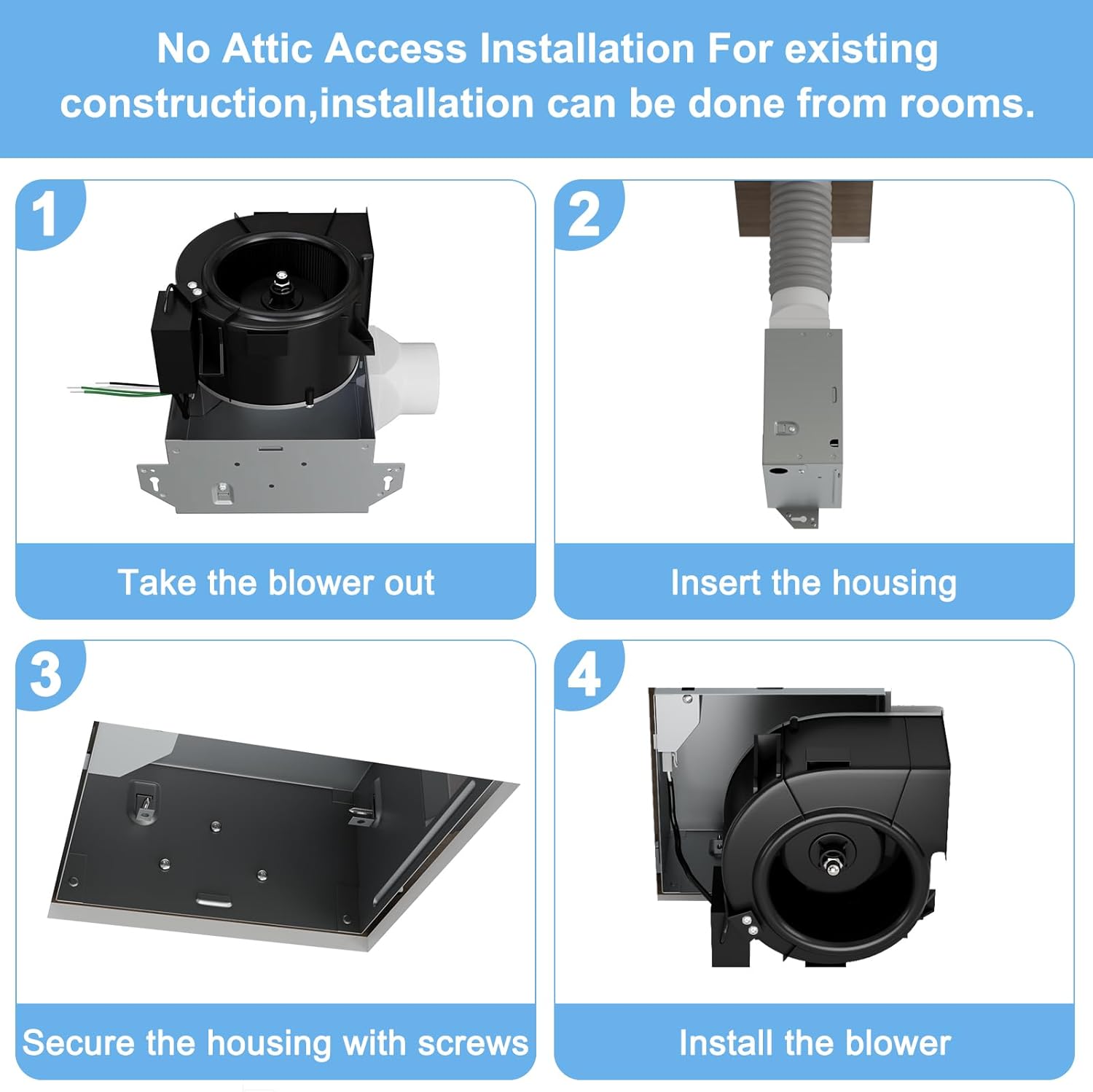
Image: Visual guide showing four steps for installation: 1. Taking the blower out, 2. Inserting the housing, 3. Securing the housing with screws, 4. Installing the blower.
For detailed wiring diagrams and specific instructions for different installation scenarios, please refer to the complete installation manual included with your product.
Operating Instructions
Your Tech Drive Bathroom Exhaust Fan with Light is designed for simple operation using standard wall switches.
Fan Operation
The exhaust fan is controlled by a standard wall switch. Simply toggle the switch to turn the fan ON or OFF. The fan will begin to extract moist air and odors from your bathroom, improving air quality.
LED Light Operation and Color Temperature Selection
The integrated LED light is also controlled by a wall switch. This fan features a 3-Color Temperature (3CCT) selectable LED, allowing you to choose between Warm White (3000K), Natural White (4000K), and Cool White (5000K).
To change the color temperature:
- Turn the wall switch controlling the light OFF.
- Turn the wall switch back ON again within 3 seconds. The light color temperature will cycle to the next available option.
- Repeat this process until your desired color temperature is selected. The fan will remember your last selected setting.
Note: It is recommended to use two separate wall switches to control the fan and the light independently for optimal convenience.

Image: Depiction of the three selectable color temperatures (3000K, 4000K, 5000K) for the integrated LED light.
Maintenance
Regular maintenance ensures optimal performance and longevity of your exhaust fan. Always turn off the power at the circuit breaker before performing any maintenance.
- Cleaning the Grille: Periodically remove the grille and wash it with mild soap and water. Rinse thoroughly and dry completely before reattaching.
- Cleaning the Fan Housing: Use a damp cloth to wipe down the exterior of the fan housing. Do not allow water to enter the motor or electrical components.
- Motor Maintenance: The motor is permanently lubricated and requires no additional oiling.
- Ductwork Inspection: Annually inspect the ductwork for any obstructions, kinks, or disconnections that could impede airflow.
Troubleshooting
If you experience issues with your Tech Drive Bathroom Exhaust Fan, refer to the common troubleshooting steps below. If the problem persists, contact customer support.
| Problem | Possible Cause | Solution |
|---|---|---|
| Fan does not operate. | No power; Loose wiring; Faulty switch. | Check circuit breaker. Ensure all wiring connections are secure. Test or replace the wall switch. |
| Fan is noisy. | Loose mounting; Obstruction in fan blades; Damaged motor. | Ensure fan housing is securely mounted. Turn off power and check for debris in the fan blades. If motor is damaged, contact customer support. |
| Poor air movement. | Blocked ductwork; Dirty grille; Fan too small for room. | Check ductwork for obstructions or kinks. Clean the grille. Ensure the fan's CFM rating is appropriate for your bathroom size. |
| LED light does not turn on. | No power; Loose wiring; Faulty LED module. | Check circuit breaker. Ensure all wiring connections are secure. If problem persists, the LED module may need replacement; contact customer support. |
Specifications
| Attribute | Detail |
|---|---|
| Brand | Tech Drive |
| Model Number | TD-BF-15L |
| Size | 70CFM with LED light |
| Airflow (CFM) | 70 CFM |
| Noise Level | 1.5 Sones |
| LED Light Output | 800 Lumens |
| Color Temperature (CCT) | 3000K (Warm White), 4000K (Natural White), 5000K (Cool White) |
| Product Dimensions | 9"D x 8.5"W x 6"H |
| Housing Size | 7.5in x 7.25in x 4in |
| Ceiling Mounting Opening | 7.6in x 7.3in |
| Duct Size | 3 inches |
| Power Source | AC |
| Wattage | 20 watts |
| Voltage | 120 Volts |
| Certifications | Energy Star qualified, ETL, HVI certified |
| Item Weight | 5.94 pounds |
| Manufacturer | XIANGYU ELECTRICAL APPLIANCES LIMITED |

Image: Detailed dimensions of the fan unit and grille, highlighting its certifications.

Image: Components of the fan motor, emphasizing 100% copper, silicon steel, and ball bearing for durability.
Warranty and Support
For specific warranty details and to register your product, please refer to the warranty card included in your product packaging or visit the official Tech Drive website. Keep your purchase receipt as proof of purchase for any warranty claims.
If you require technical assistance, have questions about installation, or need to report a defect, please contact Tech Drive customer support. Contact information can typically be found in the installation manual or on the manufacturer's website.
Related documentsTD-BF-15L

Ask a question about this manual
Ask about setup, troubleshooting, compatibility, parts, safety, or missing instructions. Manuals+ will review the question and use this page’s manual context to help answer it.