
HTRC 16A-Charger
HTRC 16A 6V/12V/24V Smart Battery Charger User Manual
Model: 16A-Charger | Brand: HTRC
1. Introduction
Thank you for choosing the HTRC 16A Smart Battery Charger. This intelligent charger is designed to provide efficient and safe charging for a wide range of 6V, 12V, and 24V batteries, including Lithium, LiFePO4, and various Lead-Acid types (AGM, Gel, MF, EFB, SLA, Wet). With its advanced features like pulse repair, multi-stage charging, and comprehensive safety protections, it is an ideal tool for maintaining and extending the life of your vehicle batteries.

Image: The HTRC 16A Smart Battery Charger showcasing its key features and design.
2. Safety Information
Please read all safety instructions carefully before using the charger. Failure to follow these instructions may result in electric shock, fire, or serious injury.
- Ventilation: Ensure adequate ventilation during charging. Do not operate in a confined area or restrict ventilation.
- Battery Type: Only charge batteries specified in this manual. Attempting to charge other battery types may cause damage or injury.
- Connections: Connect the charger to the battery terminals correctly (positive to positive, negative to negative). Reverse polarity protection is built-in, but incorrect connection can still cause issues.
- Sparks: Avoid creating sparks near the battery. Batteries can produce explosive gases.
- Moisture: Do not expose the charger to rain or excessive moisture.
- Damaged Cables: Do not operate the charger with damaged cords or clamps. Replace immediately.
- Children: Keep the charger out of reach of children.

Image: Visual representation of the charger's multiple protection features, including short circuit, over-discharge, reverse connection, overload, over-temperature, high-voltage, low-voltage, and overcharge protection.
3. Product Features
3.1 Wide Battery Compatibility
The HTRC 16A charger supports a broad range of battery types and voltages, automatically recognizing 6V, 12V, and 24V systems. It is compatible with:
- Lithium Batteries
- LiFePO4 Batteries
- Lead-Acid Batteries (AGM, GEL, SLA, Flooded, WET, EFB)

Image: Illustration of the charger's compatibility with various battery types, including Lithium, LiFePO4, and Lead-Acid batteries, with automatic voltage recognition.
3.2 Intelligent 9-Step Charging & Repair Function
The charger employs a 9-step intelligent charging process for optimal battery health and efficiency. It also features a pulse repair function to restore lost battery performance by detecting sulfation and acid stratification.
- Automatic Detection: Detects battery power and automatically switches to maintenance mode when fully charged.
- Temperature Compensation: Adjusts voltage and current based on seasonal temperature changes.
- Pulse Repair: Utilizes pulse technology to desulfate and recondition batteries, improving engine starting power and extending battery life. Note: Fully discharged batteries cannot be activated or charged.

Image: The charger connected to a battery, demonstrating its ability to detect and repair battery damage, leading to improved performance.
3.3 Large LCD Display
The extra-large LED display provides clear, real-time information about the charging process, allowing you to monitor your battery's status at a glance.
- Charge Current (A)
- Charge Voltage (V)
- Charge Quantity (%)
- Inside Temperature (°C/°F)
- Charging Mode (Low, Medium, High, Repair)
- Battery Full/Standby/End indicators

Image: Detailed view of the charger's LCD screen, displaying different charging parameters and status indicators.
3.4 Multiple Protection Functions
Built-in intelligent control and high-quality flame-retardant ABS material ensure safe and reliable operation with multiple layers of protection:
- Reverse Polarity Protection
- Short Circuit Protection
- Overcurrent Protection
- Overvoltage Protection
- Overcharge Protection
- Low Voltage Protection
- Over-temperature Protection (with cooling system)

Image: Overview of the charger's safety suite, highlighting its robust alligator clips, pure copper cables, efficient heat sink, and comprehensive security protections.
4. Package Contents
The package includes the following items:
- 1 x HTRC 16A Smart Battery Charger
- 1 x User Manual
- 1 x AC Power Cable (EU Plug / UK Plug depending on region)
- 1 x Pair of Battery Clamps (Red for Positive, Black for Negative)

Image: Contents of the product packaging, including the charger, battery clamps, power cable, and instruction manual, along with dimensions.
5. Setup
Follow these steps to set up your HTRC Smart Battery Charger:
- Prepare the Battery: Ensure the battery terminals are clean and free of corrosion. If necessary, clean them with a wire brush.
- Connect Battery Clamps: First, connect the RED (+) positive clamp to the positive terminal of the battery. Then, connect the BLACK (-) negative clamp to the negative terminal of the battery. Ensure a secure connection.
- Connect to Power: Plug the AC power cable into a standard wall outlet (100-240V AC, 50/60Hz). The charger will power on and display the current battery status.
- Automatic Recognition: The charger will automatically detect the battery voltage (6V, 12V, or 24V).
6. Operating Instructions
The charger offers different modes for various charging needs. Use the 'MODE' button to cycle through them.
6.1 Charging Modes
Press the 'MODE' button to select the desired charging current. The charger will automatically adjust based on the detected battery voltage.
| Output Voltage | LOW Mode (Current) | MEDIUM Mode (Current) | HIGH Mode (Current) |
|---|---|---|---|
| 6V | 1.5A | 3A | 5A |
| 12V | 2A | 8A | 16A |
| 24V | 2A | 5A | 10A |
6.2 Repair Mode
To activate the pulse repair function, press the 'MODE' button until 'REPAIR' is displayed on the screen. This mode is designed to restore sulfated or stratified batteries. The process may take several hours depending on the battery condition. The display will show 'PUL' during the repair process.
6.3 Monitoring Charging Status
The LCD screen provides continuous feedback:
- Charge Percentage: A battery icon with percentage levels (25%, 50%, 75%, 100%) indicates charging progress.
- FUL: Indicates the battery is fully charged. The charger will automatically switch to maintenance mode.
- END: Indicates the repair process has completed.
- OFF: Indicates standby mode.
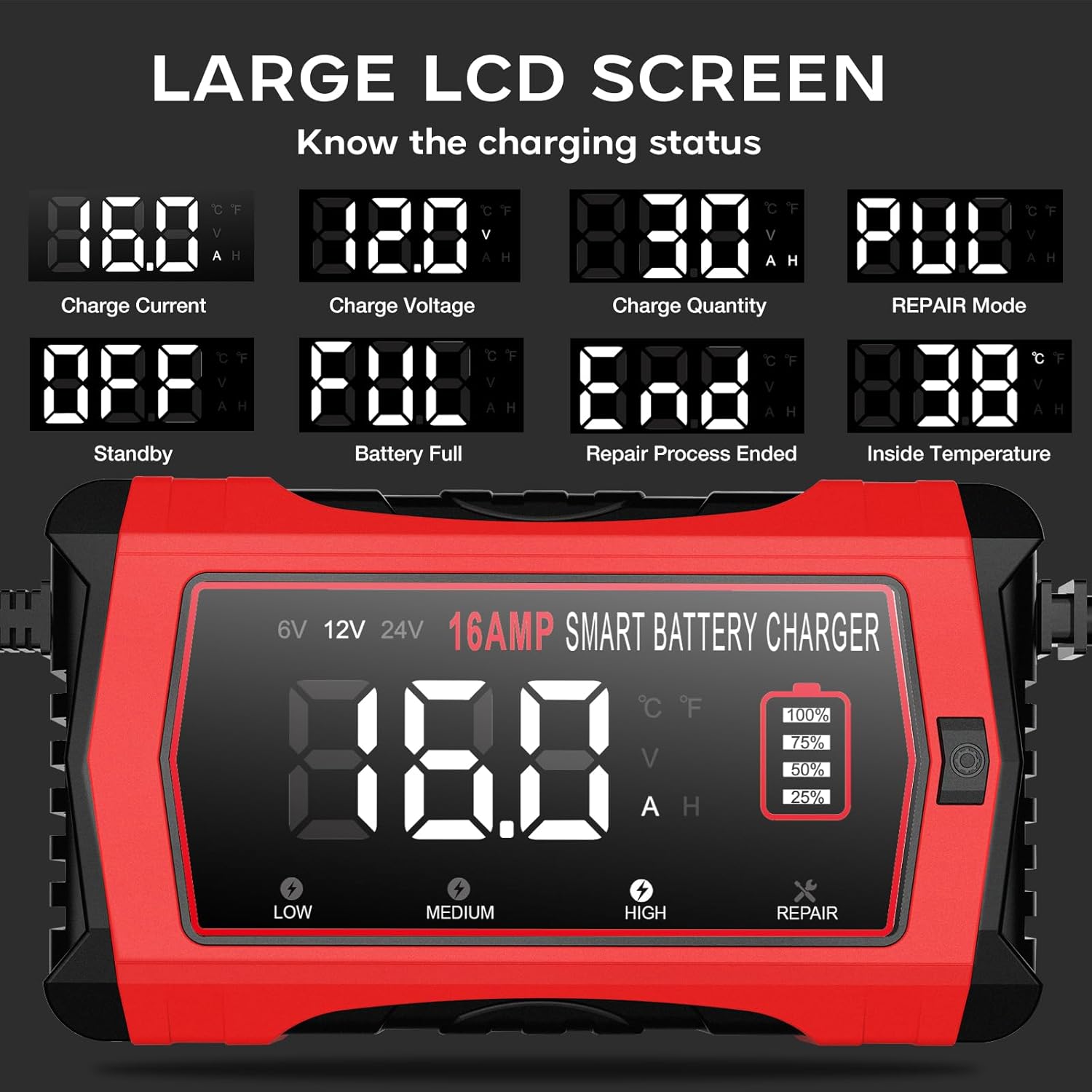
Image: The charger's LCD screen displaying different charging parameters and status messages, such as charge current, voltage, quantity, repair mode, standby, battery full, and internal temperature.
6.4 Disconnecting the Charger
Once charging or repair is complete:
- Unplug the AC power cable from the wall outlet.
- Remove the BLACK (-) negative clamp from the battery terminal.
- Remove the RED (+) positive clamp from the battery terminal.
7. Maintenance
Proper maintenance ensures the longevity and optimal performance of your charger:
- Cleaning: Clean the charger's exterior with a soft, dry cloth. Do not use abrasive cleaners or solvents.
- Cable Inspection: Regularly inspect the power cord and battery clamps for any signs of damage, fraying, or corrosion. Replace if damaged.
- Storage: Store the charger in a cool, dry place away from direct sunlight and moisture when not in use. Ensure cables are neatly coiled to prevent damage.
- Ventilation: Keep the ventilation openings clear of dust and debris to ensure proper cooling.
8. Troubleshooting
If you encounter issues with your HTRC Smart Battery Charger, refer to the table below for common problems and solutions.
| Problem | Possible Cause | Solution |
|---|---|---|
| Charger does not turn on. | No power from outlet; damaged power cord. | Check wall outlet with another device; inspect power cord for damage. |
| "ERR" or error code on display. | Reverse polarity; short circuit; battery fault. | Check clamp connections (Red to +ve, Black to -ve); ensure clamps are not touching; test battery condition. |
| Charging is very slow or not progressing. | Battery heavily discharged; incorrect mode selected; battery sulfation. | Ensure correct mode (e.g., HIGH); try Repair Mode for sulfated batteries. Note: Severely damaged batteries may not charge. |
| Charger fan is loud. | Normal operation during high load or high temperature. | This is normal. Ensure adequate ventilation around the charger. |
9. Specifications
| Feature | Specification |
|---|---|
| Model | 16A-Charger |
| Input Voltage | 100-240V AC, 50/60Hz |
| Output Voltage | 6V / 12V / 24V DC (Automatic Recognition) |
| Max Output Current | 6V: 5A | 12V: 16A | 24V: 10A |
| Max Input Power | 200W |
| Battery Types Supported | Lithium, LiFePO4, Lead-Acid (AGM, GEL, SLA, Flooded, WET, EFB) |
| Dimensions (L x W x H) | 22 x 8 x 10 cm (approx. 8.7 x 3.1 x 3.9 inches) |
| Weight | 50 g (approx. 0.11 lbs) |
| Operating Temperature | Temperature compensation for optimal charging |
| Protections | Reverse Polarity, Short Circuit, Overcurrent, Overvoltage, Overcharge, Low Voltage, Over-temperature |
10. Warranty and Support
HTRC products are manufactured to high-quality standards. For warranty information and technical support, please refer to the contact details provided with your purchase or visit the official HTRC website. Please retain your proof of purchase for any warranty claims.
Related documents16A-Charger


Ask a question about this manual
Ask about setup, troubleshooting, compatibility, parts, safety, or missing instructions. Manuals+ will review the question and use this page’s manual context to help answer it.