
Introduction
This manual provides comprehensive instructions for the safe and effective operation, setup, and maintenance of your ARRMA Typhon GROM 4X4 223S BLX Brushless Small Scale Buggy. Please read this entire manual carefully before operating the product to ensure proper function and to prevent damage or injury. This product is a sophisticated hobby item and requires careful handling and basic mechanical understanding.

Figure 1: Front view of the ARRMA Typhon GROM 4X4 223S BLX Brushless Buggy.
Safety Information
WARNING: Read the ENTIRE instruction manual to become familiar with the features of the product before operating. Failure to operate the product correctly can result in damage to the product, personal property, and cause serious injury. This is a sophisticated hobby product. It must be operated with caution and common sense and requires some basic mechanical ability. Failure to operate this Product in a safe and responsible manner could result in injury or damage to the product or other property. This product is not intended for use by children without direct adult supervision. Do not use with incompatible components or alter this product in any way outside of the instructions provided by Horizon Hobby, LLC. The product manual contains instructions for safety, operation, and maintenance. It is essential to read and follow all the instructions and warnings in the manual, prior to assembly, setup or use, in order to operate correctly and avoid damage or serious injury.
What's in the Box
Your ARRMA Typhon GROM 4X4 223S BLX Brushless Buggy package includes the following components:
- (1) TYPHON GROM 223S BLX 4X4 Small-Scale Buggy RTR
- (1) Spektrum SLT 25A 2-in-1 Brushless Waterproof ESC & Receiver 2S/3S with DSC
- (1) Spektrum 2838 4500Kv Brushless Motor
- (1) Spektrum SLT2 2-Channel 2.4GHz Transmitter with DSC
- (1) Spektrum Smart 7.4V 1400mAh 2S 30C Hard Case LiPo Battery w/IC2 Connector
- (1) Spektrum S10 Smart G2 Mini 2S USB-C Charger
- (4) AA Transmitter Batteries
- (1) Hex wrench
- (1) Instruction Manual
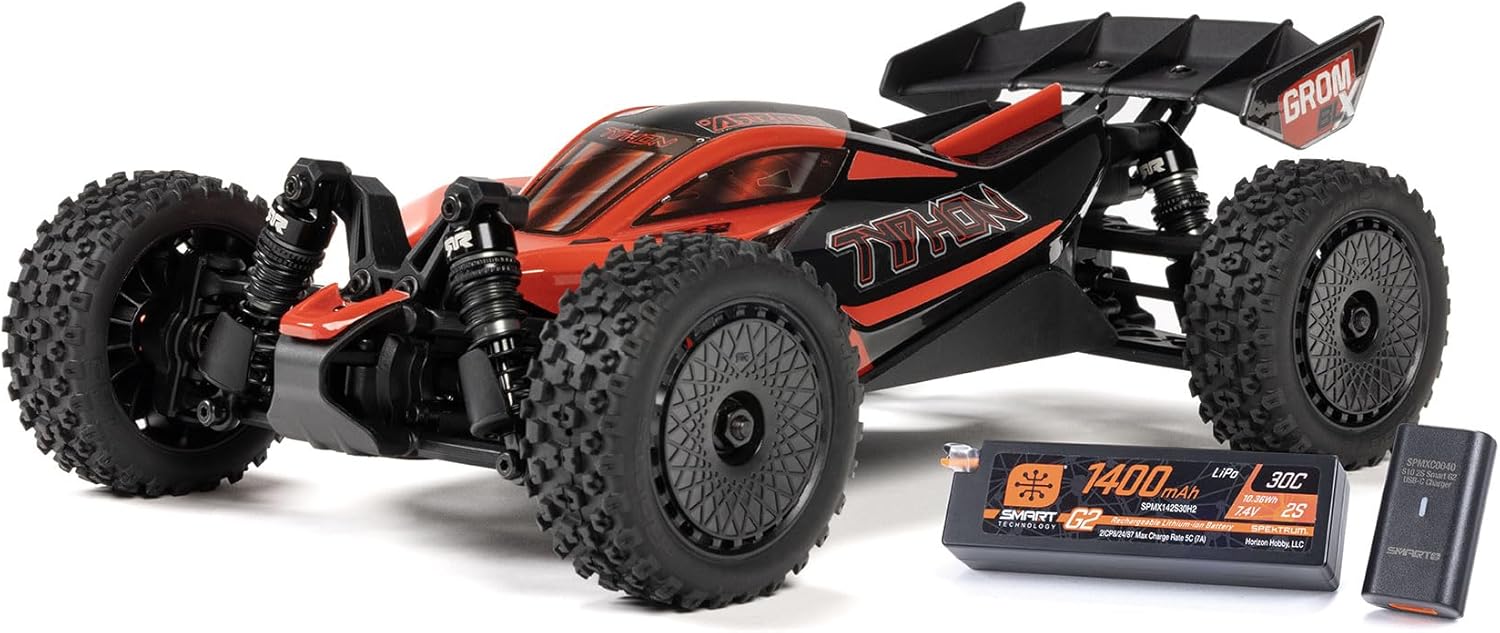
Figure 2: The ARRMA Typhon GROM Buggy shown with its included 2S LiPo battery and USB-C charger.
Setup
Follow these steps to prepare your ARRMA Typhon GROM for its first use:
- Unpack the Components: Carefully remove the RC car and all included items from their packaging. Inspect for any visible damage.
- Charge the Battery: Charge the included 2S LiPo battery using the provided USB-C charger. Refer to the charger's specific instructions for charging times and safety precautions.
- Install Vehicle Battery: Once charged, insert the 2S LiPo battery into the RC car's battery compartment. Secure it according to the vehicle's design.
- Install Transmitter Batteries: Install the four AA batteries into the Spektrum SLT2 2-Channel 2.4GHz Transmitter. Ensure correct polarity.
- Power On: Turn on the transmitter first, then turn on the RC car. This sequence helps establish a proper connection.
- Pre-Run Check: Before operating, ensure all components are securely fastened, wheels are properly attached, and steering and throttle respond correctly to transmitter inputs.

Figure 3: Top-down view of the ARRMA Typhon GROM chassis, showing the battery compartment and internal electronics.
Operating Your RC Car
The ARRMA Typhon GROM 4X4 223S BLX is designed for versatile performance, offering both 2S and 3S LiPo battery compatibility for varying speed potentials. It features Spektrum DSC (Dynamic Stability Control) and throttle limiting, which are beneficial for new drivers to maintain control.
Dynamic Stability Control (DSC)
The integrated Spektrum DSC system assists in maintaining vehicle stability, especially during high-speed maneuvers or on loose surfaces. This feature can be adjusted or disabled via the transmitter settings, allowing drivers to customize the handling characteristics to their preference and skill level.

Figure 4: Dynamic Stability Control (DSC) icon, indicating the stability feature.
Throttle Limiting
For beginners, the transmitter includes a throttle limiting feature. This allows you to reduce the maximum throttle output, making the vehicle easier to control while learning. Gradually increase the throttle limit as your skills improve.
Driving Environment
Operate your RC car in open, clear areas free from obstacles, pedestrians, and other vehicles. Avoid public roads. The Typhon GROM is suitable for various terrains, including asphalt, concrete, and hard-packed dirt. Be mindful of small rocks or thick grass, which can affect performance and potentially cause damage.
Video 1: Official product video showcasing the ARRMA Typhon GROM 223S Brushless Buggy in action, demonstrating its speed and durability on various terrains.
Maintenance
Regular maintenance is crucial for the longevity and performance of your ARRMA Typhon GROM. After each use, perform the following:
- Clean the Vehicle: Remove dirt, dust, and debris from the chassis, suspension, and drivetrain using a soft brush or compressed air.
- Inspect for Damage: Check for any broken or worn parts, such as suspension arms, shocks, wheels, or body components. Replace damaged parts promptly.
- Check Fasteners: Ensure all screws and nuts are tight. Loose fasteners can lead to component failure.
- Lubricate Moving Parts: Apply appropriate lubricant to moving parts like universal joints and bearings as needed, following manufacturer recommendations.
- Battery Care: Store LiPo batteries in a cool, dry place at storage voltage. Never leave batteries fully charged or fully discharged for extended periods.

Figure 5: Example of optional parts for maintenance and upgrades, such as shocks and suspension links.
Troubleshooting
If you encounter issues with your ARRMA Typhon GROM, consider the following common troubleshooting steps:
- No Power: Ensure the battery is fully charged and correctly connected. Check that both the transmitter and vehicle are powered on.
- Loss of Control/Interference: Verify that the transmitter and receiver are properly bound. Check for strong interference sources in the operating area.
- Poor Performance: Inspect the motor, ESC, and battery for signs of damage or overheating. Ensure all gears are free of debris and properly meshed.
- Steering Issues: Check the servo for proper function and ensure all steering linkages are free from obstruction and correctly adjusted.
- Unusual Noises: Investigate any grinding or clicking sounds, which may indicate worn gears, bearings, or a foreign object in the drivetrain.
For more detailed troubleshooting or persistent issues, refer to the full instruction manual included with your product or contact ARRMA customer support.
Specifications
| Feature | Specification |
|---|---|
| Product Dimensions | 13.9 x 9.6 x 7.6 inches |
| Item Weight | 4.76 pounds |
| Model Number | ARA2306ST1 |
| Manufacturer Recommended Age | 14 years and up |
| Batteries | 4 AA batteries required (included for transmitter) |
| Release Date | October 24, 2024 |
| Manufacturer | Horizon Hobby |

Figure 6: Vehicle dimensions for the ARRMA Typhon GROM 4X4 223S BLX Buggy.
Warranty and Support
For warranty information, technical support, or to purchase replacement parts, please visit the official ARRMA website or contact Horizon Hobby customer service. Keep your proof of purchase for warranty claims.
Online Resources: ARRMA Official Website


