
Akiisolo GO1X Portable Power Station User Manual
Model: GO1X
1. Introduction
Thank you for choosing the Akiisolo GO1X Portable Power Station. This device is designed to provide reliable and versatile power for various applications, including outdoor activities, home backup, and emergency situations. Featuring a 384Wh LiFePO4 battery, 600W rated output (1800W peak), and multiple charging options, the GO1X ensures you stay powered wherever you are.
Please read this manual carefully before using the product to ensure safe and optimal operation. Keep this manual for future reference.

Image 1.1: Akiisolo GO1X Portable Power Station - Powerful and Reliable Features.
2. Safety Instructions
To ensure safe operation and prolong the lifespan of your power station, please observe the following safety precautions:
- Do not disassemble, repair, or modify the unit. Incorrect reassembly may cause fire or electric shock.
- Do not expose the unit to fire or extreme temperatures (above 40°C/104°F or below 0°C/32°F).
- Do not use or store the unit in a bathroom or in areas exposed to water or high humidity.
- Do not use the unit if it is damaged or has been dropped.
- Keep the unit away from children and pets.
- Ensure proper ventilation during use and charging. Do not block the ventilation openings.
- Use only the provided or approved accessories and chargers.
- In case of fire, use a dry powder fire extinguisher. Do not use water.
- Dispose of the product according to local regulations. Do not dispose of with household waste.
3. Product Overview
3.1 What's in the Box
- Akiisolo GO1X Portable Power Station
- AC 110-240V Wall Plug Power Adaptor
- 12V Car Charger
- UPS Cable
- User Manual (this document)
3.2 Key Features
- Capacity: 384Wh LiFePO4 Battery.
- Output: 600W rated, 1800W peak AC output.
- Ports: 2x USB-C, 2x USB-A, 2x Pure Sine Wave AC outlets, 1x DC car port, 1x 18W Wireless Magnetic Phone Charger.
- Charging: Fast AC charging (0-80% in 1.5 hours), Solar charging, Car charging.
- Lifespan: 3,000+ cycles for LiFePO4 batteries.
- Additional Functions: Built-in Bluetooth speaker, 3-mode LED lights, UPS function (<20ms switch).
- Portability: Lightweight design (11.2 lbs) with ergonomic dual-groove.
3.3 Product Layout
The Akiisolo GO1X features a clear layout for easy access to all ports and controls.

Image 3.1: Front Panel and Ports of the Akiisolo GO1X.
Key Components:
- LCD Display: Shows battery level, input/output wattage, and status indicators.
- Power Button: Press and hold to turn the unit on/off.
- AC Outlets: For connecting AC-powered devices (600W rated, 1800W peak).
- USB-A Ports: For charging USB-A compatible devices (5V/4.5A).
- USB-C Ports: For charging USB-C compatible devices (5V/4.5A, 9A/2A, 12V/1.5A).
- DC Car Port: For 12V devices (12V/10A, 120W).
- Wireless Charging Pad: For compatible smartphones (18W).
- LED Light Panel: Provides illumination with multiple modes.
- Light Control Button: To cycle through LED light modes.
- Bluetooth Speaker: For audio playback.
4. Setup
4.1 Initial Charge
Before first use, fully charge your Akiisolo GO1X Portable Power Station. Connect the provided AC adapter to the AC input port on the power station and then plug it into a wall outlet. The LCD display will show the charging status. A full charge from 0% to 80% typically takes about 1.5 hours using the AC adapter.
4.2 Placement
Place the power station on a stable, flat surface. Ensure there is adequate ventilation around the unit to prevent overheating. Keep it away from direct sunlight, heat sources, and flammable materials.
5. Operating Instructions
5.1 Powering On/Off
- To turn on: Press and hold the main power button for 3 seconds. The LCD display will illuminate.
- To turn off: Press and hold the main power button for 3 seconds. The LCD display will turn off.
5.2 Using Output Ports
The GO1X can power up to 8 devices simultaneously. Connect your devices to the appropriate ports:
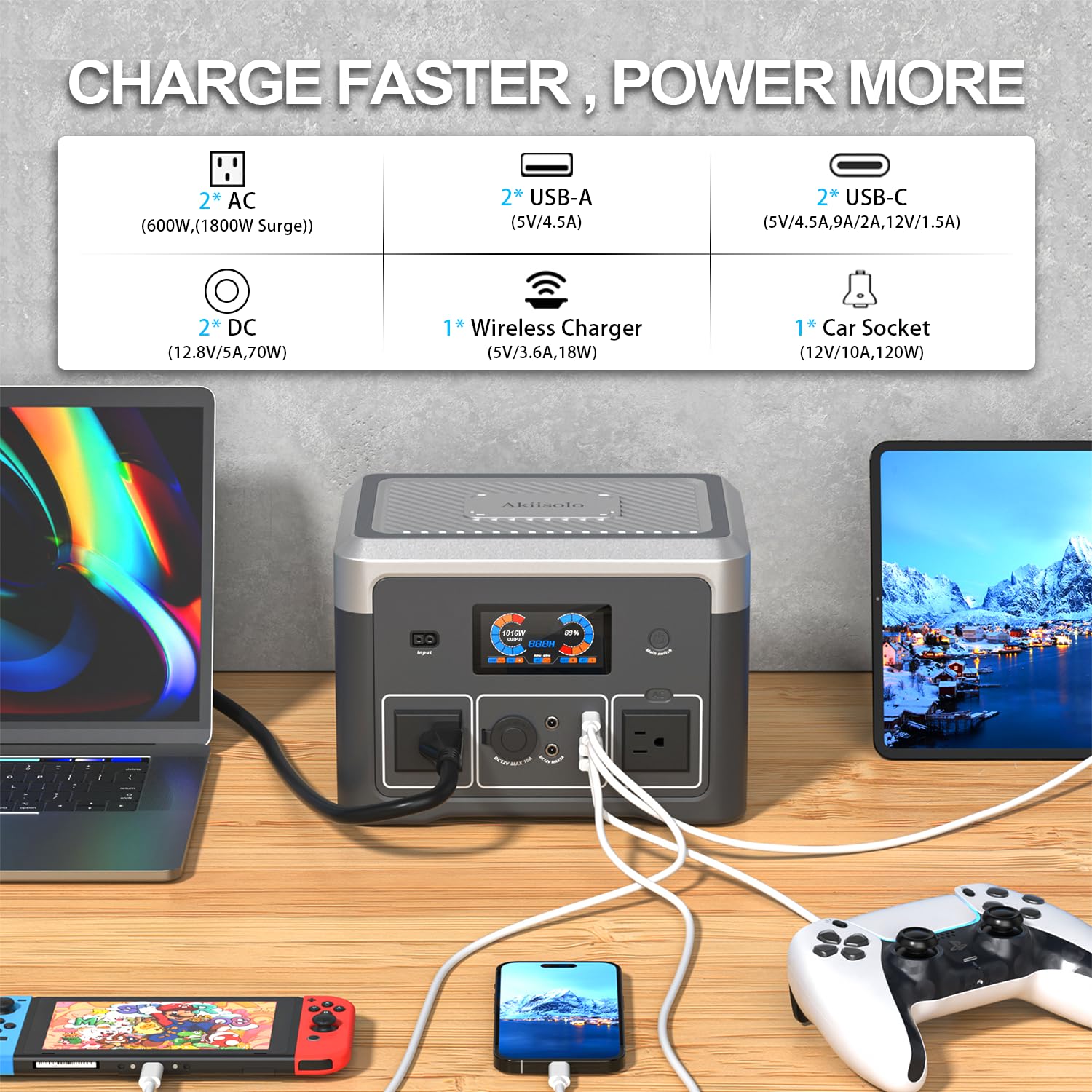
Image 5.1: Charging multiple devices with the Akiisolo GO1X.
- AC Outlets: Plug in devices requiring standard wall power. Ensure the total wattage does not exceed 600W (or 1800W peak for short bursts).
- USB-A/USB-C Ports: Connect smartphones, tablets, and other USB-powered devices using their respective cables.
- DC Car Port: Use for 12V car appliances.
- Wireless Charging: Place your compatible smartphone on the wireless charging pad. Ensure the phone is centered for optimal charging.
5.3 LED Lighting Function
The GO1X includes a built-in LED light panel with three modes:
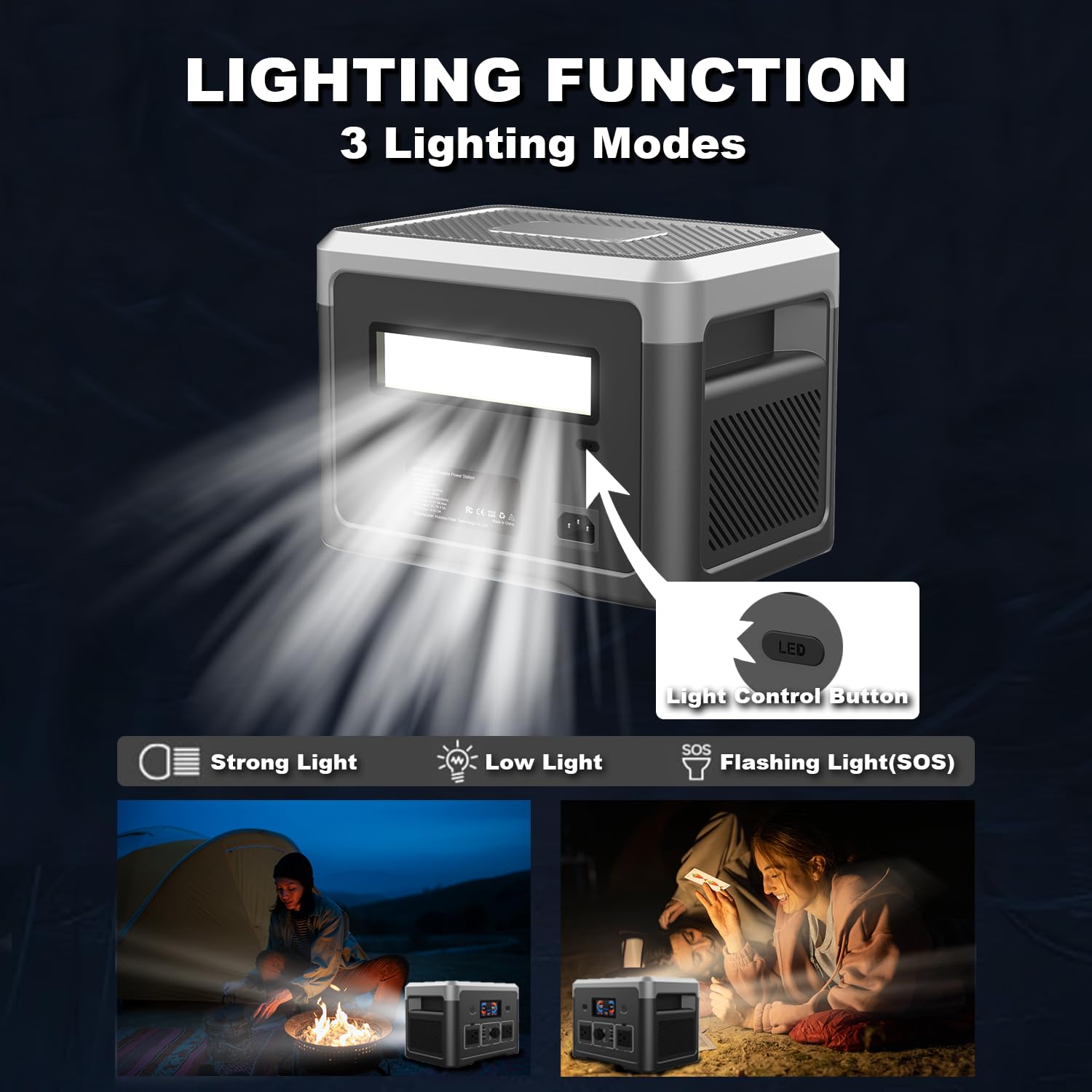
Image 5.2: LED Lighting Function with 3 Modes.
- Press the Light Control Button once for Strong Light.
- Press again for Low Light.
- Press a third time for Flashing Light (SOS mode).
- Press a fourth time to turn off the LED light.
5.4 Bluetooth Speaker Function
The integrated Bluetooth speaker allows you to play music wirelessly.

Image 5.3: Using the Built-in Bluetooth Speaker.
- Ensure the power station is on.
- Activate Bluetooth on your smartphone or other audio device.
- Search for "Akiisolo GO1X" (or similar name) in your device's Bluetooth settings and pair.
- Once paired, audio will play through the power station's speaker.
5.5 UPS Function (Uninterruptible Power Supply)
The GO1X features an Uninterruptible Power Supply (UPS) function, providing seamless power during outages.

Image 5.4: UPS Function in action.
- Connect the power station to a wall outlet using the AC adapter.
- Connect your critical devices (e.g., computer, router) to the AC outlets of the power station.
- In the event of a power failure, the GO1X will automatically switch to battery power within <20ms, ensuring your connected devices remain operational without interruption.
6. Charging the Power Station
The Akiisolo GO1X offers flexible charging options:

Image 6.1: Three Charging Methods.
6.1 AC Wall Charging
- Connect the provided AC adapter to the AC input port on the power station.
- Plug the AC adapter into a standard wall outlet.
- The LCD display will indicate charging status. Charging from 0% to 80% takes approximately 1.5 hours.
6.2 Solar Panel Charging
- Connect a compatible solar panel (Max 200W, not included) to the DC input port of the power station.
- Place the solar panel in direct sunlight for optimal charging efficiency.
- Charging time varies depending on solar intensity and panel wattage (typically 2-3 hours with a 200W panel).
6.3 Car Charging
- Connect the provided 12V car charger to the DC input port on the power station.
- Plug the other end into your vehicle's 12V cigarette lighter socket.
- Charging from 0% to 100% typically takes 3-4 hours.
7. Maintenance
7.1 General Care
- Clean the unit with a dry, soft cloth. Do not use abrasive cleaners or solvents.
- Keep the ventilation openings clear of dust and debris to ensure proper cooling.
- Avoid dropping or subjecting the unit to strong impacts.
7.2 Storage
- If storing for an extended period, charge the unit to approximately 50-80% every 3-6 months to maintain battery health.
- Store the power station in a cool, dry place, away from direct sunlight and extreme temperatures.
- Keep out of reach of children and pets.
8. Troubleshooting
| Problem | Possible Cause | Solution |
|---|---|---|
| Unit does not turn on | Battery is completely drained; Power button not pressed long enough. | Charge the unit using the AC adapter. Press and hold the power button for 3 seconds. |
| AC outlets not working | AC output not enabled; Device draws too much power; Overload protection activated. | Ensure AC output is enabled (check display). Reduce connected load. Disconnect devices, turn off/on unit. |
| USB ports not charging | Unit is off; Cable is faulty; Device is not compatible. | Turn on the unit. Try a different USB cable. Ensure device is compatible. |
| Slow charging via solar | Insufficient sunlight; Solar panel not properly angled; Panel wattage too low. | Ensure direct sunlight. Adjust panel angle. Use a higher wattage solar panel (up to 200W). |
| Bluetooth speaker not connecting | Bluetooth not enabled on power station or device; Device too far. | Ensure power station is on. Check device's Bluetooth settings. Move device closer. |
9. Specifications
| Feature | Specification |
|---|---|
| Model Name | GO1X |
| Battery Type | LiFePO4 |
| Capacity | 384Wh |
| AC Output (Rated) | 600W |
| AC Output (Peak) | 1800W |
| AC Output Voltage | 110V ±3% at 60Hz |
| USB-C Output | 2 ports (5V/4.5A, 9A/2A, 12V/1.5A) |
| USB-A Output | 2 ports (5V/4.5A) |
| DC Car Port Output | 12V/10A (140W) |
| Wireless Charger | 18W Magnetic |
| AC Charging Time (0-80%) | 1.5 hours |
| Car Charging Time (0-100%) | 3-4 hours |
| Solar Input (Max) | 200W |
| UPS Switching Time | <20ms |
| Dimensions (L x W x H) | 25.9L x 18.3W x 18.3H Centimeters |
| Weight | 11.2 lbs (approx. 5.08 kg) |
| Material | Aluminum |
| Special Features | Overload Protection, Portable, Bluetooth Speaker, LED Lights |
10. Warranty and Support
10.1 Warranty Information
The Akiisolo GO1X Portable Power Station comes with a 1-year warranty from the date of purchase. This warranty covers manufacturing defects and workmanship under normal use. It does not cover damage caused by misuse, accidents, unauthorized modifications, or natural disasters.
Please retain your proof of purchase for warranty claims.
10.2 Customer Support
Should you encounter any issues or have questions regarding your Akiisolo GO1X Portable Power Station, please contact our customer support team. We are committed to providing assistance and aim to respond within 12 hours.
For support, please refer to the contact information provided on the product packaging or the official Akiisolo website.